
Animated ASCII banner with terminal effects and customizable themes for CLI tools
Verified details
These details have been verified by PyPIProject links
GitHub Statistics
Maintainers

Project description
                 ██████████
                █▓       ░██
                █▒        ██
    █████████████░        █████████████████ ████████████ ████████████      ████████████
   ██         ███░        ███▓▒▒▒▒▒▒▒▒▒▒▒██ █▒▒▒▒▒▒▒▒▓████        █████████▓          ▒█
   ██         ███         ███▒▒▒▒▒▒▒▒▒▒▒▒▓██████████████▓        ███▓▒      ▒▓░       ▒█
   ██         ███        ░██▓▒▒▒▒▒▒▒▒▒▒▒▒▒▓██▓▒▒▒▒▒▒▒▒█▓        ███░       ░██░       ▒█
   ██         ███        ▒██▓▒▒▒▒▒▒▒▒▒▒▒▒▒▒██▓▒▒▒▒▒▒▒▓▒        ██  ▓        ██░       ▓█
   ██         ██▓        ███▒▒▒▒▒▒▒▒▒▒▒▒▒▒▒▒█▓▒▒▒▒▒▒▒▓▒       ██   █        ██░       ▓
   ██         ██▒        ██▓▒▒▒▒▒▒▒▒▒▒▒▒▒▒▒▒▓▓▒▒▒▒▒▒▒▓▒      ██    █        ▓█████████
   ██                    ██▒▒▒▒▒▒▒▒█▓▒▒▒▒▒▒▒▒▒▒▒▒▒▒▒▒▓▒   ▒███████ █░       ░▓        █
   ██         ░░         ██▒▒▒▒▒▒▒▒██▒▒▒▒▒▒▒▒▒▒▒▒▒▒▒▒▓█ ▓        ░█ ▓       ░▒       ░█
   ██         ██░       ░█▒▒▒▒▒▒▒▒▒▒▒▒▒▒▒▒▒▒▒▒▒▒▒▒▒▒▒▓█ █░        ▒ █                ░█
   ██         ██        ▓█▒▒▒▒▒▒▒▒▒██▓▒▒▒▒▒▒▒▒▒▒▒▒▒▒▒▓█ █░        ▒ █░               ▒█
    ██████████  ███████████▓██▓▓█▓█  █▓▒▒▒▒▒▒▒▒▒▓██▓██   █▓▓▓▓▓▓▓█    █▓▓▓▓▓▓▓▓▓▓▓▓▓▓██
  .:/====================█▓██▓██=========████▓█▓█ ███======> [ P R E S E N T S ] ====\:.
        /\                 ██▓██           █▓▓▓██ ██
 _ __  /  \__________________█▓█_____________██▓██______________________________ _  _    _
_ __ \/ /\____________________██_____________ ███________ _________ __ _______ _
    \  /         T H E   P I N A C L E    O F   H A K C I N G   Q U A L I T Y
     \/
            Name :                            haKC.ai - haKCer module for 1337 banners
            Release date:                     Nov 2024 (but the vibe is from 1994)

      GROUP NEWS: haKC.ai is Still Looking For haKC Coders & ASCII Art Wizards,
                  Drop corykennedy A Message on Any Fine BBS in the USA
                        Or On The Internet at cory@haKC.ai.

       _ __ ___________________________________________________________  /\ ___ ___  _ _
       __ __ __ ______________________________________________________ \/ /\__________ ___
         |  Notes from the author:                                    \  /              |
         |                                                             \/               |
         |  This library brings back the golden age of terminal art. Drop it            |
         |  into any Python CLI tool and watch boring print() statements                |
         |  transform into animated synthwave glory. 29 effects, 9 themes,              |
         |  zero config. While the script kiddies use Comic Sans, we keep               |
         |  ASCII art alive. Your tools deserve better than plain text.                 |
         |                                       Greetz to the real ones. -cory         |
         |*~'`^`'~*-,._.,-*~'`^`'~*-,._.,-*~'`^`'~*-,._.,-*~'`^`'~*-,._.,-*~'`^`'~*~'`^ |

        ┌──────────────────────── [ R E L E A S E   I N F O ] ──────────────────────────┐
        │                                                                               │
        │  NAME.........................................haKCer Terminal Banner Library  │
        │  TYPE..................................................Python CLI Enhancement │
        │  VERSION........................................................v1.2.2-FINAL  │
        │  PLATFORM............................................Python 3.8+ / Cross-OS   │
        │  RELEASE DATE.................................................November 2024   │
        │  RIPPED BY.............................................haKC.ai / /dev/CØR.23  │
        │  CATEGORY..................................................Developer Tooling  │
        │  EFFECTS PACK...........................................................29x   │
        │  THEME COLLECTION........................................................9x   │
        │  SIZE...................................................Lightweight (~50KB)   │
        │                                                                               │
        │  [*] ZERO-CONFIG animated ASCII banners for Python CLI tools                  │
        │  [*] Drop-in replacement for boring print() statements                        │
        │  [*] 29 terminal effects from subtle fades to FULL SYNTHGRID                  │
        │  [*] 9 color themes: Tokyo Night, Cyberpunk, Matrix, Synthwave++              │
        │  [*] Custom ASCII art support - BYOB (Bring Your Own Banner)                  │
        │  [*] Production-ready with smart terminal detection                           │
        │  [*] No dependencies on legacy ncurses or termcap crap                        │
        │                                                                               │
        └───────────────────────────────────────────────────────────────────────────────┘
         ════════════════════════════════════════════════════════════════════════════════
         [*] If you're still using print() for your CLI banners, this file is for you
         [*] If your terminal looks like notepad.exe, bounce now
         [*] Real hackers use Nano and animated ASCII art, not Comic Sans
         ════════════════════════════════════════════════════════════════════════════════
[::: WHAT THE HELL IS THIS :::]




Back in the 90s, we used to spend HOURS crafting sick ASCII art for our tool releases.
BBS splash screens, NFO files, cracktro animations. That art is DEAD because every script
kiddie today just slaps print("My Tool v1.0") and calls it a day.
haKCer brings that culture back. Drop this library into ANY Python CLI tool and instantly get animated ASCII banners with 29 different terminal effects and 9 color themes.
Think of it like this: Your boring CLI tool is a Honda Civic. haKCer is the body kit, underglow LEDs, and sound system that makes people actually WANT to use your shit.
Demo Time (Because Seeing Is Believing)

WATCH IT RUN - Animated ASCII banners with 29 terminal effects and 9 color themes
┌─────────────────────────────────────────────────────────────────────────────┐
│ WHAT YOU GET:                                                               │
│                                                                             │
│  [✓] 29 terminal effects (decrypt, matrix, synthgrid, fireworks++)         │
│  [✓] 9 color themes (synthwave, cyberpunk, tokyo_night, matrix++)          │
│  [✓] Zero config - works out of the box with sane defaults                 │
│  [✓] Custom ASCII art support - use your own designs                       │
│  [✓] Smart terminal detection - no banners in pipes/redirects              │
│  [✓] Production ready - fast effects for CI/CD, slow for demos             │
│  [✓] Framework agnostic - works with Click, Typer, argparse, whatever      │
│                                                                             │
└─────────────────────────────────────────────────────────────────────────────┘
[::: INSTALLATION / SETUP :::]



The Easy Way (For Normal People)
pip install hakcer
The Proper Way (For People Who Know What They're Doing)
# Create a venv like you're supposed to
python3 -m venv myproject_venv
source myproject_venv/bin/activate  # Windows: myproject_venv\Scripts\activate

# Upgrade pip (because distros ship ancient versions)
pip install --upgrade pip

# Install haKCer
pip install hakcer

# Verify it worked
python -c "from hakcer import show_banner; show_banner()"
From Source (For Paranoid Hackers Who Don't Trust PyPI)
git clone https://github.com/haKC-ai/hakcer.git
cd hakcer
pip install -e .
Requirements



Python 3.8 or higher (if you're still on 2.7, we can't help you)
terminaltexteffects >= 0.11.0 (the animation engine)
rich >= 13.0.0 (because life's too short for manual ANSI codes)
════════════════════════════════════════════════════════════════════════════════
  INSTALLATION NOTES:

  [*] Works on Linux, macOS, Windows (even Windows Terminal, surprisingly)
  [*] No compilation required - pure Python
  [*] Installs in under 10 seconds on a potato connection
  [*] Zero system dependencies (no ncurses, no termcap, none of that)
════════════════════════════════════════════════════════════════════════════════
[::: QUICK START / USAGE :::]


Basic Usage (The Absolute Minimum)
from hakcer import show_banner

# That's it. This works.
show_banner()

# Your actual CLI tool code goes here
print("Welcome to my tool...")
Output: Random fast effect with neon theme. Good enough for 99% of use cases.
With Theme Selection (Looking Fly)

from hakcer import show_banner, set_theme

# Tokyo Night aesthetic (for the refined hacker)
set_theme("tokyo_night")
show_banner()

# Cyberpunk 2077 vibes (yellow/pink high contrast)
set_theme("cyberpunk")
show_banner()

# Full synthwave mode (cyan/magenta/purple retro)
set_theme("synthwave")
show_banner(effect_name="synthgrid")

# Classic green Matrix (because we're old school)
set_theme("matrix")
show_banner(effect_name="matrix")
Custom ASCII Art (BYOB - Bring Your Own Banner)

from hakcer import show_banner

# Load from file (recommended for complex art)
show_banner(
    custom_file="assets/my_logo.txt",
    theme="cyberpunk",
    effect_name="decrypt"
)

# Inline ASCII art (for quick stuff)
my_banner = """
╔═══════════════════════════════╗
║  MY SICK CLI TOOL v2.0        ║
║  Coded by: l33th4x0r          ║
╚═══════════════════════════════╝
"""
show_banner(custom_text=my_banner, theme="neon")
Pro Tip: Generate ASCII art at http://patorjk.com/software/taag/ (ANSI Shadow font is sick)
════════════════════════════════════════════════════════════════════════════════
  QUICK START NOTES:

  [*] If you don't specify a theme, you get "neon" (good default)
  [*] If you don't specify an effect, you get a random fast one
  [*] Fast effects run under 2 seconds (production ready)
  [*] Slow effects run 4+ seconds (demo mode, conferences, showing off)
════════════════════════════════════════════════════════════════════════════════
[::: THEMES REFERENCE :::]


Theme Gallery

ALL 9 THEMES - See how each color palette transforms your ASCII art
Available Themes (Pick Your Poison)
| Theme | Description | Primary Colors | Vibe | Badge |
|---|---|---|---|---|
| synthwave | Classic 80s retro | Cyan, Magenta, Purple | Retro synth |  |
| neon | Bright electric [DEFAULT] | All neon spectrum | Maximum brightness |  |
| tokyo_night | Dark blue Tokyo aesthetic | Deep blues, soft accents | Modern clean |  |
| tokyo_storm | Deeper Tokyo variant | Darker blues | Stormy nights |  |
| cyberpunk | CP2077 yellow/pink | Hot pink, electric yellow | High contrast |  |
| matrix | Classic green terminals | Matrix green | OG hacker |  |
| dracula | Popular Dracula palette | Purple, pink, cyan | Dark vampire |  |
| nord | Arctic bluish tones | Cool blues, whites | Professional |  |
| gruvbox | Retro warm colors | Warm browns, oranges | Cozy terminal |  |
Usage
from hakcer import set_theme, show_banner, list_themes

# Set theme globally (affects all subsequent banners)
set_theme("cyberpunk")
show_banner()

# Override theme for a specific banner
show_banner(theme="matrix")

# List all available themes
themes = list_themes()
print(themes)  # ['synthwave', 'neon', 'tokyo_night', ...]
════════════════════════════════════════════════════════════════════════════════
  THEME NOTES:

  [*] Themes are JSON configs in themes/ directory
  [*] Easy to add your own (PR welcome if it's not garbage)
  [*] Neon is the default because it looks sick on most terminals
  [*] Matrix theme required by law for any "hacking" tool
════════════════════════════════════════════════════════════════════════════════
[::: EFFECTS REFERENCE :::]


Effects Demo Reel
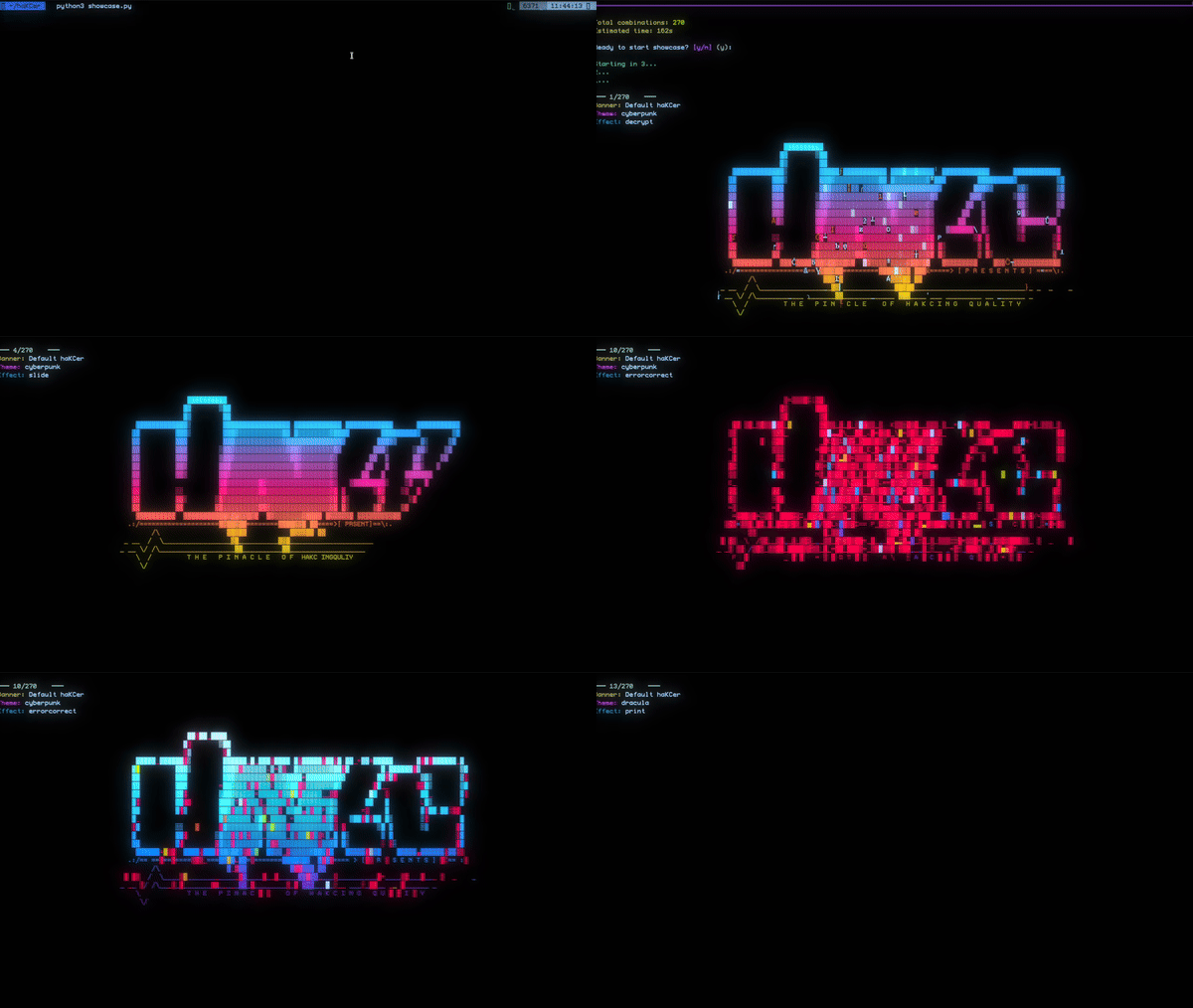
29 TERMINAL EFFECTS - From subtle animations to maximum visual impact
Effect Categories By Speed
FAST Effects (<2 seconds) - Production Ready


decrypt         - Matrix-style decryption reveal
expand          - Text expands from center
print           - Typewriter effect
slide           - Slides in from edge
wipe            - Screen wipe transition
colorshift      - Colors cycle through palette
scattered       - Characters scatter then assemble
random_sequence - Random character appearance
pour            - Text pours down like liquid
errorcorrect    - Glitchy error correction
Use Case: CI/CD pipelines, production tools, frequent runs, impatient users
MEDIUM Effects (2-4 seconds) - Balanced


beams           - Light beams scan across
binarypath      - Binary code path tracing
burn            - Text burns onto screen
crumble         - Crumbling reveal effect
overflow        - Buffer overflow animation
rain            - Digital rain (mini matrix)
spray           - Spray paint effect
unstable        - Unstable/glitchy appearance
vhstape         - VHS tape tracking errors
waves           - Wave distortion effect
Use Case: Demos, presentations, tool launches, showing off to colleagues
SLOW Effects (4+ seconds) - Maximum Flex


blackhole       - Black hole gravity effect
bouncyballs     - Bouncing ball physics
fireworks       - Fireworks explosion
matrix          - Full Matrix digital rain
orbittingvolley - Orbiting particles
rings           - Expanding rings
spotlights      - Spotlight scanning
swarm           - Particle swarm
synthgrid       - Full synthwave grid animation
Use Case: Conference talks, demos, YouTube videos, impressing management
Speed Preference System
from hakcer import show_banner

# Let haKCer pick a fast effect (default)
show_banner(speed_preference="fast")

# Let haKCer pick a medium effect
show_banner(speed_preference="medium")

# Let haKCer pick a slow effect
show_banner(speed_preference="slow")

# Let haKCer pick ANY effect (random)
show_banner(speed_preference="any")

# Specify exact effect (override everything)
show_banner(effect_name="synthgrid")
Usage Recommendations
| Scenario | Speed Setting | Why |
|---|---|---|
| CI/CD Pipeline | fast |
Don't slow down builds |
| Production CLI Tool | fast |
Users run it frequently |
| Demo at Meetup | medium |
Balance of cool + time |
| Conference Talk | slow |
Make it MEMORABLE |
| YouTube Video | slow |
Production value matters |
| Internal Tool | medium |
Colleagues will appreciate it |
════════════════════════════════════════════════════════════════════════════════
  EFFECT NOTES:

  [*] All effects provided by terminaltexteffects library (credit where due)
  [*] Fast effects are <2s because that's the user patience threshold
  [*] Slow effects are 4+ seconds of pure eye candy
  [*] If you're in a hurry, just use speed_preference="fast"
  [*] If you're showing off, use effect_name="synthgrid" (trust us)
════════════════════════════════════════════════════════════════════════════════
[::: INTEGRATION PATTERNS :::]


Pattern 1: Basic CLI Tool
#!/usr/bin/env python3
"""
basic_tool.py - Example CLI tool with haKCer banner
"""
import sys
from hakcer import show_banner, set_theme

def main():
    # Only show banner if running in a terminal (not piped)
    if sys.stdout.isatty():
        set_theme("neon")
        show_banner(speed_preference="fast", hold_time=0.5)

    # Your actual tool logic here
    print("Running my tool...")
    print("Processing complete!")

if __name__ == "__main__":
    main()
Why This Pattern:
- Respects pipes and redirects (no banners in logs)
- Fast by default (production friendly)
- Clean separation of concerns
Pattern 2: Click Framework Integration

import click
from hakcer import show_banner, set_theme

@click.group()
@click.option('--no-banner', is_flag=True, help='Disable ASCII banner')
@click.option('--theme', default='neon', help='Banner theme')
@click.pass_context
def cli(ctx, no_banner, theme):
    """My Awesome CLI Tool"""
    ctx.ensure_object(dict)
    ctx.obj['no_banner'] = no_banner

    if not no_banner:
        set_theme(theme)
        show_banner(speed_preference="fast")

@cli.command()
@click.pass_context
def process(ctx):
    """Process some data"""
    click.echo("Processing...")

if __name__ == '__main__':
    cli()
Why This Pattern:
- Users can disable banners with
--no-banner - Theme selection via CLI flag
- Plays nice with Click's context system
Pattern 3: Environment Variable Control
#!/usr/bin/env python3
import sys
import os
from hakcer import show_banner, set_theme

# Read config from environment
SHOW_BANNER = os.getenv("SHOW_BANNER", "true").lower() == "true"
BANNER_THEME = os.getenv("BANNER_THEME", "neon")
BANNER_SPEED = os.getenv("BANNER_SPEED", "fast")

def main():
    if SHOW_BANNER and sys.stdout.isatty():
        set_theme(BANNER_THEME)
        show_banner(speed_preference=BANNER_SPEED)

    print("Tool running...")

if __name__ == "__main__":
    main()
Usage:
# Normal run with banner
./tool.py

# Disable banner
SHOW_BANNER=false ./tool.py

# Custom theme
BANNER_THEME=cyberpunk ./tool.py

# Slow banner for demo
BANNER_SPEED=slow BANNER_THEME=synthwave ./tool.py
Why This Pattern:
- Docker-friendly (env vars are standard)
- CI/CD friendly (can disable in pipelines)
- Power users can customize without code changes
════════════════════════════════════════════════════════════════════════════════
  INTEGRATION NOTES:

  [*] Always check sys.stdout.isatty() - don't spam logs with ANSI codes
  [*] Provide a --no-banner flag (someone will need it)
  [*] Default to fast effects (production users will thank you)
  [*] Use environment variables for Docker/CI/CD friendliness
  [*] If your tool gets piped to other commands, banners will auto-disable
════════════════════════════════════════════════════════════════════════════════
[::: CUSTOM ASCII ART :::]


Custom Art Demo
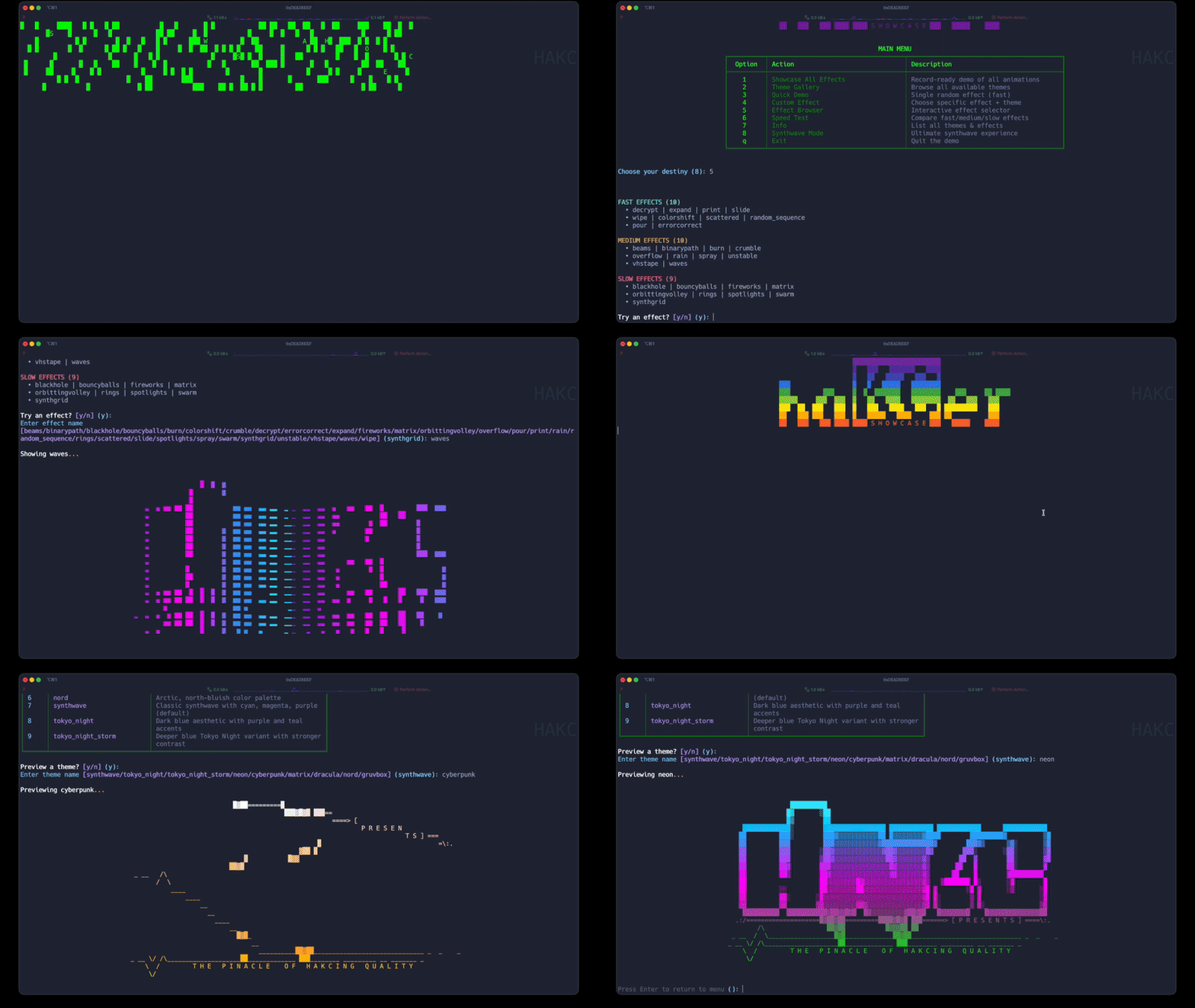
BRING YOUR OWN DESIGNS - Any ASCII art works with all effects and themes
ASCII Art Generation Tools
| Tool | URL | Best For | Badge |
|---|---|---|---|
| TAAG | http://patorjk.com/software/taag/ | Text to ASCII |  |
| ASCII Generator | https://ascii-generator.site/ | Images to ASCII |  |
| ASCII Art Archive | https://ascii.co.uk/art/ | Pre-made art |  |
| Text-Image.com | https://www.text-image.com/convert/ | Photos to ASCII |  |
Recommended Fonts (From TAAG)
Top Picks for Terminal Banners:
- ANSI Shadow (clean, professional, works everywhere)
- Bloody (horror/metal aesthetic)
- Doom (classic, recognizable from the game)
- Graffiti (street art style)
- ANSI Regular (safe default)
- Block (bold and readable)
- Banner3 (old school BBS vibes)
- 3D-ASCII (depth perception)
Usage Examples
From External File (Recommended)
from hakcer import show_banner, set_theme

# Load custom ASCII art from file
set_theme("cyberpunk")
show_banner(
    custom_file="assets/my_logo.txt",
    effect_name="decrypt",
    hold_time=1.0
)
my_logo.txt:
 ███╗   ███╗██╗   ██╗    ████████╗ ██████╗  ██████╗ ██╗
 ████╗ ████║╚██╗ ██╔╝    ╚══██╔══╝██╔═══██╗██╔═══██╗██║
 ██╔████╔██║ ╚████╔╝        ██║   ██║   ██║██║   ██║██║
 ██║╚██╔╝██║  ╚██╔╝         ██║   ██║   ██║██║   ██║██║
 ██║ ╚═╝ ██║   ██║          ██║   ╚██████╔╝╚██████╔╝███████╗
 ╚═╝     ╚═╝   ╚═╝          ╚═╝    ╚═════╝  ╚═════╝ ╚══════╝

         H A C K I N G   T H E   P L A N E T   v2.0
Inline ASCII Art (Quick and Dirty)
from hakcer import show_banner

banner = """
╔═══════════════════════════════════════╗
║  ▄▄▄▄▄▄▄ ▄▄▄▄▄▄▄ ▄▄▄▄▄▄▄ ▄▄▄▄▄▄▄      ║
║ █       █       █       █       █     ║
║ █▄     ▄█    ▄  █   ▄   █   ▄   █    ║
║   █   █ █   █▄█ █  █ █  █  █ █  █    ║
║   █   █ █    ▄▄▄█  █▄█  █  █▄█  █    ║
║   █   █ █   █   █       █       █    ║
║   █▄▄▄█ █▄▄▄█   █▄▄▄▄▄▄▄█▄▄▄▄▄▄▄█    ║
║                                       ║
║    The Absolute Penetration Tool     ║
║         v3.0 - UNDETECTABLE          ║
╚═══════════════════════════════════════╝
"""

show_banner(custom_text=banner, theme="matrix", effect_name="decrypt")
Pro Tips For Custom Art
Width Guidelines
Recommended widths for different terminals:
- 60-70 chars: Safe for most terminals
- 80 chars: Classic terminal width
- 100 chars: Modern wide terminals
- 120+ chars: Ultra-wide monitors only
Common Issues and Fixes
| Issue | Cause | Fix |
|---|---|---|
| Art gets cut off | Too wide for terminal | Reduce width to <80 chars |
| Weird spacing | Tab characters | Replace tabs with spaces |
| Missing characters | Encoding issues | Save as UTF-8 |
| Looks garbled | Font doesn't support chars | Use ASCII-only characters |
════════════════════════════════════════════════════════════════════════════════
  CUSTOM ART NOTES:

  [*] Keep your art under 80 chars wide (some terminals still use this)
  [*] Use UTF-8 encoding for files (not ASCII or Latin-1)
  [*] Test with multiple themes - some chars look better in certain palettes
  [*] Box-drawing characters (─ │ ╔ ╗ ╚ ╝) work great
  [*] Avoid colors in your art file - let haKCer handle the colors
════════════════════════════════════════════════════════════════════════════════
[::: API REFERENCE :::]


show_banner()

Display an animated ASCII banner with the specified theme and effect.
Parameters:
| Parameter | Type | Default | Description |
|---|---|---|---|
effect_name |
str | None | Specific effect to use (e.g., "decrypt", "matrix") |
speed_preference |
str | "fast" | Speed category: "fast", "medium", "slow", or "any" |
hold_time |
float | 1.5 | Seconds to hold the final frame |
clear_after |
bool | False | Clear terminal after displaying banner |
theme |
str | None | Override global theme for this banner only |
custom_text |
str | None | Custom ASCII art as string |
custom_file |
str | None | Path to file containing custom ASCII art |
Returns: None
Raises:
ValueError: If effect_name is invalidFileNotFoundError: If custom_file doesn't exist
Examples:
# Basic usage (random fast effect, current theme)
show_banner()

# Specific effect
show_banner(effect_name="synthgrid")

# Speed preference
show_banner(speed_preference="slow")

# Custom theme for this banner only
show_banner(theme="cyberpunk", effect_name="decrypt")

# Custom ASCII art from file
show_banner(custom_file="logo.txt", theme="neon")

# Custom ASCII art inline
banner = "My Tool v1.0"
show_banner(custom_text=banner, effect_name="print")
set_theme()

Set the global theme for all subsequent banner calls.
Available Themes:
[
    "synthwave",      # Cyan/Magenta/Purple retro
    "neon",           # Full neon spectrum (default)
    "tokyo_night",    # Dark blue Tokyo aesthetic
    "tokyo_storm",    # Darker Tokyo variant
    "cyberpunk",      # Yellow/Pink CP2077
    "matrix",         # Classic green terminals
    "dracula",        # Popular Dracula palette
    "nord",           # Arctic bluish tones
    "gruvbox"         # Retro warm colors
]
list_themes()

Get a list of all available theme names.
Returns: List of theme name strings
list_effects()

Get a list of all available effect names.
Returns: List of effect name strings
get_effect_info()

Get detailed information about a specific effect.
Return Structure:
{
    "name": str,           # Effect name
    "speed": str,          # "fast", "medium", or "slow"
    "duration": float,     # Approximate duration in seconds
    "description": str     # Human-readable description
}
════════════════════════════════════════════════════════════════════════════════
  API NOTES:

  [*] All functions are in the hakcer namespace (from hakcer import *)
  [*] Type hints provided for all parameters
  [*] Functions validate input and raise ValueError for invalid args
  [*] No async/await - everything is synchronous
  [*] Thread-safe (but why would you multithread ASCII art?)
════════════════════════════════════════════════════════════════════════════════
[::: REQUIREMENTS / DEPENDENCIES :::]


Core Requirements


Python 3.8 or higher
├── terminaltexteffects >= 0.11.0  (animation engine)
└── rich >= 13.0.0                 (terminal formatting)
Platform Support


| Platform | Terminal | Status | Notes |
|---|---|---|---|
| Linux | All |  |
Native support |
| macOS | Terminal.app | |
Works great |
| macOS | iTerm2 | |
Recommended |
| Windows | Windows Terminal | |
Best option |
| Windows | PowerShell | |
Decent |
| Windows | CMD.exe |  |
Limited colors |
════════════════════════════════════════════════════════════════════════════════
  REQUIREMENTS NOTES:

  [*] Only 2 dependencies - we don't pull in half of PyPI
  [*] All dependencies are MIT licensed (compatible with everything)
  [*] No native extensions - pure Python, no compilation
  [*] No network dependencies - works completely offline
  [*] No system libraries required (ncurses, termcap, etc)
════════════════════════════════════════════════════════════════════════════════
[::: LINKS / REFERENCES :::]

Official Resources
| Resource | URL | Badge |
|---|---|---|
| PyPI Package | https://pypi.org/project/hakcer/ |  |
| GitHub Repository | https://github.com/haKC-ai/hakcer |  |
| Issue Tracker | https://github.com/haKC-ai/hakcer/issues |  |
| Documentation | https://github.com/haKC-ai/hakcer#readme |  |
Dependencies
| Dependency | Repository | License |
|---|---|---|
| terminaltexteffects | https://github.com/ChrisBuilds/terminaltexteffects |  |
| rich | https://github.com/Textualize/rich | |
Credits & Acknowledgments

Built with:
├── terminaltexteffects - Terminal animation engine by ChrisBuilds
├── rich - Terminal formatting by Textualize
├── Python - Because we're not masochists
└── https://github.com/NoDataFound/awesome-hacker-art
Contact: Use GitHub Issues (no email support)
[::: GREETS & SHOUTOUTS :::]

                          GROUP NEWS: Be a real one and contribute.

                          GR33TZ: SecKC, LEGACY CoWTownComputerCongress,ACiD,
                                                   iCE, T$A, +o--, badge lords
                          SHOUTZ:
                                  [*] 14.4k Modem Jammers
                                  [*] l33t soulz still patching proggies &
                                    huntin' sick ANSIs for their AOHELL punter

                                           FU to [LAMERZ] still using WordPad
                                  If your editor auto wraps lines, bounce now.

                               ───── ▓ signed, /dev/CØR.23: ▓ ─────
                                       "nano > vim. come fight us."
Project details
Verified details
These details have been verified by PyPIProject links
GitHub Statistics
Maintainers
Release history Release notifications | RSS feed


Download files
Download the file for your platform. If you're not sure which to choose, learn more about installing packages.
Source Distribution
Built Distribution
Filter files by name, interpreter, ABI, and platform.
If you're not sure about the file name format, learn more about wheel file names.
Copy a direct link to the current filters
File details
Details for the file hakcer-1.2.4.tar.gz.
File metadata
- Download URL: hakcer-1.2.4.tar.gz
- Upload date:
- Size: 57.8 kB
- Tags: Source
- Uploaded using Trusted Publishing? Yes
- Uploaded via: twine/6.1.0 CPython/3.13.7
File hashes
| Algorithm | Hash digest | |
|---|---|---|
| SHA256 |
60f3981aaca4060ded2f90ca54ce34c1d321e971d28e712919030a8851c08fc2
|
|
| MD5 |
f5f23e39395db683543b1b7bf113a763
|
|
| BLAKE2b-256 |
5a04e878477bbb2377445fca6dc2cb3b8899cab6b1cc9fe38d97db4b433f3610
|
Provenance
The following attestation bundles were made for hakcer-1.2.4.tar.gz:
Publisher:
publish.yml on haKC-ai/hakcer
-
Statement:
-
Statement type:
https://in-toto.io/Statement/v1 -
Predicate type:
https://docs.pypi.org/attestations/publish/v1 -
Subject name:
hakcer-1.2.4.tar.gz -
Subject digest:
60f3981aaca4060ded2f90ca54ce34c1d321e971d28e712919030a8851c08fc2 - Sigstore transparency entry: 693175529
- Sigstore integration time:
-
Permalink:
haKC-ai/hakcer@e6152002fae5eb1cd031f6f43047257dca9c49ba -
Branch / Tag:
refs/tags/v1.2.4 - Owner: https://github.com/haKC-ai
-
Access:
public
-
Token Issuer:
https://token.actions.githubusercontent.com -
Runner Environment:
github-hosted -
Publication workflow:
publish.yml@e6152002fae5eb1cd031f6f43047257dca9c49ba -
Trigger Event:
push
-
Statement type:
File details
Details for the file hakcer-1.2.4-py3-none-any.whl.
File metadata
- Download URL: hakcer-1.2.4-py3-none-any.whl
- Upload date:
- Size: 20.2 kB
- Tags: Python 3
- Uploaded using Trusted Publishing? Yes
- Uploaded via: twine/6.1.0 CPython/3.13.7
File hashes
| Algorithm | Hash digest | |
|---|---|---|
| SHA256 |
058c06ce3fa9627f2d86ca2c0b1dcb5af3bfa320288d5117adf9dabc33e66be2
|
|
| MD5 |
3f296674d43dcf7bd6caac22f7867a1e
|
|
| BLAKE2b-256 |
dfe5fa0020d4ab1bcb144b3fc362170ee9976b249472f81374672c446cb14abf
|
Provenance
The following attestation bundles were made for hakcer-1.2.4-py3-none-any.whl:
Publisher:
publish.yml on haKC-ai/hakcer
-
Statement:
-
Statement type:
https://in-toto.io/Statement/v1 -
Predicate type:
https://docs.pypi.org/attestations/publish/v1 -
Subject name:
hakcer-1.2.4-py3-none-any.whl -
Subject digest:
058c06ce3fa9627f2d86ca2c0b1dcb5af3bfa320288d5117adf9dabc33e66be2 - Sigstore transparency entry: 693175531
- Sigstore integration time:
-
Permalink:
haKC-ai/hakcer@e6152002fae5eb1cd031f6f43047257dca9c49ba -
Branch / Tag:
refs/tags/v1.2.4 - Owner: https://github.com/haKC-ai
-
Access:
public
-
Token Issuer:
https://token.actions.githubusercontent.com -
Runner Environment:
github-hosted -
Publication workflow:
publish.yml@e6152002fae5eb1cd031f6f43047257dca9c49ba -
Trigger Event:
push
-
Statement type:






