
PDFwerks
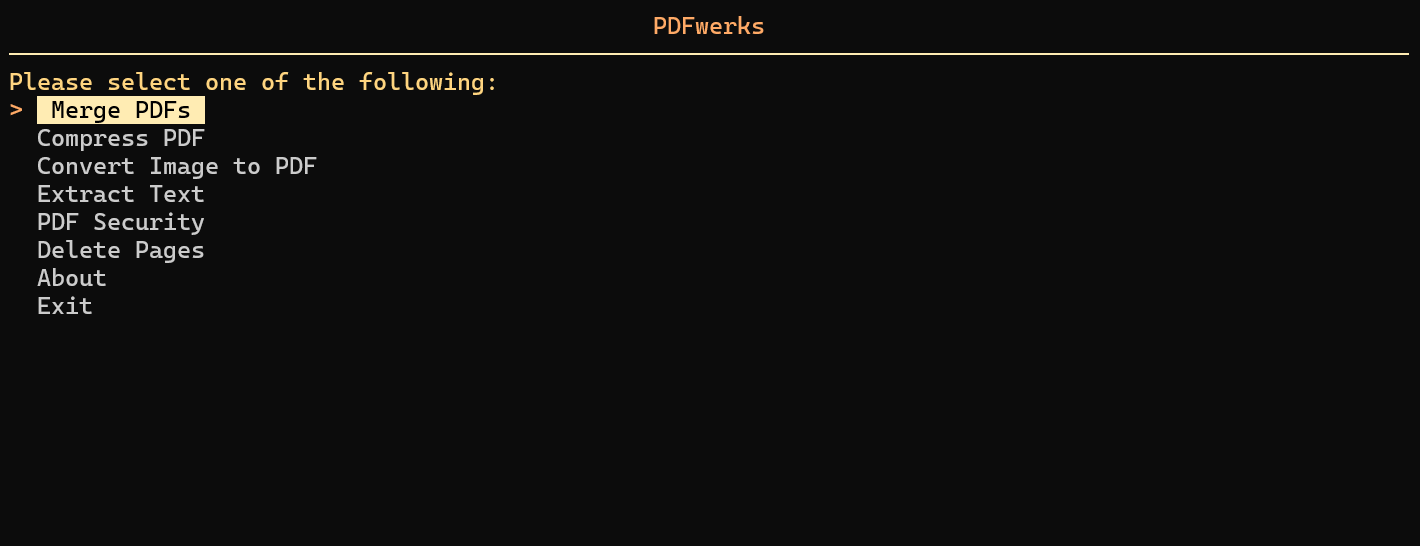
PDFwerks is a lightweight yet comprehensive, tool for working with PDFs. It provides essential PDF manipulation tools all in one easy to use package. All operations are performed locally on your machine, ensuring your sensitive documents stay secure and private. With PDFwerks, you can finally say goodbye to uploading your documents to shady websites or paying for basic PDF operations.





Documentation
Check out the official documentation here: PDFwerks Documentation. It's more detailed and well I put a lot of effort, so go see it :)
Cross Platform Support
PDFwerks is a cross platform PDF toolkit and works across all major operating systems.
It has been locally tested and verified on both Ubuntu (including WSL2) and Windows. Additionally, Continuous Integration (CI) tests are run on Windows, macOS, and Ubuntu, ensuring core functionality remains stable across environments.
⚠️ Important:
tkinteris a required dependency for PDFwerks. For OS specific installation instructions, see the PDFwerks Documentation
Installation
You can install PDFwerks using pip:
pip install pdfwerks
Usage
Run the tool directly from your terminal with:
pdfwerks
Command Line Interface (CLI)
You can also use PDFwerks through the CLI for quick PDF operations without using the TUI.
Merge PDFs
pdfwerks merge file1.pdf file2.jpg [file3.pdf ...] [-o OUTPUT]
- Merge two or more files into one PDF. (Supported File Types:
*.pdf,*.jpg,*.png,*.jpeg,*.txt) - Use
-oor--outputto specify the output file path. (Defaults to~Downloads/merged.pdfif not specified)
Compress PDFs
pdfwerks compress file.pdf [--level LEVEL] [-o OUTPUT]
- Compress and reduce the size of a PDF file
- Use
--levelto choose the compression strength -low,medium(default), orhigh. - Use
-oor--outputto specify the output file path. (Defaults to~Downloads/compressed.pdfif not specified)
Convert Image to PDF
pdfwerks convert-image file.jpg [-o OUTPUT]
- Converts any image to a PDF file (Supported File Types:
*.jpg,*.png,*.jpeg) - Use
-oor--outputto specify the output file path. (Defaults to~Downloads/converted.pdfif not specified)
Extract Text
pdfwerks extract file.pdf --format [text|markdown|json] [-o OUTPUT]
- Extract text from a PDF file and export it to the selected formats
- Use
--formatto specify the export format. This is required and must be one of:text,markdown, orjson. - Use
-oor--outputto specify the output file path. (Defaults to~Downloads/extracted.[format]if not specified)
PDF Security
Enable Password Protection
pdfwerks enable-pwd file.pdf --pwd PASSWORD [-o OUTPUT]
- Enables password protection for a PDF file
- Use
--pwdto specify the new password for the file. This is required. - Use
-oor--outputto specify the output file path. (Defaults to~Downloads/encrypted.pdfif not specified)
Disable Password Protection
pdfwerks disable-pwd file.pdf --pwd PASSWORD [-o OUTPUT]
- Disables password protection for an encrypted PDF file
- Use
--pwdto specify the password for the encrypted PDF file. This is required. - Use
-oor--outputto specify the output file path. (Defaults to~Downloads/decrypted.pdfif not specified)
Update PDF Password
pdfwerks update-pwd file.pdf --old-pwd OLD_PASSWORD --new-pwd NEW_PASSWORD [-o OUTPUT]
- Updates the password for a password protected PDF file
- Use
--old-pwdto specify the old password and--new-pwdto specify the new password for the PDF file. These are required. - Use
-oor--outputto specify the output file path. (Defaults to~Downloads/updated_pwd.pdfif not specified)
Delete Pages
pdfwerks delete-pages file.pdf --pages PAGES [-o OUTPUT]
- Deletes the specified pages from a PDF file
- Use
--pagesto specify pages to delete in the PDF file. Use commas and ranges, e.g.,1,3,5-7,10. This is required. - Use
-oor--outputto specify the output file path. (Defaults to~Downloads/deleted.pdfif not specified)
Help & Version
pdfwerks --help
pdfwerks --version
For Developers
If you want to test, contribute or customize the tool locally:
-
Clone the repository:
git clone https://github.com/adithya-menon-r/PDFwerks.git
cd PDFwerks
-
Create a virtual environment and activate it:
python -m venv .venv
.venv\Scripts\activate    # On Linux/Mac: source .venv/bin/activate
-
Install dependencies and the package in editable mode:
pip install -e .
Optional Dependencies
Depending on what you are working on, you can install extras as needed:
-
For tests:
pip install -e .[test]
-
For documentation:
pip install -e .[docs]
You can now make changes to the code, run tests, or build documentation without reinstalling the package.
Running Tests
Once test dependencies are installed (using pip install -e .[test]), you run the full test suite with:
pytest
All test files are located in the tests/ directory and are automatically discovered by pytest.
License
PDFwerks is licensed under the MIT LICENSE
Author
PDFwerks is developed and maintained by Adithya Menon R
1 maintainer

Metadata
1 maintainer
Release files for pdfwerks 1.1.0
For a detailed explanation of source distributions (sdists) and built distributions (wheels), please see the package formats documentation.
Source distribution (sdist)
| File | Size | Uploaded | Provenance | Actions |
|---|---|---|---|---|
| pdfwerks-1.1.0.tar.gz | 50.1 kB | Without provenance | Details for pdfwerks-1.1.0.tar.gz |
Built distribution (wheel)
| File | Interpreter | ABI | Platform | Actions Reset |
|---|---|---|---|---|
| pdfwerks-1.1.0-py3-none-any.whl | Python 3 | none | any | Details for pdfwerks-1.1.0-py3-none-any.whl |
Total release size: 69.8 kB
Release files / pdfwerks-1.1.0.tar.gz
| Download URL | pdfwerks-1.1.0.tar.gz |
|---|---|
| Size | 50.1 kB |
| Tags | Source |
|
SHA-256 checksum How to use checksums |
6d4bea5e6d320da6df33707855b3169d4b73248b6ad098eb10aa5e9127f1a7e2
|
|
BLAKE2b-256 checksum How to use checksums |
6c9437ae0a4c8c95c5b2535b7f60c06f2f3a350a4ba67e4a74461e9cd8d8a817
|
| Upload date | |
|
Uploaded using Trusted Publishing? What is trusted publishing? |
No |
| Uploaded via |
twine/6.1.0 CPython/3.12.10
|
Release files / pdfwerks-1.1.0-py3-none-any.whl
| Download URL | pdfwerks-1.1.0-py3-none-any.whl |
|---|---|
| Size | 19.7 kB |
| Tags | Python 3 |
|
SHA-256 checksum How to use checksums |
23478adeb195de59b1b0840a84ddb12cd2e55311c98642d7a2d5284e35558cc9
|
|
BLAKE2b-256 checksum How to use checksums |
c6d1b4031e07c6c0362814a5fcb8b1376bc2ec45a242ea7cd55f8b032dc90252
|
| Upload date | |
|
Uploaded using Trusted Publishing? What is trusted publishing? |
No |
| Uploaded via |
twine/6.1.0 CPython/3.12.10
|
Security for pdfwerks 1.1.0
Provenance
Provenance describes where a file came from. On PyPI, provenance is shared via attestations, which provide a verifiable record of the build or publishing details. View details, limitations and caveats.
No provenance found
None of the files in this release were uploaded with provenance metadata.
A note on package security
PyPI is a repository for distributing packages, not a service for auditing them. While third-party security researchers and our staff do their best to detect and remove malicious packages, PyPI cannot guarantee the quality, security or suitability of any given package.
To learn more about protecting yourself from malicious actors, visit our package security documentation.














