
systemctl2mqtt - Deliver systemctl status information over MQTT




This program uses journalctl and systemctl to watch for changes in your services, and top for metrics about those services, and delivers current status to MQTT. It will also publish Home Assistant MQTT Discovery messages so that (binary) sensors automatically show up in Home Assistant.
The focus lies on long-running services with continuous uptime, instead of single or one-shot services, as the stats being reported as well as the child PIDs being refreshed every stats_record_seconds. For services with a lifespan comparable to this interval, the reported stats will not be accurate. Further, as the library uses top and matches the services with their respective PIDs, including child PIDs from subprocesses, it is also not suited for monitoring services which spawn regularly new threads.
This is part of a family of similar tools:
Installation and Deployment
It is available as python package on pypi/systemctl2mqtt.
Pypi package

pip install systemctl2mqtt
systemctl2mqtt --name MySystemName --events -vvvvv
Usage
from systemctl2mqtt import systemctl2Mqtt, DEFAULT_CONFIG

cfg = Systemctl2MqttConfig({
  **DEFAULT_CONFIG,
  "host": "mosquitto",
  "enable_events": True
})

try:
  systemctl2mqtt = Systemctl2Mqtt(cfg)
  systemctl2mqtt.loop_busy()

except Exception as ex:
  # Do something
Default Configuration
You can use environment variables to control the behavior.
| Config | Default | Description |
|---|---|---|
log_level |
4 |
Set to DEBUG=5,INFO=4,WARN=3,ERROR=2,CRITICAL=1 to enable different levels of verbosity. |
| `log_dir | `` | Set path to for additional logging to file. |
systemctl2mqtt_hostname |
systemctl2mqtt Hostname | The hostname of your host, if you want to overwrite it. |
homeassistant_prefix |
homeassistant |
The prefix for Home Assistant discovery. Must be the same as discovery_prefix in your Home Assistant configuration. |
homeassistant_single_device |
false |
Group all entities by a single device in Home Assistant instead of one device per entity. |
mqtt_client_id |
mqtt2discord |
The client id to send to the MQTT broker. |
mqtt_host |
localhost |
The MQTT broker to connect to. |
mqtt_port |
1883 |
The port on the broker to connect to. |
mqtt_user |
The user to send to the MQTT broker. Leave unset to disable authentication. | |
mqtt_password |
The password to send to the MQTT broker. Leave unset to disable authentication. | |
mqtt_timeout |
30 |
The timeout for the MQTT connection. |
mqtt_topic_prefix |
systemctl |
The MQTT topic prefix. With the default data will be published to systemctl/<hostname>. |
mqtt_qos |
1 |
The MQTT QOS level |
service_whitelist |
Define a whitelist for services to consider, if empty, everything is monitored. The entries are either match as literal strings or as regex. | |
service_blacklist |
Define a blacklist for services to consider, takes priority over whitelist. The entries are either match as literal strings or as regex. | |
destroyed_service_ttl |
86400 |
How long, in seconds, before destroyed services are removed from Home Assistant. Services won't be removed if the service is restarted before the TTL expires. |
stats_record_seconds |
30 |
The number of seconds to record state and make an average |
enable_events |
0 |
1 Or 0 for processing events |
enable_stats |
0 |
1 Or 0 for processing statistics |
Consuming The Data
Data is published to the topic systemctl/<hostname>/events using JSON serialization. It will arrive whenever a change happens and its type can be inspected in type_definitions.py or the documentation.
Data is also published to the topic systemctl/<hostname>/stats using JSON serialization. It will arrive every STATS_RECORD_SECONDS seconds or so can be inspected in type_definitions.py or the documentation.
Discovery
It is possible to enable/disable discovery of the metrics.
systemctl2mqtt --name Server1 -vvvvv --discovery "<your_discovery>"
Setting it to an empty list will deactivate discovery, per default homeassistant is active.
systemctl2mqtt --name Server1 -vvvvv --discovery ""
Home Assistant
systemctl2mqtt --name Server1 -vvvvv --discovery "homeassistant"
Once systemctl2mqtt is collecting data and publishing it to MQTT, it's rather trivial to use the data in Home Assistant.
A few assumptions:
- Home Assistant is already configured to use a MQTT broker. Setting up MQTT and HA is beyond the scope of this documentation. However, there are a lot of great tutorials on YouTube. An external broker (or as add-on) like Mosquitto will need to be installed and the HA MQTT integration configured.
- The HA MQTT integration is configured to use
homeassistantas the MQTT autodiscovery prefix. This is the default for the integration and also the default forsystemctl2mqtt. If you have changed this from the default, use the--prefixparameter to specify the correct one. - You're not using TLS to connect to the MQTT broker. Currently
systemctl2mqttonly works with unencrypted connections. Username / password authentication can be specified with the--usernameand--passwordparameters, but TLS encryption is not yet supported.
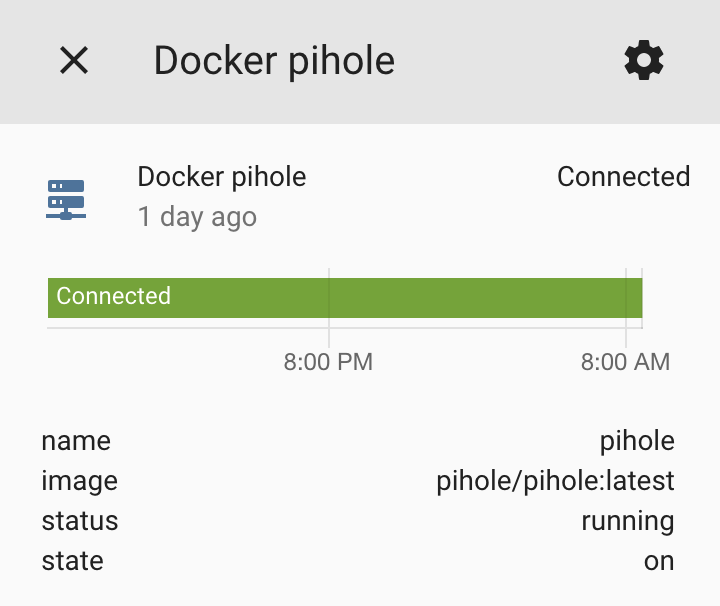
After you start the service (binary) sensors should show up in Home Assistant immediately. Look for sensors that start with (binary_)sensor.systemctl. Metadata about the container will be available as attributes for events, which you can then expose using template sensors if you wish.
Logging
systemctl2mqtt can log to a directory in addition to the console using the --logdir parameter. The specified directory can be absolute or relative and is created if it doesn't exist. The verbosity parameter applies to file logging and the log file size is limited to 1M bytes and 5 previous files are kept.
systemctl2mqtt --name Server1 -vvvvv --logdir /var/log/systemctl2mqtt/
Documentation
Using mkdocs, the documentation and reference is generated and available on github pages.
Dev
Setup the dev environment using VSCode, it is highly recommended.
python -m venv .venv
source .venv/bin/activate
pip install -r requirements_dev.txt
Install pre-commit
pre-commit install

# Run the commit hooks manually
pre-commit run --all-files
Following VSCode integrations may be helpful:
Releasing
A final version can only be released from the master branch. To pass the gates of the publish workflow, the version must match in both the tag and systemctl2mqtt/__init__.py.
To release a prerelease version, it must be done from a feature branch (not master). Prerelease versions are explicitly marked as such on the GitHub release page.
Credits
This is inspired from my other repo docker2mqtt.
CHANGELOG
DEPRECATED
This changelog is no longer maintained and will not be updated in future releases. Please refer to the release notes on GitHub for the latest changes.
1.3.1
- Fix parsing of memory values with suffixes from top
1.3.0
- Add option to group all entities into a single device in home assistant
1.2.0
- Update version package identifier and bump setuptools
- Fix mypy setup
1.1.2
- Update the discovery jsons for home assistant
1.1.1
- Refresh child PIDs every interval data is reported (see README.md for limitations of this behaviour)
1.1.0
- Add child pids to metrics
1.0.0
- Initial version.
1 maintainer

Metadata
1 maintainer
Release files for systemctl2mqtt 1.6.0
For a detailed explanation of source distributions (sdists) and built distributions (wheels), please see the package formats documentation.
Source distribution (sdist)
| File | Size | Uploaded | |
|---|---|---|---|
| systemctl2mqtt-1.6.0.tar.gz | 25.6 kB | Details |
Built distribution (wheel)
| File | Interpreter | ABI | Platform | Reset |
|---|---|---|---|---|
| systemctl2mqtt-1.6.0-py3-none-any.whl | Python 3 | none | any | Details |
Total release size: 48.0 kB
Release files / systemctl2mqtt-1.6.0.tar.gz
| Download URL | systemctl2mqtt-1.6.0.tar.gz |
|---|---|
| Size | 25.6 kB |
| Tags | Source |
|
SHA-256 checksum How to use checksums |
391347ca32e00b773fc3b15c6288d8b3e52adeb14c0390a01bf8282ae148e363
|
|
BLAKE2b-256 checksum How to use checksums |
65af890a5e20df135b98c65d82640e23d0d966669a7daf31a2983f2a3ae2509e
|
| Upload date | |
|
Uploaded using Trusted Publishing? What is trusted publishing? |
Yes |
| Uploaded via |
twine/6.1.0 CPython/3.13.7
|
Provenance
Provenance describes where a file came from. On PyPI, provenance is shared via attestations, which provide a verifiable record of the build or publishing details. View details, limitations and caveats.


PyPI Publish Attestation
PyPI verified that this artifact, at this checksum, originated from the publisher listed below.
Signed by GitHub Actions, verified by PyPI on Feb 5, 2026.
Transparency logRelease files / systemctl2mqtt-1.6.0-py3-none-any.whl
| Download URL | systemctl2mqtt-1.6.0-py3-none-any.whl |
|---|---|
| Size | 22.4 kB |
| Tags | Python 3 |
|
SHA-256 checksum How to use checksums |
bb2a0c714220c5be2f24e5f26a052955b1c01e82300f7bdd09736c06aae6b0d0
|
|
BLAKE2b-256 checksum How to use checksums |
278fa0775cd6c312713603101b21cb4c0b79d386489356c19e139ee94182c734
|
| Upload date | |
|
Uploaded using Trusted Publishing? What is trusted publishing? |
Yes |
| Uploaded via |
twine/6.1.0 CPython/3.13.7
|
Provenance
Provenance describes where a file came from. On PyPI, provenance is shared via attestations, which provide a verifiable record of the build or publishing details. View details, limitations and caveats.
PyPI Publish Attestation
PyPI verified that this artifact, at this checksum, originated from the publisher listed below.
Signed by GitHub Actions, verified by PyPI on Feb 5, 2026.
Transparency log













