
This is a simple library to implement Binary decision Trees.
In computer science, a binary decision diagram (BDD) or branching program is a data structure that is used to represent a Boolean function. On a more abstract level, BDDs can be considered as a compressed representation of sets or relations. Unlike other compressed representations, operations are performed directly on the compressed representation, i.e. without decompression.
A simple example of this would be the following tree:
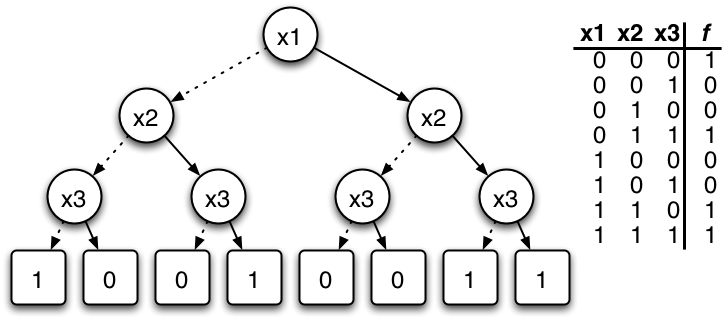
Each node has a pair of childs, one child is the one associated to its father when the function inside the father returns a true value, and the other is associated when the fathers function returns false.
Use
You can create the nodes manually as python objects like is shown in this example:
from bdt.tree import BDT
from bdt.node import Node


true_node = Node(
    'True Node'
)

false_node = Node(
    'False Node'
)

head_node = Node(
   'Head Node',
   lambda var: var < 10,
   true_child=true_node,
   false_child=false_node
)

tree = BDT(
    head_node
)
Other option is to create the tree by passing a python dictionary:
from bdt.tools import tree_from_dict


tree_dict = {
    'head': 'Head Node',

    'variables': [
        'withd',
        'height'
    ],

    'nodes': [
        {
            'name': 'Head Node',
            'function': 'withd * height < 50',
            'true_child': 'True Node',
            'false_child': 'False Node'
        },
        {
            'name': 'True Node',
            'function': 'withd * height < 25',
            'true_child': 'True True Node',
            'false_child': 'True False Node'
        },
        {
            'name': 'False Node',
            'function': 'withd * height < 100',
            'true_child': 'False True Node',
            'false_child': 'False False Node'
        },
        {
            'name': 'True True Node',
            'function': 'None',
            'true_child': 'None',
            'false_child': 'None'
        },
        {
            'name': 'True False Node',
            'function': 'None',
            'true_child': 'None',
            'false_child': 'None',
        },
        {
            'name': 'False True Node',
            'function': 'None',
            'true_child': 'None',
            'false_child': 'None'
        },
        {
            'name': 'False False Node',
            'function': 'None',
            'true_child': 'None',
            'false_child': 'None'
        },
    ]
}

tree = tree_from_dict(tree_dict)
And the final form would be to load it from a JSON file the matches the previous dictionary and load it by using:
import json

from bdt.tools import tree_from_json

json_data = open('{PATH_TO_FILE/file.json}', 'r')
tree = tree_from_json(json_data)
And the final form would be to load it from a JSON file the matches the previous dictionary and load it by using:
import json

from bdt.tools import tree_from_json

json_data = open('{PATH_TO_FILE/file.json}', 'r')
tree = tree_from_json(json_data)
To traverse the created tree yo can makeit like this:
import json

from bdt.tools import tree_from_json

json_data = open('{PATH_TO_FILE/file.json}', 'r')
tree = tree_from_json(json_data)

tree.set_parameters({
    'withd': 25,
    'height': 25
})

for node in tree:
    print node.name
The set_parameters function let you initialize the values needed to run the boolean functions inside each node.
1 maintainer

Metadata
1 maintainer
Release files for BDT 0.0.3
For a detailed explanation of source distributions (sdists) and built distributions (wheels), please see the package formats documentation.
Source distribution (sdist)
| File | Size | Uploaded | Provenance | Actions |
|---|---|---|---|---|
| BDT-0.0.3.tar.gz | 4.3 kB | Without provenance | Details for BDT-0.0.3.tar.gz |
Release files / BDT-0.0.3.tar.gz
| Download URL | BDT-0.0.3.tar.gz |
|---|---|
| Size | 4.3 kB |
| Tags | Source |
|
SHA-256 checksum How to use checksums |
cf0df7a54d849a09cb206fd524996055d666808598c2e788bb97b2146f07af6e
|
|
BLAKE2b-256 checksum How to use checksums |
a8fcb02e5964ed69277ff17895e3aa7c557bffafc915f7e75416fd35b76b6225
|
| Upload date | |
|
Uploaded using Trusted Publishing? What is trusted publishing? |
No |
Security for BDT 0.0.3
Provenance
Provenance describes where a file came from. On PyPI, provenance is shared via attestations, which provide a verifiable record of the build or publishing details. View details, limitations and caveats.
No provenance found
None of the files in this release were uploaded with provenance metadata.
A note on package security
PyPI is a repository for distributing packages, not a service for auditing them. While third-party security researchers and our staff do their best to detect and remove malicious packages, PyPI cannot guarantee the quality, security or suitability of any given package.
To learn more about protecting yourself from malicious actors, visit our package security documentation.














