
CD to Spotify and EBay
CDs have become quite antiquated in recent years, and you might still have some lying around the house. Instead of just throwing them out, why not transfer the songs on them to your everyday Spotify playlist so you can hold on to your old songs and memories. You can also make a little money by listing them on eBay.
CD-to-Spotify-and-EBay is a Python utility which interfaces with standard barcode scanners (such as Zebra scanners); users scan the barcodes of many CDs consecutively and the program automatically adds the contents of those CDs to a requested Spotify Playlist and lists the scanned CDs on eBay for the average listing price of the CD.
Spotify Authorization Setup
Go to Spotify Dashboard to Create a Spotify Application of any name.
Go to Settings and set Redirect URI to: http://localhost:8888/callback
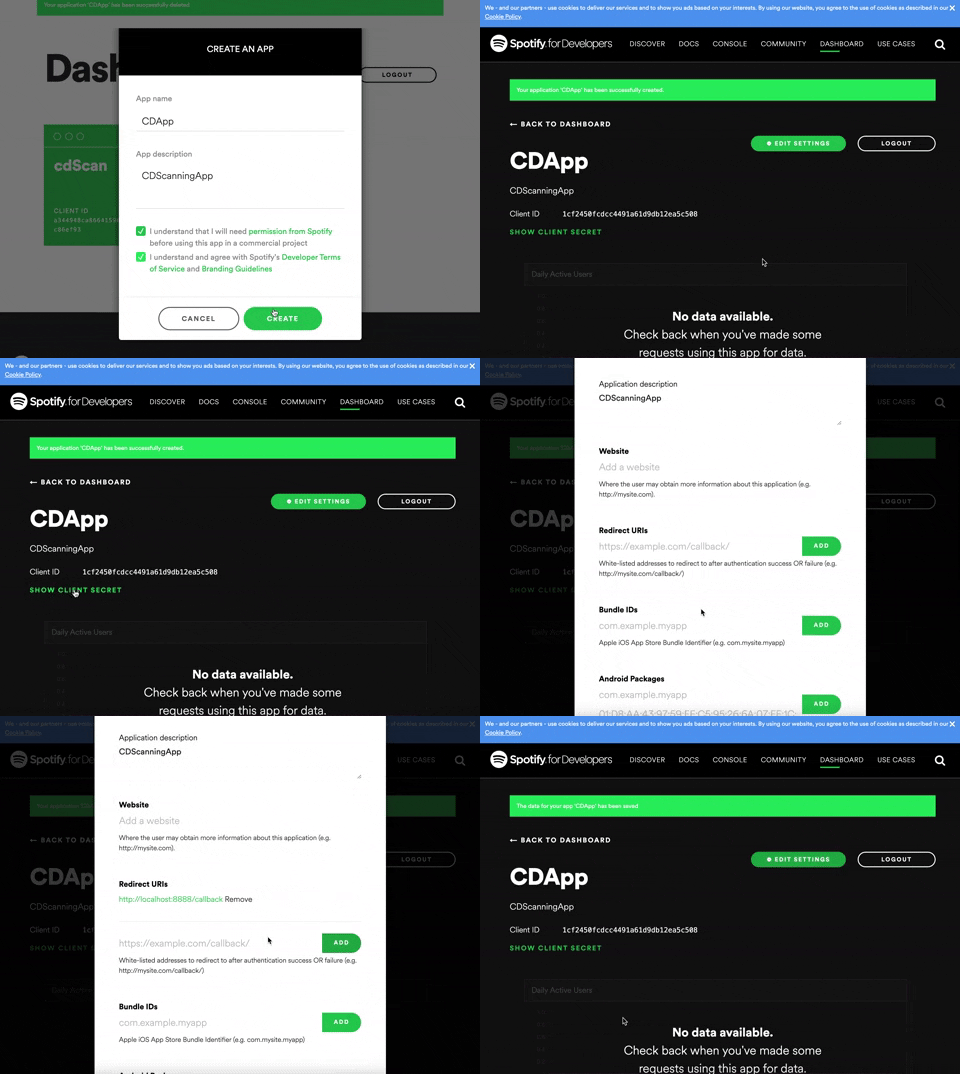
Create a copy of information.yaml found here (or just edit the file if cloning the repository) and input your Spotify username, your client_id and client_secret from the application you created (gif above shows where this information is), as well as the URI of the playlist you would like to add the contents of the CD to:
# Spotify Authorization Information
spotifyInfo:
    user_id: INSERT_SPOTIFY_USERNAME
    client_id: INSERT_SPOTIFY_CLIENT_ID
    client_secret: INSERT_SPOTIFY_CLIENT_SECRET
    playlist_uri: INSERT_SPOTIFY_PLAYLIST_URI
EBay Authorization Setup
With an eBay Developer account create application keys for a Production Application here.
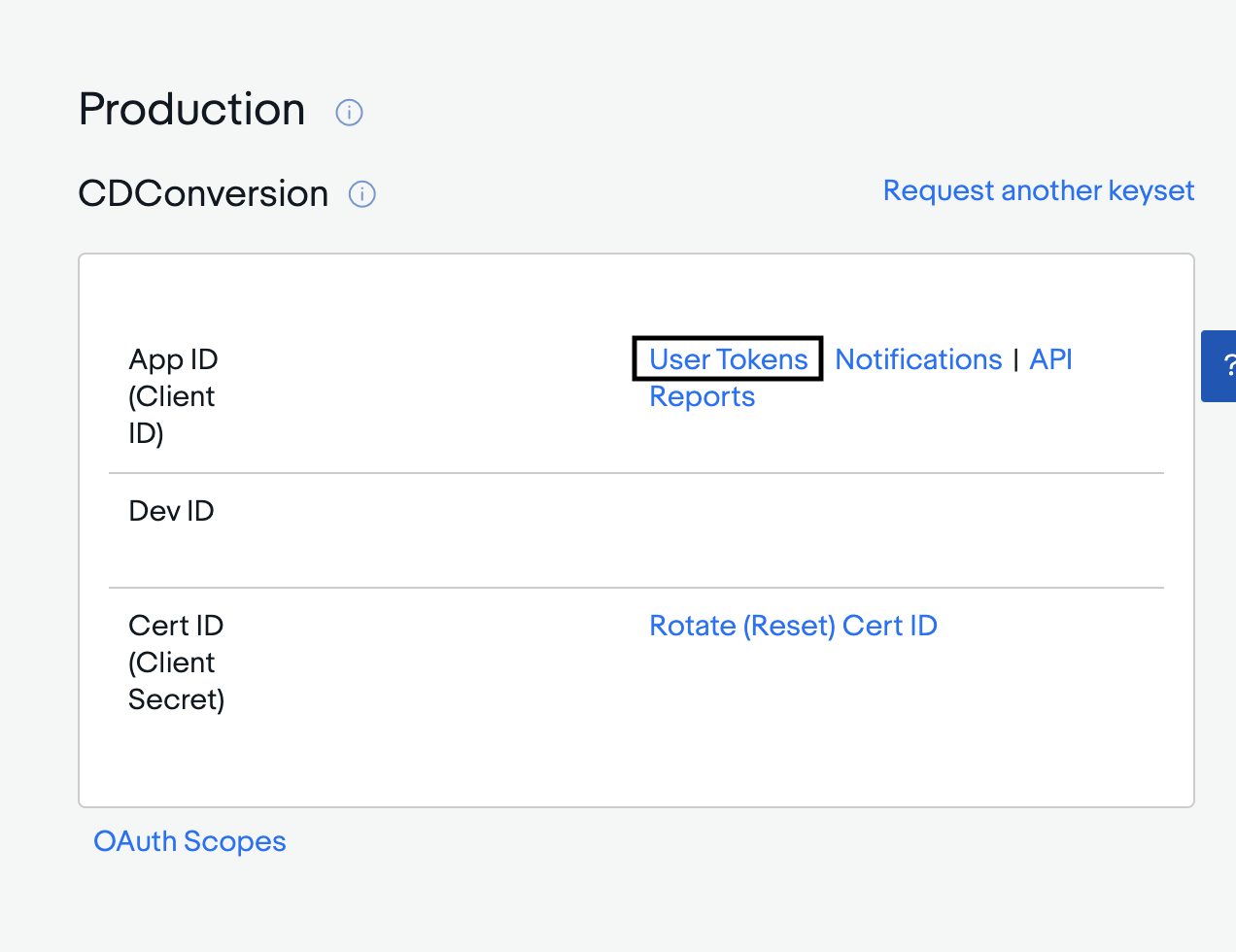
Connect your developer account to your eBay seller account by retrieving a Production User Token (by clicking on user tokens on application keys page) and signing into your Seller Account.
Insert the eBay appid, certid, devid, token (from application keys you created) and pricemultiplier (percent of average listing price to list item for Example: .85 for 85 percent) into information.yaml:
# EBay Authorization information (See GitHub)
api.ebay.com:
    compatability: 719 #No Need to Change
    appid: INSERT_EBAY_APP_ID
    certid: INSERT_EBAY_CERT_ID
    devid:  INSERT_EBAY_DEV_ID
    token: INSERT_EBAY_TOKEN
    pricemultiplier: INSERT_PRICE_MULTIPLIER
Final Setup
Finally, make sure to fill out the rest of the information in the information.yaml which provides the serial port of the scanner and information for posting the CD on eBay:
otherInfo:
    country: INSERT_COUNTRY #Example: US
    location: INSERT_LOCATION #Example: NY
    site: INSERT_SITE #Example: US
    conditionID: INSERT_CONDITION_ID #See eBay docs
    PayPalEmailAddress: INSERT_PAYPAL_EMAIL
    description: INSERT_EBAY_DESCRIPTION
    currency: INSERT_CURRENCY_TYPE
    com_port: INSERT_COM_PORT
Usage
First pip install the package:
pip3 install CD_to_Spotify_and_EBay
Then use the package in python like this:
from CD_to_Spotify_and_EBay import BarcodeScanner
cd = BarcodeScanner(PATH_TO_INFORMATION.YML)
cd.run()
OR
Clone this repository, connect your barcode scanner, cd into the repository, and run:
pip3 install -r requirements.txt
then
python3 main.py
For both, scan a batch of barcodes back to back and scan the final barcode twice to initiate transfer to Spotify and posting on eBay.
License
1 maintainer

Metadata
1 maintainer
Release files for CD-to-Spotify-and-EBay 1.1.1
For a detailed explanation of source distributions (sdists) and built distributions (wheels), please see the package formats documentation.
Source distribution (sdist)
| File | Size | Uploaded | Provenance | Actions |
|---|---|---|---|---|
| CD_to_Spotify_and_EBay-1.1.1.tar.gz | 7.6 kB | Without provenance | Details for CD_to_Spotify_and_EBay-1.1.1.tar.gz |
Built distribution (wheel)
| File | Interpreter | ABI | Platform | Actions Reset |
|---|---|---|---|---|
| CD_to_Spotify_and_EBay-1.1.1-py3-none-any.whl | Python 3 | none | any | Details for CD_to_Spotify_and_EBay-1.1.1-py3-none-any.whl |
Total release size: 15.4 kB
Release files / CD_to_Spotify_and_EBay-1.1.1.tar.gz
| Download URL | CD_to_Spotify_and_EBay-1.1.1.tar.gz |
|---|---|
| Size | 7.6 kB |
| Tags | Source |
|
SHA-256 checksum How to use checksums |
852c42336eb75adc1971ca4b2f8c86fe53832b38afff59903f368260dbf39366
|
|
BLAKE2b-256 checksum How to use checksums |
ce893fae183454b78b0d641640b8872c0d1643621cc56dcfa1e28e7a8456be28
|
| Upload date | |
|
Uploaded using Trusted Publishing? What is trusted publishing? |
No |
| Uploaded via |
twine/3.4.1 importlib_metadata/3.10.0 pkginfo/1.7.0 requests/2.25.1 requests-toolbelt/0.9.1 tqdm/4.60.0 CPython/3.9.4
|
Release files / CD_to_Spotify_and_EBay-1.1.1-py3-none-any.whl
| Download URL | CD_to_Spotify_and_EBay-1.1.1-py3-none-any.whl |
|---|---|
| Size | 7.8 kB |
| Tags | Python 3 |
|
SHA-256 checksum How to use checksums |
9e58ffdef484a8c0f7f2d1da95f27e46cd525f9d6dca01b01423463a5c2cef74
|
|
BLAKE2b-256 checksum How to use checksums |
612313574edd809dadf35202dd6042cd79810efa9b396a50a22490a7c930e8b4
|
| Upload date | |
|
Uploaded using Trusted Publishing? What is trusted publishing? |
No |
| Uploaded via |
twine/3.4.1 importlib_metadata/3.10.0 pkginfo/1.7.0 requests/2.25.1 requests-toolbelt/0.9.1 tqdm/4.60.0 CPython/3.9.4
|
Security for CD-to-Spotify-and-EBay 1.1.1
Provenance
Provenance describes where a file came from. On PyPI, provenance is shared via attestations, which provide a verifiable record of the build or publishing details. View details, limitations and caveats.
No provenance found
None of the files in this release were uploaded with provenance metadata.
A note on package security
PyPI is a repository for distributing packages, not a service for auditing them. While third-party security researchers and our staff do their best to detect and remove malicious packages, PyPI cannot guarantee the quality, security or suitability of any given package.
To learn more about protecting yourself from malicious actors, visit our package security documentation.













