
ELF_RSS


- 容易使用的命令
- 更规范的代码,方便移植到你自己的机器人
- 使用全新的 Nonebot2 框架
这是一个以 Python 编写的 QQ 机器人插件,用于订阅 RSS 并实时以 QQ消息推送。
算是第一次用 Python 写出来的比较完整、实用的项目。代码比较难看,正在重构中
当然也有很多插件能够做到订阅 RSS ,但不同的是,大多数都需要在服务器上修改相应配置才能添加订阅,而该插件只需要发送QQ消息给机器人就能动态添加订阅。
对于订阅,支持QQ、QQ群、QQ频道的单个、多个订阅。
每个订阅的个性化设置丰富,能够应付多种场景。
功能介绍
- 发送命令添加、删除、查询、修改 RSS 订阅
- 交互式添加 RSSHub 订阅
- 订阅内容翻译(使用谷歌机翻,可设置为百度翻译)
- 个性化订阅设置(更新频率、翻译、仅标题、仅图片等)
- 多平台支持
- 图片压缩后发送
- 种子下载并上传到群文件
- 离线下载到 PikPak 网盘(方便追番)
- 消息支持根据链接、标题、图片去重
- 可设置只发送限定数量的图片,防止刷屏
- 可设置从正文中要移除的指定内容,支持正则
文档目录
注意:推荐 Python 3.8.3+ 版本 Windows版安装包下载地址:https://www.python.org/ftp/python/3.8.3/python-3.8.3-amd64.exe
效果预览

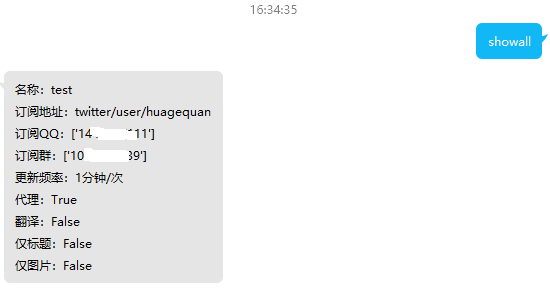
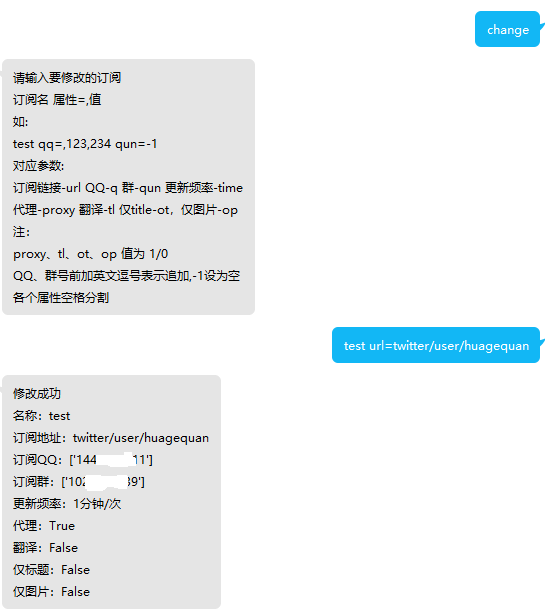
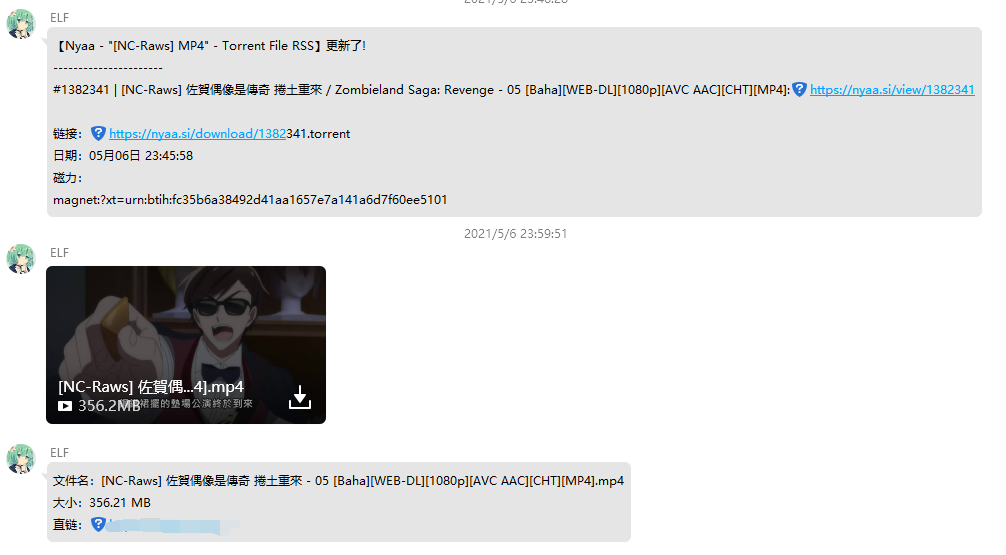
TODO
- 1. 订阅信息保护,不在群组中输出订阅QQ、群组
- 2. 更为强大的检查更新时间设置
- 3. RSS 源中 torrent 自动下载并上传至订阅群(适合番剧订阅)
- 4. 暂停检查订阅更新
- 5. 正则匹配订阅名
- 6. 性能优化,尽可能替换为异步操作
感谢以下项目或服务
不分先后
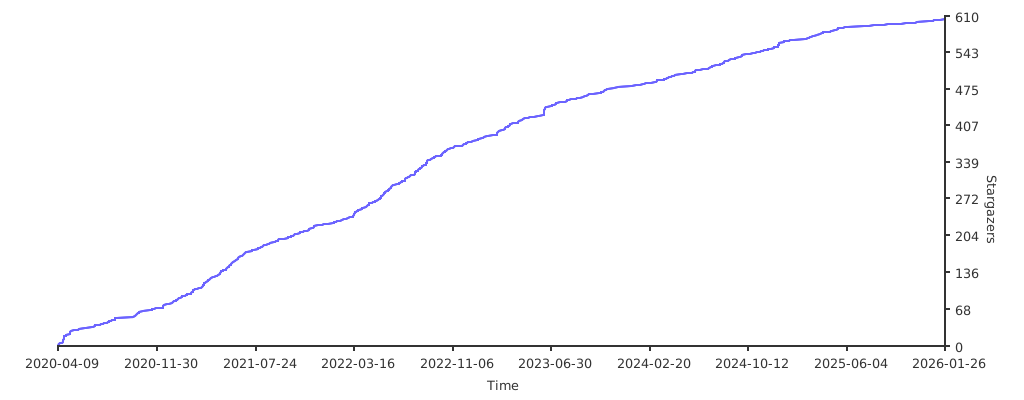
Star History
1 maintainer

Metadata
1 maintainer
Release files for ELF-RSS 2.6.25
For a detailed explanation of source distributions (sdists) and built distributions (wheels), please see the package formats documentation.
Source distribution (sdist)
| File | Size | Uploaded | Provenance | Actions |
|---|---|---|---|---|
| elf_rss-2.6.25.tar.gz | 57.2 kB | Without provenance | Details for elf_rss-2.6.25.tar.gz |
Built distribution (wheel)
| File | Interpreter | ABI | Platform | Actions Reset |
|---|---|---|---|---|
| elf_rss-2.6.25-py3-none-any.whl | Python 3 | none | any | Details for elf_rss-2.6.25-py3-none-any.whl |
Total release size: 132.4 kB
Release files / elf_rss-2.6.25.tar.gz
| Download URL | elf_rss-2.6.25.tar.gz |
|---|---|
| Size | 57.2 kB |
| Tags | Source |
|
SHA-256 checksum How to use checksums |
9388e30597b794de341096a0152b44ca592ca8d028faad6b5b4d9f3c20cec09a
|
|
BLAKE2b-256 checksum How to use checksums |
b0055cfbd8a06ed198a8a77c16fd1bb15973c9251467aefa2bd18507b52f60e1
|
| Upload date | |
|
Uploaded using Trusted Publishing? What is trusted publishing? |
No |
| Uploaded via |
twine/5.1.1 CPython/3.12.6
|
Release files / elf_rss-2.6.25-py3-none-any.whl
| Download URL | elf_rss-2.6.25-py3-none-any.whl |
|---|---|
| Size | 75.2 kB |
| Tags | Python 3 |
|
SHA-256 checksum How to use checksums |
358be4ffa36660f91433cfe07fe4fc1af6da89832b7eb4c9218e064a4fde4da4
|
|
BLAKE2b-256 checksum How to use checksums |
2b50b1b31be37340f1be8a78857dbf5c1bebf4deaf15b0c38934426fe91eaf07
|
| Upload date | |
|
Uploaded using Trusted Publishing? What is trusted publishing? |
No |
| Uploaded via |
twine/5.1.1 CPython/3.12.6
|
Security for ELF-RSS 2.6.25
Provenance
Provenance describes where a file came from. On PyPI, provenance is shared via attestations, which provide a verifiable record of the build or publishing details. View details, limitations and caveats.
No provenance found
None of the files in this release were uploaded with provenance metadata.
A note on package security
PyPI is a repository for distributing packages, not a service for auditing them. While third-party security researchers and our staff do their best to detect and remove malicious packages, PyPI cannot guarantee the quality, security or suitability of any given package.
To learn more about protecting yourself from malicious actors, visit our package security documentation.














