

Welcome to ERDot 👋


Creates Entity Relationship Diagrams from JSON/YAML code.
Installation
to install ERDot:
pip install ERDot
you may also need to install graphvis to be able to create images of the dot files generated. If you don't want to install graphviz, you can copy the contents of the generated dot file into an online grapviz viewer.
CLI Usage
Usage: erdot [OPTIONS] INPUTFILE

  ERDot generates graphvis .dot files from the .json/.yml files INPUTFILE.

Options:
  -o, --outputFile TEXT  The graphvis dot file to write (.dot)
  -q, --quiet            Suppresses program information messages.
  --help                 Show this message and exit.
Note that after generating the .dot file, you will still need to output it to your desired format using graphviz. An example of how to do this:
$ erdot example.erd.json

$ dot example.dot -Tpng -o imageFile.png
(You could also copy and paste the contents of the .dot file into an online graphviz viewer)
ERDJSON format:
{
    "tables":{
        ...
    },
    "relations":[
        ...
    ],
    "rankAdjustments":"...",
    "label":"..."
}
Every single one of these sections are required, however, if you dont need that specific feature (for example label or rankAdjustments), just leave the value blank
table:
Each table inside of the table section of the ERDJSON document is formated like this:
"TableName": {
      "*PrimaryKey": "Int(10)",
      "+ForeignKey": "Int(10)",
      "RandomData": "Char(70)"
    }
the general idea is that the key is the column name, and the value is the type.
you will also notice the * and + next to the column names, these indicate primary and foriegn keys respectively. You can combine two of these together into a primary foreign key (a composite key consisting of two foreign keys), just by putting both a * and a + next to the name.
relations:
each element in the relations array of the ERDJSON document is formatted like this:
"TableOne:PrimaryKey 1--* TableTwo:ForeignKey"
There are three elements that make up the relation string, (1) the left hand side, (2) the cardinality indicator, and (3) the right hand side.
Left and Right hand side:
The sides of the relation string consist of two elements, separated by a :. the text before the : indicates what table it is in, and the text after the : indicates what specific column it should use to link. (note how you dont include the + or * in the specific column text).
Cardinality indicator:
Each relationship must have two of these cardinalities in the indicator, separated by --:
Cardinality    Syntax
0 or 1         ?
exactly 1      1
0 or more      *
1 or more      +
So for example, the following defines a relationship between Person's birthplaceID foreign key and BirthPlace's ID primary key that reads "every person has exactly one birth place, linked together using the birthplaceID":
Person:birthplaceID *--1 BirthPlace:ID
rankAdjustments
applies graphvis' rank adjustments to adjust where the tables appear in the final image. (note that it is only one string)
{ rank=min; TableOne Tabletwo }; // sets TableOne and TableTwo to be in the minimum rank (left)
{ rank=same; TableThree TableFour }; // sets TableThree and TableFour to be in the same rank
{ rank=max; TableFive }; // sets TableFive to be in the maximum rank (right)
Label
a string that sets what label will be drawn on top of the ERD, think of it like the title of the ERD.
Example ERDJSON:
{
    "tables":{
        "Person":{
            "*name":"char()",
            "height":"int()",
            "weight":"int()",
            "birthDate":"date()",
            "+birthPlaceID":"int()"
        },
        "BirthPlace":{
            "*id":"int()",
            "birthCity":"char()",
            "birthState":"char()",
            "birthCountry":"char()"
        }
    },
    "relations":[
        "Person:birthPlaceID *--1 BirthPlace:id"
    ],
    "rankAdjustments":"",
    "label":""
}
which then creates this image:
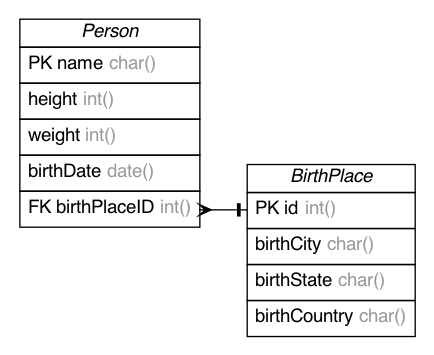
The ERDYAML of the same image would look like:
tables:
  Person:
    "*name": char()
    height: int()
    weight: int()
    birthDate: date()
    "+birthPlaceID": int()
  BirthPlace:
    "*id": int()
    birthCity: char()
    birthState: char()
    birthCountry: char()
relations:
- Person:birthPlaceID *--1 BirthPlace:id
rankAdjustments: ''
label: ''
Author
👤 ehne
- Github: @ehne
Show your support
Give a ⭐️ if this project helped you!
This README was generated with ❤️ by readme-md-generator
1 maintainer

Release files for ERDot 2.3.1
For a detailed explanation of source distributions (sdists) and built distributions (wheels), please see the package formats documentation.
Built distribution (wheel)
| File | Interpreter | ABI | Platform | Reset |
|---|---|---|---|---|
| ERDot-2.3.1-py3-none-any.whl | Python 3 | none | any | Details |
Release files / ERDot-2.3.1-py3-none-any.whl
| Download URL | ERDot-2.3.1-py3-none-any.whl |
|---|---|
| Size | 55.8 kB |
| Tags | Python 3 |
|
SHA-256 checksum How to use checksums |
99b2ec3830bfcbc82e3b2807d0d279adad317c1c31b2f6191e319ce0b0baa7c8
|
|
BLAKE2b-256 checksum How to use checksums |
8207b38e3ed9a59ba2cdb57e89ab1a25622babc608ea488e12f5c6f89c326783
|
| Upload date | |
|
Uploaded using Trusted Publishing? What is trusted publishing? |
No |
| Uploaded via |
twine/3.4.1 importlib_metadata/3.10.0 pkginfo/1.7.0 requests/2.25.1 requests-toolbelt/0.9.1 tqdm/4.59.0 CPython/3.9.6
|














