
Psychometric curve fitting package for Python and MATLAB.

Project description
Psychometric curve fitting


Fitting for Psychometric curves in Python and Matlab. Supports:
- Simple logit link function (mean and varience parameters).
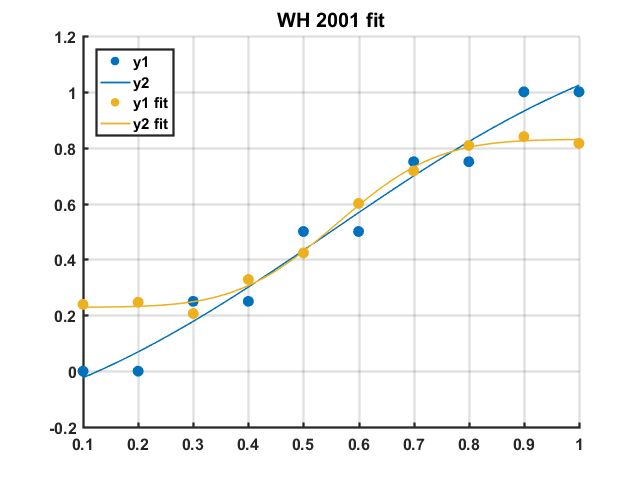
- Wichmann and Hill 2001. This curve adds two additional parameters, "guess" and "lapse", which control somewhat for subject fallibility, improving the estimate of the discrimination threshold.
Python usage
pip install fit-psyche
Using the sklearn API.
import numpy as np

from fit_psyche.psychometric_curve import PsychometricCurve

x = np.linspace(start=12, stop=16, num=6)
y = (x > x.mean()).astype(float)
y[2] = y[2] + np.abs(np.random.rand())
y[3] = y[3] - np.abs(np.random.rand())

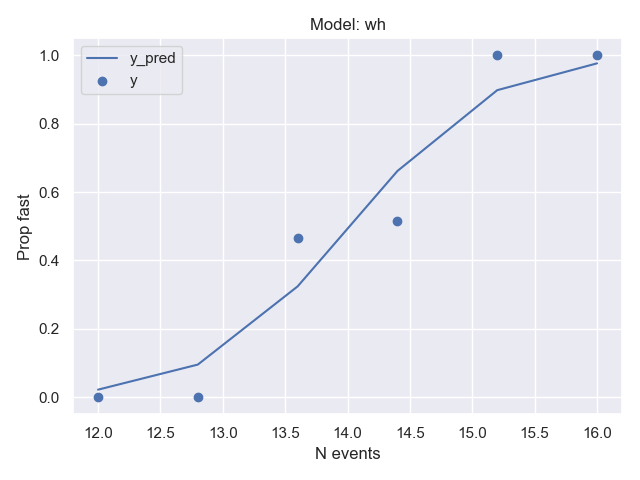
pc = PsychometricCurve(model='wh').fit(x, y)
pc.plot(x, y)
print(pc.score(x, y))
print(pc.coefs_)
>>> 0.9796769364413764
>>> {'mean': 13.829364486404069,
     'var': 0.9658606821413274,
     'guess_rate': 0.010000000000000002,
     'lapse_rate': 0.010000000000000002}
Assuming enough data is available, this is also compatible with CV search objects, for example:
import numpy as np

from sklearn.model_selection import RandomizedSearchCV

from fit_psyche.psychometric_curve import PsychometricCurve

x = np.linspace(start=12, stop=16, num=16)
y = (x > x.mean()).astype(float)
y[2] = y[2] + np.abs(np.random.rand())
y[3] = y[3] - np.abs(np.random.rand())

grid = RandomizedSearchCV(PsychometricCurve(), n_jobs=3,
                          param_distributions={'model': ['wh', 'logit'],
                                               'guess_rate_lims': [(0.01, 0.05), (0.01, 0.03), (0.03, 0.04)],
                                               'lapse_rate_lims': [(0.01, 0.05), (0.01, 0.03), (0.03, 0.04)]})
grid.fit(x, y)

print(grid.best_estimator_.get_params())
print(grid.best_estimator_.coefs_)
>>> {'guess_rate_lims': (0.03, 0.04),
     'lapse_rate_lims': (0.01, 0.05),
     'mean_lims': (0, 20),
     'model': 'wh',
     'var_lims': (0.001, 20)}
>>> {'mean': 14.001413727640738,
     'var': 0.027772082199237953,
     'guess_rate': 0.030000000000000002,
     'lapse_rate': 0.01000000000000001}
Matlab Usage
Fitting functions can be accessed by creating a PsychFit object, or directly. See also examples in scripts/.
% Make up some data
y1 = [0 0 25 25 50 50 75 75 100 100]/100;
y2 = [20 20 20 30 40 60 70 80 80 80];
y2 = (y2+rand(1,numel(y2))*5)/100;
% Create x axis
x = 0.1:0.1:1;
PsychFit object
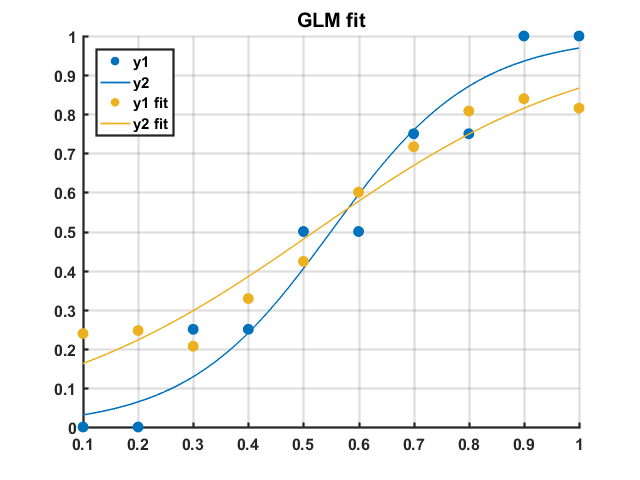
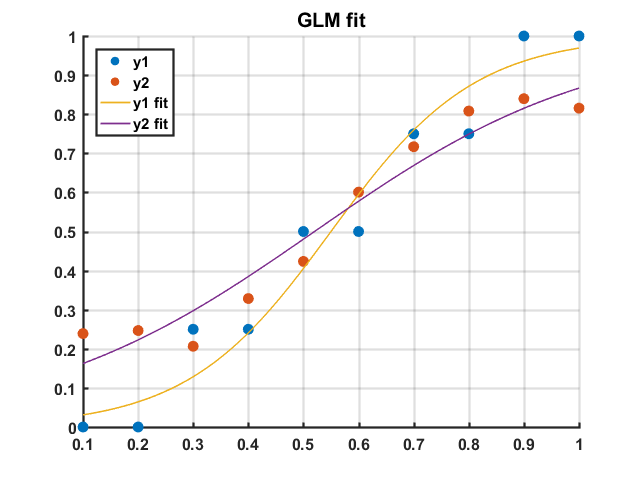
GLM
ffit1 = fitPsyche(x, y1, 'GLM');
ffit2 = fitPsyche(x, y2, 'GLM');

figure
plotPsyche(ffit1)
hold on
plotPsyche(ffit2)
legend({'y1', 'y2', 'y1 fit', 'y2 fit'}, 'Location', 'NorthWest')
title('GLM fit')
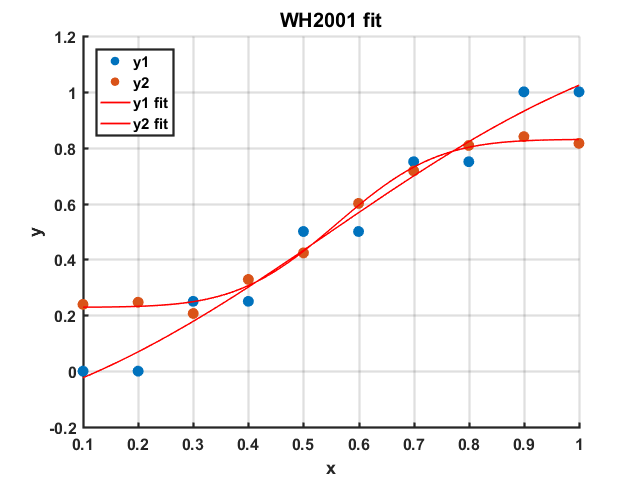
WH2001
ffit1 = fitPsyche(x, y1, 'WH');
ffit2 = fitPsyche(x, y2, 'WH');

figure
plotPsyche(ffit1)
hold on
plotPsyche(ffit2)
legend({'y1', 'y2', 'y1 fit', 'y2 fit'}, 'Location', 'NorthWest')
title('WH 2001 fit')

disp(ffit1.model)
disp(ffit2.model)
WH2001 with limited coefficients
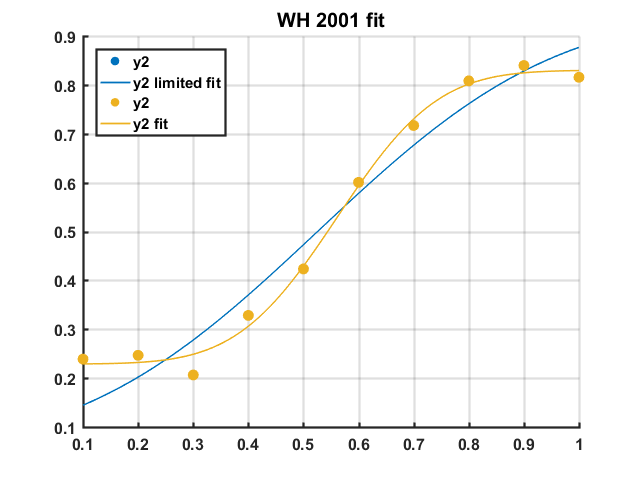
%% Set limits for WH fit

% g (guess rate), l (lapse), u (mean, bias), v (variance, discrimination
% thresh)
% UpperLimits:
UL = [0.05, 0.05, 1, 1]; % Limit upper bound of g and l to 5%
% StartPoints:
SP = [0, 0, 0.5, 0.5];
% LowerLimits:
LL = [0.05, 0.05, 0, 0];

ffit1 = fitPsyche(x, y2, 'WH', [UL;SP;LL]);
ffit2 = fitPsyche(x, y2, 'WH');
figure
plotPsyche(ffit1)
hold on
plotPsyche(ffit2)
legend({'y2', 'y2 limited fit', 'y2', 'y2 fit'}, 'Location', 'NorthWest')
title('WH 2001 fit')

disp(ffit1.model)
disp(ffit2.model)
Direct method access
GLM
%% Fit GLM - access methods directly

[coeffs1, curve1, ~] = ...
    fitPsyche.fitPsycheCurveLogit(x, y1);
[coeffs2, curve2, ~] = ...
    fitPsyche.fitPsycheCurveLogit(x, y2);

% Plot
figure
scatter(x', y1')
hold on
scatter(x', y2')
plot(curve1(:,1),curve1(:,2))
plot(curve2(:,1),curve2(:,2))
legend({'y1', 'y2', 'y1 fit', 'y2 fit'}, 'Location', 'NorthWest')
title('GLM fit')
WH2001
[ffit1, curve1] = ...
    fitPsyche.fitPsycheCurveWH(x, y1);
[ffit2, curve2] = ...
    fitPsyche.fitPsycheCurveWH(x, y2);

% Plot
figure
scatter(x', y1')
hold on
scatter(x', y2')
plot(ffit1)
plot(ffit2)
legend({'y1', 'y2', 'y1 fit', 'y2 fit'}, 'Location', 'NorthWest')
title('WH2001 fit')


Download files
Download the file for your platform. If you're not sure which to choose, learn more about installing packages.
Source Distribution
Built Distribution
Filter files by name, interpreter, ABI, and platform.
If you're not sure about the file name format, learn more about wheel file names.
Copy a direct link to the current filters
File details
Details for the file FitPsyche-0.0.3.tar.gz.
File metadata
- Download URL: FitPsyche-0.0.3.tar.gz
- Upload date:
- Size: 6.8 kB
- Tags: Source
- Uploaded using Trusted Publishing? No
- Uploaded via: twine/3.2.0 pkginfo/1.5.0.1 requests/2.24.0 setuptools/47.1.0 requests-toolbelt/0.9.1 tqdm/4.49.0 CPython/3.8.5
File hashes
| Algorithm | Hash digest | |
|---|---|---|
| SHA256 |
51e3104d4ab355cfade5df2a5e80cb1038bd4912cb0daaf6a977cdb92f136a1d
|
|
| MD5 |
6f52f8a6456e560c93ec1ef6d5642f87
|
|
| BLAKE2b-256 |
20722587bf4bbc8c9ed91ec996f148079945c0aeb4cf96cf26e6a3a21fac0b18
|
File details
Details for the file FitPsyche-0.0.3-py3-none-any.whl.
File metadata
- Download URL: FitPsyche-0.0.3-py3-none-any.whl
- Upload date:
- Size: 9.4 kB
- Tags: Python 3
- Uploaded using Trusted Publishing? No
- Uploaded via: twine/3.2.0 pkginfo/1.5.0.1 requests/2.24.0 setuptools/47.1.0 requests-toolbelt/0.9.1 tqdm/4.49.0 CPython/3.8.5
File hashes
| Algorithm | Hash digest | |
|---|---|---|
| SHA256 |
774cc2f71935f4cb92f129eb4adbca426dfa197da04750cda8679713d549605a
|
|
| MD5 |
6bd31419ccb0cfdd5290351c3f7e5b35
|
|
| BLAKE2b-256 |
e056a77cba025b963230d6f80da876937b3b69ffdbbc915b7290a9acd32df722
|






