




Slack event subscriptions for Flask
Installation
Install last stable version from Pypi:
pip install flask-slack-events
Create a Slack bot user
See the Slack’s documentation for further guidance on creating your bot (step 1).
Within the Basic Information about your application, copy the Signing Secret necessary to verify requests from Slack.

Configure your Application
You should create a SlackManager object within your application:
slack_manager = SlackManager()Configure your application object updating the SLACK_SIGNING_SECRET key with the value obtained in the previous step 1:
app.config['SLACK_SIGNING_SECRET'] = '<your Signing Secret>'Once the actual application object has been created, you can configure it for SlackManager object with:
slack_manager.init_app(app)
Configure your Slack Bot
Continue with the Slacks’s documentation to setting up the Events API (step 2) and enter the URL to receive the subscriptions joining your host and the relative path /slack/events:
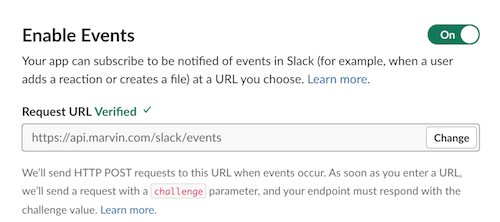
Finally, install your bot to a workspace (step 3).
How it Works
Now in order to subscribe to Slack Events, use the SlackManager.on decorator:
# Reply to only the message events that mention your bot

@slack_manager.on('app_mention')
def reply_to_app_mention(sender, data, **extra):
    event = data['event']

    slack_client.api_call(
        'chat.postMessage',
        channel=event['channel'],
        text=f":robot_face: Hello <@{event['user']}>!")
Context Processors
To inject new variables automatically into the context of a handler, context processors exist in Flask-Slack-Events.
A context processor is a function that returns a dictionary:
@slack_manager.context_processor
def context_processor(data):
    return dict(my_bot_id='UAZ02BCBH')
The injected variables will be sent as an extra argument for each event handler f(sender, data, **extra).
Dispatch Events Asynchronously
Some event handlers can delay the execution of another, to avoid this you can configure the event dispatcher and call handlers asynchronously:
@slack_manager.dispatch_event_handler
def async_event_dispatcher(sender, data, handlers, **extra):
    for handler in handlers:
        task(handler)(data, **extra)
Subscribe to Signals
The following signals are sended internally by Flask-Slack-Events:
signals.expired_event
Sent when the event has expired according to the value of SLACK_EVENT_EXPIRATION_DELTA and the HTTP header X-Slack-Request-Timestamp received
Receiver: f(sender, **extra)
signals.invalid_signature
Sent when the signature included within the HTTP header X-Slack-Signature is invalid
Receiver: f(sender, **extra)
signals.event_received
Sent when an event has been received
Receiver: f(sender, data, **extra)
SlackManager Handlers
The following handlers are used internally by Flask-Slack-Events:
SlackManager.expired_event_handler
Called to handle an expired event
Handler: f()
Default: SlackManager.expired_event()
SlackManager.invalid_signature_handler
Called to handle a request with an invalid signature
Handler: f()
Default: SlackManager.invalid_signature()
SlackManager.dispatch_event_handler
Called to dispatch the event to all handlers connected with SlackManager.on(event_type) decorator
Handler: f(sender, data, handlers, **extra)
Default: SlackManager.dispatch_event(data)
Configuration
The following configuration values are used internally by Flask-Slack-Events:
SLACK_SIGNING_SECRET
Signing Secret to verify whether requests from Slack are authentic
Default: ''
SLACK_EVENTS_URL
URL rule that is used to register the Subscription View
Default: /slack/events
SLACK_EVENT_EXPIRATION_DELTA
Timedelta added to time.time() to set the expiration time of each event If the value is None then the event never expires
Default: timedelta(seconds=60 * 5) (5 minutes)
Marvin the Paranoid Android
Marvin is a Slack Bot layout for Flask to develop Slack Event handlers and deploy on AWS Lambda + API Gateway
1 maintainer

Metadata
1 maintainer
Release files for Flask-Slack-Events 0.0.2
For a detailed explanation of source distributions (sdists) and built distributions (wheels), please see the package formats documentation.
Source distribution (sdist)
| File | Size | Uploaded | |
|---|---|---|---|
| Flask-Slack-Events-0.0.2.tar.gz | 7.0 kB | Details |
Built distribution (wheel)
| File | Interpreter | ABI | Platform | Reset |
|---|---|---|---|---|
| Flask_Slack_Events-0.0.2-py2.py3-none-any.whl | Python 3, Python 2 | none | any | Details |
Total release size: 14.5 kB
Release files / Flask-Slack-Events-0.0.2.tar.gz
| Download URL | Flask-Slack-Events-0.0.2.tar.gz |
|---|---|
| Size | 7.0 kB |
| Tags | Source |
|
SHA-256 checksum How to use checksums |
b696c151c875bc349861e6906fb90f3ef7d920a428e667e7e0c6e82735e045c7
|
|
BLAKE2b-256 checksum How to use checksums |
59484e9d146e14fb49eb85c5746d3e1389a64bee9ddc62a35c125d39a17175ee
|
| Upload date | |
|
Uploaded using Trusted Publishing? What is trusted publishing? |
No |
| Uploaded via |
Python-urllib/3.6
|
Release files / Flask_Slack_Events-0.0.2-py2.py3-none-any.whl
| Download URL | Flask_Slack_Events-0.0.2-py2.py3-none-any.whl |
|---|---|
| Size | 7.5 kB |
| Tags | Python 2 Python 3 |
|
SHA-256 checksum How to use checksums |
327e89b951ca01dc0f182c6227f1262884a023c2de097274e4efc607a374894f
|
|
BLAKE2b-256 checksum How to use checksums |
76538a4f369ac9a93c02907eae12c7f8ea946d6aa524bc4bc0f53ce2375b494a
|
| Upload date | |
|
Uploaded using Trusted Publishing? What is trusted publishing? |
No |
| Uploaded via |
Python-urllib/3.6
|














