
Impostor









Impostor is a Django application which allows staff members to login as a different user by using their own username and password.
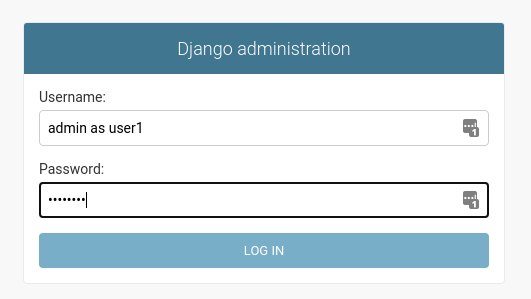
Login
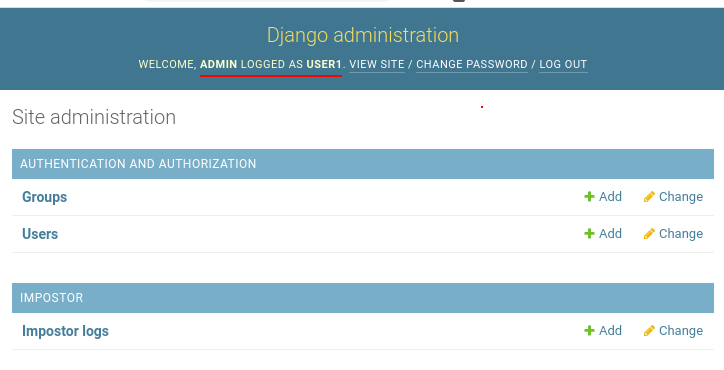
Logged as
Impostor log
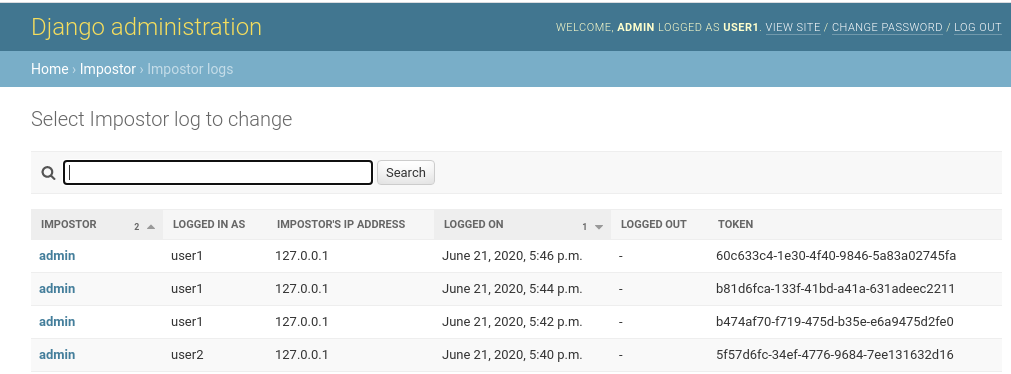
Every such authentication is recorded in database and listed in admin interface to everyone with an access to ImpostorLog interface. However it is not possible to delete log entries through admin interface to make covering tracks more difficult.
Impostor was tested with Django 1.11 and above. It might work with other versions too. It also depends on Django's authentication system and assumes you use its usernames for authentication.
Impostor is a MMM project developed by Marko Samastur
(markos@gaivo.net) and maintained by Andreu Vallbona (avallbona@gmail.com)
licensed under MIT license.
Installation
Impostor won't work, if you are not using Django's auth system. It currently
uses settings AUTH_USER_MODEL(default: django.contrib.auth.models.User)
USERNAME_FIELD(default: username) or username as authentication parameter
along with password and user object _default_manager get_by_natural_key
function for returning user object from USERNAME_FIELD.
First install impostor app files as you would any other Django app
pip install impostor
Next some changes to your Django settings file are inorder.
Add impostor.backend.AuthBackend To AUTHENTICATION_BACKENDS :
This will add impostor auth backend to other backends. AUTHENTICATION_BACKENDS
is a tuple listing backends and if you don't have it yet, then add following
lines to your settings:
AUTHENTICATION_BACKENDS = (
    'impostor.backend.AuthBackend',
    'django.contrib.auth.backends.ModelBackend',
)
Also add impostor app to INSTALLED_APPS.
INSTALLED_APPS = [
    '...',
    'impostor',
]
In order to be able to see the user logged as anotheruser in the django admin,
be sure to include the 'impostor' app before the 'django.contrib.admin' in the INSTALLED_APPS.
Run
python manage.py migrate
to create needed table and you are set.
Usage
By now you should have a working system. This means that your superuser users (users with is_superuser flag set to True) can log in as different user by using their password and following concatenation:
staff_username as users_username
Example: Let's say my username is markos and I want to login as user fry. Then I would use 'markos as fry' as my username and my normal password for password.
Every such log in is logged in ImpostorLog table that can be seen through Django admin interface, but for obvious security reasons can't be manipulated there.
You can widen set of users who can impose as other users by adding a setting IMPOSTOR_GROUP to settings.py. Users belonging to a group with this name will also be able to pretend to be somebody else (but not superusers).
Impostor also provides a replacement authentication form, because two usernames can easily exceed 30 character limit of original form. Its name is BigAuthenticationForm and you can find it in impostor.forms.
NOTE: Only superuser users can use this (you have to turn on is_superuser for every user that needs this privilege) or those belonging to IMPOSTOR_GROUP and every such log in gets recorded.
Also use IMPOSTOR_GROUP cautiously because it still allows impersonating somebody with different set of permissions (and hence security breach).
Contributing
Contributions are very welcome. Tests can be run with tox, please ensure the coverage at least stays the same before you submit a pull request.
Local development
Install all the python interpreters you need via pyenv. E.g.:
pyenv install 3.14.3
pyenv install 3.13.2
pyenv install 3.12.2
pyenv install 3.11.8
pyenv install 3.10.13
pyenv install 3.9.2
pyenv install 3.8.8
and then make them global with:
pyenv global 3.14.3 3.13.2 3.12.2 3.11.8 3.10.13 3.9.2 3.8.8
Run the tests
tox
Issues
If you encounter any problems, please file an issue along with a detailed description.
TODO/Wishlist
- record when impostor logs out
- mark "hijacked" requests (so impostor can tell when he is using website as somebody else and avoid doing something stupid or that you can limit what is doable in such case)
- framework for easy notification of hijacked users (so you can notify them that their account has been accessed if you wish)
- add some tests to improve the coverage
2 maintainers


Metadata
2 maintainers
Release files for Impostor 3.3.0
For a detailed explanation of source distributions (sdists) and built distributions (wheels), please see the package formats documentation.
Source distribution (sdist)
| File | Size | Uploaded | Provenance | Actions |
|---|---|---|---|---|
| impostor-3.3.0.tar.gz | 15.4 kB | Without provenance | Details for impostor-3.3.0.tar.gz |
Built distribution (wheel)
| File | Interpreter | ABI | Platform | Actions Reset |
|---|---|---|---|---|
| impostor-3.3.0-py3-none-any.whl | Python 3 | none | any | Details for impostor-3.3.0-py3-none-any.whl |
Total release size: 29.2 kB
Release files / impostor-3.3.0.tar.gz
| Download URL | impostor-3.3.0.tar.gz |
|---|---|
| Size | 15.4 kB |
| Tags | Source |
|
SHA-256 checksum How to use checksums |
6bd9e4696cd005b719fda83616bb22b4eddf58ff2a9fa62b3dfa1f5dd6be371a
|
|
BLAKE2b-256 checksum How to use checksums |
4efd445e7b9eb509b4703adc731bef579750deac4860a8deff116699aad622b0
|
| Upload date | |
|
Uploaded using Trusted Publishing? What is trusted publishing? |
No |
| Uploaded via |
twine/6.2.0 CPython/3.14.3
|
Release files / impostor-3.3.0-py3-none-any.whl
| Download URL | impostor-3.3.0-py3-none-any.whl |
|---|---|
| Size | 13.7 kB |
| Tags | Python 3 |
|
SHA-256 checksum How to use checksums |
311bcc490d01e309301489afec67da343b34aa264aae2bff945a4ff397ebade3
|
|
BLAKE2b-256 checksum How to use checksums |
5ab63761d205fb809b778b950d9417fb1253d5af035490dc05d91f997ee4aa30
|
| Upload date | |
|
Uploaded using Trusted Publishing? What is trusted publishing? |
No |
| Uploaded via |
twine/6.2.0 CPython/3.14.3
|
Security for Impostor 3.3.0
Provenance
Provenance describes where a file came from. On PyPI, provenance is shared via attestations, which provide a verifiable record of the build or publishing details. View details, limitations and caveats.
No provenance found
None of the files in this release were uploaded with provenance metadata.
A note on package security
PyPI is a repository for distributing packages, not a service for auditing them. While third-party security researchers and our staff do their best to detect and remove malicious packages, PyPI cannot guarantee the quality, security or suitability of any given package.
To learn more about protecting yourself from malicious actors, visit our package security documentation.














