
A minimal and customizable fetch script.

Project description
KatFetch
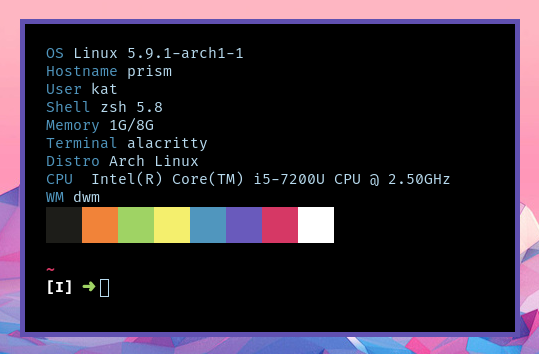
KatFetch is a minimal and customizable fetch script.
What is a fetch script?
A fetch script is a script that fetches some information about your system. It is commonly used when taking screenshots of your desktop and is designed to show off your terminal and it's colours.
Installation
You can install KatFetch using Pip. Simply run pip3 install katfetch as root (or use the --user option if ~/.local/bin is in your path).
KatFetch also includes an installer. To use it, simply run python3 setup.py install and KatFetch will be installed to /usr/bin along with all dependencies.
Command line arguments
  --bar / --no-bar             Whether or not to display bar
  --just-bar / --not-just-bar  Display bar only
  --accent TEXT                Accent color to use for highlighted entries,
                               set to off for none

  --bar-length INTEGER         Amount of colors to display in bar
  --bar-height INTEGER         Height of bar
  --stdout / --no-stdout       Output plaintext
  --help                       Show this message and exit.
Screenshots
Release history Release notifications | RSS feed


Download files
Download the file for your platform. If you're not sure which to choose, learn more about installing packages.
Source Distribution
KatFetch-1.3.1.tar.gz
(4.6 kB
view details)
File details
Details for the file KatFetch-1.3.1.tar.gz.
File metadata
- Download URL: KatFetch-1.3.1.tar.gz
- Upload date:
- Size: 4.6 kB
- Tags: Source
- Uploaded using Trusted Publishing? No
- Uploaded via: twine/3.2.0 pkginfo/1.6.1 requests/2.24.0 setuptools/50.3.2 requests-toolbelt/0.9.1 tqdm/4.51.0 CPython/3.8.6
File hashes
| Algorithm | Hash digest | |
|---|---|---|
| SHA256 |
d1705633c9fc44d8d894463ba3cbb84c39d78cac2e95f2551c3095327ce0ac3a
|
|
| MD5 |
81809b2059a7ec28a0e9d7d54abc9b6b
|
|
| BLAKE2b-256 |
d811afc567518e8fa52cb588eab019f82a9195c54a2ed123ff9adadd140946d3
|






