
Mesa: Agent-based modeling in Python 3+




Mesa allows users to quickly create agent-based models using built-in core components (such as spatial grids and agent schedulers) or customized implementations; visualize them using a browser-based interface; and analyze their results using Python's data analysis tools. Its goal is to be the Python 3-based alternative to NetLogo, Repast, or MASON.
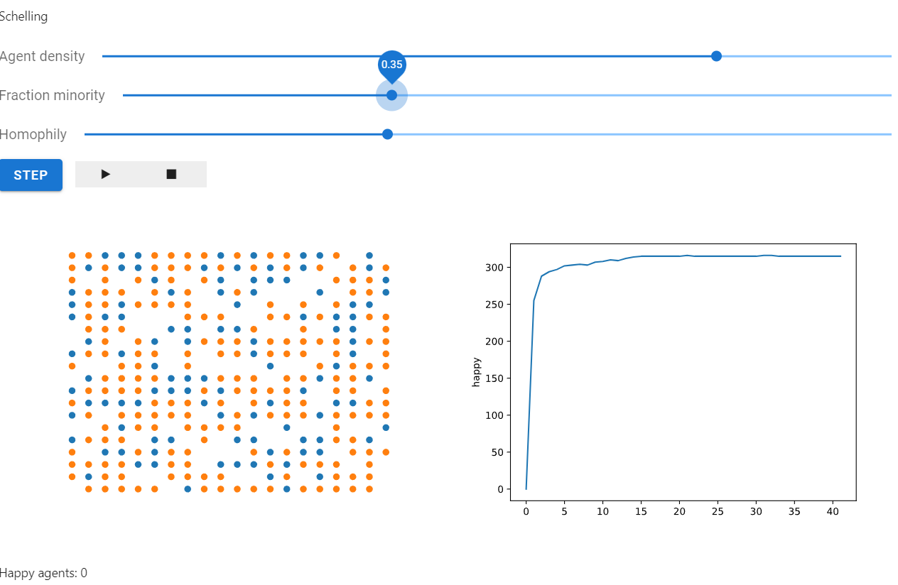
Above: A Mesa implementation of the Schelling segregation model, this can be displayed in browser windows or Jupyter.
Features
- Modular components
- Browser-based visualization
- Built-in tools for analysis
- Example model library
Using Mesa
Getting started quickly:
pip install mesa
You can also use pip to install the github version:
pip install -U -e git+https://github.com/projectmesa/mesa@main#egg=mesa
Or any other (development) branch on this repo or your own fork:
pip install -U -e git+https://github.com/YOUR_FORK/mesa@YOUR_BRANCH#egg=mesa
For resources or help on using Mesa, check out the following:
- Intro to Mesa Tutorial (An introductory model, the Boltzmann Wealth Model, for beginners or those new to Mesa.)
- Complexity Explorer Tutorial (An advanced-beginner model, SugarScape with Traders, with instructional videos)
- Mesa Examples (A repository of seminal ABMs using Mesa and examples of employing specific Mesa Features)
- Docs (Mesa's documentation, API and useful snippets)
- Discussions (GitHub threaded discussions about Mesa)
- Matrix Chat (Chat Forum via Matrix to talk about Mesa)
Running Mesa in Docker
You can run Mesa in a Docker container in a few ways.
If you are a Mesa developer, first install Docker Compose and then, in the folder containing the Mesa Git repository, you run:
$ docker compose up
# If you want to make it run in the background, you instead run
$ docker compose up -d
This runs the Schelling model, as an example.
With the docker-compose.yml file in this Git repository, the docker compose up command does two important things:
- It mounts the mesa root directory (relative to the docker-compose.yml file) into /opt/mesa and runs pip install -e on that directory so your changes to mesa should be reflected in the running container.
- It binds the docker container's port 8765 to your host system's port 8765 so you can interact with the running model as usual by visiting localhost:8765 on your browser
If you are a model developer that wants to run Mesa on a model, you need to:
- make sure that your model folder is inside the folder containing the docker-compose.yml file
- change the
MODEL_DIRvariable in docker-compose.yml to point to the path of your model - make sure that the model folder contains an app.py file
Then, you just need to run docker compose up -d to have it
accessible from localhost:8765.
Contributing to Mesa
Want to join the Mesa team or just curious about what is happening with Mesa? You can...
- Join our Matrix chat room in which questions, issues, and ideas can be (informally) discussed.
- Come to a monthly dev session (you can find dev session times, agendas and notes on Mesa discussions).
- Just check out the code on GitHub.
If you run into an issue, please file a ticket for us to discuss. If possible, follow up with a pull request.
If you would like to add a feature, please reach out via ticket or join a dev session (see Mesa discussions). A feature is most likely to be added if you build it!
Don't forget to checkout the Contributors guide.
Citing Mesa
To cite Mesa in your publication, you can use the CITATION.bib.


Release files for Mesa 2.2.0
For a detailed explanation of source distributions (sdists) and built distributions (wheels), please see the package formats documentation.
Source distribution (sdist)
| File | Size | Uploaded | Provenance | Actions |
|---|---|---|---|---|
| Mesa-2.2.0.tar.gz | 1.8 MB | Without provenance | Details for Mesa-2.2.0.tar.gz |
Built distribution (wheel)
| File | Interpreter | ABI | Platform | Actions Reset |
|---|---|---|---|---|
| Mesa-2.2.0-py3-none-any.whl | Python 3 | none | any | Details for Mesa-2.2.0-py3-none-any.whl |
Total release size: 3.6 MB
Release files / Mesa-2.2.0.tar.gz
| Download URL | Mesa-2.2.0.tar.gz |
|---|---|
| Size | 1.8 MB |
| Tags | Source |
|
SHA-256 checksum How to use checksums |
291eba3ee6c8f4e79c5e8c5fb6a14968eb2f5869ad2ba03ff3b38b679d5ccc13
|
|
BLAKE2b-256 checksum How to use checksums |
26504c81d5a0f38945fe85842c660ff224809919446a6e07a5b6d2c421f81137
|
| Upload date | |
|
Uploaded using Trusted Publishing? What is trusted publishing? |
No |
| Uploaded via |
twine/4.0.2 CPython/3.9.9
|
Release files / Mesa-2.2.0-py3-none-any.whl
| Download URL | Mesa-2.2.0-py3-none-any.whl |
|---|---|
| Size | 1.8 MB |
| Tags | Python 3 |
|
SHA-256 checksum How to use checksums |
3eadf6a5d55530c5482309b6f8262af35dc9be4f8d52de1e5a464e3a50047b91
|
|
BLAKE2b-256 checksum How to use checksums |
334a0f0bd02426bb7163d204481a19530855f2bc7227c283c3b4ee57dd707d25
|
| Upload date | |
|
Uploaded using Trusted Publishing? What is trusted publishing? |
No |
| Uploaded via |
twine/4.0.2 CPython/3.9.9
|
Security for Mesa 2.2.0
Provenance
Provenance describes where a file came from. On PyPI, provenance is shared via attestations, which provide a verifiable record of the build or publishing details. View details, limitations and caveats.
No provenance found
None of the files in this release were uploaded with provenance metadata.
A note on package security
PyPI is a repository for distributing packages, not a service for auditing them. While third-party security researchers and our staff do their best to detect and remove malicious packages, PyPI cannot guarantee the quality, security or suitability of any given package.
To learn more about protecting yourself from malicious actors, visit our package security documentation.














