
Overview
Mezzanine is a content management platform built using the Django framework. It is BSD licenced and designed to provide both a consistant interface for managing content, and a simple archtiecture that makes diving in and hacking on the code as easy as possible.
Its goal is to resemble something like Wordpress, with an intuitive interface for managing pages and blog posts. Mezzanine takes a different approach from a lot of other Django applications in this space like Pinax or Mingus that glue together a lot of reusable apps, instead opting to provide most of its functionality included with the project by default.
Dependencies
Apart from Django itself, Mezzanine has no explicit dependencies but is designed to be used most effectively in conjunction with the following libraries.
Installation
Assuming you have setuptools installed, the easiest method is to install directly from Pypi by running the following command, which will also attempt to install the dependencies mentioned above:
$ easy_install -U mezzanine
Otherwise you can download Mezzanine and install it directly from source:
$ python setup.py install
Once installed the command mezzanine-project should be available which can be for creating a new Mezzaine project in a similar fashion to django-admin.py:
$ mezzanine-project project_name
Features
On top of all the usual features provided by Django such as MVC architecture, ORM, templating, caching and the automatic admin interface, Mezzanine provides the following features.
Hierarchical page navigation
Save as draft and preview on site
Drag-n-drop page ordering
WYSIWYG editing
SEO friendly URLs and meta data
Mobile device detection and templates
Blogging engine
Tagging
Built-in threaded comments, or:
Disqus integration
Gravatar integration
Google Analytics integration
Twitter feed integration
bit.ly integration
Sharing via Facebook or Twitter
Custom templates per page or blog post
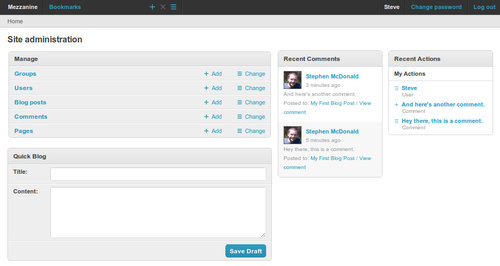
The Mezzanine admin dashboard
Sites Using Mezzanine
2 maintainers


Metadata
2 maintainers
Release files for Mezzanine 0.1.4
For a detailed explanation of source distributions (sdists) and built distributions (wheels), please see the package formats documentation.
Source distribution (sdist)
| File | Size | Uploaded | Provenance | Actions |
|---|---|---|---|---|
| Mezzanine-0.1.4.tar.gz | 109.4 kB | Without provenance | Details for Mezzanine-0.1.4.tar.gz |
Release files / Mezzanine-0.1.4.tar.gz
| Download URL | Mezzanine-0.1.4.tar.gz |
|---|---|
| Size | 109.4 kB |
| Tags | Source |
|
SHA-256 checksum How to use checksums |
f5b957ba500d737ed6c82ca80c6d92019d5c6bca74c60c13a83cf960a1337aa1
|
|
BLAKE2b-256 checksum How to use checksums |
ee402a4df28960aa1c2a75025dbd4b6f02c627a6fb3fa57776813f29edf9c7e1
|
| Upload date | |
|
Uploaded using Trusted Publishing? What is trusted publishing? |
No |
Security for Mezzanine 0.1.4
Provenance
Provenance describes where a file came from. On PyPI, provenance is shared via attestations, which provide a verifiable record of the build or publishing details. View details, limitations and caveats.
No provenance found
None of the files in this release were uploaded with provenance metadata.
A note on package security
PyPI is a repository for distributing packages, not a service for auditing them. While third-party security researchers and our staff do their best to detect and remove malicious packages, PyPI cannot guarantee the quality, security or suitability of any given package.
To learn more about protecting yourself from malicious actors, visit our package security documentation.














