
Octobot-Pro 0.0.11



Octobot-Pro Community



OctoBot Pro is the backtesting framework using the OctoBot Ecosystem
OctoBot Pro is in early alpha version
Documentation available at https://pro.octobot.info/
Install OctoBot Pro from pip
OctoBot pro requires Python 3.10
python3 -m pip install OctoBot wheel
python3 -m pip install octobot-pro
Example of a backtesting script
Script
import asyncio
import tulipy    # Can be any TA library.
import octobot_pro as op


async def rsi_test():
    async def strategy(ctx):
        # Will be called at each candle.
        if run_data["entries"] is None:
            # Compute entries only once per backtest.
            closes = await op.Close(ctx, max_history=True)
            times = await op.Time(ctx, max_history=True, use_close_time=True)
            rsi_v = tulipy.rsi(closes, period=ctx.tentacle.trading_config["period"])
            delta = len(closes) - len(rsi_v)
            # Populate entries with timestamps of candles where RSI is
            # bellow the "rsi_value_buy_threshold" configuration.
            run_data["entries"] = {
                times[index + delta]
                for index, rsi_val in enumerate(rsi_v)
                if rsi_val < ctx.tentacle.trading_config["rsi_value_buy_threshold"]
            }
            await op.plot_indicator(ctx, "RSI", times[delta:], rsi_v, run_data["entries"])
        if op.current_live_time(ctx) in run_data["entries"]:
            # Uses pre-computed entries times to enter positions when relevant.
            # Also, instantly set take profits and stop losses.
            # Position exists could also be set separately.
            await op.market(ctx, "buy", amount="10%", stop_loss_offset="-15%", take_profit_offset="25%")

    # Configuration that will be passed to each run.
    # It will be accessible under "ctx.tentacle.trading_config".
    config = {
        "period": 10,
        "rsi_value_buy_threshold": 28,
    }

    # Read and cache candle data to make subsequent backtesting runs faster.
    data = await op.get_data("BTC/USDT", "1d", start_timestamp=1505606400)
    run_data = {
        "entries": None,
    }
    # Run a backtest using the above data, strategy and configuration.
    res = await op.run(data, strategy, config)
    print(res.describe())
    # Generate and open report including indicators plots
    await res.plot(show=True)
    # Stop data to release local databases.
    await data.stop()


# Call the execution of the script inside "asyncio.run" as
# OctoBot-Pro runs using the python asyncio framework.
asyncio.run(rsi_test())
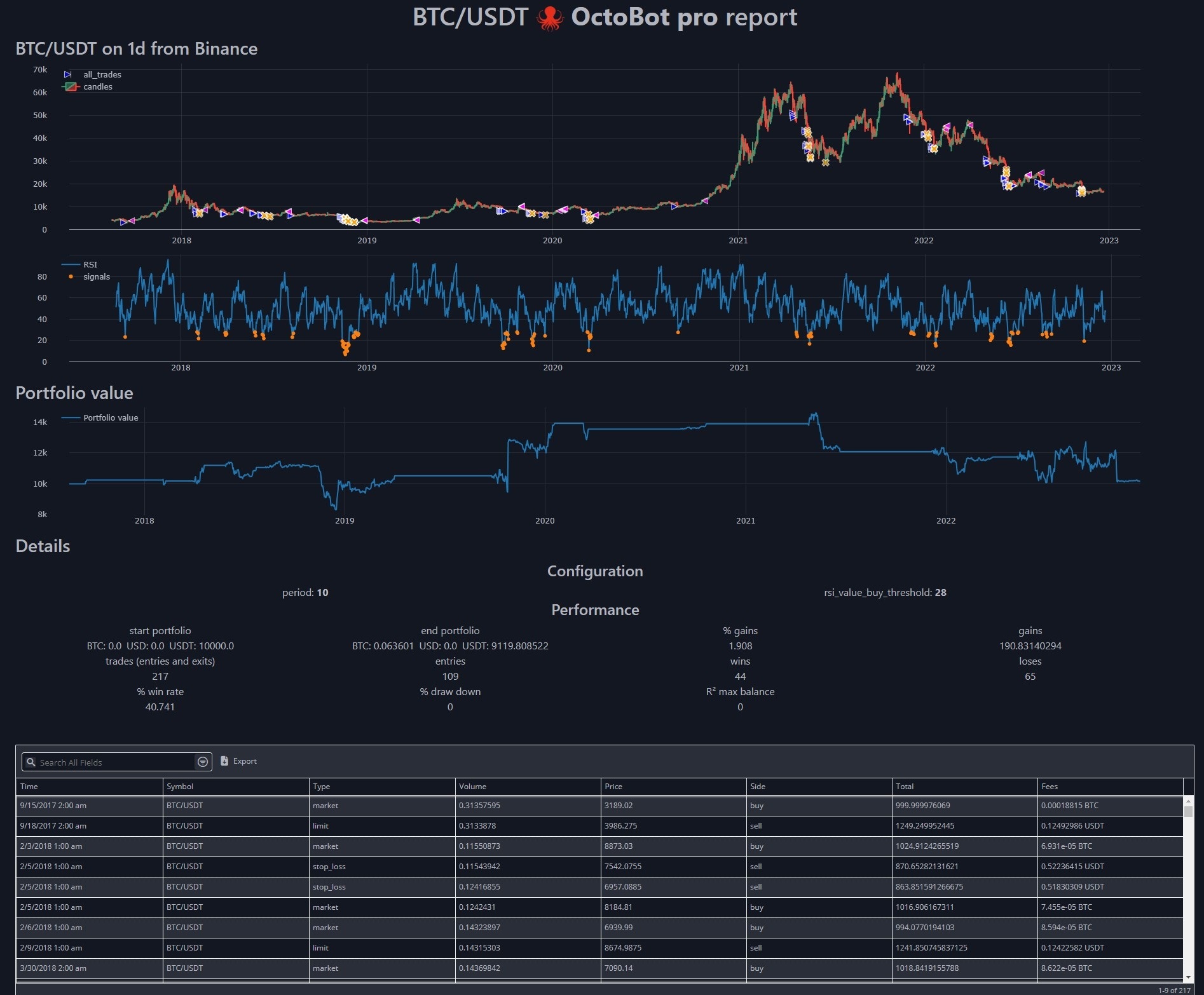
Generated report
Join the community
We recently created a telegram channel dedicated to OctoBot Pro.

2 maintainers


Metadata
2 maintainers
Release files for OctoBot-Pro 0.0.11
For a detailed explanation of source distributions (sdists) and built distributions (wheels), please see the package formats documentation.
Source distribution (sdist)
| File | Size | Uploaded | Provenance | Actions |
|---|---|---|---|---|
| OctoBot-Pro-0.0.11.tar.gz | 33.2 kB | Without provenance | Details for OctoBot-Pro-0.0.11.tar.gz |
Release files / OctoBot-Pro-0.0.11.tar.gz
| Download URL | OctoBot-Pro-0.0.11.tar.gz |
|---|---|
| Size | 33.2 kB |
| Tags | Source |
|
SHA-256 checksum How to use checksums |
0dfabeb8971b66dabdb421dce24039472eb78c22a8560cf5fd1105a3bc2f9973
|
|
BLAKE2b-256 checksum How to use checksums |
53b2ee2b8f75f5b32fd6927b28e7bbbd0edd850285f011f0b92f46551580922d
|
| Upload date | |
|
Uploaded using Trusted Publishing? What is trusted publishing? |
No |
| Uploaded via |
twine/4.0.2 CPython/3.10.13
|
Security for OctoBot-Pro 0.0.11
Provenance
Provenance describes where a file came from. On PyPI, provenance is shared via attestations, which provide a verifiable record of the build or publishing details. View details, limitations and caveats.
No provenance found
None of the files in this release were uploaded with provenance metadata.
A note on package security
PyPI is a repository for distributing packages, not a service for auditing them. While third-party security researchers and our staff do their best to detect and remove malicious packages, PyPI cannot guarantee the quality, security or suitability of any given package.
To learn more about protecting yourself from malicious actors, visit our package security documentation.














