
Pandas Data Exploration Utility Package
Table of content
Overview
Pandas Data Exploration utility is an interactive, notebook based library for quickly profiling and exploring the shape of data and the relationships between data. Using existing APIs from IpyWidget, Plot.ly, and Pandas, it creates a flexible point and click widget that allows the user to easily explore and visualize the dataset.
This is a work in progress, and I welcome any suggestions on features and/or enhancements.
Installation
pip install Pandas-Data-Exploration-Utility-Package
Usage
Visualization Module
import pandas as pd
import pandas_exploration_util.viz.explore as pe

global_temp = pd.read_csv("./data/GlobalTemperatures.csv", parse_dates = [0], infer_datetime_format=True)

pe.generate_widget(global_temp)
see /test for sample data and test jupyter notebook
https://github.com/yifeihuang/pandas_exploration_util/tree/master/test
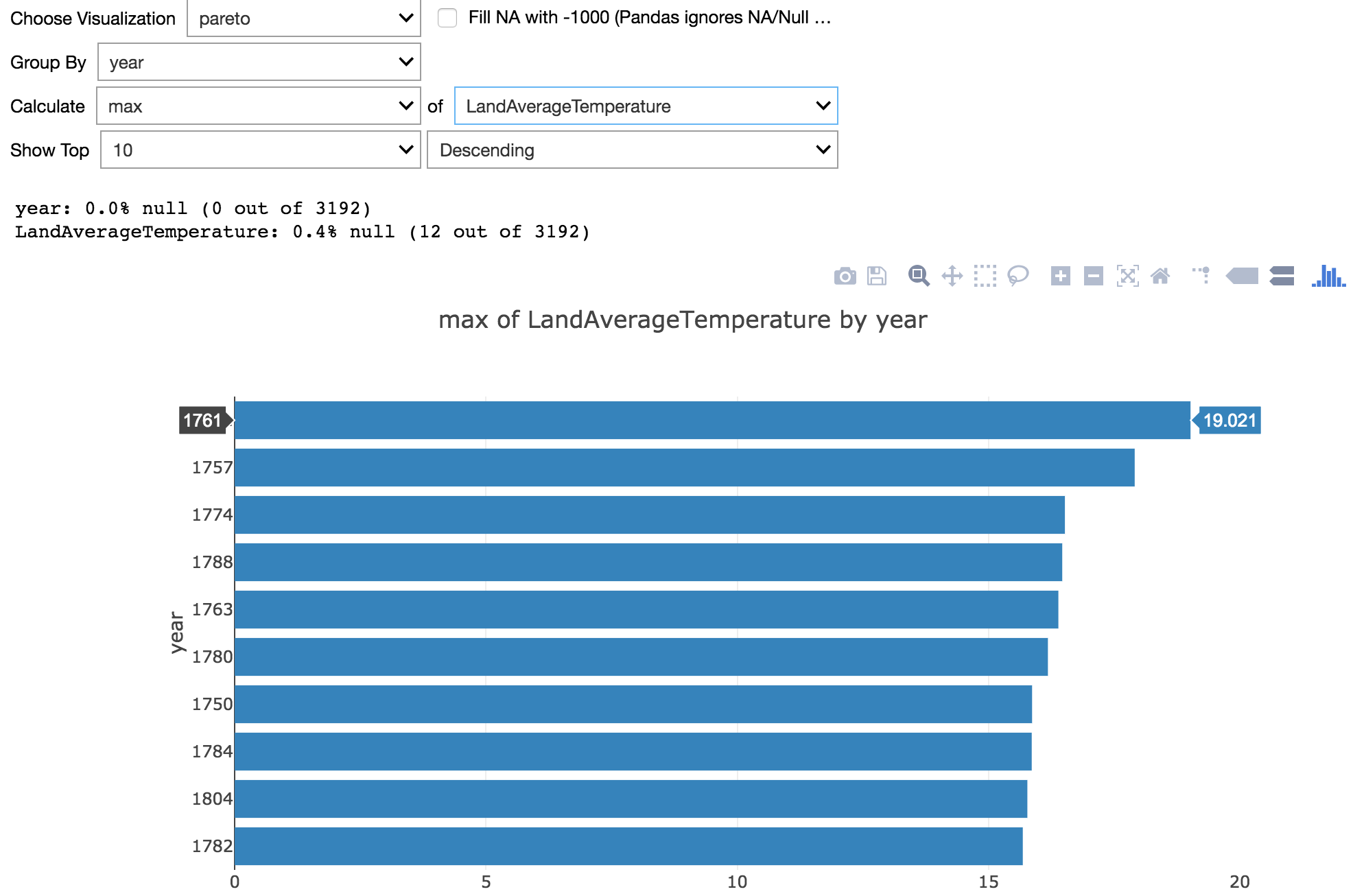
Pareto plot
Visualize the top values of any column as ranked by aggregation of any other column. Support aggregation functions include 'count', 'sum', 'mean', 'std', 'max', 'min', 'uniques'
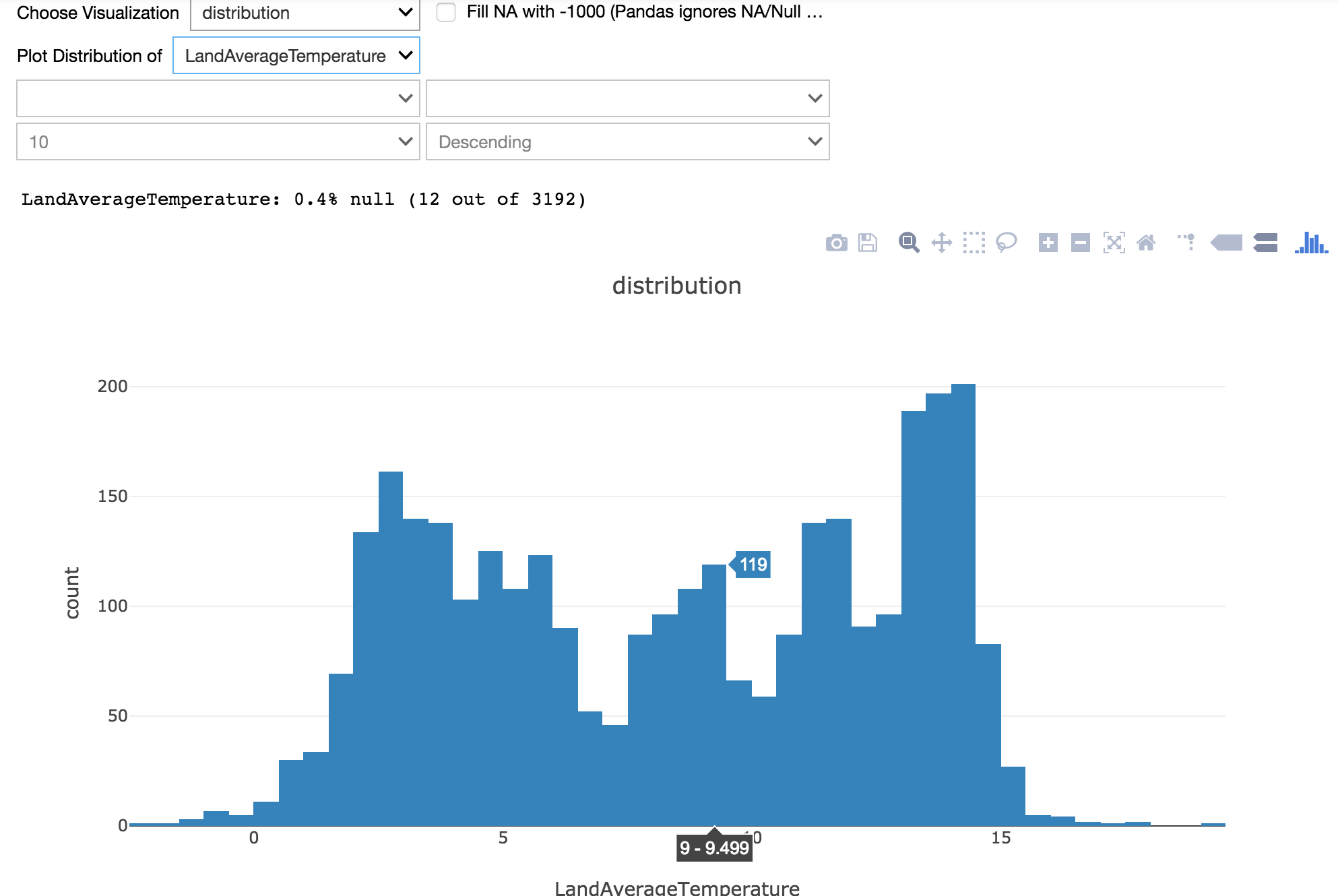
Distribution plot
Visualize distribution of any numerical value. Binning is automatically determined by the plot.ly histogram method.
X-Y plot
Visualize the X-Y scatter of any column vs aggregation of any other column. Support aggregation functions include 'count', 'sum', 'mean', 'std', 'max', 'min', 'uniques'

Recommended development setup
Local Dev
- Setup virtualenv
- Create a virtual environment using
virtualenv /path/to/env/dir - Activate virtual environment using
source /path/to/env/dir/bin/activate - Clone the repo locally
- Navigate the root directory of the repo where the
setup.pylives - Install the module in development mode using
python setup.py develop - Run the Jupyter notebook that is in the virtual environment directory, which should have installed as the part of the dependency of the module
- Dev away
- When done uninstall the package using
python setup.py develop --uninstall - Deactive the environment using
deactivate
Building and distributing
https://packaging.python.org/tutorials/packaging-projects/
Assuming all relevant tools are installed and the relevant project files are properly defined
- build the distribution using
python3 setup.py sdist bdist_wheel - upload the distribution using
twine upload dist/*{version}*
1 maintainer

Metadata
1 maintainer
Release files for Pandas-Data-Exploration-Utility-Package 0.0.3
For a detailed explanation of source distributions (sdists) and built distributions (wheels), please see the package formats documentation.
Source distribution (sdist)
| File | Size | Uploaded | |
|---|---|---|---|
| Pandas Data Exploration Utility Package-0.0.3.tar.gz | 5.5 kB | Details |
Built distribution (wheel)
| File | Interpreter | ABI | Platform | Reset |
|---|---|---|---|---|
| Pandas_Data_Exploration_Utility_Package-0.0.3-py3-none-any.whl | Python 3 | none | any | Details |
Total release size: 11.9 kB
Release files / Pandas Data Exploration Utility Package-0.0.3.tar.gz
| Download URL | Pandas Data Exploration Utility Package-0.0.3.tar.gz |
|---|---|
| Size | 5.5 kB |
| Tags | Source |
|
SHA-256 checksum How to use checksums |
372acc91c7bcfb192a078af599607acf64dcc09461f5a332d673298e20cfe8e6
|
|
BLAKE2b-256 checksum How to use checksums |
044606077509fabcd921e0c7b43b7b6d8455e90d7f6b8681e441004cfd81009a
|
| Upload date | |
|
Uploaded using Trusted Publishing? What is trusted publishing? |
No |
| Uploaded via |
twine/1.11.0 pkginfo/1.4.2 requests/2.18.4 setuptools/40.0.0 requests-toolbelt/0.8.0 tqdm/4.24.0 CPython/3.6.5
|
Release files / Pandas_Data_Exploration_Utility_Package-0.0.3-py3-none-any.whl
| Download URL | Pandas_Data_Exploration_Utility_Package-0.0.3-py3-none-any.whl |
|---|---|
| Size | 6.4 kB |
| Tags | Python 3 |
|
SHA-256 checksum How to use checksums |
adb69db3acdc64c73c104146d00a5cd612f9f68f8aa89e01d8bcccd012400e71
|
|
BLAKE2b-256 checksum How to use checksums |
cd83a1476af964060b88561e2645ff2487b67aeca5faaab9edbc255a51248541
|
| Upload date | |
|
Uploaded using Trusted Publishing? What is trusted publishing? |
No |
| Uploaded via |
twine/1.11.0 pkginfo/1.4.2 requests/2.18.4 setuptools/40.0.0 requests-toolbelt/0.8.0 tqdm/4.24.0 CPython/3.6.5
|














