
A free, easy to use, digital photograph metadata (Exif, IPTC, XMP) editing application for Linux, Windows and MacOS.
“Metadata” is said to mean “data about data”. In the context of digital photographs this means information that isn’t essential in order to display the image, but tells you something about it. For example a title and description of the scene or the date & time and the GPS coordinates of the camera’s position when the picture was taken.
“[Photini] doesn’t try to be an all-singing, all-dancing image management powerhouse - it just lets you add information to photos, quickly and easily.”
—Linux Format magazine, January 2013
Why is it called Photini? Read my blog post on how I chose a name.
Features
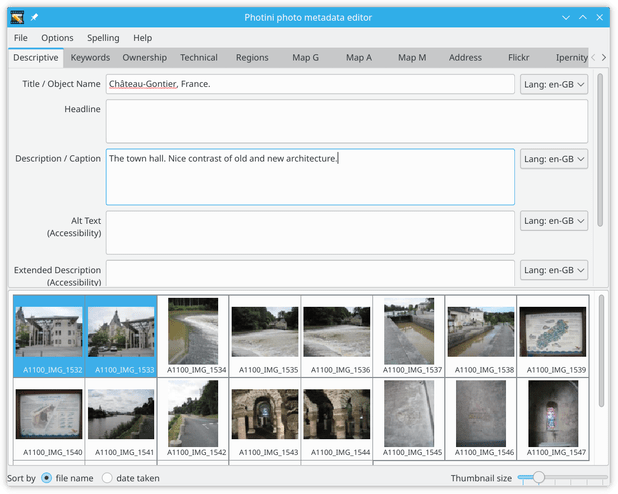
Easy to use graphical interface.
Set photo title, description, keywords, copyright and creator fields.
Some support for video files.
Spell checking of some fields (optional).
Can set metadata for multiple images simultaneously.
Can adjust picture date & time and time zone (of multiple images simultaneously).
Reads Exif, IPTC and XMP metadata, writes all three to maximise compatibility with other software.
Writes metadata to image files or to XMP “sidecar” files.
Can import photographs from many digital cameras.
Upload to Flickr or Ipernity or Pixelfed with reuse of metadata.
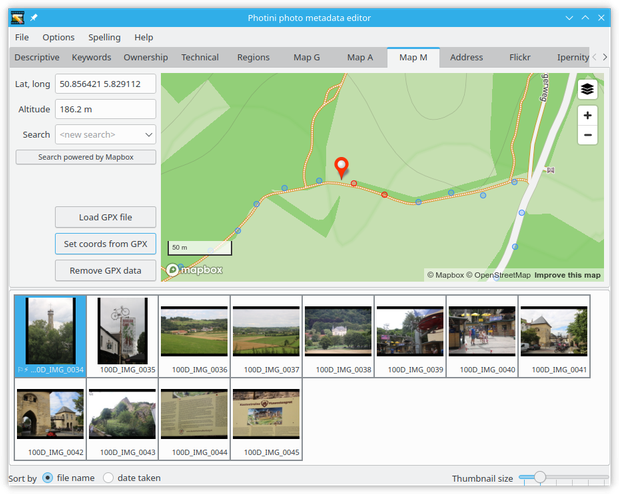
Geotagging - search map to find named places.
Choice of map providers - instantly switch to compare details.
Drag and drop images on to map to set GPS location.
Or set GPS location using data exported by a tracker app.
Edit coordinates if required, or clear to unset GPS data.
Convert GPS coordinates to street address.
Suggestions for further development welcome.
Dependencies
Photini requires at least the following:
Python3: http://python.org/
PyQt5, PyQt6, PySide2, or PySide6: http://www.riverbankcomputing.co.uk/software/pyqt/ or https://doc.qt.io/qtforpython/
python-exiv2: https://pypi.org/project/exiv2/
For a full list of dependencies, please see the installation documentation.
Documentation
Photini’s documentation is at http://photini.readthedocs.io/. It includes detailed installation instructions and a full user manual.
Getting help
If you encounter any problems installing or running Photini, please email jim@jim-easterbrook.me.uk and I’ll respond as soon as I can. There is also an email list or forum for discussions about Photini at https://groups.google.com/forum/#!forum/photini. If you discover a bug and have a GitHub account then please file a bug report on the GitHub “issues” page.
If you find a problem with a particular image file then it would be useful for me to have a copy of its metadata. You can use the exiv2 command line program to extract the raw metadata so you don’t need to send me the entire image file. For example, the command exiv2 ex problem_file.jpg can reduce a 3 MByte image file to a 20 kByte file called problem_file.exv. I promise not to publish or redistribute any file you send me.
Localisation
Work has begun on providing Photini in multiple languages. I rely on users to do the translation, as I am not fluent in any language other than English. The project uses an online translation service called Weblate. If you’d like to help translate Photini, please join the Photini team on Hosted Weblate. For more details, see the localisation documentation.
Licence
This program is free software: you can redistribute it and/or modify it under the terms of the GNU General Public License as published by the Free Software Foundation, either version 3 of the License, or (at your option) any later version.
This program is distributed in the hope that it will be useful, but WITHOUT ANY WARRANTY; without even the implied warranty of MERCHANTABILITY or FITNESS FOR A PARTICULAR PURPOSE. See the GNU General Public License for more details.
You should have received a copy of the GNU General Public License along with this program. If not, see http://www.gnu.org/licenses/.
Service terms and conditions
Use of the Google map tab is subject to the Google Maps Terms of Use and Google Privacy Policy.
Use of the Azure map tab is subject to the Microsoft Product Terms For Online Services and Microsoft Privacy & Security Terms.
Use of the Bing map tab is subject to the Microsoft Bing Maps Terms of Use and Microsoft Privacy Statement.
Use of the Mapbox map tab is subject to the Mapbox terms of service and Mapbox privacy policy.
The Flickr upload tab uses the Flickr API but is not endorsed or certified by Flickr.
Privacy statement
Photini does not directly gather any information from its users, but the online services it can use (maps and uploaders) may do so. You should read these services’ privacy policies before using them.
Photini stores user preferences in a text file on the user’s computer. The default location of this file is $HOME/.config/photini/ (Linux), $HOME/Library/Preferences/photini (MacOS), or %USERPROFILE%\AppData\Local\photini\ (Windows). OAuth access tokens for the uploader tabs are securely stored on the user’s computer using Python keyring.
Documentation licence
Permission is granted to copy, distribute and/or modify the Photini documentation under the terms of the GNU Free Documentation License, Version 1.3 or any later version published by the Free Software Foundation; with no Invariant Sections, no Front-Cover Texts, and no Back-Cover Texts. A copy of the license is included in the documentation section entitled “GNU Free Documentation License”.
1 maintainer

Download files
Download the file for your platform. If you're not sure which to choose, learn more about installing packages.
Source Distribution
Built Distribution
Filter files by name, interpreter, ABI, and platform.
If you're not sure about the file name format, learn more about wheel file names.
Copy a direct link to the current filters
File details
Details for the file photini-2026.8.0.tar.gz.
File metadata
- Download URL: photini-2026.8.0.tar.gz
- Upload date:
- Size: 724.9 kB
- Tags: Source
- Uploaded using Trusted Publishing? No
- Uploaded via:
twine/6.1.0 CPython/3.11.15
File hashes
| Algorithm | Hash digest | |
|---|---|---|
| SHA256 |
267781b8586280f342a4ca0f8996cda86d3c64559d0bd98313c2da983c574d04
|
|
| MD5 |
0f7a62893da54a2d537d776f0055762b
|
|
| BLAKE2b-256 |
3ddd90bf70139e35ba3abe2797711915e7008ff32c732d758f7e6e032c2b447e
|
File details
Details for the file photini-2026.8.0-py3-none-any.whl.
File metadata
- Download URL: photini-2026.8.0-py3-none-any.whl
- Upload date:
- Size: 761.3 kB
- Tags: Python 3
- Uploaded using Trusted Publishing? No
- Uploaded via:
twine/6.1.0 CPython/3.11.15
File hashes
| Algorithm | Hash digest | |
|---|---|---|
| SHA256 |
cd40c73a74f9bee7fcad118685801b302f2d401d2f5981ef60ed129047331c22
|
|
| MD5 |
14ced5bab47745f10fd22430c8f9afe8
|
|
| BLAKE2b-256 |
5779b1923f627e18602a30f4df407e87840509ff1fac66c53423bb8435f7011d
|














