
PyQtWaitingSpinner







(Py)QtWaitingSpinner is a highly configurable, custom (Py)Qt widget for showing "waiting", or "loading", spinner icons in (Py)Qt applications.
Based on pyqtspinner, by fbjorn, which is a fork of z3ntu's port of snowwlex's QtWaitingSpinner.
The spinners below are all (Py)QtWaitingSpinner widgets, differing only in their configuration:




Original GIF by snowwlex

Original Image by fbjorn
Installation
pip install pyqtwaitingspinner
Dependencies
Configuration
The following properties can all be controlled directly through their corresponding properties:
- Color of the widget
- "Roundness" of the lines
- Speed (rotations per second)
- Number of lines to be drawn
- Line length
- Line width
- Radius of the spinner's "dead space" or inner circle
- The percentage fade of the "trail"
- The minimum opacity of the "trail"
- Whether to center the spinner on its parent widget
- Whether or not to disable the parent widget whilst the spinner is spinning
- The direction in which the spinner will spin
Usage
Spinner
The following code will create a simple spinner that
- (1) blocks all user input to the main application for as long as the spinner is active
- (2) automatically centers itself on its parent widget every time "start" is called
- (3) makes use of the default shape, size and color settings.
spin_pars = SpinnerParameters(disable_parent_when_spinning=True)
spinner = WaitingSpinner(parent, spin_pars)
Configurator
The graphical Configurator allows you edit the parameters of the spinner, and view the changes live.
The Configurator can be launched with:
spinner-conf
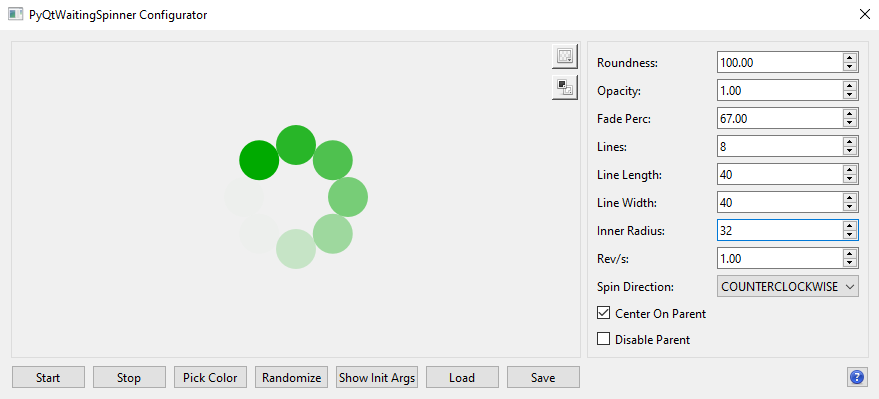
Once the spinner's appearance is to your liking, you can either copy (and view) the initialization parameters for the construction of a SpinnerParameters object, or you can save the spinner as a YAML configuration and load it from within a WaitingSpinner class.
Show Init Args
Pressing the Show Init Args button will show the initialization arguments for the equivalent SpinnerParameters object, and will make a copy to the clipboard, including newlines and whitespace.
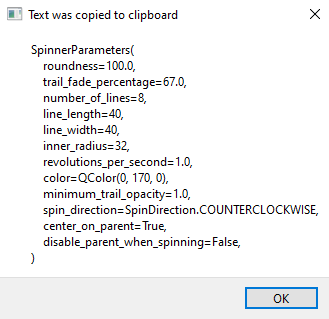
SpinnerParameters(
    roundness=100.0,
    trail_fade_percentage=67.0,
    number_of_lines=8,
    line_length=40,
    line_width=40,
    inner_radius=32,
    revolutions_per_second=1.0,
    color=QColor(0, 170, 0),
    minimum_trail_opacity=1.0,
    spin_direction=SpinDirection.COUNTERCLOCKWISE,
    center_on_parent=True,
    disable_parent_when_spinning=False,
)
Save Config
Pressing the Save button will open a dialog allowing you to select the location, and name, in which to save the configured spinner. The outputted YAML file can then be loaded like so:
spinner = WaitingSpinner(parent)
spinner.load("path/to/spinner.yaml")
Documentation
Full documentation at ReadTheDocs
Credits
-
snowwlex (Alex Turkin), William Hallatt, & jacob3141 (Jacob Dawid) for the original Qt widget.
-
z3ntu (Luca Weiss) for his PyQt6 port.
-
fbjorn for his PyQt5 port of z3ntu's port.
-
Yusuke Kamiyamane for the icons used in the Configurator.
-
See full credits
Enjoy!
1 maintainer

Metadata
1 maintainer
Release files for PyQtWaitingSpinner 1.3.2
For a detailed explanation of source distributions (sdists) and built distributions (wheels), please see the package formats documentation.
Source distribution (sdist)
| File | Size | Uploaded | |
|---|---|---|---|
| pyqtwaitingspinner-1.3.2.tar.gz | 19.9 kB | Details |
Built distribution (wheel)
| File | Interpreter | ABI | Platform | Reset |
|---|---|---|---|---|
| pyqtwaitingspinner-1.3.2-py3-none-any.whl | Python 3 | none | any | Details |
Total release size: 41.9 kB
Release files / pyqtwaitingspinner-1.3.2.tar.gz
| Download URL | pyqtwaitingspinner-1.3.2.tar.gz |
|---|---|
| Size | 19.9 kB |
| Tags | Source |
|
SHA-256 checksum How to use checksums |
17985450521c85d670e44b15a750bbd47689499ba795a57ec4d46dd738ff942d
|
|
BLAKE2b-256 checksum How to use checksums |
a1bf26482cec798e88ead3aa266c09e2b0079b448ff8508c97d78a68ce4f4207
|
| Upload date | |
|
Uploaded using Trusted Publishing? What is trusted publishing? |
No |
| Uploaded via |
twine/5.1.1 CPython/3.11.9
|
Release files / pyqtwaitingspinner-1.3.2-py3-none-any.whl
| Download URL | pyqtwaitingspinner-1.3.2-py3-none-any.whl |
|---|---|
| Size | 22.0 kB |
| Tags | Python 3 |
|
SHA-256 checksum How to use checksums |
7300f1d3f7718910b893af70794845bd28253de6081723b514ac670f855cce24
|
|
BLAKE2b-256 checksum How to use checksums |
e02602c4c0a292ed991368bc9cbf5d861fcfaaa0623e59cf5b158031eadaef20
|
| Upload date | |
|
Uploaded using Trusted Publishing? What is trusted publishing? |
No |
| Uploaded via |
twine/5.1.1 CPython/3.11.9
|














