
Pytheas22
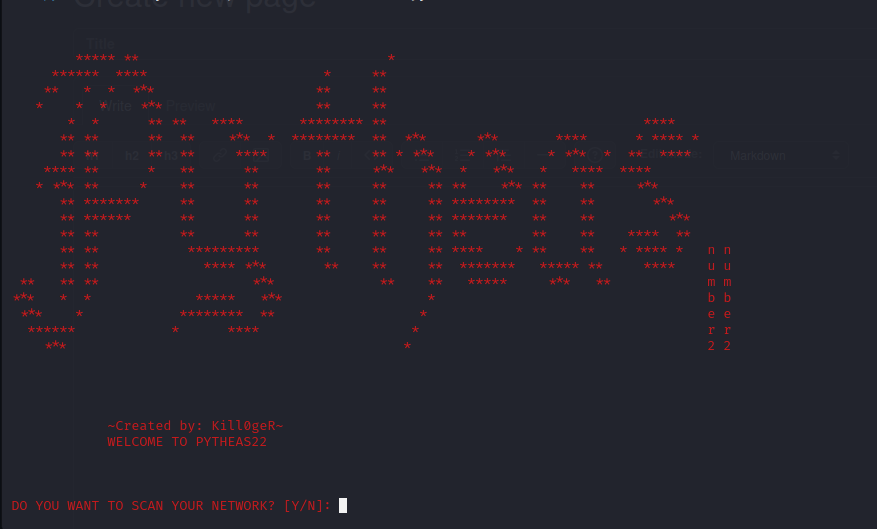
Created by: Fawaz Bashiru
Pytheas22 is an innovative Port Scanner. It scans IP-Cameras of countries, your home network and individual IP-Addresses or websites. Analysis of the IP-Cameras and the scanned home network will be saved in a database. Every open port will have a documentation.
If the port 22 of an IP-Address or a website is open pytheas22 will try to log in to the host via bruteforce.
Check out my github: https://github.com/Kill0geR/Pytheas22
Making a range of ports
from Pytheas22 import Python_Port_Scanner

scanner = Python_Port_Scanner.PythonPortScannerList(well_known_ports=True)
scanner_lst = scanner.make_lst()
This makes a list of every well_known ports Output of that list will look like this:
[20, 21, 22, 23, 25, 53, 80, 110, 119, 123, 135, 139, 143, 161, 194, 389, 443, 445, 515, 520, 636, 3389, 5060, 5061, 5357, 8001, 8002, 8080, 9080, 9999, 62078]
If you want to make your own list simply do this:
from Pytheas22 import Python_Port_Scanner

scanner = Python_Port_Scanner.PythonPortScannerList(port_range="20-80")
scanner_lst = scanner.make_lst()
This will make a list from 20 to 80 Output of that list will look like this:
[20, 21, 22, 23, 24, 25, 26, 27, 28, 29, 30, 31, 32, 33, 34, 35, 36, 37, 38, 39, 40, 41, 42, 43, 44, 45, 46, 47, 48, 49, 50, 51, 52, 53, 54, 55, 56, 57, 58, 59, 60, 61, 62, 63, 64, 65, 66, 67, 68, 69, 70, 71, 72, 73, 74, 75, 76, 77, 78, 79, 80]
Scanning with Pytheas22
After you made your list you have to choose what you want to scan
- To scan your home network:
from Pytheas22 import Python_Port_Scanner

scanner = Python_Port_Scanner.PythonPortScannerList(well_known_ports=True)
scanner_lst = scanner.make_lst()

start_scan = Python_Port_Scanner.PythonPortScanner(scanner_lst)
# IF YOU WANT TO SCAN ALL IP'S FROM YOUR NETWORK SIMPLY WRITE
# Python_Port_Scanner.PortScanner.scan_all = True
start_scan.scan_internal_network()
- To scan ip cameras:
from Pytheas22 import Python_Port_Scanner

scanner = Python_Port_Scanner.PythonPortScannerList(well_known_ports=True)
scanner_lst = scanner.make_lst()

start_scan = Python_Port_Scanner.PythonPortScanner(scanner_lst)
start_scan.scan_ip_cameras()
- To scan one host:
from Pytheas22 import Python_Port_Scanner

scanner = Python_Port_Scanner.PythonPortScannerList(well_known_ports=True)
scanner_lst = scanner.make_lst()

start_scan = Python_Port_Scanner.PythonPortScanner(scanner_lst)
start_scan.scan_one_addr("127.0.0.1") #websites also work like start_scan.scan_one_addr("https://google.com")
- All included:
from Pytheas22 import Port_Scanner

Port_Scanner.PortScanner.question(Port_Scanner.PortScanner)
This will have every scanning opportunity. Every step will be questioned like in the picture. Just like the GitHub version
Bruteforcing hosts with open ssh ports
To Bruteforce hosts with open ssh ports simply set the parameter 'ssh_bruteforce' from PythonPortScanner to True:
from Pytheas22 import Python_Port_Scanner

scanner = Python_Port_Scanner.PythonPortScannerList(well_known_ports=True)
scanner_lst = scanner.make_lst()

start_scan = Python_Port_Scanner.PythonPortScanner(scanner_lst, ssh_bruteforce=True)
start_scan.internal_network()
The wordlist for that bruteforce is on my GitHub: https://github.com/Kill0geR/Pytheas22
Additional
-
Works on Linux and Windows (recommended in Linux)
-
Pytheas22 is very easy to use.
-
Bruteforce list is trained on ip-cameras
-
DO NOT USE THIS TO ATTACK SOMEONE FOREIGN. I BUILD IT FOR EDUCATIONAL PURPOSES.
Change Log
0.0.1 (01/06/2023)
- First Release
0.0.2 (05/06/2023)
- New Internal database
- Files on GitHub now work on windows
- "question" function now also works on windows
0.0.2.1 (10/06/2023)
- (small fixes)
0.0.3 (28/07/2023)
- prints hostnames of internal network
- new printing system
- more efficient port information
0.0.4 (01/08/2023)
- 15x faster port scanning
0.0.5 (10/09/2023)
- Better Code
- New Arp Poisoning Feature (only on Linux)
- Better Port scanning on Windows
- Shows Seconds over run seconds when scanning lots of ip's
- Multithreading Error fixed
0.0.6 (17/09/2023)
- New Printing Modell
- New Python_Port_Scanner.py Script
0.0.7 (12/12/2023)
- IPv6 port scanning
- new terminal look
- Getting the exact location of the target's IP
0.0.7.1 (15/12/2023)
- Download fix
0.0.7.2 (15/12/2023)
- Error fix
0.0.8 (16/12/2023)
- New Portscanning Model in Linux
- New Hostname features in Linux
- Port scanning error fixed in Linux
0.0.9 (18/12/2023)
- Network scan fix
0.1.0 (26/06/2025)
- Internal Network Scan Fix
- More Network to choose from
0.2.0 (06/03/2026)
- All IP-Addresses can now be returned via one function
- Better install requires
1 maintainer

Metadata
1 maintainer
Release files for Pytheas22 0.2.0
For a detailed explanation of source distributions (sdists) and built distributions (wheels), please see the package formats documentation.
Source distribution (sdist)
| File | Size | Uploaded | Provenance | |
|---|---|---|---|---|
| pytheas22-0.2.0.tar.gz | 5.7 MB | Without provenance | Details |
Release files / pytheas22-0.2.0.tar.gz
| Download URL | pytheas22-0.2.0.tar.gz |
|---|---|
| Size | 5.7 MB |
| Tags | Source |
|
SHA-256 checksum How to use checksums |
13794f62715058943a69aae0d2a6b864fbd20b83b12983e3e2cf9a976d0ae4f1
|
|
BLAKE2b-256 checksum How to use checksums |
53105b7ebfe379d4431366a1db31d335055b342b4057385f7bffe21f176f7344
|
| Upload date | |
|
Uploaded using Trusted Publishing? What is trusted publishing? |
No |
| Uploaded via |
twine/6.1.0 CPython/3.11.7
|
Security for Pytheas22 0.2.0
Provenance
Provenance describes where a file came from. On PyPI, provenance is shared via attestations, which provide a verifiable record of the build or publishing details. View details, limitations and caveats.
No provenance found
None of the files in this release were uploaded with provenance metadata.
A note on package security
PyPI is a repository for distributing packages, not a service for auditing them. While third-party security researchers and our staff do their best to detect and remove malicious packages, PyPI cannot guarantee the quality, security or suitability of any given package.














