








PySLM is a Python library for supporting development and generation of build files in Additive Manufacturing or 3D Printing, in particular Selective Laser Melting (SLM), Direct Metal Laser Sintering (DMLS) platforms typically used in both academia and industry. The core capabilities aim to include slicing, hatching and support generation and providing an interface to the binary build file formats available for platforms. The library is built of core classes which may provide the basic functionality to generate the scan vectors used on systems and also be used as building blocks to prototype and develop new algorithms.
This library provides design tools for use in Additive Manufacturing including the slicing, hatching, support generation and related analysis tools (e.g. overhang analysis, build-time estimation).
PySLM is built-upon Trimesh v4.0 for mesh handling and manipulation and the polygon clipping and offsetting provided by Clipper 2 library via Pyclipr, which together leveraged to provide the slicing and manipulation of polygons, such as offsetting and clipping of scan vectors used.
The aims of this library is to provide a useful set of tools for prototyping novel pre-processing approaches to aid research and development of Additive Manufacturing processes, amongst an academic environment. The tools aim to compliment experimental and analytical studies that can enrich scientific understanding of the process. This includes data-fusion from experiments and sensors within the process but also enhancing the capability of the process by providing greater control over the process. Furthermore, the open nature of the library intends to inform and educate those interested in the underlying algorithms of preparing toolpaths in Additive Manufacturing.
Current Features
PySLM is building up a core feature set aiming to provide the basic blocks for primarily generating the scan paths and additional design features used for AM and 3D printing systems typically (SLM/SLS/SLA) systems which consolidate material using a single/multi point exposure by generating a series of scan vectors in a region.
Slicing:
Slicing of triangular meshes supported via the Trimesh library.
Simplification of 2D layer boundaries
Bitmap slicing for SLA, DLP, Inkjet Systems
Hatching: The following operations are provided as a convenience to aid the development of novel scan strategies in Selective Laser Melting:
Offsetting of contours and boundaries
Trimming of lines and hatch vectors (sequentially ordered and sorted)
The following scan strategies have been implemented as reference for AM platforms:
Standard ‘alternating’ hatching
Stripe scan strategy
Island or checkerboard scan strategy
Support Structure Generation
PySLM provides underlying tools and a framework for identifying and generating support structures suitable for SLM and other AM processes. Tools are provided identifying overhang areas based on their mesh and connectivity information, but also using a projection based method. The projection method takes advantage of GPU GLSL shaders for providing an efficient raytracing approach. Using the Manifold boolean CSG library, an algorithm for extracting precise definition of volumetric support regions. These regions are segmented based on self-intersections with the mesh. From these volumes, porous grid-truss structure suitable for SLM based process can be generated.

Extracting overhang surfaces from meshes with optional connectivity information
- Projection based block and truss support structure generation
3D intersected support volumes are generated from overhang regions using OpenGL ray-tracing approach
Generate a truss grid using support volumes suitable for Metal AM processes
Perforated teeth for support connection
Exact support volume generation using Manifold CSG library
Visualisation:
The laser scan vectors can be visualised using Matplotlib. The order of the scan vectors can be shown to aid development of the scan strategies, but additional information such length, laser parameter information associated with each scan vector can be shown.
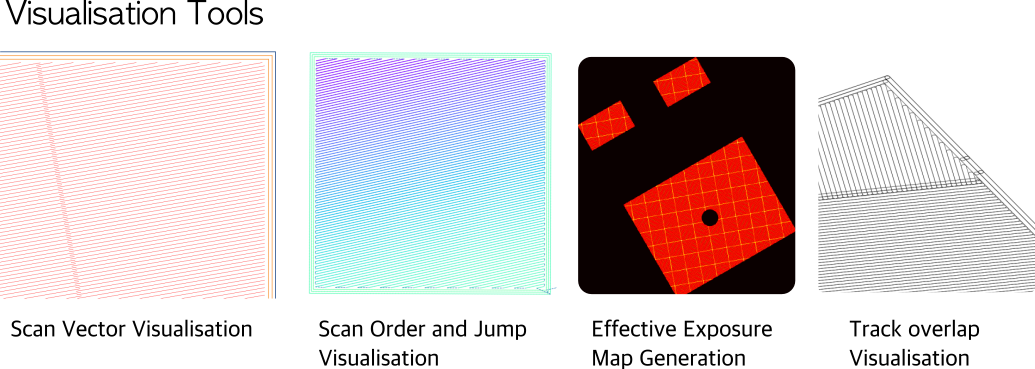
Scan vector plots (including underlying BuildStyle information and properties)
Exposure point visualisation
Exposure (effective heat) map generation
Overhang visualisation
Analysis:
- Build time estimation tools
Based on scan strategy and geometry
Time estimation based on LayerGeometry
Iterators (Scan Vector and Exposure Points) useful for simulation studies
Export to Machine Files:
Currently the capability to enable translation to commercial machine build platforms is being providing through a supporting library called libSLM . This is a c++ library to enable efficient import and export across various commercial machine build files. With support from individuals the following machine build file formats have been developed.
Renishaw MTT (.mtt),
DMG Mori Realizer (.rea),
CLI/CLI+ & .ilt (.cli/.ilt),
EOS SLI formats (.sli)
SLM Solutions (.slm).
If you would like to support implementing a custom format, please raise a request. For further information, see the latest release notes.
Installation
Installation is currently supported on Windows, Mac OS X and Linux environments. The pre-requisites for using PySLM can be installed via PyPi and/or Anaconda distribution.
conda install -c conda-forge shapely, Rtree, networkx, scikit-image
conda install trimesh
If you are interested using the support generation module, there are additional dependencies that are required to be installed. These are not required for the core functionality of PySLM such as slicing and hatching. These require a working OpenGL environment to work via vispy - the PyQt5 module provides the OpenGL backend for this currently, which is currently supported across all major platforms.
pip install vispy pyqt5 triangle pyclipr manifold3d mapbox-earcutInstallation of PySLM can be performed using pre-built python packages using the PyPi repository. Additionally to interface with commercial L-PBF systems, the user can choose to install libSLM. Note, the user should contact the author to request machine build file translators, as this cannot be installed currently without having the machine build file translators available.
pip install PythonSLMAlternatively, PySLM may be compiled directly from source. For PySLM version (>v0.6) the entire library are now written exclusively in Python, therefore a separate compiler infrastructure (cython) is not required.
git clone https://github.com/drlukeparry/pyslm.git && cd ./pyslm
pip install .
Usage
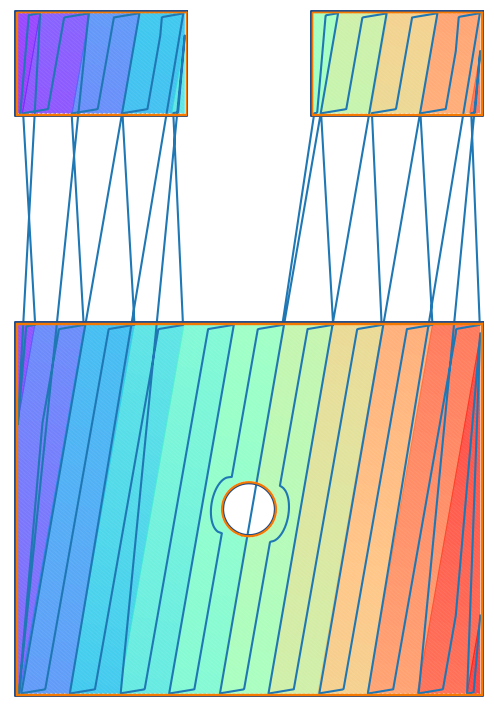
A basic example below, shows how relatively straightforward it is to generate a single layer from a STL mesh which generates a the hatch infill using a Stripe Scan Strategy typically employed on some commercial systems to limit the maximum scan vector length generated in a region.
import pyslm
import pyslm.visualise
from pyslm import hatching as hatching

# Imports the part and sets the geometry to an STL file (frameGuide.stl)
solidPart = pyslm.Part('myFrameGuide')
solidPart.setGeometry('../models/frameGuide.stl')

# Set te slice layer position
z = 23.

# Create a StripeHatcher object for performing any hatching operations
myHatcher = hatching.StripeHatcher()
myHatcher.stripeWidth = 5.0 # [mm]

# Set the base hatching parameters which are generated within Hatcher
myHatcher.hatchAngle = 10 # [°]
myHatcher.volumeOffsetHatch = 0.08 # [mm]
myHatcher.spotCompensation = 0.06 # [mm]
myHatcher.numInnerContours = 2
myHatcher.numOuterContours = 1

# Slice the object at Z and get the boundaries
geomSlice = solidPart.getVectorSlice(z)

# Perform the hatching operations
layer = myHatcher.hatch(geomSlice)

# Plot the layer geometries generated
pyslm.visualise.plot(layer, plot3D=False, plotOrderLine=True) # plotArrows=True)
The result of the script output is shown here
For further guidance please look at documented examples are provided in examples .
1 maintainer

Metadata
1 maintainer
Release files for PythonSLM 0.6.1
For a detailed explanation of source distributions (sdists) and built distributions (wheels), please see the package formats documentation.
Source distribution (sdist)
| File | Size | Uploaded | |
|---|---|---|---|
| pythonslm-0.6.1.tar.gz | 3.6 MB | Details |
Built distribution (wheel)
| File | Interpreter | ABI | Platform | Reset |
|---|---|---|---|---|
| pythonslm-0.6.1-py3-none-any.whl | Python 3 | none | any | Details |
Total release size: 7.2 MB
Release files / pythonslm-0.6.1.tar.gz
| Download URL | pythonslm-0.6.1.tar.gz |
|---|---|
| Size | 3.6 MB |
| Tags | Source |
|
SHA-256 checksum How to use checksums |
7ad2f12ef865cfc2dbe7d420e05d47af4685c9962d141e2d8712004fa20776ad
|
|
BLAKE2b-256 checksum How to use checksums |
d2b40387057d1b57c62f7aee06b1562eca69e093900d1a60931dd48b817c2d27
|
| Upload date | |
|
Uploaded using Trusted Publishing? What is trusted publishing? |
No |
| Uploaded via |
twine/6.1.0 CPython/3.13.7
|
Release files / pythonslm-0.6.1-py3-none-any.whl
| Download URL | pythonslm-0.6.1-py3-none-any.whl |
|---|---|
| Size | 3.6 MB |
| Tags | Python 3 |
|
SHA-256 checksum How to use checksums |
43a5f384b5ed588c4c4faf15c0c0f8b168dd12a0f05161f0f90ee43ac88ad969
|
|
BLAKE2b-256 checksum How to use checksums |
f39d6b1717bb179ef702318a3334b8d46f78e9c403763469e951dab1e8b203b0
|
| Upload date | |
|
Uploaded using Trusted Publishing? What is trusted publishing? |
No |
| Uploaded via |
twine/6.1.0 CPython/3.13.7
|














