
Python Turtle









An educational environment for learning Python, suitable for beginners and children. Inspired by LOGO.
Homepage: http://pythonturtle.org
An Appealing Environment to Learn Python
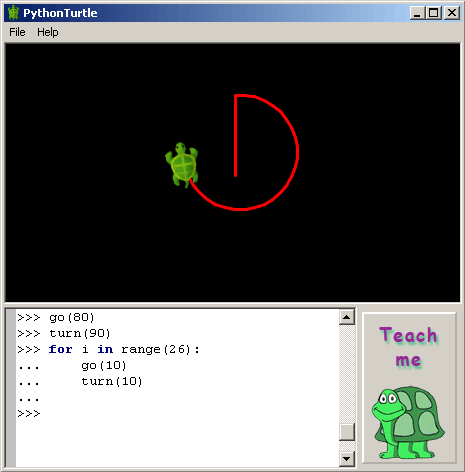
PythonTurtle strives to provide the lowest-threshold way to learn Python. Students command an interactive Python shell (similar to the IDLE development environment) and use Python functions to move a turtle displayed on the screen.
An illustrated help screen introduces the student to the basics of Python programming while demonstrating how to move the turtle. Simplicity and a colorful visual appearance makes the learning environment more appealing to students.
Installation
Installers for Microsoft Windows and macOS are available from pythonturtle.org and GitHub.
Ubuntu Linux:
sudo apt-get install -y python3-wxgtk4.0
Fedora:
python3 -m pip install wxpython
On any GNU/Linux distribution: (after installing prerequisites from above)
python3 -m pip install --user PythonTurtle
PythonTurtle
If you're into automation:
Ansible tasks for setting up PythonTurtle including a desktop shortcut for GNOME.
Troubleshooting
ImportError: libpng12.so.0: cannot open shared object file: No such file or directory
See https://askubuntu.com/a/978338/14650
Compatibility
Tested with Python version 3.6 and wxPython version 4.0.1. Reported to run on Windows, macOS, Ubuntu Linux, and Fedora.
Development
git clone https://github.com/PythonTurtle/PythonTurtle.git
cd PythonTurtle
python3 -m pythonturtle
Build application bundles like this:
python3 setup.py clean bundle
Please open a pull request for contributions or bug fixes. If you can, please also add tests.
About
This project is licensed under the MIT license.
PythonTurtle was created by Ram Rachum as a side-project in 2009. I also provide freelance Django/Python development services. I give Python workshops to teach people Python and related topics. (Hebrew website.)


Release files for PythonTurtle 0.3.2
For a detailed explanation of source distributions (sdists) and built distributions (wheels), please see the package formats documentation.
Source distribution (sdist)
| File | Size | Uploaded | Provenance | |
|---|---|---|---|---|
| PythonTurtle-0.3.2.tar.gz | 513.9 kB | Without provenance | Details |
Built distribution (wheel)
| File | Interpreter | ABI | Platform | Reset |
|---|---|---|---|---|
| PythonTurtle-0.3.2-py3-none-any.whl | Python 3 | none | any | Details |
Total release size: 1.0 MB
Release files / PythonTurtle-0.3.2.tar.gz
| Download URL | PythonTurtle-0.3.2.tar.gz |
|---|---|
| Size | 513.9 kB |
| Tags | Source |
|
SHA-256 checksum How to use checksums |
bd5628ab23a73189ec1cb9effbddf2f9fb43613ee9c971cf0954700b202d8534
|
|
BLAKE2b-256 checksum How to use checksums |
32b12267c041fd484f864c575d69ebac593bb511d2f91d14dfaea24e63203025
|
| Upload date | |
|
Uploaded using Trusted Publishing? What is trusted publishing? |
No |
| Uploaded via |
twine/3.2.0 pkginfo/1.5.0.1 requests/2.24.0 setuptools/50.3.0 requests-toolbelt/0.9.1 tqdm/4.49.0 CPython/3.6.10
|
Release files / PythonTurtle-0.3.2-py3-none-any.whl
| Download URL | PythonTurtle-0.3.2-py3-none-any.whl |
|---|---|
| Size | 518.4 kB |
| Tags | Python 3 |
|
SHA-256 checksum How to use checksums |
255d1912c79e34c47e93684e915ea74c584d38bc94637c16a161212ce332b6b5
|
|
BLAKE2b-256 checksum How to use checksums |
5edfb83ffcf5626d59af2247d257cb252996df0559f2e07bec3de1bad9a619f0
|
| Upload date | |
|
Uploaded using Trusted Publishing? What is trusted publishing? |
No |
| Uploaded via |
twine/3.2.0 pkginfo/1.5.0.1 requests/2.24.0 setuptools/50.3.0 requests-toolbelt/0.9.1 tqdm/4.49.0 CPython/3.6.10
|
Security for PythonTurtle 0.3.2
Provenance
Provenance describes where a file came from. On PyPI, provenance is shared via attestations, which provide a verifiable record of the build or publishing details. View details, limitations and caveats.
No provenance found
None of the files in this release were uploaded with provenance metadata.
A note on package security
PyPI is a repository for distributing packages, not a service for auditing them. While third-party security researchers and our staff do their best to detect and remove malicious packages, PyPI cannot guarantee the quality, security or suitability of any given package.
To learn more about protecting yourself from malicious actors, visit our package security documentation.














