
Scrollable containers which just work!
If you have developed GUI applications, you probably know the pain of designing a clean front-end only to find that your application window is too large for your client's screen. Making the content scrollable is not straightforward (at least in Tkinter). Especially not after you have already written a lot of code to draw the content.
You can use ScrollableContainers to reduce headaches.
It's available on PyPI!
pip install ScrollableContainers
Scrollable containers are currently available for the following GUI toolkits.
- Tkinter
- wxPython
- PyQt5
- PyQt6

No part of the code in this repository has been written by or in consultation with artificial intelligence chatbots. All of it is purely a product of natural intelligence (or stupidity, as the case may be).
This project is not sponsored or endorsed by, or connected with, any organisation or entity such as but not limited to: the Tcl Core Team, the Python Software Foundation, the wxWidgets Team, the wxPython Team, the Qt Company and Riverbank Computing.


Tkinter
ScrollableContainers.ScrollableFrameTk: a comprehensive implementation of a scrollable frame, and the flagship class
of this project. (I wrote the other classes just for completeness.)
Usage
Add widgets to the frame attribute of a ScrollableFrameTk object.
See examples.
Features
- Handles resize events correctly.
- Supports scrolling with the mouse wheel and touchpad.
- Scrolling the mouse wheel or swiping vertically with two fingers on the touchpad triggers a vertical scroll.
- Scrolling the mouse wheel while holding down Shift or swiping horizontally with two fingers on the touchpad triggers a horizontal scroll.
- Horizontally centres the contents if the window is wider.
- Reserves all space in the window for child widgets.
- The scrollbars do not take up any space. When scrolling or moving the cursor in the window, they are shown briefly, and then hidden.
Demo
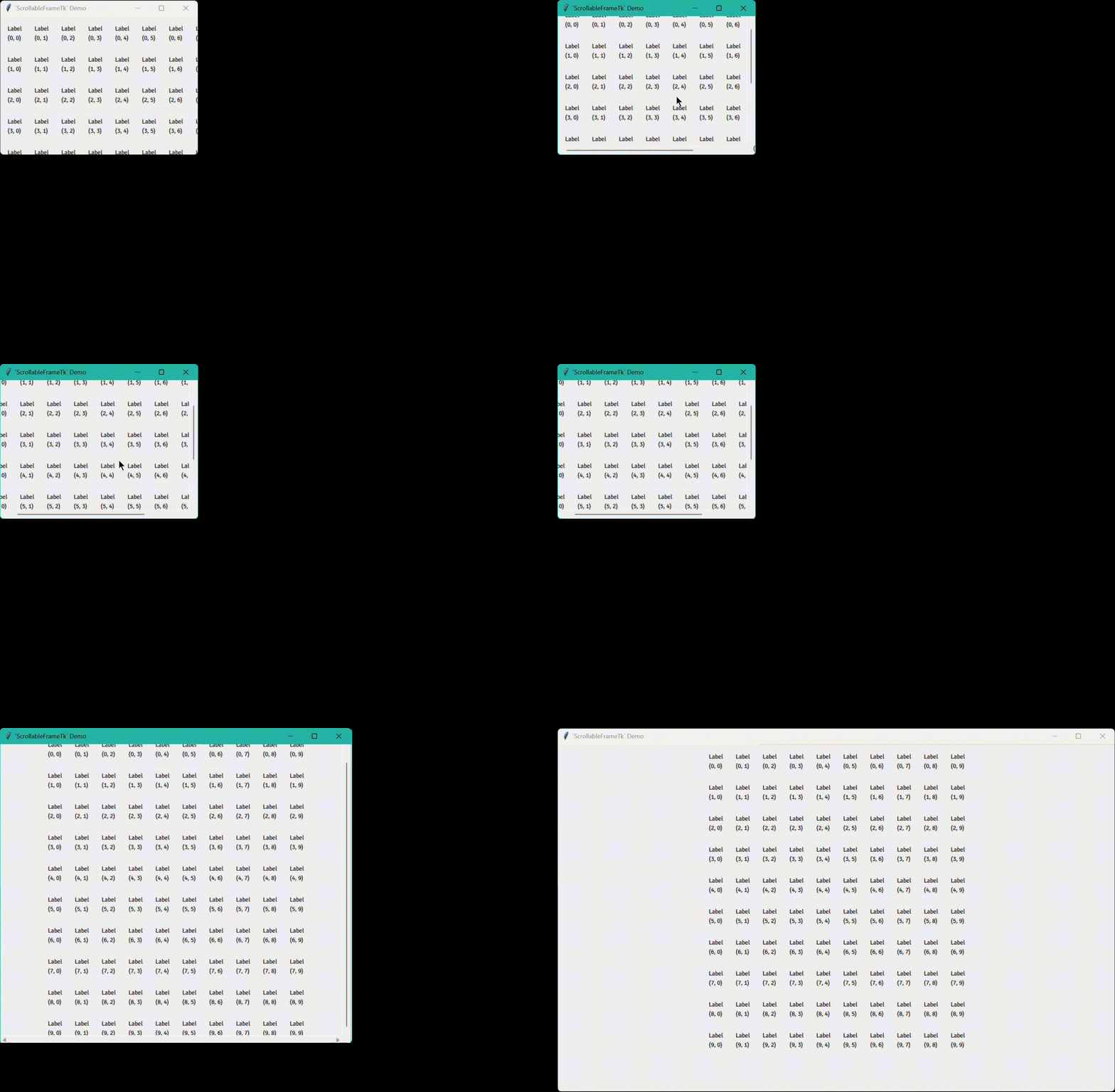
Notes
"<Button-4>", "<Button-5>" and "<MouseWheel>" are bound to all widgets using bind_all to handle mouse wheel
scroll events. Do not unbind_all (or bind_all another function to) these three sequences!
wxPython
ScrollableContainers.ScrollablePanelWx: a thin wrapper around wx.lib.scrolledpanel.ScrolledPanel.
Usage
Add widgets to the panel attribute of a ScrollablePanelWx object.
See examples.
Features
- Does everything the wrapped class does.
- Horizontally centres the contents if the window is wider.
PyQt5/PyQt6
ScrollableContainers.ScrollableAreaQt5/ScrollableContainers.Qt6.ScrollableAreaQt6: a thin wrapper around
PyQt5.QtWidgets.QScrollArea/PyQt6.QtWidgets.QScrollArea.
Usage
Add widgets to the area attribute of a ScrollableAreaQt5/ScrollableAreaQt6 object.
See
examples.
Features
- Does everything the wrapped class does.
- Horizontally centres the contents if the window is wider.
In GTK, containers are widgets, so they can be aligned in other containers.
import itertools

import gi; gi.require_version("Gtk", "3.0")
from gi.repository import Gtk

window = Gtk.Window()
window.connect("destroy", Gtk.main_quit)
window.set_default_size(256, 128)

scrolled_window = Gtk.ScrolledWindow()
window.add(scrolled_window)

grid = Gtk.Grid()
grid.set_halign(Gtk.Align.CENTER)
grid.set_row_spacing(20)
grid.set_column_spacing(20)
scrolled_window.add(grid)

dim = 10
for i, j in itertools.product(range(dim), repeat=2):
    label = Gtk.Label()
    label.set_label(f"Label\n({i}, {j})")
    grid.attach(label, j, i, 1, 1)

window.show_all()
Gtk.main()
Since horizontally centring the contents of a scrollable container is the primary function of this package, and GTK has built-in functionality to achieve the same, no submodule for PyGObject is implemented here.
1 maintainer

Metadata
1 maintainer
Release files for ScrollableContainers 2.3.0
For a detailed explanation of source distributions (sdists) and built distributions (wheels), please see the package formats documentation.
Source distribution (sdist)
| File | Size | Uploaded | Provenance | |
|---|---|---|---|---|
| scrollablecontainers-2.3.0.tar.gz | 21.3 kB | Without provenance | Details |
Built distribution (wheel)
| File | Interpreter | ABI | Platform | Reset |
|---|---|---|---|---|
| scrollablecontainers-2.3.0-py3-none-any.whl | Python 3 | none | any | Details |
Total release size: 40.6 kB
Release files / scrollablecontainers-2.3.0.tar.gz
| Download URL | scrollablecontainers-2.3.0.tar.gz |
|---|---|
| Size | 21.3 kB |
| Tags | Source |
|
SHA-256 checksum How to use checksums |
5ec8605dd35716171ba1da6aa682ca0eeb7102b0378e2b3bf19145d194198117
|
|
BLAKE2b-256 checksum How to use checksums |
99d00ffa33d896cb3f4ba6486d47dd4833ce7a993e94ebe61e88f27ee804af7b
|
| Upload date | |
|
Uploaded using Trusted Publishing? What is trusted publishing? |
No |
| Uploaded via |
twine/6.2.0 CPython/3.13.5
|
Release files / scrollablecontainers-2.3.0-py3-none-any.whl
| Download URL | scrollablecontainers-2.3.0-py3-none-any.whl |
|---|---|
| Size | 19.3 kB |
| Tags | Python 3 |
|
SHA-256 checksum How to use checksums |
e7f85b41fd6be4cb1bf8592db2c5de0d73ca99397a47d91923e72cf9f9c5abac
|
|
BLAKE2b-256 checksum How to use checksums |
cd2a6ba7b1f37590523d09531702c11389b42d3df1b28fb45be5a5297b6a4384
|
| Upload date | |
|
Uploaded using Trusted Publishing? What is trusted publishing? |
No |
| Uploaded via |
twine/6.2.0 CPython/3.13.5
|
Security for ScrollableContainers 2.3.0
Provenance
Provenance describes where a file came from. On PyPI, provenance is shared via attestations, which provide a verifiable record of the build or publishing details. View details, limitations and caveats.
No provenance found
None of the files in this release were uploaded with provenance metadata.
A note on package security
PyPI is a repository for distributing packages, not a service for auditing them. While third-party security researchers and our staff do their best to detect and remove malicious packages, PyPI cannot guarantee the quality, security or suitability of any given package.
To learn more about protecting yourself from malicious actors, visit our package security documentation.














