
TinyTinyDebugger
Simple debugger for small scripts - shows the line being executed, local vars ... It only can be used if your script is in a .py file. It doesn't work directly from the console.
pip install TinyTinyDebugger
#Examples
from TinyTinyDebugger import (
function_debug,
detailed_debugger
)

@function_debug(
sleep_between_each_line=1)
def combinations(iterable, r):
    pool = tuple(iterable)
    n = len(pool)
    if r > n:
        print('r bigger n')
    indices = list(range(r))
    # provoking an Exception
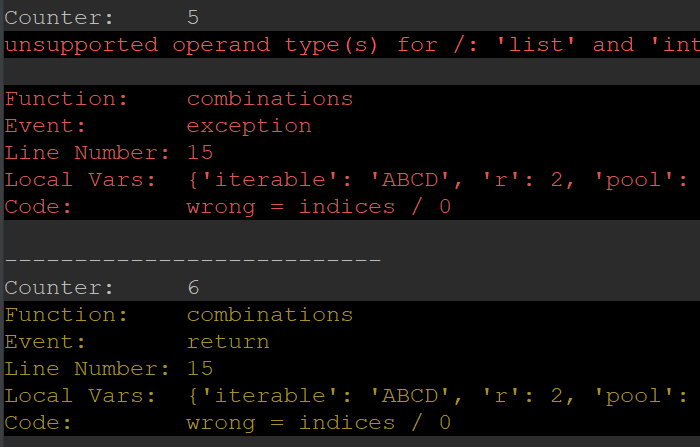
    wrong = indices / 0
    return indices
#combinations("ABCD", 2)
from pprint import pprint


@function_debug(
    active=True,  # used to disable the debugger
    write_log_file=False,  # if True, data will be saved to hdd. Import allow_long_path_windows from windows_filepath and execute before! function_debug won't check for path length, so it is better to allow long file names
    log_folder='c:\\debugmyfunction',  # default value is the folder "_tinytinydebugger_log" in cwd
    pause_for_n_seconds_when_except=10,  # Only important if continue_on_exceptions is True. The execution will be paused and you can read the Exception. When you are done, press ctrl+c to continue
    continue_on_exceptions=True,  # if True, the execution will go on
    capture_local_vars=True,  # If True, all local variables in the function will be saved after each line in: detailed_debugger.local_function_vars
    color_print=True,  # black/white or colored
    print_line=True,  # If False, the event "line" won't be printed
    print_return=True,  # If False, the event "return" won't be printed
    print_exception=True,  # If False, the event "exception" won't be printed
    print_execution_time=True,  # enable/disable printing of execution time
    print_local_vars=True,  # if True: prints all local variables in the function each line
    sleep_between_each_line=0,  # sleep after each line of code
)
def baba(x):
    print(4/x)

baba(10)
pprint(detailed_debugger
       .local_function_vars)
Take a look at the video:
1 maintainer

Metadata
1 maintainer
Release files for TinyTinyDebugger 0.14
For a detailed explanation of source distributions (sdists) and built distributions (wheels), please see the package formats documentation.
Source distribution (sdist)
| File | Size | Uploaded | Provenance | Actions |
|---|---|---|---|---|
| TinyTinyDebugger-0.14.tar.gz | 6.8 kB | Without provenance | Details for TinyTinyDebugger-0.14.tar.gz |
Built distribution (wheel)
| File | Interpreter | ABI | Platform | Actions Reset |
|---|---|---|---|---|
| TinyTinyDebugger-0.14-py3-none-any.whl | Python 3 | none | any | Details for TinyTinyDebugger-0.14-py3-none-any.whl |
Total release size: 15.6 kB
Release files / TinyTinyDebugger-0.14.tar.gz
| Download URL | TinyTinyDebugger-0.14.tar.gz |
|---|---|
| Size | 6.8 kB |
| Tags | Source |
|
SHA-256 checksum How to use checksums |
7294fb55cf24b3b4c20110bf077fcec448bf4a86b4d9405387813c999c2dccd0
|
|
BLAKE2b-256 checksum How to use checksums |
097efbffcb7217ff199421f189d0fcb99c75c5f875da50924ed50d93c91d8706
|
| Upload date | |
|
Uploaded using Trusted Publishing? What is trusted publishing? |
No |
| Uploaded via |
twine/4.0.1 CPython/3.9.13
|
Release files / TinyTinyDebugger-0.14-py3-none-any.whl
| Download URL | TinyTinyDebugger-0.14-py3-none-any.whl |
|---|---|
| Size | 8.7 kB |
| Tags | Python 3 |
|
SHA-256 checksum How to use checksums |
ec0952dfcd0b6cfc9a04aba4144a3a292ebee5d4d6b32abc000583b6568fc2a6
|
|
BLAKE2b-256 checksum How to use checksums |
23b7d8d1a11c7732022d8c6cad7a1c96134b7c6bbebd0754d62b4dcb8127140c
|
| Upload date | |
|
Uploaded using Trusted Publishing? What is trusted publishing? |
No |
| Uploaded via |
twine/4.0.1 CPython/3.9.13
|
Security for TinyTinyDebugger 0.14
Provenance
Provenance describes where a file came from. On PyPI, provenance is shared via attestations, which provide a verifiable record of the build or publishing details. View details, limitations and caveats.
No provenance found
None of the files in this release were uploaded with provenance metadata.
A note on package security
PyPI is a repository for distributing packages, not a service for auditing them. While third-party security researchers and our staff do their best to detect and remove malicious packages, PyPI cannot guarantee the quality, security or suitability of any given package.
To learn more about protecting yourself from malicious actors, visit our package security documentation.














