
Translation-Gummy




Translation Gummy is a magical gadget which enables user to be able to speak and understand other languages. ※ Supported journals are listed here.
Installation
- Install
Translation-Gummy(There are two ways to install):- Install from PyPI (recommended):
$ sudo pip install Translation-Gummy
- Alternatively: install
Translation-Gummyfrom the GitHub source:$ git clone https://github.com/iwasakishuto/Translation-Gummy.git # If you want to use the latest version (under development) $ git clone -b develop https://github.com/iwasakishuto/Translation-Gummy.git $ cd Translation-Gummy $ sudo python setup.py install
- Install from PyPI (recommended):
- Install
wkhtmltopdf- Debian/Ubuntu:
$ sudo apt-get install wkhtmltopdf
- macOS:
$ brew install homebrew/cask/wkhtmltopdf
- Debian/Ubuntu:
- Install driver for
selenium:Seleniumrequires a driver to interface with the chosen browser, so please visit the documentation to install it.# Example: Chrome # visit "chrome://settings/help" to check your chrome version. # visit "https://chromedriver.chromium.org/downloads" to check <Suitable.Driver.Version> for your chrome. $ wget https://chromedriver.storage.googleapis.com/<Suitable.Driver.Version>/chromedriver_mac64.zip $ unzip chromedriver_mac64.zip $ mv chromedriver /usr/local/bin/chromedriver $ chmod +x /usr/local/bin/chromedriver
※ See
Pyenv + Poetry
I recommend you to use these tools to avoid the chaos of the python environment. See other sites for how to install these tools.
$ pyenv install 3.8.9
$ pyenv local 3.8.9
$ python -V
Python 3.8.9
# For Windows
$ poetry install -E windows
# For the other platform
$ poetry install
$ poetry run gummy-translate "This is a pen." --from-lang en --to-lang ja
$ poetry run gummy-journal "https://www.nature.com/articles/ncb0800_500"
Quick example
- example notebooks
- Translation:
- Python Module:
>>> from gummy import TranslationGummy
>>> model = TranslationGummy(translator="deepl", from_lang="en", to_lang="ja")
[success] local driver can be built.
[failure] remote driver can't be built.
DRIVER_TYPE: local
>>> model.en2ja("This is a pen.")
DeepLTranslator (query1) 02/30[#-------------------]  6.67% - 2.144[s]   translated: これはペン
'これはペンです。'
- Command line:
$ gummy-translate "This is a pen." --from-lang en --to-lang ja
[success] local driver can be built.
[failure] remote driver can't be built.
DRIVER_TYPE: local
DeepLTranslator (query1) 02/30[#-------------------]  6.67% - 2.185[s]   translated: これはペン
これはペンです。
- Output
- Create PDF (with translation)
- Python Module:
>>> from gummy import TranslationGummy
>>> model = TranslationGummy(gateway="utokyo", translator="deepl")
>>> pdfpath = model.toPDF(url="https://www.nature.com/articles/ncb0800_500", delete_html=True)
- Command line:
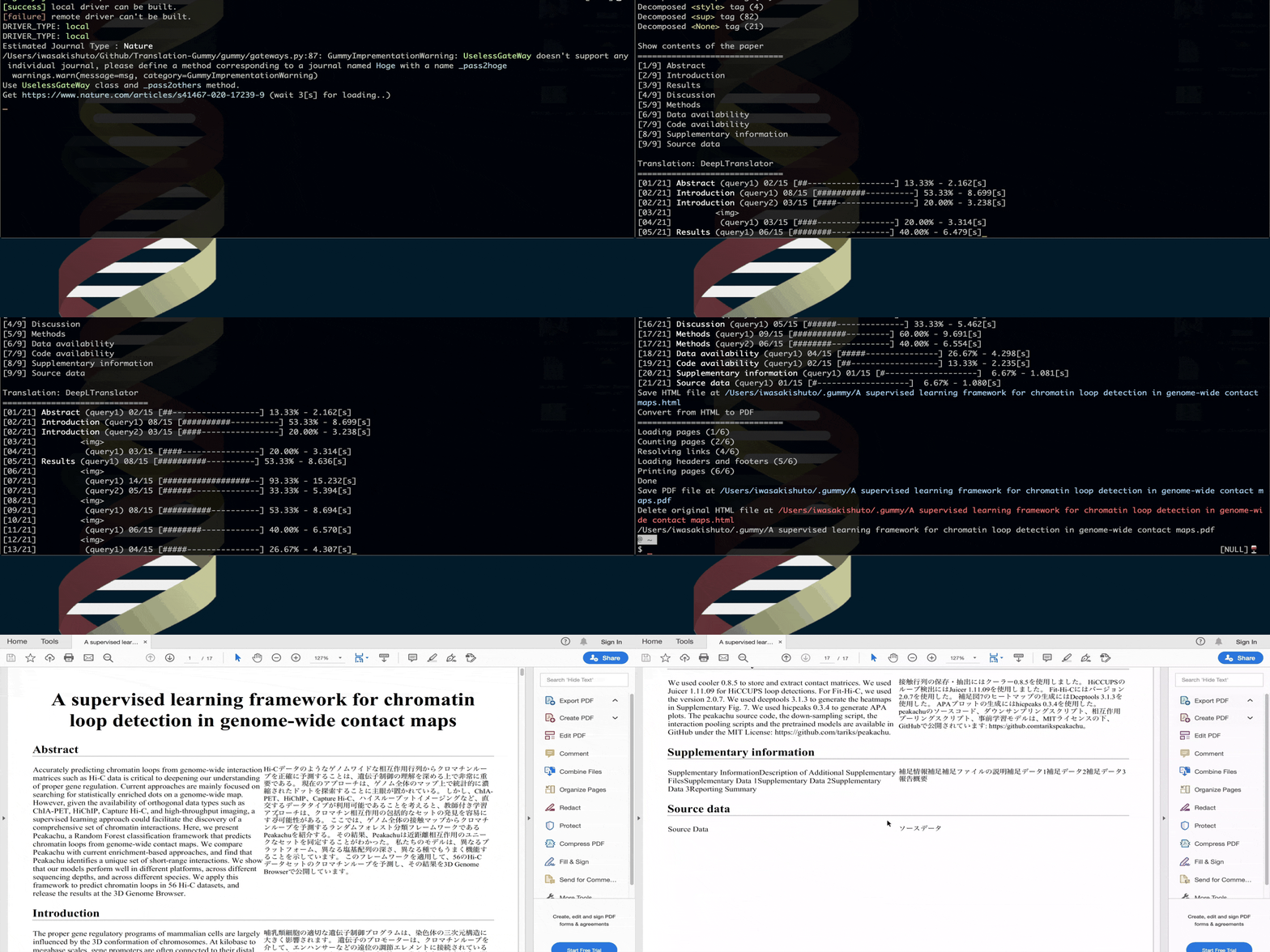
$ gummy-journal "https://www.nature.com/articles/ncb0800_500"
- Output

1 maintainer

Metadata
1 maintainer
Release files for translation-gummy 4.0.1
For a detailed explanation of source distributions (sdists) and built distributions (wheels), please see the package formats documentation.
Source distribution (sdist)
| File | Size | Uploaded | Provenance | Actions |
|---|---|---|---|---|
| Translation-Gummy-4.0.1.tar.gz | 73.5 kB | Without provenance | Details for Translation-Gummy-4.0.1.tar.gz |
Built distribution (wheel)
| File | Interpreter | ABI | Platform | Actions Reset |
|---|---|---|---|---|
| Translation_Gummy-4.0.1-py3-none-any.whl | Python 3 | none | any | Details for Translation_Gummy-4.0.1-py3-none-any.whl |
Total release size: 157.9 kB
Release files / Translation-Gummy-4.0.1.tar.gz
| Download URL | Translation-Gummy-4.0.1.tar.gz |
|---|---|
| Size | 73.5 kB |
| Tags | Source |
|
SHA-256 checksum How to use checksums |
acdd4196b42923f7cc39b815a193ac6284fd8d1b71aaf263005416bd48ddfb79
|
|
BLAKE2b-256 checksum How to use checksums |
3421281d217c3566daeb51dafd40530d806b9d56d6b8f5bcfb66cfade74346f8
|
| Upload date | |
|
Uploaded using Trusted Publishing? What is trusted publishing? |
No |
| Uploaded via |
poetry/1.1.6 CPython/3.8.12 Linux/5.13.0-1022-azure
|
Release files / Translation_Gummy-4.0.1-py3-none-any.whl
| Download URL | Translation_Gummy-4.0.1-py3-none-any.whl |
|---|---|
| Size | 84.4 kB |
| Tags | Python 3 |
|
SHA-256 checksum How to use checksums |
a8afaafefa8eb6ffd298b184557d7c40cc1be9294384031994537789506a737d
|
|
BLAKE2b-256 checksum How to use checksums |
1de950d1bcd4813f21cb8ede017ca6d56d5ce83094c9f833f267b9e667e1d93f
|
| Upload date | |
|
Uploaded using Trusted Publishing? What is trusted publishing? |
No |
| Uploaded via |
poetry/1.1.6 CPython/3.8.12 Linux/5.13.0-1022-azure
|
Security for translation-gummy 4.0.1
Provenance
Provenance describes where a file came from. On PyPI, provenance is shared via attestations, which provide a verifiable record of the build or publishing details. View details, limitations and caveats.
No provenance found
None of the files in this release were uploaded with provenance metadata.
A note on package security
PyPI is a repository for distributing packages, not a service for auditing them. While third-party security researchers and our staff do their best to detect and remove malicious packages, PyPI cannot guarantee the quality, security or suitability of any given package.
To learn more about protecting yourself from malicious actors, visit our package security documentation.














