
WeReadScan




About
一个用于的将微信读书上的图书扫描转换本地PDF的爬虫库.
谈谈为何而开发
不得不说,“微信读书”是一个很好的平台。但是美中不足很明显,用户购买了图书资源,但是只能在“微信读书”的Application中阅读或者做一些文字批注╮(╯▽╰)╭,这些功能相较于购买的纸质书籍显然是不足的。比如,作者就习惯于用iPad的相关notebook类app做笔记,而“微信读书”并没有适配pencil做handwriting笔记的功能。
因此,既然“微信读书”没有提供,那只好自己解决了。于是,经过2天的开发,终于有了这个爬虫脚本,也可以开心地做手写笔记了o( ̄▽ ̄)ブ
相关版本
在Sec-ant的建议下,参考了他的解决方案weread-scraper,将其中最重要的获取#preRenderContent的部分脚本进行整合,得到了WeReadScan-HTML版本,可以直接自动化获得多本图书的HTML,更加高效。
Get started
WeReadScan(原始版本)
pip install WeReadScan
WeReadScan-HTML(html-scrape version)
pip install WeReadScan-HTML
使用WeReadScan-HTML这个版本请访问 https://github.com/Algebra-FUN/WeReadScan/tree/html-variant
本项目需要使用selenium,需要对selenium具备基础的了解
Demo
话不多说,直接上代码
from selenium.webdriver import Chrome, ChromeOptions
from WeReadScan import WeRead

# 重要!为webdriver设置headless
chrome_options = ChromeOptions()
chrome_options.add_argument('--headless')
chrome_options.add_argument("--disable-blink-features=AutomationControlled")
chrome_options.add_argument('disable-infobars')
chrome_options.add_argument('log-level=3')

# 启动webdriver(--headless)
headless_driver = Chrome(options=chrome_options)

# debug 模式启动,可以保留png缓存
with WeRead(headless_driver,debug=True) as weread:
    # 重要!登陆
    weread.login()
    # 爬去指定url对应的图书资源并保存到当前文件夹
    weread.scan2pdf('https://weread.qq.com/web/reader/2c632ef071a486a92c60226')
扫描结果样例:
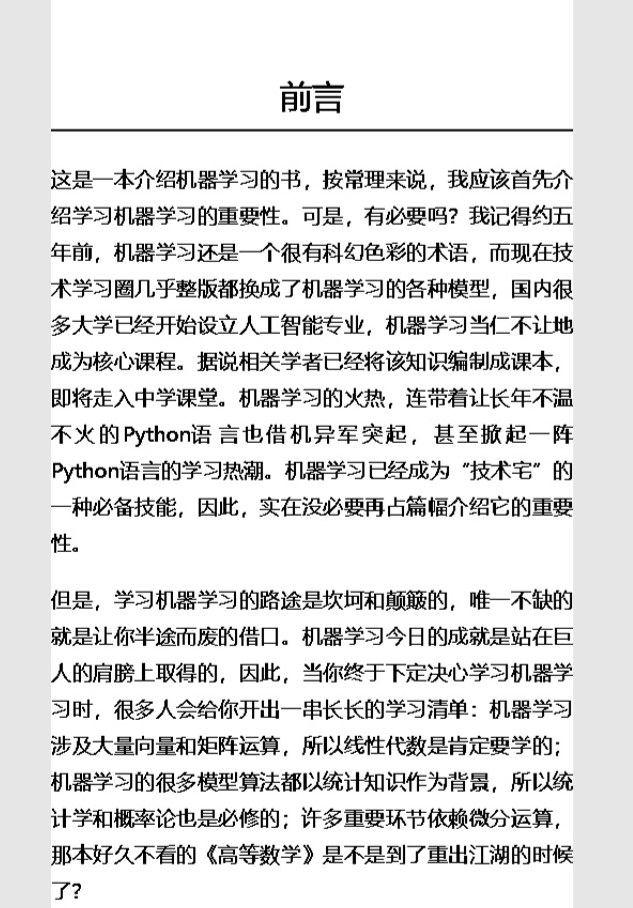
几点说明:
- webdriver 需要
无头(headless)模式启动 - 只有登陆后,才能扫描完整的图书资源;若不登陆,也可以扫描部分无需解锁的部分
API Reference
WeRead
WeReadScan.WeRead(headless_driver)
微信读书网页代理,用于图书扫描
Args
- headless_driver: 设置了headless的Webdriver示例
Returns
- WeReadInstance
Usage
chrome_options = ChromeOptions()
chrome_options.add_argument('--headless')
headless_driver = Chrome(chrome_options=chrome_options)
weread = WeRead(headless_driver)
Login
WeReadScan.WeRead.login(wait_turns=15)
展示二维码以登陆微信读书
Args
- wait_turns: 登陆二维码等待扫描的等待轮数
Usage
weread.login()
Scan2pdf
WeReadScan.WeRead.scan2pdf(self, book_url, save_at='.', binary_threshold=95, quality=90, show_output=True,font_size_index=1)
扫面微信读书的书籍转换为PDF并保存本地
Args
| 参数名 | 类型 | 默认值 | 描述 |
|---|---|---|---|
| book_url | str | 必填 | 扫描目标书籍的URL |
| save_at | str | '.' | 保存地址 |
| binary_threshold | int | 200 | 二值化处理的阈值 |
| quality | int | 100 | 扫描PDF的质量 |
| show_output | bool | True | 是否在该方法函数结束时展示生成的PDF文件 |
| font_size_index | int | 1 | 设置字号大小(对应微信读书字号) |
Usage
weread.scan2pdf('https://weread.qq.com/web/reader/a57325c05c8ed3a57224187kc81322c012c81e728d9d180')
Disclaimer
- 本脚本仅限用于已购图书的爬取,用于私人学习目的,禁止用于商业目的和网上资源扩散,尊重微信读书方面的利益
- 若User使用该脚本用于不当的目的,责任由使用者承担,作者概不负责
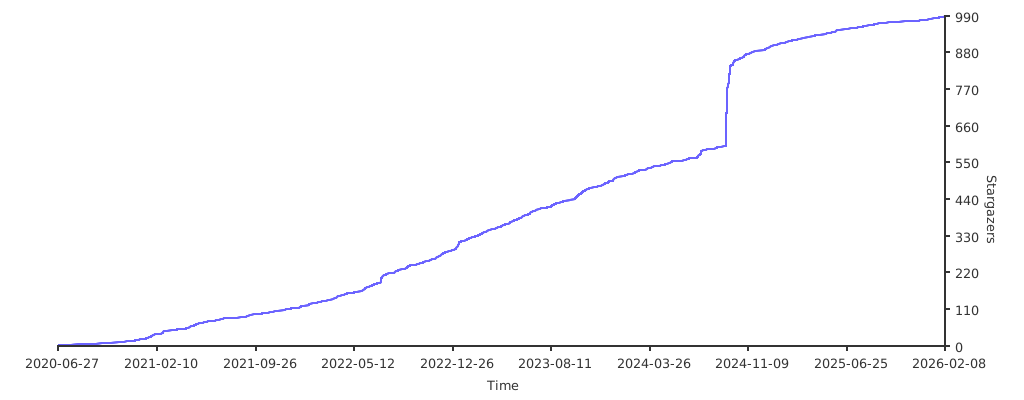
Stargazers over time
1 maintainer

Metadata
1 maintainer
Release files for WeReadScan 0.8.7
For a detailed explanation of source distributions (sdists) and built distributions (wheels), please see the package formats documentation.
Source distribution (sdist)
| File | Size | Uploaded | |
|---|---|---|---|
| WeReadScan-0.8.7.tar.gz | 7.4 kB | Details |
Built distribution (wheel)
| File | Interpreter | ABI | Platform | Reset |
|---|---|---|---|---|
| WeReadScan-0.8.7-py3-none-any.whl | Python 3 | none | any | Details |
Total release size: 15.7 kB
Release files / WeReadScan-0.8.7.tar.gz
| Download URL | WeReadScan-0.8.7.tar.gz |
|---|---|
| Size | 7.4 kB |
| Tags | Source |
|
SHA-256 checksum How to use checksums |
5c1f9dfac1216fb58effd5064c2d940f12379ea3daaec48e9cc5426a707361b0
|
|
BLAKE2b-256 checksum How to use checksums |
4c0cd4ddf9b5518eaf690ed9f0a603b842cc9bbecdcab1411c6704fb9e1b6a02
|
| Upload date | |
|
Uploaded using Trusted Publishing? What is trusted publishing? |
No |
| Uploaded via |
twine/3.3.0 pkginfo/1.7.0 requests/2.25.1 setuptools/57.4.0 requests-toolbelt/0.9.1 tqdm/4.56.0 CPython/3.8.7
|
Release files / WeReadScan-0.8.7-py3-none-any.whl
| Download URL | WeReadScan-0.8.7-py3-none-any.whl |
|---|---|
| Size | 8.3 kB |
| Tags | Python 3 |
|
SHA-256 checksum How to use checksums |
cb7df61e1e3a6e1e7ef34ffaeb6bf80e0e644e8b542c94b3447d8d7183e70362
|
|
BLAKE2b-256 checksum How to use checksums |
cb0b9779c5e36ee39bb293aaea297e8c221c452341ae6460ebc20129a624a1e4
|
| Upload date | |
|
Uploaded using Trusted Publishing? What is trusted publishing? |
No |
| Uploaded via |
twine/3.3.0 pkginfo/1.7.0 requests/2.25.1 setuptools/57.4.0 requests-toolbelt/0.9.1 tqdm/4.56.0 CPython/3.8.7
|














