
Installation | Basic Usage | Documentation | Contributing

A lone hard drive stands atop a data heap, staring at the full moon. Suddenly, it transforms…into a bootable clone of your drive, whirring hungrily at the digital moon.
WereSync takes a Linux hard drive and effectively clones it, but works incrementally so you don’t have to spend so long backing up each time. Additionally, WereSync can clone to a smaller drive, if your data will fit on the smaller drive. Because WereSync uses rsync to copy, it can copy a running drive, though certain parts of state may not be preserved.
Why Use WereSync?
Hopefully, you think this project looks amazing and you want to try it right away. However, you may be skeptical about the usefulness of WereSync. You may be thinking, I can do this exact same thing using gparted or ddrescue. Hear me out! There are a few reasons to use WereSync over the other tools.
WereSync is accessible to less-technical users. It comes with a simple interface and clone a drive with a single command while your computer is running. No booting to a live disk or pushing through a long initiation process. Unlike dd or CloneZilla, WereSync requires a low level of technical skill and has an easy learning curve
WereSync can run while the your main drive is being used, instead of blocking your computer up for hours at a time
WereSync will incrementally update clones, making subsequent clones much faster.
WereSync works quickly, a single command copies your entire drive, no booting to live CDs or managing MBRs.
WereSync can copy to a smaller drive, provided your drive’s data will fit.
WereSync creates new UUIDs for the new partitions, allowing you to use the old and new drives alongside each other.
Full documentation may be found here.
Installation
WereSync can be installed using the setup.py file.
$ ./setup.py installIf you have pip installed, you can easily install WereSync with the following command:
$ pip install weresync
For more in-depth instructions, see the installation documentation.
Basic Usage
Note: The WereSync daemon requires root capabilities to run because it has to access block devices. The client GUI and CLI programs do not need root permissions.
Copy the policy file in src/wersync/resources/weresync-dbus.conf to /etc/dbus-1/system.d. Then start the daemon:
$ sudo weresync-daemon & >/dev/null 2>&1
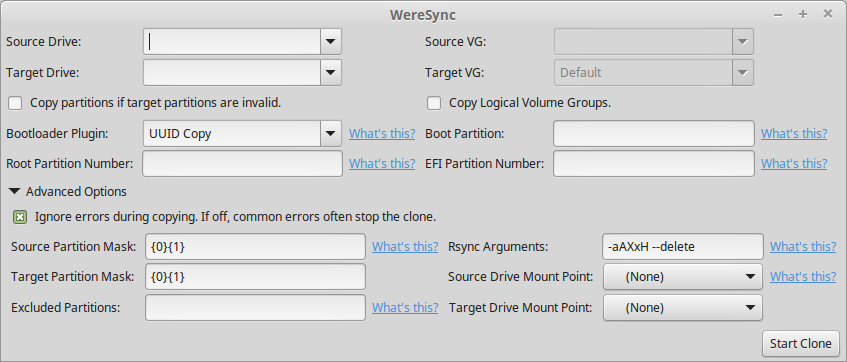
Then gui can be launched with the command:
$ weresync-gui
Which generates the following GUI, though generally the advanced options are unneeded:
To see the options for the terminal command use:
$ weresync -h
To copy from /dev/sda to /dev/sdb (the two drives must have the same partition scheme) use:
$ weresync /dev/sda /dev/sdb
After the copy is completely finished, you can kill the daemon process.
For more information, including how to copy the partition table from drive to another, see the Basic Usage documentation page.
Documentation
Documentation can be found on the Read the Docs.
Contributing and Bug Reports
First, take a look at our contribution guidelines.
To contribute simply fork this repository, make your changes, and submit a pull request. Bugs can be reported on the issue tracker
WereSync currently has huge need of people testing the program on complex drive setups. In order to do this please:
Install WereSync from pip:
pip install weresync
Run it on your system:
sudo weresync -C source_drive target_drive
Report any errors to the issue tracker. Please be sure to post the contents of /var/log/weresync/weresync.log and fdisk -l.
All contributions will be greatly appreciated!
Distributions Capability for Drive Copying






If you are able to test any of these systems, please report your exprience at the issue tracker. Any help will be much appreciated.
Licensing
This project is licensed under the Apache 2.0 License. Licensing is in the LICENSE.txt file in this directory.
Acknowledgments
Huge thanks to the creators of:
1 maintainer

Release files for WereSync 1.1.5
For a detailed explanation of source distributions (sdists) and built distributions (wheels), please see the package formats documentation.
Source distribution (sdist)
| File | Size | Uploaded | |
|---|---|---|---|
| WereSync-1.1.5.tar.gz | 161.4 kB | Details |
Built distributions (wheels)
| File | Interpreter | ABI | Platform | Reset |
|---|---|---|---|---|
| WereSync-1.1.5-py3.7.egg | Legacy Egg format | - | - | Details |
| WereSync-1.1.5-py3-none-any.whl | Python 3 | none | any | Details |
Total release size: 341.4 kB
Release files / WereSync-1.1.5.tar.gz
| Download URL | WereSync-1.1.5.tar.gz |
|---|---|
| Size | 161.4 kB |
| Tags | Source |
|
SHA-256 checksum How to use checksums |
ca6313fc9d1a8c17c6b161aef00996665176c96eee12e67f3aee5e5113fc26fc
|
|
BLAKE2b-256 checksum How to use checksums |
222d09b8ab7ab0ddf1c946812b5b3b7266e3c1adf7e539646f05e48a31bcced4
|
| Upload date | |
|
Uploaded using Trusted Publishing? What is trusted publishing? |
No |
| Uploaded via |
twine/1.13.0 pkginfo/1.5.0.1 requests/2.22.0 setuptools/41.0.1 requests-toolbelt/0.9.1 tqdm/4.32.1 CPython/3.7.3
|
Release files / WereSync-1.1.5-py3.7.egg
| Download URL | WereSync-1.1.5-py3.7.egg |
|---|---|
| Size | 114.4 kB |
| Tags | Egg |
|
SHA-256 checksum How to use checksums |
3e21391edb464cb18695683f485607d56a661c9d1344b9cdc982b0b19aefff2e
|
|
BLAKE2b-256 checksum How to use checksums |
4b08e46ede0e115e51985b9fab649a0e717afea8a0c99f2b590d844274a1ea94
|
| Upload date | |
|
Uploaded using Trusted Publishing? What is trusted publishing? |
No |
| Uploaded via |
twine/1.13.0 pkginfo/1.5.0.1 requests/2.22.0 setuptools/41.0.1 requests-toolbelt/0.9.1 tqdm/4.32.1 CPython/3.7.3
|
Release files / WereSync-1.1.5-py3-none-any.whl
| Download URL | WereSync-1.1.5-py3-none-any.whl |
|---|---|
| Size | 65.6 kB |
| Tags | Python 3 |
|
SHA-256 checksum How to use checksums |
62f211c82acea536465412b46d75debf0a6da9d94cb495d8115eb9df49d8046a
|
|
BLAKE2b-256 checksum How to use checksums |
087b4c2d5429fc98daeb6bf1d4fe19a48986e0d3e14d7908f56c53b429112717
|
| Upload date | |
|
Uploaded using Trusted Publishing? What is trusted publishing? |
No |
| Uploaded via |
twine/1.13.0 pkginfo/1.5.0.1 requests/2.22.0 setuptools/41.0.1 requests-toolbelt/0.9.1 tqdm/4.32.1 CPython/3.7.3
|














