
Wiring-x86
Wiring-x86 is a Python module that lets you use Arduino like functionality on Intel® Arduino capable boards such as:
It provides a simple and unified API (similar to the WiringPi module) to talk to the GPIO pins on the board.
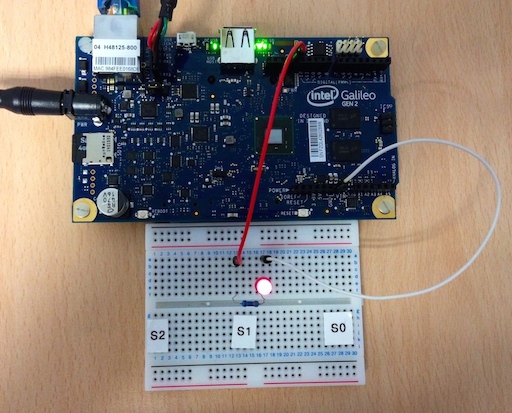
At the moment the Wiring-x86 library provides support to:
Writing to a GPIO pin configured as output.
Reading from a GPIO pin configured as high impedance input.
Reading from a GPIO pin configured as pullup input.
Reading from a GPIO pin configured as pulldown input.
Reading from a GPIO pin configured as analog input (ADC).
Writing to a GPIO pin configured as analog output (PWM).
Here is a simple example:
# Import the time module enable sleeps between turning the led on and off.
import time

# Import the GPIOEdison class from the wiringx86 module.
# In case you want to use a different board, simply the import right class
# below. The API is unified for all supported boards.
from wiringx86 import GPIOEdison as GPIO

# Create a new instance of the GPIOEdison class.
# Setting debug=True gives information about the interaction with sysfs.
gpio = GPIO(debug=False)
pin = 13
state = gpio.HIGH

# Set pin 13 to be used as an output GPIO pin.
print 'Setting up pin %d' % pin
gpio.pinMode(pin, gpio.OUTPUT)


print 'Blinking pin %d now...' % pin
try:
    while(True):
        # Write a state to the pin. ON or OFF.
        gpio.digitalWrite(pin, state)

        # Toggle the state.
        state = gpio.LOW if state == gpio.HIGH else gpio.HIGH

        # Sleep for a while.
        time.sleep(0.5)

# When you get tired of seeing the led blinking kill the loop with Ctrl-C.
except KeyboardInterrupt:
    # Leave the led turned off.
    print '\nCleaning up...'
    gpio.digitalWrite(pin, gpio.LOW)

    # Do a general cleanup. Calling this function is not mandatory.
    gpio.cleanup()
Full documentation can be found at wiring-x86 site on Read the Docs.
The original YOCTO Linux OS provided by Intel® must be used. For more information on how to get this software go to Intel® Makers site. This module will only work with that combination of boards and OS since it uses specific Intel® GPIO driver sysfs interface.
1 maintainer

Metadata
1 maintainer
Release files for Wiring-x86 1.0.0
For a detailed explanation of source distributions (sdists) and built distributions (wheels), please see the package formats documentation.
Source distribution (sdist)
| File | Size | Uploaded | Provenance | Actions |
|---|---|---|---|---|
| Wiring-x86-1.0.0.tar.gz | 9.9 kB | Without provenance | Details for Wiring-x86-1.0.0.tar.gz |
Release files / Wiring-x86-1.0.0.tar.gz
| Download URL | Wiring-x86-1.0.0.tar.gz |
|---|---|
| Size | 9.9 kB |
| Tags | Source |
|
SHA-256 checksum How to use checksums |
6e4df802cd9b3e35c9d18ef52f832c8729948d46a4044d437bdfb4fa9cf7f4b2
|
|
BLAKE2b-256 checksum How to use checksums |
5468849eb1b2afafb090112a0df009f2bb1f196a617e0ed12e259a4f31cee88b
|
| Upload date | |
|
Uploaded using Trusted Publishing? What is trusted publishing? |
No |
Security for Wiring-x86 1.0.0
Provenance
Provenance describes where a file came from. On PyPI, provenance is shared via attestations, which provide a verifiable record of the build or publishing details. View details, limitations and caveats.
No provenance found
None of the files in this release were uploaded with provenance metadata.
A note on package security
PyPI is a repository for distributing packages, not a service for auditing them. While third-party security researchers and our staff do their best to detect and remove malicious packages, PyPI cannot guarantee the quality, security or suitability of any given package.
To learn more about protecting yourself from malicious actors, visit our package security documentation.














