
Description
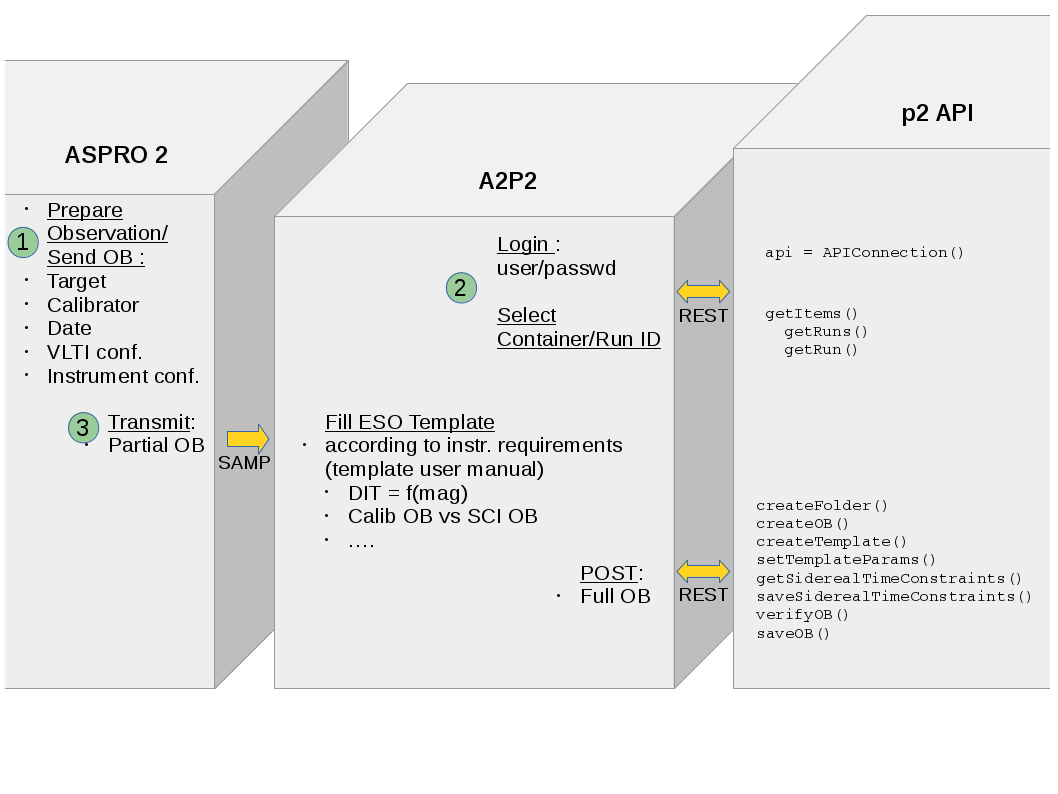
Prepare your observations within Aspro2 ( V0.9.9.3+ ) and run a2p2 to submit your OB.
Once setup ready, select your target and use Interop Menu
You will need an account to perform operation on ESO database through P2.
Installation
The package is uploaded to PyPI, so you can install the package using pip:
pip install [--user] -U a2p2
You can also build and install from sources using git:
git clone https://github.com/JMMC-OpenDev/a2p2.git
pip install [--user] ./a2p2
Or select a tagged version and download tagged zip version:
pip install [--user] ./{unzipped-directory}
Usage
a2p2 [-h] [-u USERNAME] [-v]
- optional arguments:
- -h, --help
show this help message and exit
- -u USERNAME, --username USERNAME
use another user login in history’s comments.
- -v, --verbose
Verbose
A GUI is provided using tkinter.
- Once Aspro2 is running and a2p2 is connected to an OB submission service (using P2API) :
select your target
enter the Aspro2’s menu Interop/Send Obs. block(s) to A2p2
After few seconds, you shoud get a report of your new submission.
Each facilities get it’s own code directory to manage specific GUI and specific OB processing. You can get associated inline help in the HELP tab.
License
A2P2 is released under GPL license. Please have a look in the LICENSE file for any detail and feel free to fill issues.
Interaction diagram
1 maintainer

Metadata
1 maintainer
Release files for a2p2 0.1.3
For a detailed explanation of source distributions (sdists) and built distributions (wheels), please see the package formats documentation.
Source distribution (sdist)
| File | Size | Uploaded | Provenance | Actions |
|---|---|---|---|---|
| a2p2-0.1.3.tar.gz | 30.6 kB | Without provenance | Details for a2p2-0.1.3.tar.gz |
Built distribution (wheel)
| File | Interpreter | ABI | Platform | Actions Reset |
|---|---|---|---|---|
| a2p2-0.1.3-py2-none-any.whl | Python 2 | none | any | Details for a2p2-0.1.3-py2-none-any.whl |
Total release size: 67.3 kB
Release files / a2p2-0.1.3.tar.gz
| Download URL | a2p2-0.1.3.tar.gz |
|---|---|
| Size | 30.6 kB |
| Tags | Source |
|
SHA-256 checksum How to use checksums |
6f233d7e532c2bc1b48f9877a4bc2696baebde14c71be073964dc808b4970e76
|
|
BLAKE2b-256 checksum How to use checksums |
1dd45576f8d90b9db450032a7fe6223efb4122b0f9a38cd3b7850f89924e7381
|
| Upload date | |
|
Uploaded using Trusted Publishing? What is trusted publishing? |
No |
| Uploaded via |
twine/1.11.0 pkginfo/1.4.2 requests/2.19.1 setuptools/40.2.0 requests-toolbelt/0.8.0 tqdm/4.23.4 CPython/2.7.9
|
Release files / a2p2-0.1.3-py2-none-any.whl
| Download URL | a2p2-0.1.3-py2-none-any.whl |
|---|---|
| Size | 36.8 kB |
| Tags | Python 2 |
|
SHA-256 checksum How to use checksums |
a0c6d1ed21920b1b68b43ee31877151fe76bf63f8b68fb8baf16bb52c5accac4
|
|
BLAKE2b-256 checksum How to use checksums |
1d002fb3c5805f4a31fb690cdfc1534aafa6dc913322d7cc442716551cb7125d
|
| Upload date | |
|
Uploaded using Trusted Publishing? What is trusted publishing? |
No |
| Uploaded via |
twine/1.11.0 pkginfo/1.4.2 requests/2.19.1 setuptools/40.2.0 requests-toolbelt/0.8.0 tqdm/4.23.4 CPython/2.7.9
|
Security for a2p2 0.1.3
Provenance
Provenance describes where a file came from. On PyPI, provenance is shared via attestations, which provide a verifiable record of the build or publishing details. View details, limitations and caveats.
No provenance found
None of the files in this release were uploaded with provenance metadata.
A note on package security
PyPI is a repository for distributing packages, not a service for auditing them. While third-party security researchers and our staff do their best to detect and remove malicious packages, PyPI cannot guarantee the quality, security or suitability of any given package.
To learn more about protecting yourself from malicious actors, visit our package security documentation.














