




Abraia Vision SDK
Abraia is a Python SDK and command-line tool for computer vision and image processing. Use it to run vision models on images and video, combine inference with tracking and counting, edit images, and manage files in Abraia storage. Inference runs through ONNX Runtime or a compatible Hailo accelerator.
Contents
Installation
Install the SDK and its abraia command:
python -m pip install -U abraia
For remote file operations, configure your Abraia API key:
abraia configure
The command shows where to obtain your key and saves it for future commands.
You can also set the ABRAIA_KEY environment variable. Python applications
use the same credentials or accept a key through Abraia(abraia_key="...").
Quick start
Run object detection on a local video and save the rendered result:
abraia run demo detect input.mp4 --output result.avi
Use camera 0 instead of a video file:
abraia run demo detect 0
Choose another demo to change the workflow:
abraia run demo segment input.mp4
abraia run demo pose input.mp4
abraia run demo people input.mp4
abraia run demo faces input.mp4
--output saves rendered video locally. --accelerator selects auto, onnx,
cpu, gpu, or hailo; the default is auto. See
Hardware acceleration for backend setup.
Command-line usage
Use abraia --help or abraia COMMAND --help for available options. In the
command reference below, uppercase names are placeholders and brackets mark
optional arguments.
Remote files
abraia list [FOLDER]
abraia upload LOCAL_PATH [REMOTE_FOLDER]
abraia download REMOTE_PATH [LOCAL_FOLDER]
abraia remove REMOTE_PATH
abraia metadata [--remove] REMOTE_PATH
upload accepts a file or directory. remove lists matching files and asks
for confirmation before deleting them. metadata displays metadata unless
--remove is supplied.
Demos and saved projects
abraia run demo DEMO_NAME [SOURCE] [--accelerator auto] [--output FILE]
abraia run PROJECT [SOURCE] [--accelerator auto] [--output FILE]
Available demos are detect, segment, pose, people, queue, escalator,
tomato, apple, strawberry, grapes, plates, and faces. A supplied
source overrides the demo's configured camera or video.
A project run loads PROJECT/pipeline.json from Abraia storage. First create
a pipeline configuration, then upload it to your project:
abraia upload pipeline.json my-project/
abraia run my-project input.mp4 --output result.avi
The project must contain pipeline.json; a project run does not select a
trained model automatically. Omit the source to use the one saved in the
pipeline.
Image search
Search a remote project's images using a text query or a local reference image:
abraia search my-project "man with red shirt"
abraia search my-project reference.jpg
Python API
The public entry points are:
| Module | Entry points | Purpose |
|---|---|---|
abraia |
Abraia, APIError, config |
Remote files, metadata, image transforms, and credentials |
abraia.editing |
Image editing functions | Background removal, cropping, upscaling, anonymization, and inpainting |
abraia.inference |
load_model, register_model_factory |
Load configured models or register an adapter |
abraia.runtime |
Pipeline |
Run a configured workflow over an image or video source |
abraia.utils |
load_image, save_image, show_image, encode_image, image_base64, render_results |
Load, save, display, encode images, and render inference results |
Remote files and image transforms
from abraia import Abraia

client = Abraia()
remote_path = client.upload_file("input.jpg", "examples/input.jpg")
files, folders = client.list_files("examples/")
local_path = client.download_file(remote_path, "downloads/input.jpg")
client.transform_image(
    remote_path,
    "downloads/input-small.jpg",
    params={"width": 640},
)
list_files() returns (files, folders). upload_file() returns the remote
path, and download_file() returns a local path. transform_image() writes
the transformed image to its local destination. Remote API failures raise
APIError, whose code attribute contains the HTTP status code.
The client also provides check_file, move_file, remove_file, metadata
operations, and load/save methods for JSON and images.
Image editing
Editing functions accept RGB NumPy arrays. For example, remove an image's background and save the transparent result:
from abraia.editing import remove_background
from abraia.utils import load_image, save_image

image = load_image("input.jpg")
result = remove_background(image)
save_image(result, "cutout.png")
load_image() applies EXIF orientation, returns an RGB array by default, and
limits the longest edge to 2048 pixels. Pass max_size=None to keep the full
resolution, or mode="RGBA" to preserve transparency. save_image(image, path)
creates missing parent directories. Use encode_image() for encoded bytes,
image_base64() for a data URL, or show_image() to open an image for viewing.
Other editing functions are anonymize_image, blur_background,
clean_image, inpaint_image, smartcrop_image, and upscale_image.
Model-backed operations load their models when first used.
Inference on an image
Load a configured detector and pass it an RGB image:
from abraia.inference import load_model
from abraia.utils import load_image

image = load_image("input.jpg")
with load_model({"kind": "yolov8", "task": "detection", "size": "small"}) as model:
    results = model.run(image, conf_threshold=0.35)
print(results)
Use a pipeline when you also need video input, tracking, counting, or rendered output.
Pipelines
A pipeline is a version-two JSON document containing a source, ordered
steps, and optional display settings. The first step runs a model; later
steps process its results. Sources can be cameras, images, videos, or streams.
Detection, tracking, and counting
Save the following as pipeline.json. It detects people, tracks them across
frames, counts crossings of a line, and writes a rendered video:
{
  "version": 2,
  "source": {"type": "video", "src": "input.mp4"},
  "steps": [
    {
      "type": "model",
      "model": {
        "kind": "yolov8",
        "task": "detection",
        "size": "small",
        "labels": ["person"],
        "conf_threshold": 0.35
      }
    },
    {"type": "tracker"},
    {"type": "line_counter", "line": [[100, 360], [1180, 360]]}
  ],
  "display": {"show": true, "dest": "result.avi"}
}
Line and polygon coordinates are in source-image pixels. Adjust them to your video's resolution and the area you want to monitor.
Run the local configuration from Python:
from abraia.runtime import Pipeline

with Pipeline.from_file("pipeline.json") as pipeline:
    pipeline.run()
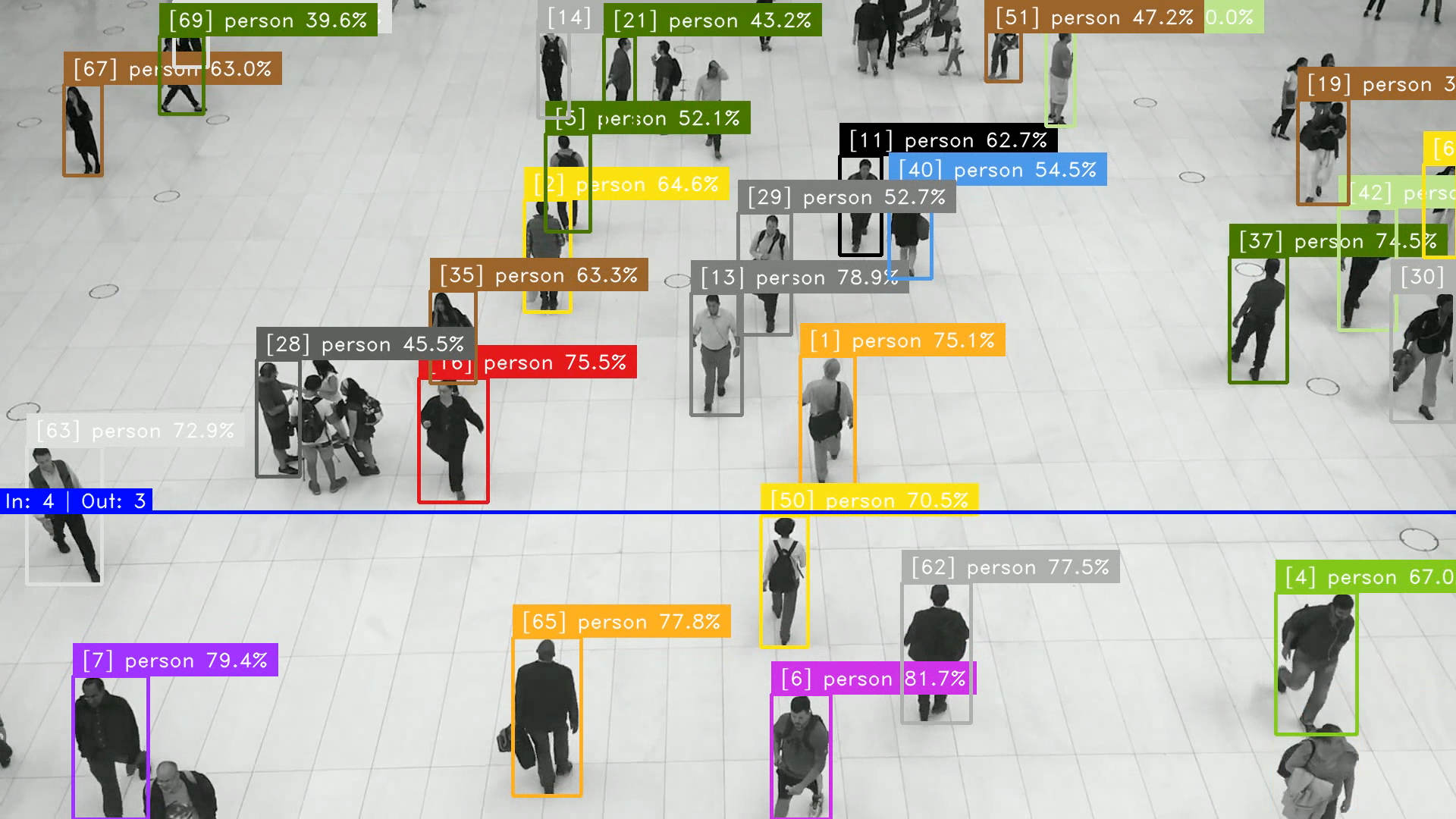
Use Pipeline.from_dict(config) to supply a Python dictionary instead of a
file. For processing without a display window, set display.show to false;
display.dest can still save the rendered video.
Besides tracker and line_counter, pipelines support filter, crop,
region_filter, and region_timer. Filters select detections, crops produce
regions for further processing, and region steps restrict or time activity
inside a polygon. Tracking must precede counting and region timing.
Combining two models
A pipeline can contain up to two model steps. The second model processes
regions from the preceding results and attaches its output to the matching
detections. For example, save this configuration as plate_ocr.json to detect
license plates and read their text:
{
  "version": 2,
  "source": {"type": "video", "src": "traffic.mp4"},
  "steps": [
    {
      "type": "model",
      "model": {"kind": "license_plate", "task": "detection"}
    },
    {
      "type": "model",
      "model": {"kind": "ocr", "task": "recognition"}
    }
  ],
  "display": {"show": true}
}
Run it with Pipeline.from_file("plate_ocr.json").run().

Choosing a model
Each model configuration uses kind for the model family and task for the
operation. Common combinations include:
kind |
task |
Model selection |
|---|---|---|
yolov8 |
detection, segmentation, pose |
Built-in small, medium, or large preset, or explicit uri |
yolo9 |
detection |
Built-in small, medium, or large preset, or explicit uri |
yolov5, yolo11 |
detection, segmentation, pose |
Explicit uri |
rtmdet |
detection, segmentation |
Built-in small, medium, or large preset, or explicit uri |
resnet |
classification |
Explicit model uri |
grounding_dino |
detection |
Built-in model with labels or a text prompt |
face |
detection, recognition |
Built-in models; recognition can use a face index |
license_plate |
detection, recognition |
Built-in plate detection or recognition workflow |
ocr |
recognition |
Built-in text detection and recognition |
size selects small, medium, or large where presets are available. An
explicit uri selects your own model. It can refer to a local file or an
Abraia storage path. Managed model assets are downloaded and cached as needed.
To use Grounding DINO, replace a detection step's model object with:
{
  "kind": "grounding_dino",
  "task": "detection",
  "labels": ["person", "red car"],
  "conf_threshold": 0.35,
  "text_threshold": 0.25
}
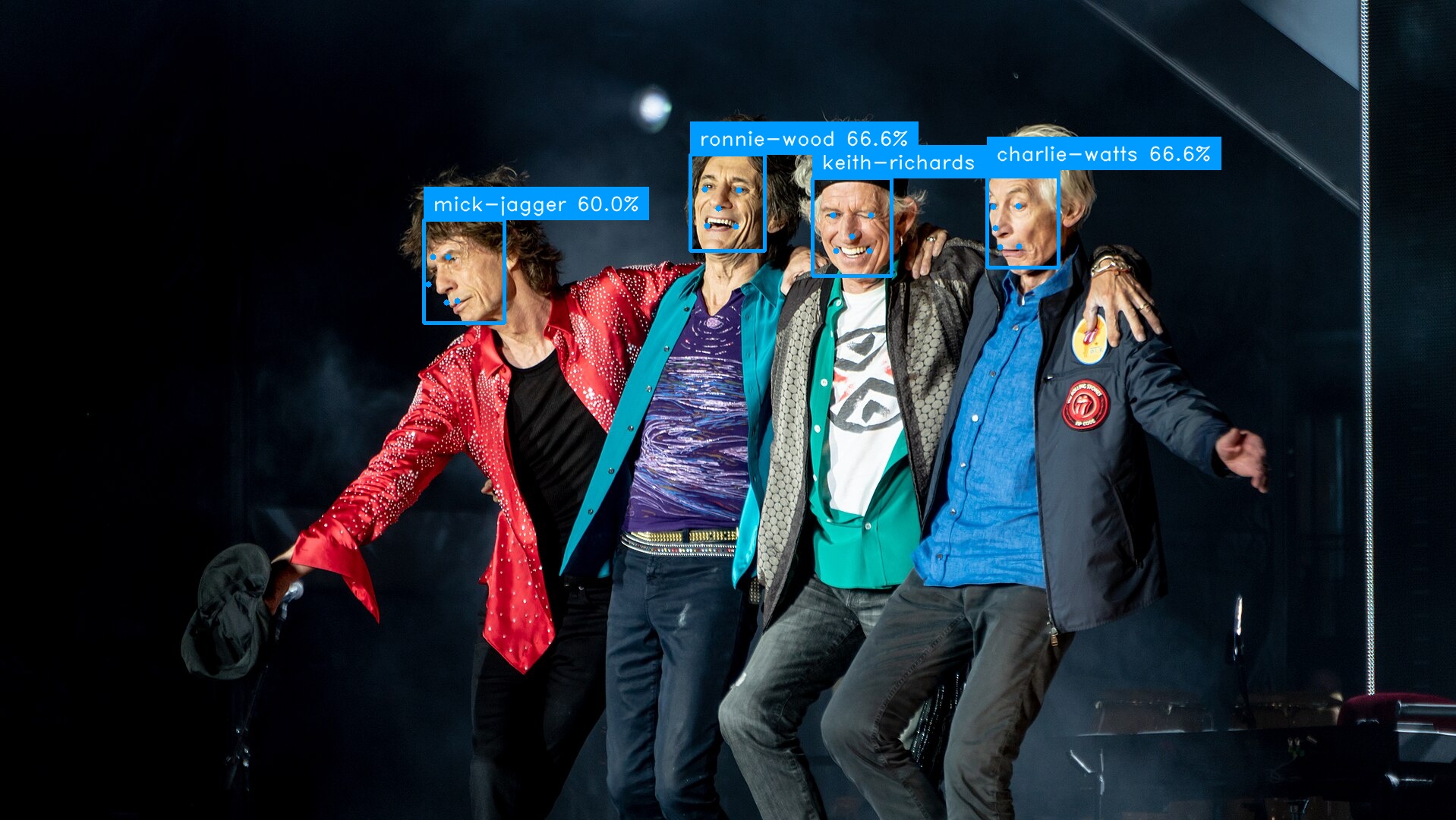
For face recognition, use kind: "face", task: "recognition", and
params: {"index": "faces.json", "threshold": 0.45}. The index contains
name and vector entries.
The full pipeline schema is packaged at
abraia/runtime/pipeline-v2.schema.json.
Hardware acceleration
ONNX Runtime: CPU and GPU
The default installation includes the CPU build of ONNX Runtime.
--accelerator cpu forces CPU execution; onnx uses the available ONNX Runtime providers.
The default auto prefers a compatible Hailo device and model, then falls
back to ONNX Runtime.
For an NVIDIA GPU on Linux, replace the CPU package in the same environment:
python -m pip uninstall -y onnxruntime
python -m pip install onnxruntime-gpu
python -c "import onnxruntime as ort; print(ort.get_available_providers())"
Check that the provider list includes CUDAExecutionProvider, then run:
abraia run demo detect input.mp4 --accelerator gpu
The GPU package must match the host's CUDA and cuDNN versions. See the ONNX Runtime CUDA provider requirements for compatibility details.
Hailo and Raspberry Pi
Install the Hailo platform runtime and connect a compatible device. A model must be compiled for the device's architecture, such as Hailo-8 or Hailo-8L. The SDK accepts local HEF files, Hailo export directories, and Abraia storage paths. Model metadata uses JSON sidecars; YAML metadata is no longer read.
For a supported demo, select Hailo explicitly:
abraia run demo people input.mp4 --accelerator hailo
For a custom pipeline, replace its model object with a compatible HEF, for
example:
{
  "kind": "yolov8",
  "task": "detection",
  "uri": "multiple/models/yolov8n_hailo8.hef",
  "conf_threshold": 0.3
}
This example targets Hailo-8. Choose a HEF matching your own device. On a
Raspberry Pi, the counting pipeline above can use a camera source such as
{"type": "camera", "src": 0, "resolution": [1280, 720], "fps": 30}.
The same Python entry point runs the pipeline:
from abraia.runtime import Pipeline

with Pipeline.from_file("pipeline.json", accelerator="hailo") as pipeline:
    pipeline.run()
Hailo bundles use abraia.json for the model family (kind), operation
(task), labels (classes), and host-side decoding settings. For example:
{
  "kind": "rtmdet",
  "task": "segmentation",
  "classes": ["tomato", "leaf"],
  "confidenceThreshold": 0.25,
  "iouThreshold": 0.7
}
Use kind in ONNX sidecars as well. Move model-family values such as
"backend": "rtmdet" to "kind": "rtmdet". Decoder selection follows
kind and task; model_type overrides are no longer needed in pipeline
parameters. A pipeline's explicit kind takes precedence over the sidecar.
License
This project is licensed under the MIT License.
1 maintainer

Metadata
1 maintainer
Release files for abraia 0.28.1
For a detailed explanation of source distributions (sdists) and built distributions (wheels), please see the package formats documentation.
Source distribution (sdist)
| File | Size | Uploaded | Provenance | |
|---|---|---|---|---|
| abraia-0.28.1.tar.gz | 171.8 kB | Without provenance | Details |
Built distribution (wheel)
| File | Interpreter | ABI | Platform | Reset |
|---|---|---|---|---|
| abraia-0.28.1-py3-none-any.whl | Python 3 | none | any | Details |
Total release size: 326.8 kB
Release files / abraia-0.28.1.tar.gz
| Download URL | abraia-0.28.1.tar.gz |
|---|---|
| Size | 171.8 kB |
| Tags | Source |
|
SHA-256 checksum How to use checksums |
c34cd196ec08142d28f6e822077529c2643c7121bf5b3a04e19fb1c24bed946e
|
|
BLAKE2b-256 checksum How to use checksums |
b2ca11372f4fa0305bfdd6e329e9eb988715dcf7d049f49ecb17491f1100bc40
|
| Upload date | |
|
Uploaded using Trusted Publishing? What is trusted publishing? |
No |
| Uploaded via |
twine/7.0.0 CPython/3.13.16
|
Release files / abraia-0.28.1-py3-none-any.whl
| Download URL | abraia-0.28.1-py3-none-any.whl |
|---|---|
| Size | 154.9 kB |
| Tags | Python 3 |
|
SHA-256 checksum How to use checksums |
8f4d99a39bb7b18e5fcdc299dabf7eaa246df3493e2da043a97e6c051ece8420
|
|
BLAKE2b-256 checksum How to use checksums |
23287059b6556b626ea6fa68ae627663467422ee1389eb071e2c30c673acc1d0
|
| Upload date | |
|
Uploaded using Trusted Publishing? What is trusted publishing? |
No |
| Uploaded via |
twine/7.0.0 CPython/3.13.16
|
Security for abraia 0.28.1
Provenance
Provenance describes where a file came from. On PyPI, provenance is shared via attestations, which provide a verifiable record of the build or publishing details. View details, limitations and caveats.
No provenance found
None of the files in this release were uploaded with provenance metadata.
A note on package security
PyPI is a repository for distributing packages, not a service for auditing them. While third-party security researchers and our staff do their best to detect and remove malicious packages, PyPI cannot guarantee the quality, security or suitability of any given package.
To learn more about protecting yourself from malicious actors, visit our package security documentation.














