





Acoular
Acoular is a Python module for acoustic beamforming that is distributed under the new BSD license.
It is aimed at applications in acoustic testing. Multichannel data recorded by a microphone array can be processed and analyzed in order to generate mappings of sound source distributions. The maps (acoustic photographs) can then be used to locate sources of interest and to characterize them using their spectra.
Features
- frequency domain beamforming algorithms: delay & sum, Capon (adaptive), MUSIC, functional beamforming, eigenvalue beamforming
- frequency domain deconvolution algorithms: DAMAS, DAMAS+, Clean, CleanSC, orthogonal deconvolution
- frequency domain inverse methods: CMF (covariance matrix fitting), general inverse beamforming, SODIX
- time domain methods: delay & sum beamforming, CleanT deconvolution
- time domain methods applicable for moving sources with arbitrary trajectory (linear, circular, arbitrarily 3D curved),
- frequency domain methods for rotating sources via virtual array rotation for arbitrary arrays and with different interpolation techniques
- 1D, 2D and 3D mapping grids for all methods
- gridless option for orthogonal deconvolution
- four different built-in steering vector formulations
- arbitrary stationary background flow can be considered for all methods
- efficient cross spectral matrix computation
- flexible modular time domain processing: n-th octave band filters, fast, slow, and impulse weighting, A-, C-, and Z-weighting, filter bank, zero delay filters
- time domain simulation of array microphone signals from fixed and arbitrarily moving sources in arbitrary flow
- fully object-oriented interface
- lazy evaluation: while processing blocks are set up at any time, (expensive) computations are only performed when needed
- intelligent and transparent caching: computed results are automatically saved and loaded on the next run to avoid unnecessary re-computation
- parallel (multithreaded) implementation with Numba for most algorithms
- easily extendable with new algorithms
License
Acoular is licensed under the BSD 3-clause. See LICENSE
Citing
If you use Acoular for academic work, please consider citing both our publication:
Sarradj, E., & Herold, G. (2017).
A Python framework for microphone array data processing.
Applied Acoustics, 116, 50–58.
https://doi.org/10.1016/j.apacoust.2016.09
and our software:
Sarradj, E., Herold, G., Kujawski, A., Jekosch, S., Pelling, A. J. R., Czuchaj, M., Gensch, T., & Oertwig, S..
Acoular – Acoustic testing and source mapping software.
Zenodo. https://zenodo.org/doi/10.5281/zenodo.3690794
Dependencies
Acoular runs under Linux, Windows and MacOS and needs Numpy, Scipy, Traits, scikit-learn, pytables, Numba packages available. Matplotlib is needed for some of the examples.
If you want to use input from a soundcard, you will also need to install the sounddevice package. Some solvers for the CMF method need Pylops.
Installation
Acoular can be installed via conda, which is also part of the Anaconda Python distribution. It is recommended to install into a dedicated conda environment. After activating this environment, run
conda install -c acoular acoular
This will install Acoular in your Anaconda Python environment and make the Acoular library available from Python. In addition, this will install all dependencies (those other packages mentioned above) if they are not already present on your system.
A second option is to install Acoular via pip. It is recommended to use a dedicated virtual environment and then run
pip install acoular
For more detailed installation instructions, see the documentation.
Documentation and help
Documentation is available here with a getting started section and examples.
The Acoular blog contains some tutorials.
If you discover problems with the Acoular software, please report them using the issue tracker on GitHub. Please use the Acoular discussions forum for practical questions, discussions, and demos.
Contributing
We are always happy to welcome new contributors to the project. If you are interested in contributing, have a look at the CONTRIBUTING.md file.
Example
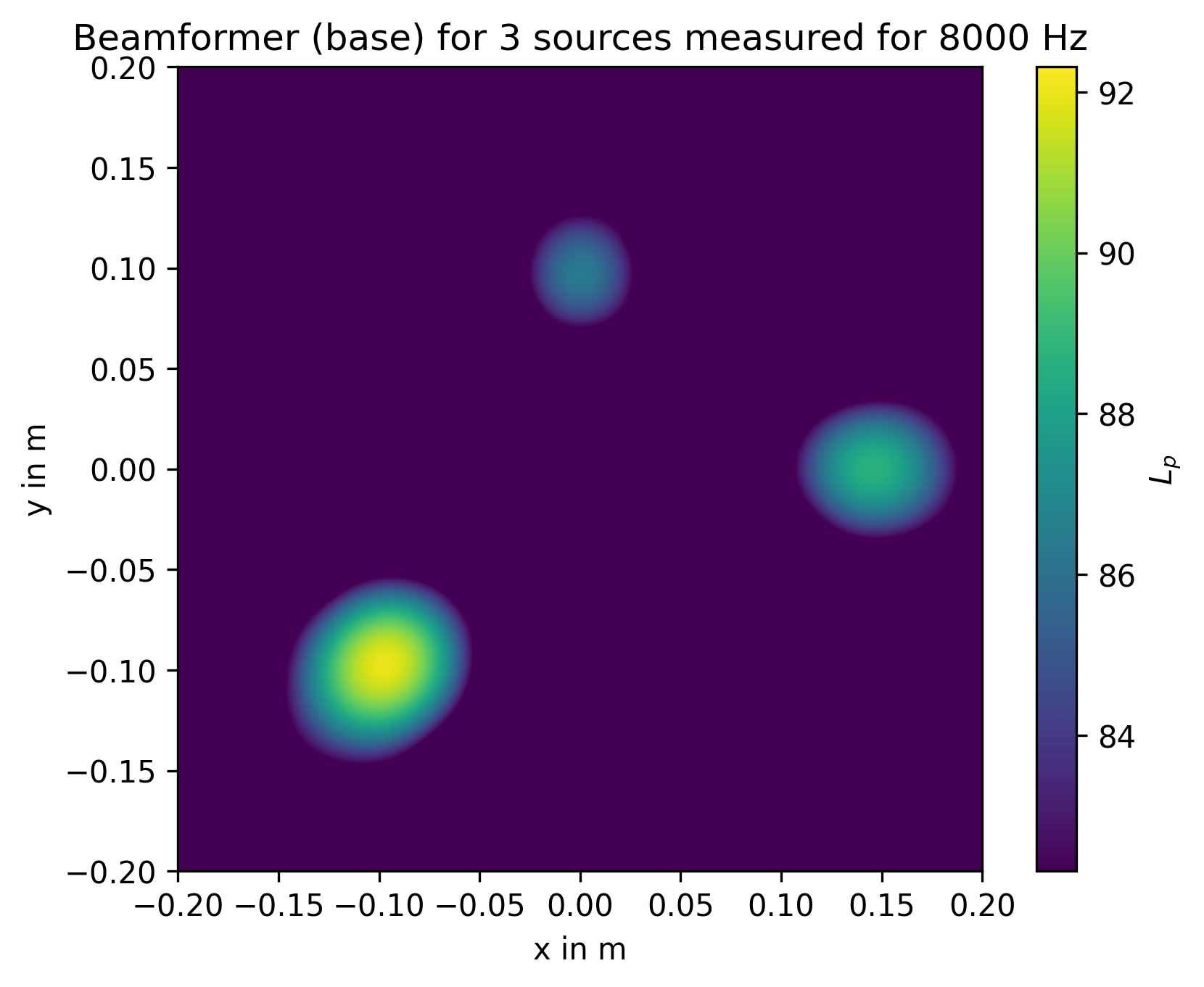
This reads data from 64 microphone channels and computes a beamforming map for the 8kHz third octave band:
from pathlib import Path

import acoular as ac
import matplotlib.pylab as plt

# this file contains the microphone coordinates
micgeofile = Path(ac.__file__).parent / 'xml' / 'array_64.xml'
# set up object managing the microphone coordinates
mg = ac.MicGeom( file=micgeofile )
# generate test data, in real life this would come from an array measurement
p = ac.demo.create_three_sources(mg, h5savefile='three_sources.h5')
# set up object managing the microphone array data (usually from measurement)
ts = ac.TimeSamples( file='three_sources.h5')
# set up object managing the cross spectral matrix computation
ps = ac.PowerSpectra( source=ts, block_size=128, window='Hanning' )
# alternatively, you can use the in-memory Mixer object directly:
# ps = ac.PowerSpectra( source=p, block_size=128, window='Hanning' )
# set up object managing the mapping grid
rg = ac.RectGrid( x_min=-0.2, x_max=0.2, y_min=-0.2, y_max=0.2, z=-0.3, \
increment=0.01 )
# set up steering vector, implicitely contains also the standard quiescent
# environment with standard speed of sound
st = ac.SteeringVector( grid = rg, mics=mg )
# set up the object managing the delay & sum beamformer
bb = ac.BeamformerBase( freq_data=ps, steer=st )
# request the result in the 8kHz third octave band from approriate FFT-Lines
# this starts the actual computation (data intake, FFT, Welch CSM, beamforming)
pm = bb.synthetic( 8000, 3 )
# compute the sound pressure level
Lm = ac.L_p( pm )
# plot the map
plt.imshow( Lm.T, origin='lower', vmin=Lm.max()-10, extent=rg.extend(), \
interpolation='bicubic')
plt.title('Beamformer (base) for 3 sources measured for 8000 Hz')
plt.xlabel('x in m')
plt.ylabel('y in m')
plt.colorbar(label=r'$L_p$')
plt.savefig('three_sources.png', dpi=300, bbox_inches='tight')
plt.show()
3 maintainers


Metadata
3 maintainers
Release files for acoular 25.3
For a detailed explanation of source distributions (sdists) and built distributions (wheels), please see the package formats documentation.
Source distribution (sdist)
| File | Size | Uploaded | Provenance | Actions |
|---|---|---|---|---|
| acoular-25.3.tar.gz | 160.4 kB | Without provenance | Details for acoular-25.3.tar.gz |
Built distribution (wheel)
| File | Interpreter | ABI | Platform | Actions Reset |
|---|---|---|---|---|
| acoular-25.3-py3-none-any.whl | Python 3 | none | any | Details for acoular-25.3-py3-none-any.whl |
Total release size: 343.9 kB
Release files / acoular-25.3.tar.gz
| Download URL | acoular-25.3.tar.gz |
|---|---|
| Size | 160.4 kB |
| Tags | Source |
|
SHA-256 checksum How to use checksums |
a1e37a16ba0818e6680f6b624c740bc6073361e576c2e0b14e186b408a17cf60
|
|
BLAKE2b-256 checksum How to use checksums |
0bedbd8afa83d5ba9b30acdaddac33da15068d626ffd8893710381c7c71352c8
|
| Upload date | |
|
Uploaded using Trusted Publishing? What is trusted publishing? |
No |
| Uploaded via |
python-httpx/0.28.1
|
Release files / acoular-25.3-py3-none-any.whl
| Download URL | acoular-25.3-py3-none-any.whl |
|---|---|
| Size | 183.6 kB |
| Tags | Python 3 |
|
SHA-256 checksum How to use checksums |
4ec97358446cf4e31f263c65214006cb9b5910ea846618110b11ffa8cdd0534c
|
|
BLAKE2b-256 checksum How to use checksums |
041a449366ca96402e5d7e328edec2f50dcad6d5987b710231e4ed8e01e2748d
|
| Upload date | |
|
Uploaded using Trusted Publishing? What is trusted publishing? |
No |
| Uploaded via |
python-httpx/0.28.1
|
Security for acoular 25.3
Provenance
Provenance describes where a file came from. On PyPI, provenance is shared via attestations, which provide a verifiable record of the build or publishing details. View details, limitations and caveats.
No provenance found
None of the files in this release were uploaded with provenance metadata.
A note on package security
PyPI is a repository for distributing packages, not a service for auditing them. While third-party security researchers and our staff do their best to detect and remove malicious packages, PyPI cannot guarantee the quality, security or suitability of any given package.
To learn more about protecting yourself from malicious actors, visit our package security documentation.














