

Auto DEap LEarning Computer Vision
Python library and dashboard for hyperparameter search and model training for computer vision tasks based on PyTorch, Optuna, FiftyOne, Dash, Segmentation Model Pytorch.





The main features of this library are:
- Fiftyone dataset integration with prediction visualization
- Uploading your dataset in one of the popular formats, currently supported - 2
- Adding your own python class for convert dataset
- Displaying training statistics in tensorboard
- Support for all samples from optuna
- Segmentation use smp: 9 model architectures, popular losses and metrics, see doc smp
- Convert weights to another format, currently supported - 1 (onnx)
📚 Project Documentation 📚
Visit Read The Docs Project Page or read following README to know more about Auto Deap Learning Computer Vision (AdeleCV for short) library
📋 Table of content
💡 Examples
🛠 Installation
Install torch cuda if not installed:
$ pip install torch torchvision torchaudio --extra-index-url https://download.pytorch.org/whl/cu116
PyPI version:
$ pip install adelecv
Poetry:
$ poetry add adelecv
📜 Instruction Dashboard
- Create .env file.
See docs.
Notification_LEVEL: DEBUG | INFO | ERROR
Example:
TMP_PATH='./tmp'
DASHBOARD_PORT=8080
FIFTYONE_PORT=5151
TENSORBOARD_PORT=6006
NOTIFICATION_LEVEL=DEBUG
- Run (about 30 seconds (I'm working on acceleration)).
adelecv_dashboard --envfile .env
- Help
adelecv_dashboard --help
🏰 Architecture
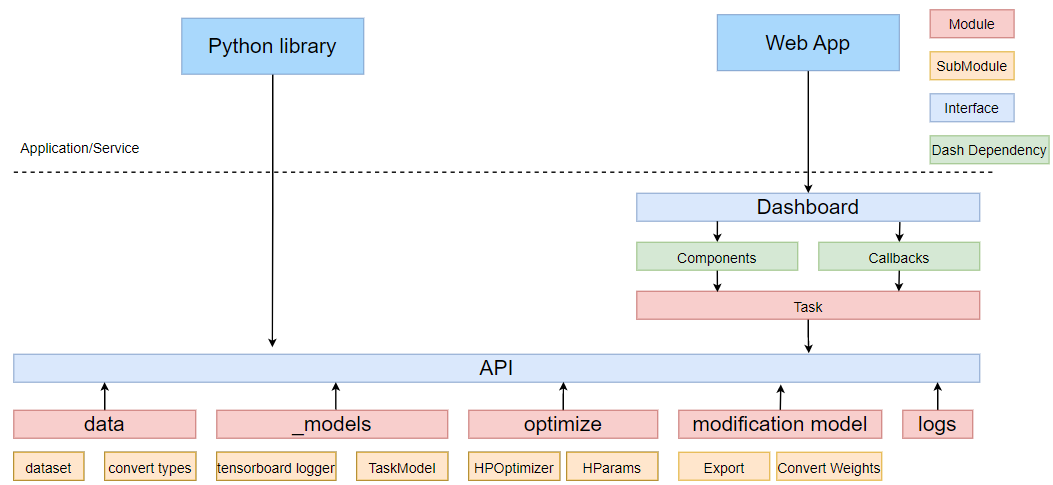
The user can use the api or dashboard(web app). The api is based on 5 modules:
- data: contains an internal representation of the dataset, classes for converting datasets, fiftyone dataset
- _models: torch model, its hyperparams, functions for training
- optimize: set of hyperparams, optuna optimizer
- modification model: export and conversion of weights
- logs: python logging
The Dash library was used for dashboard. It is based on components and callbacks on these component elements.
📝 Citing
@misc{Mamatin:2023,
  Author = {Denis Mamatin},
  Title = {AdeleCV},
  Year = {2023},
  Publisher = {GitHub},
  Journal = {GitHub repository},
  Howpublished = {\url{https://github.com/AsakoKabe/AdeleCV}}
}
🛡️ License
Project is distributed under MIT License
1 maintainer

Metadata
1 maintainer
Release files for adelecv 0.0.2
For a detailed explanation of source distributions (sdists) and built distributions (wheels), please see the package formats documentation.
Source distribution (sdist)
| File | Size | Uploaded | Provenance | Actions |
|---|---|---|---|---|
| adelecv-0.0.2.tar.gz | 26.9 kB | Without provenance | Details for adelecv-0.0.2.tar.gz |
Built distribution (wheel)
| File | Interpreter | ABI | Platform | Actions Reset |
|---|---|---|---|---|
| adelecv-0.0.2-py3-none-any.whl | Python 3 | none | any | Details for adelecv-0.0.2-py3-none-any.whl |
Total release size: 68.4 kB
Release files / adelecv-0.0.2.tar.gz
| Download URL | adelecv-0.0.2.tar.gz |
|---|---|
| Size | 26.9 kB |
| Tags | Source |
|
SHA-256 checksum How to use checksums |
f4b06de3f960ea2823f81e0df5b97b273efb1a4195437ee5c7e6eb096081d4b3
|
|
BLAKE2b-256 checksum How to use checksums |
342b8eb2c70a1d880b3f98072fe01441bb76687b6388f293caf2478b848fadc6
|
| Upload date | |
|
Uploaded using Trusted Publishing? What is trusted publishing? |
No |
| Uploaded via |
poetry/1.4.2 CPython/3.10.9 Linux/5.15.0-1036-azure
|
Release files / adelecv-0.0.2-py3-none-any.whl
| Download URL | adelecv-0.0.2-py3-none-any.whl |
|---|---|
| Size | 41.5 kB |
| Tags | Python 3 |
|
SHA-256 checksum How to use checksums |
0e1956c74b1f4c5c0d15ff25d1149ad1d2f315a74d1543b6ef55f983904ab1e7
|
|
BLAKE2b-256 checksum How to use checksums |
469bc84ff743cb331edb23bfaa9d03c9c118b8ada1d9d77a86500507a01defd8
|
| Upload date | |
|
Uploaded using Trusted Publishing? What is trusted publishing? |
No |
| Uploaded via |
poetry/1.4.2 CPython/3.10.9 Linux/5.15.0-1036-azure
|
Security for adelecv 0.0.2
Provenance
Provenance describes where a file came from. On PyPI, provenance is shared via attestations, which provide a verifiable record of the build or publishing details. View details, limitations and caveats.
No provenance found
None of the files in this release were uploaded with provenance metadata.
A note on package security
PyPI is a repository for distributing packages, not a service for auditing them. While third-party security researchers and our staff do their best to detect and remove malicious packages, PyPI cannot guarantee the quality, security or suitability of any given package.
To learn more about protecting yourself from malicious actors, visit our package security documentation.














