
AI Voc Builder
Available in other languages: [中文]
"AI Voc Builder" is a smart English vocabulary tool powered by AI technology. It helps you quickly build your own English vocabulary and learn more effectively.
Key Features:
- Unique, efficient vocabulary building: One-click saving of sample sentences, translations, new words, and definitions.
- Engaging story and quiz modes to help you master new words.
- Supports over 10 target languages with multiple AI backends, including OpenAI, Gemini, and Anthropic.
Product Screenshots:
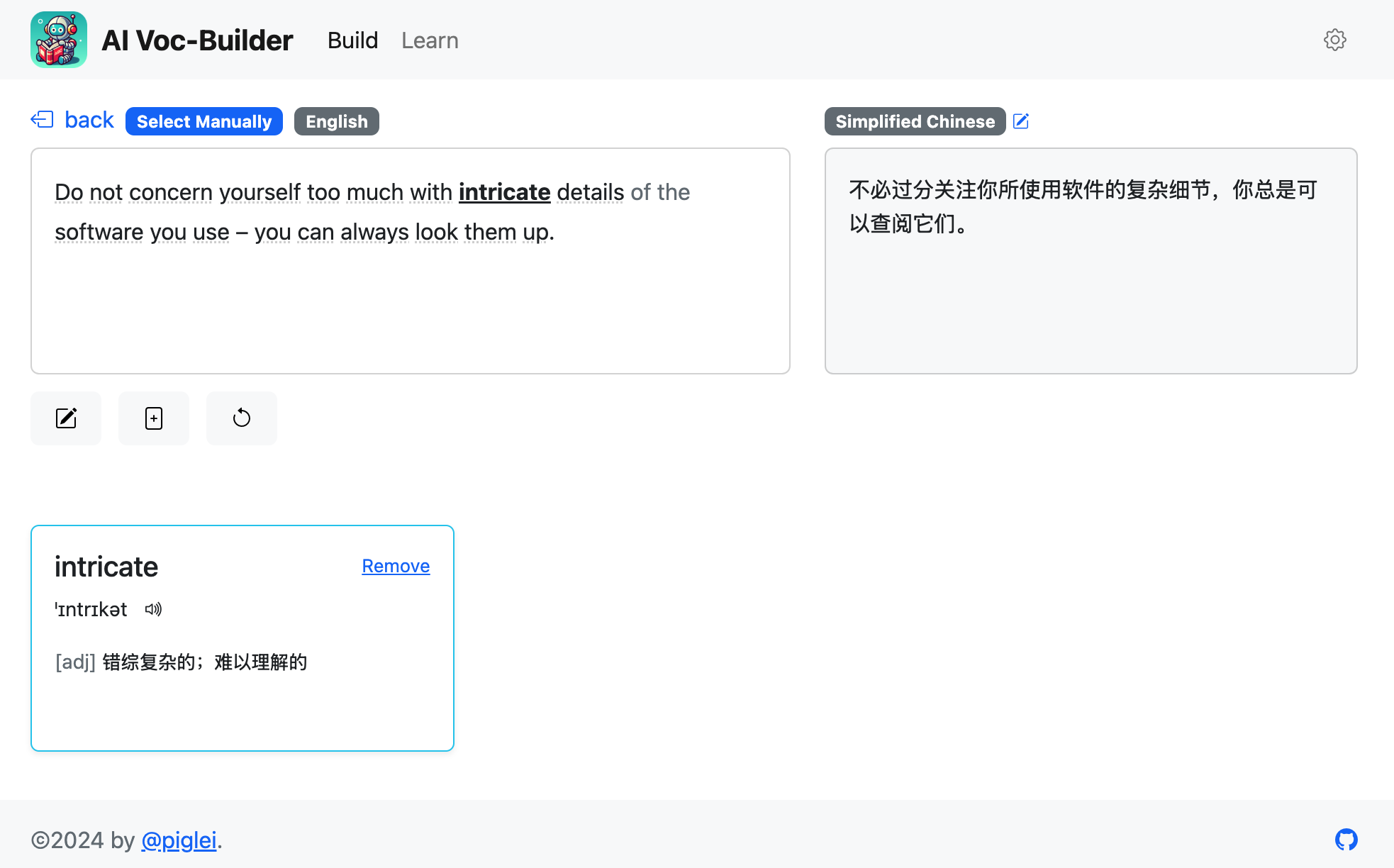
↑ AI-Powered Smart Vocabulary Extraction |
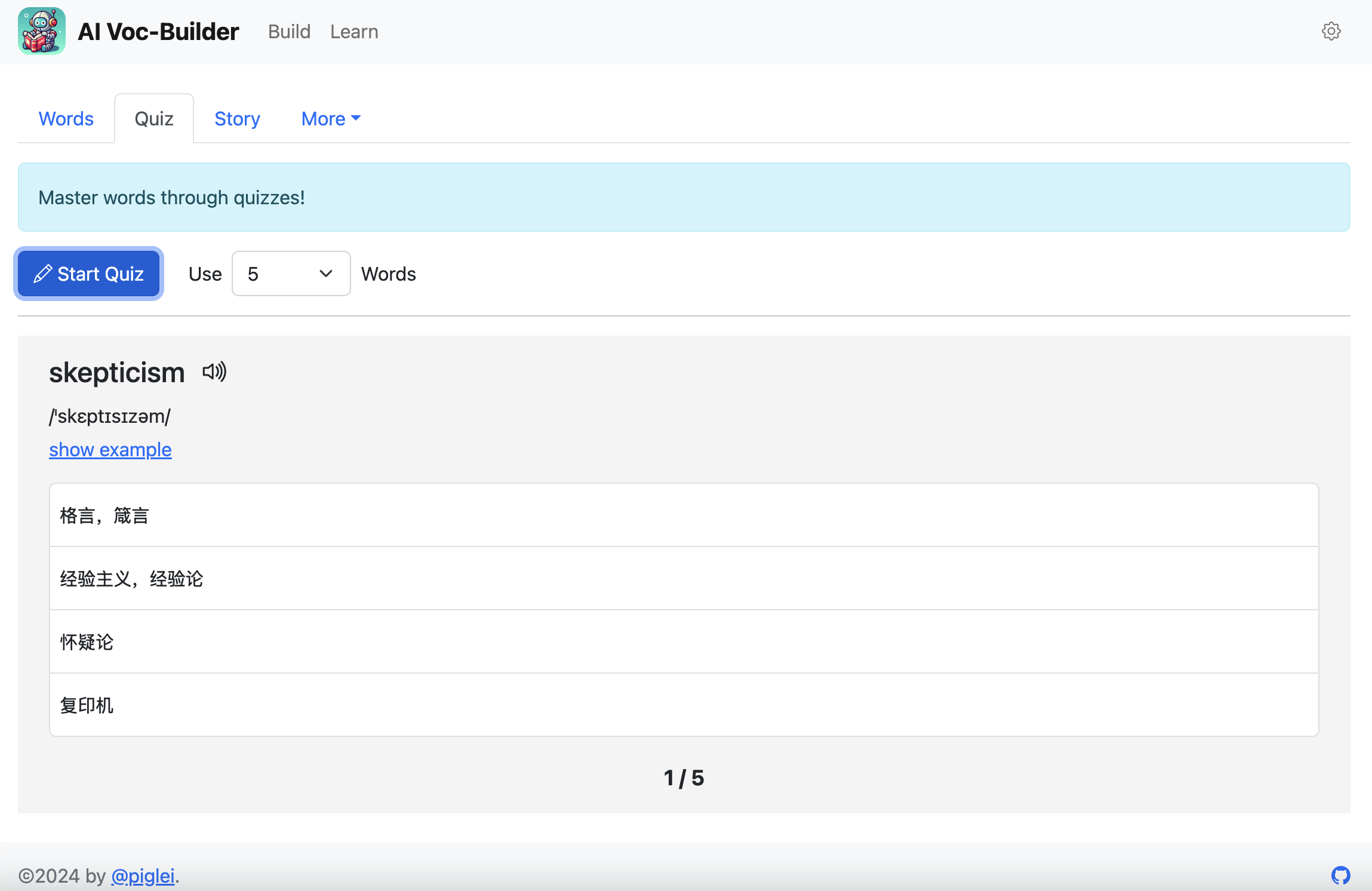
↑ Test Mode for Enhanced Memorization |
Quick Start
This tool is developed using Python. Please use pip or other packaging tools to install it:
pip install ai-vocabulary-builder
pipx install ai-vocabulary-builder
uv pip install ai-vocabulary-builder
# or uvx to run the notebook directly
# uvx --from ai-vocabulary-builder aivoc notebook
Requires Python version 3.9 or higher.
After installation, run aivoc notebook to open the application in your browser.
Docker
For easier setup and a consistent environment, you can also use Docker. See the CONTRIBUTING.md file for instructions on building and running the Docker image.
Features
The most commonly used features can be found inside the notebook app. Here are some more advanced features:
- Integration with PopClip to add new words by highlighting. Read Guide
Configurations
The main configurations for this tool can be managed from the web page. Here are some additional configurations that are set through environment variables.
AIVOC_DATA_DIR
Specifies the path where the vocabulary data files are stored. The default path is the current user's home directory: ~/.
Example:
export AIVOC_DATA_DIR="$HOME/Documents"
Why Develop This Tool?
When learning English, a vocabulary builder is a very important tool. A good vocabulary builder should include at least the following: new words, definitions, example sentences, and example sentence translations . However, maintaining this information manually is very tedious. As a result, most people who have studied English for many years do not have their own vocabulary builder. They often encounter new words while reading, look them up in the dictionary, and then forget them 20 seconds later.
"AI Voc Builder" tries to use the power of AI to make the process of building a vocabulary builder easy and fun, so that everyone can have their own vocabulary builder and quickly expand their vocabulary.
1 maintainer

Metadata
1 maintainer
Release files for ai-vocabulary-builder 1.4.3
For a detailed explanation of source distributions (sdists) and built distributions (wheels), please see the package formats documentation.
Source distribution (sdist)
| File | Size | Uploaded | Provenance | Actions |
|---|---|---|---|---|
| ai_vocabulary_builder-1.4.3.tar.gz | 840.0 kB | Without provenance | Details for ai_vocabulary_builder-1.4.3.tar.gz |
Built distribution (wheel)
| File | Interpreter | ABI | Platform | Actions Reset |
|---|---|---|---|---|
| ai_vocabulary_builder-1.4.3-py3-none-any.whl | Python 3 | none | any | Details for ai_vocabulary_builder-1.4.3-py3-none-any.whl |
Total release size: 1.7 MB
Release files / ai_vocabulary_builder-1.4.3.tar.gz
| Download URL | ai_vocabulary_builder-1.4.3.tar.gz |
|---|---|
| Size | 840.0 kB |
| Tags | Source |
|
SHA-256 checksum How to use checksums |
2b3cdca37564d87a16b6084c9c761743fe8bf6309b7e30dc420165a73d98318f
|
|
BLAKE2b-256 checksum How to use checksums |
65e00eaa7950f5c09d60efe1e4d9df0d9e497eeb4b9d86bf640dac8d19895222
|
| Upload date | |
|
Uploaded using Trusted Publishing? What is trusted publishing? |
No |
| Uploaded via |
twine/6.2.0 CPython/3.12.8
|
Release files / ai_vocabulary_builder-1.4.3-py3-none-any.whl
| Download URL | ai_vocabulary_builder-1.4.3-py3-none-any.whl |
|---|---|
| Size | 849.8 kB |
| Tags | Python 3 |
|
SHA-256 checksum How to use checksums |
b41c036a08e8d44f67dfe2ea7d1f91ea7a1ac86e36c28d968117236b465159f8
|
|
BLAKE2b-256 checksum How to use checksums |
6ae8f46dfb40725b50380a054205050a53839d36c606ddcda51ecc03a135f678
|
| Upload date | |
|
Uploaded using Trusted Publishing? What is trusted publishing? |
No |
| Uploaded via |
twine/6.2.0 CPython/3.12.8
|
Security for ai-vocabulary-builder 1.4.3
Provenance
Provenance describes where a file came from. On PyPI, provenance is shared via attestations, which provide a verifiable record of the build or publishing details. View details, limitations and caveats.
No provenance found
None of the files in this release were uploaded with provenance metadata.
A note on package security
PyPI is a repository for distributing packages, not a service for auditing them. While third-party security researchers and our staff do their best to detect and remove malicious packages, PyPI cannot guarantee the quality, security or suitability of any given package.
To learn more about protecting yourself from malicious actors, visit our package security documentation.














