
Ai Chat CLI

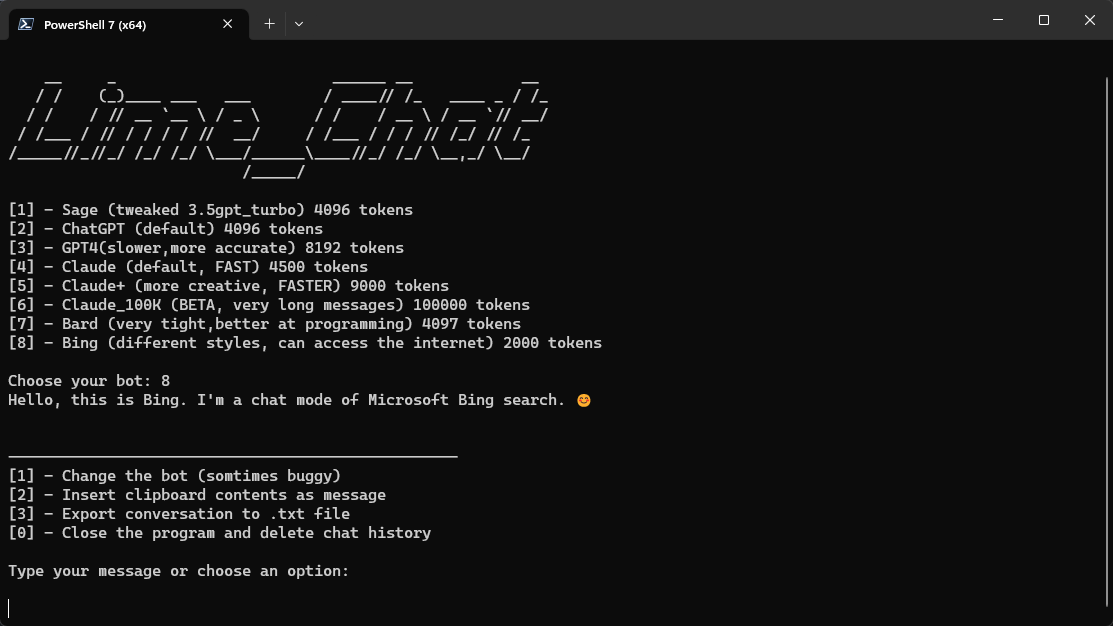
A command-line interface chatbot. It allows you to have interactive conversations with different bots, including GPT4 FOR FREE
Check the web version here (WIP).
Thanks to @Lomusire for providing premium tokens ❤️.
We are in a race with poe.com devs baning our tokens, you can help by generating tokens.
Updated poe.com token list here.
Features✨
- Choose between different bots.
- Input messages for the chatbot via command-line arguments or interactively.
- Export the conversation to a .txt file for future reference.
- Insert your clipboard for multiple-line messages.
- Delete your messages to respect your privacy.
- Updated tokens each day
Prerequisites📋
- Python 3.7 or higher installed on your system.
Getting Started🚀
-
Clone or download the CLI app repository to your local machine.
-
Open a command-line interface (e.g., Command Prompt, Terminal) and navigate to the directory where you have saved the GPT CLI files.
-
Install the required dependencies by running the following command:
pip install -r requirements.txt
- Run the CLI app:
cd aichat
python chatcli.py
OR download it using pip📥📦
pip install aichat-cli --upgrade
📦#####How to add pip package to PATH#####📦
- Open the command prompt.
- Type
pip show aichat-cliand press Enter. This will show you the location of the package. - Copy the path of the package.
- Open the Start menu and search for “Environment Variables”.
- Click on “Edit the system environment variables”.
- Click on “Environment Variables” button.
- Under “System Variables”, scroll down and find “Path” and click on “Edit”.
- Click on “New” and paste the path of the package that you copied earlier.
- Click on “OK” to save changes.
🔐#####How To generate tokens manually#####🔐
poe token
Log into Poe on any web browser, then open your browser's developer tools (also known as "inspect") and look for the value of the p-b cookie in the following menus:
Chromium: Devtools > Application > Cookies > poe.com
Firefox: Devtools > Storage > Cookies
Safari: Devtools > Storage > Cookies
then save the token by creating poe_token.txt in /aichat/tokens
Bard token
Log into Bard on any web browser, then open your browser's developer tools (also known as "inspect") and look for the value of the __Secure-1PSID cookie in the following menus:
(tip : copy the cookie name to the filter box)
Chromium: Devtools > Application > Cookies > bard.google.com
Firefox: Devtools > Storage > Cookies
Safari: Devtools > Storage > Cookies
then save the token by creating bard_token.txt in /aichat/tokens
⚠️ Warning: Be careful using Bard tokens; they are Google account tokens.
Bing token
Not required.
Usage📝
This CLI app supports the following command-line arguments:
-
-bor--bot: Choose the bot for the conversation. Valid options are provided by the application. Example:python chatcli.py -b chatgpt -
-mor--message: Input a message for the chatbot. Example:python chatcli.py -b sage -m "Hello, how are you?" -
For more info, use
-hor--helpto see the help message.
If you don't provide any command-line arguments, the app will prompt you to choose a bot and enter a message interactively.
Once the conversation starts, you can continue the interaction by typing your messages or selecting options from the menu. The menu options include changing the bot or exporting the conversation to a .txt file.
Notes📌
-
If the app cannot find the
token.txtfile or the file is empty, it will automatically generate a new token using thetoken_gen.pyin/aichat/token_genscript provided. -
The CLI app also supports the use of premium tokens , so you can be able to use GPT4.
-
The conversation history is stored within the app and is not persistent between sessions.
Feel free to customize and enhance the GPT CLI app according to your needs. Happy chatting!
1 maintainer

Metadata
1 maintainer
Release files for aichat-cli 0.5.1
For a detailed explanation of source distributions (sdists) and built distributions (wheels), please see the package formats documentation.
Source distribution (sdist)
| File | Size | Uploaded | Provenance | Actions |
|---|---|---|---|---|
| aichat-cli-0.5.1.tar.gz | 15.8 kB | Without provenance | Details for aichat-cli-0.5.1.tar.gz |
Built distribution (wheel)
| File | Interpreter | ABI | Platform | Actions Reset |
|---|---|---|---|---|
| aichat_cli-0.5.1-py3-none-any.whl | Python 3 | none | any | Details for aichat_cli-0.5.1-py3-none-any.whl |
Total release size: 31.6 kB
Release files / aichat-cli-0.5.1.tar.gz
| Download URL | aichat-cli-0.5.1.tar.gz |
|---|---|
| Size | 15.8 kB |
| Tags | Source |
|
SHA-256 checksum How to use checksums |
18e2a18a861e3c561cb34409ccae14b76955933b43de8df1308c952d7f403fd0
|
|
BLAKE2b-256 checksum How to use checksums |
ef73bf2f15dfc85d12aede34bc11f89509168e5b430acd4476d12570bdea238e
|
| Upload date | |
|
Uploaded using Trusted Publishing? What is trusted publishing? |
No |
| Uploaded via |
twine/4.0.2 CPython/3.11.3
|
Release files / aichat_cli-0.5.1-py3-none-any.whl
| Download URL | aichat_cli-0.5.1-py3-none-any.whl |
|---|---|
| Size | 15.8 kB |
| Tags | Python 3 |
|
SHA-256 checksum How to use checksums |
a23e0ec71ac677905878571a55fbb0b21904779e417db71b202995883727ee50
|
|
BLAKE2b-256 checksum How to use checksums |
c1fa24eb6b3cc0b87c3a2571f7d1210fad1458c0bb397b0656f5a4f4cd2ec06a
|
| Upload date | |
|
Uploaded using Trusted Publishing? What is trusted publishing? |
No |
| Uploaded via |
twine/4.0.2 CPython/3.11.3
|
Security for aichat-cli 0.5.1
Provenance
Provenance describes where a file came from. On PyPI, provenance is shared via attestations, which provide a verifiable record of the build or publishing details. View details, limitations and caveats.
No provenance found
None of the files in this release were uploaded with provenance metadata.
A note on package security
PyPI is a repository for distributing packages, not a service for auditing them. While third-party security researchers and our staff do their best to detect and remove malicious packages, PyPI cannot guarantee the quality, security or suitability of any given package.
To learn more about protecting yourself from malicious actors, visit our package security documentation.














