
# aiochrome
[](https://travis-ci.org/fate0/aiochrome)
[](https://codecov.io/gh/fate0/aiochrome)
[](https://pyup.io/repos/github/fate0/aiochrome/)
[](https://pypi.python.org/pypi/aiochrome)
[](https://github.com/fate0/aiochrome)
A Python Package for the Google Chrome Dev Protocol, [more document](https://fate0.github.io/aiochrome/)
## Table of Contents
* [Installation](#installation)
* [Setup Chrome](#setup-chrome)
* [Getting Started](#getting-started)
* [Tab management](#tab-management)
* [Debug](#debug)
* [Examples](#examples)
* [Ref](#ref)
## Installation
To install aiochrome, simply:
```
$ pip install -U aiochrome
```
or from GitHub:
```
$ pip install -U git+https://github.com/fate0/aiochrome.git
```
or from source:
```
$ python setup.py install
```
## Setup Chrome
simply:
```
$ google-chrome --remote-debugging-port=9222
```
or headless mode (chrome version >= 59):
```
$ google-chrome --headless --disable-gpu --remote-debugging-port=9222
```
or use docker:
```
$ docker pull fate0/headless-chrome
$ docker run -it --rm --cap-add=SYS_ADMIN -p9222:9222 fate0/headless-chrome
```
## Getting Started
``` python
import asyncio
import aiochrome
async def main():
# create a browser instance
browser = aiochrome.Browser(url="http://127.0.0.1:9222")
# create a tab
tab = await browser.new_tab()
# register callback if you want
async def request_will_be_sent(**kwargs):
print("loading: %s" % kwargs.get('request').get('url'))
tab.Network.requestWillBeSent = request_will_be_sent
# start the tab
await tab.start()
# call method
await tab.Network.enable()
# call method with timeout
await tab.Page.navigate(url="https://github.com/fate0/aiochrome", _timeout=5)
# wait for loading
await tab.wait(5)
# stop the tab (stop handle events and stop recv message from chrome)
await tab.stop()
# close tab
await browser.close_tab(tab)
loop = asyncio.get_event_loop()
try:
loop.run_until_complete(main())
finally:
loop.close()
```
or (alternate syntax)
``` python
import asyncio
import aiochrome
async def main():
browser = aiochrome.Browser(url="http://127.0.0.1:9222")
tab = await browser.new_tab()
async def request_will_be_sent(**kwargs):
print("loading: %s" % kwargs.get('request').get('url'))
tab.set_listener("Network.requestWillBeSent", request_will_be_sent)
await tab.start()
await tab.call_method("Network.enable")
await tab.call_method("Page.navigate", url="https://github.com/fate0/aiochrome", _timeout=5)
await tab.wait(5)
await tab.stop()
await browser.close_tab(tab)
loop = asyncio.get_event_loop()
try:
loop.run_until_complete(main())
finally:
loop.close()
```
more methods or events could be found in
[Chrome DevTools Protocol](https://chromedevtools.github.io/devtools-protocol/tot/)
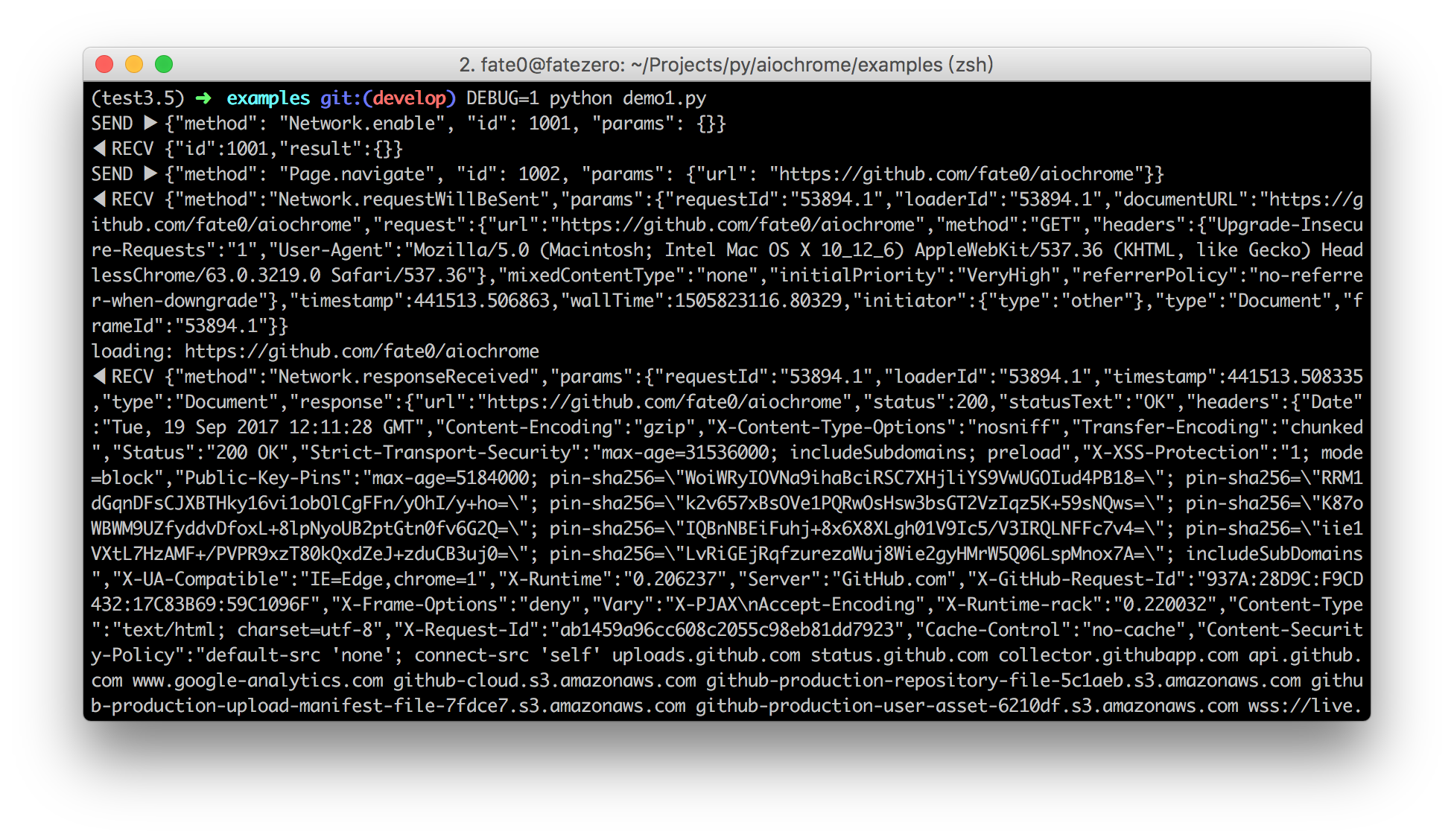
## Debug
set DEBUG env variable:
## Tab management
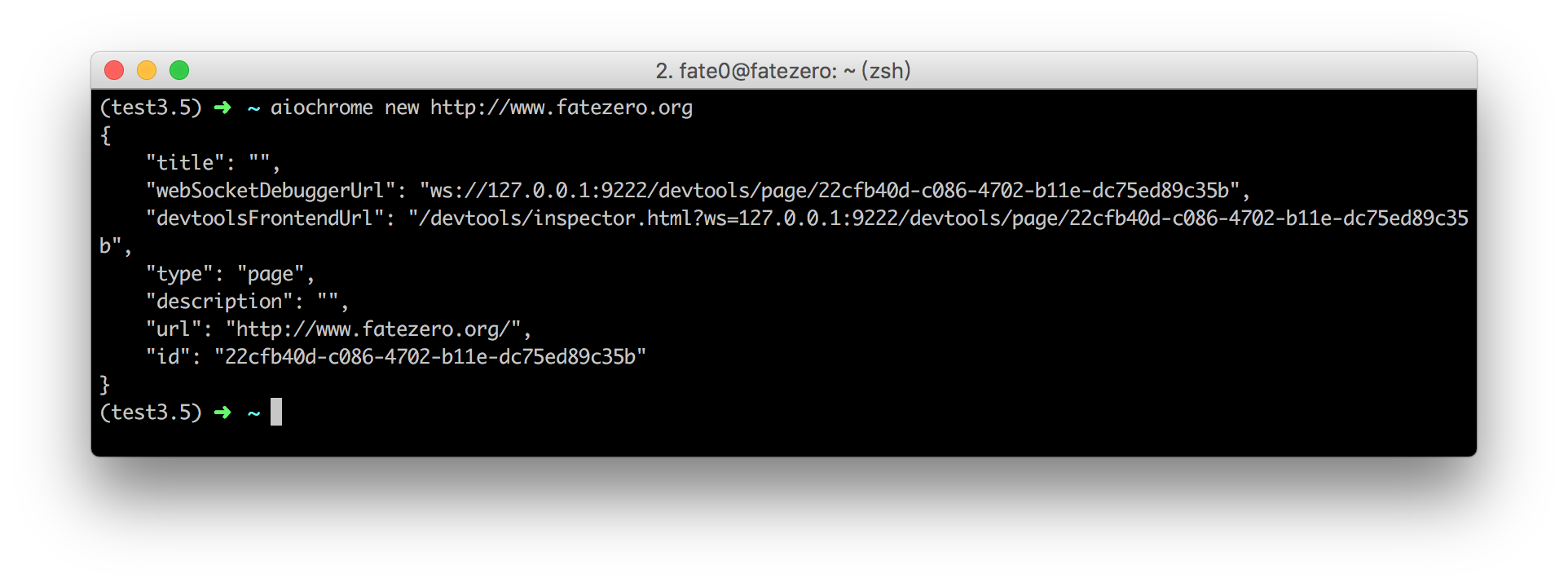
run `aiochrome -h` for more info
example:
## Examples
please see the [examples](http://github.com/fate0/aiochrome/blob/master/examples) directory for more examples
## Ref
* [chrome-remote-interface](https://github.com/cyrus-and/chrome-remote-interface/)
* [Chrome DevTools Protocol](https://chromedevtools.github.io/devtools-protocol/tot/)
[](https://travis-ci.org/fate0/aiochrome)
[](https://codecov.io/gh/fate0/aiochrome)
[](https://pyup.io/repos/github/fate0/aiochrome/)
[](https://pypi.python.org/pypi/aiochrome)
[](https://github.com/fate0/aiochrome)
A Python Package for the Google Chrome Dev Protocol, [more document](https://fate0.github.io/aiochrome/)
## Table of Contents
* [Installation](#installation)
* [Setup Chrome](#setup-chrome)
* [Getting Started](#getting-started)
* [Tab management](#tab-management)
* [Debug](#debug)
* [Examples](#examples)
* [Ref](#ref)
## Installation
To install aiochrome, simply:
```
$ pip install -U aiochrome
```
or from GitHub:
```
$ pip install -U git+https://github.com/fate0/aiochrome.git
```
or from source:
```
$ python setup.py install
```
## Setup Chrome
simply:
```
$ google-chrome --remote-debugging-port=9222
```
or headless mode (chrome version >= 59):
```
$ google-chrome --headless --disable-gpu --remote-debugging-port=9222
```
or use docker:
```
$ docker pull fate0/headless-chrome
$ docker run -it --rm --cap-add=SYS_ADMIN -p9222:9222 fate0/headless-chrome
```
## Getting Started
``` python
import asyncio
import aiochrome
async def main():
# create a browser instance
browser = aiochrome.Browser(url="http://127.0.0.1:9222")
# create a tab
tab = await browser.new_tab()
# register callback if you want
async def request_will_be_sent(**kwargs):
print("loading: %s" % kwargs.get('request').get('url'))
tab.Network.requestWillBeSent = request_will_be_sent
# start the tab
await tab.start()
# call method
await tab.Network.enable()
# call method with timeout
await tab.Page.navigate(url="https://github.com/fate0/aiochrome", _timeout=5)
# wait for loading
await tab.wait(5)
# stop the tab (stop handle events and stop recv message from chrome)
await tab.stop()
# close tab
await browser.close_tab(tab)
loop = asyncio.get_event_loop()
try:
loop.run_until_complete(main())
finally:
loop.close()
```
or (alternate syntax)
``` python
import asyncio
import aiochrome
async def main():
browser = aiochrome.Browser(url="http://127.0.0.1:9222")
tab = await browser.new_tab()
async def request_will_be_sent(**kwargs):
print("loading: %s" % kwargs.get('request').get('url'))
tab.set_listener("Network.requestWillBeSent", request_will_be_sent)
await tab.start()
await tab.call_method("Network.enable")
await tab.call_method("Page.navigate", url="https://github.com/fate0/aiochrome", _timeout=5)
await tab.wait(5)
await tab.stop()
await browser.close_tab(tab)
loop = asyncio.get_event_loop()
try:
loop.run_until_complete(main())
finally:
loop.close()
```
more methods or events could be found in
[Chrome DevTools Protocol](https://chromedevtools.github.io/devtools-protocol/tot/)
## Debug
set DEBUG env variable:

## Tab management
run `aiochrome -h` for more info
example:

## Examples
please see the [examples](http://github.com/fate0/aiochrome/blob/master/examples) directory for more examples
## Ref
* [chrome-remote-interface](https://github.com/cyrus-and/chrome-remote-interface/)
* [Chrome DevTools Protocol](https://chromedevtools.github.io/devtools-protocol/tot/)
1 maintainer

Metadata
1 maintainer
Release files for aiochrome 0.0.3
For a detailed explanation of source distributions (sdists) and built distributions (wheels), please see the package formats documentation.
Source distribution (sdist)
| File | Size | Uploaded | |
|---|---|---|---|
| aiochrome-0.0.3.tar.gz | 12.0 kB | Details |
Built distribution (wheel)
| File | Interpreter | ABI | Platform | Reset |
|---|---|---|---|---|
| aiochrome-0.0.3-py2.py3-none-any.whl | Python 3, Python 2 | none | any | Details |
Total release size: 24.3 kB
Release files / aiochrome-0.0.3.tar.gz
| Download URL | aiochrome-0.0.3.tar.gz |
|---|---|
| Size | 12.0 kB |
| Tags | Source |
|
SHA-256 checksum How to use checksums |
3b26d9a57956455119eea78cd48a10f43667787a5622280b553762fd7b767703
|
|
BLAKE2b-256 checksum How to use checksums |
a6b1f2b8e4eb68f3829b221f6fc6a5d5ce4e684746ab1bc4e48a9c8ce7139c33
|
| Upload date | |
|
Uploaded using Trusted Publishing? What is trusted publishing? |
No |
Release files / aiochrome-0.0.3-py2.py3-none-any.whl
| Download URL | aiochrome-0.0.3-py2.py3-none-any.whl |
|---|---|
| Size | 12.4 kB |
| Tags | Python 2 Python 3 |
|
SHA-256 checksum How to use checksums |
7a5af71f3957fbc97352f77b91215fdd5b09753d5b941243e1a2a609b451ab69
|
|
BLAKE2b-256 checksum How to use checksums |
6d4d71e4c45cafba544fc1104c52a6cb924037875e5816dd592abced6c9cff07
|
| Upload date | |
|
Uploaded using Trusted Publishing? What is trusted publishing? |
No |














