
aiohttp-debugtoolbar




aiohttp_debugtoolbar provides a debug toolbar for your aiohttp web application. Library is port of pyramid_debugtoolbar and still in early development stages. Basic functionality has been ported:
basic panels
intercept redirects
intercept and pretty print exception
interactive python console
show source code
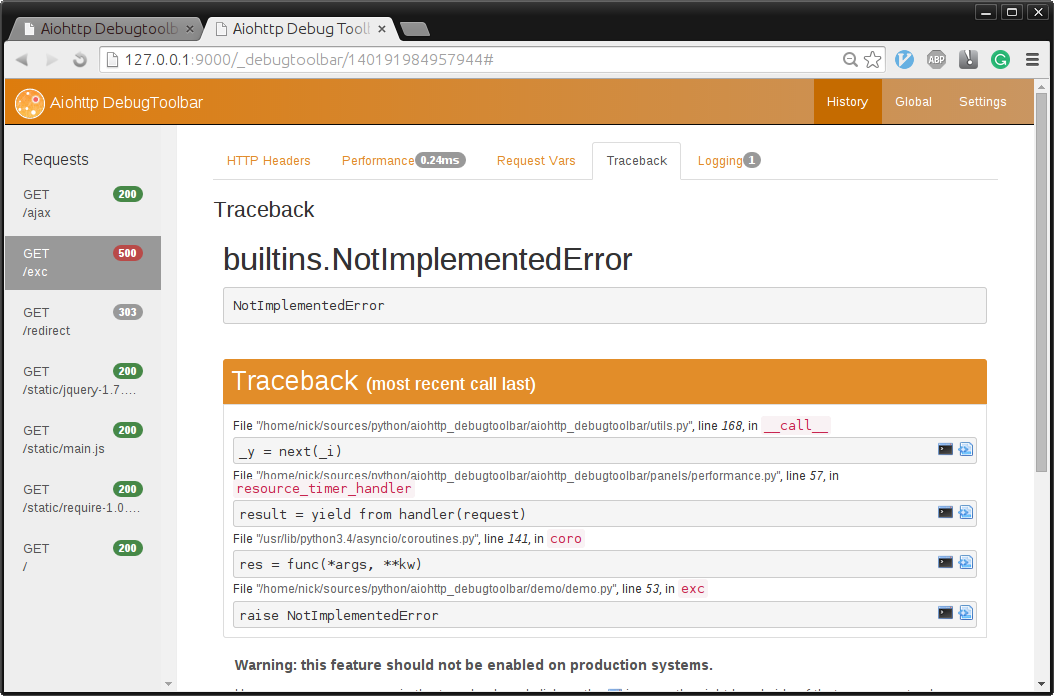
Ported Panels
HeaderDebugPanel, PerformanceDebugPanel, TracebackPanel, SettingsDebugPanel, MiddlewaresDebugPanel, VersionDebugPanel, RoutesDebugPanel, RequestVarsDebugPanel, LoggingPanel
Help Needed
Are you coder looking for a project to contribute to python/asyncio libraries? This is the project for you!
Install and Configuration
$ pip install aiohttp_debugtoolbar
In order to plug in aiohttp_debugtoolbar, call aiohttp_debugtoolbar.setup on your app.
import aiohttp_debugtoolbar
app = web.Application(loop=loop)
aiohttp_debugtoolbar.setup(app)
Full Example
import asyncio
import jinja2
import aiohttp_debugtoolbar
import aiohttp_jinja2

from aiohttp import web


@aiohttp_jinja2.template('index.html')
async def basic_handler(request):
    return {'title': 'example aiohttp_debugtoolbar!',
            'text': 'Hello aiohttp_debugtoolbar!',
            'app': request.app}


async def exception_handler(request):
    raise NotImplementedError


async def init(loop):
    # add aiohttp_debugtoolbar middleware to you application
    app = web.Application(loop=loop)
    # install aiohttp_debugtoolbar
    aiohttp_debugtoolbar.setup(app)

    template = """
    <html>
        <head>
            <title>{{ title }}</title>
        </head>
        <body>
            <h1>{{ text }}</h1>
            <p>
              <a href="{{ app.router['exc_example'].url() }}">
              Exception example</a>
            </p>
        </body>
    </html>
    """
    # install jinja2 templates
    loader = jinja2.DictLoader({'index.html': template})
    aiohttp_jinja2.setup(app, loader=loader)

    # init routes for index page, and page with error
    app.router.add_route('GET', '/', basic_handler, name='index')
    app.router.add_route('GET', '/exc', exception_handler,
                         name='exc_example')
    return app


loop = asyncio.get_event_loop()
app = loop.run_until_complete(init(loop))
web.run_app(app, host='127.0.0.1', port=9000)
Settings
aiohttp_debugtoolbar.setup(app, hosts=['172.19.0.1', ])Supported options
enabled: The debugtoolbar is disabled if False. By default is set to True.
intercept_redirects: If True, intercept redirect and display an intermediate page with a link to the redirect page. By default is set to True.
hosts: The list of allow hosts. By default is set to [‘127.0.0.1’, ‘::1’].
exclude_prefixes: The list of forbidden hosts. By default is set to [].
check_host: If False, disable the host check and display debugtoolbar for any host. By default is set to True.
max_request_history: The max value for storing requests. By default is set to 100.
max_visible_requests: The max value of display requests. By default is set to 10.
path_prefix: The prefix of path to debugtoolbar. By default is set to ‘/_debugtoolbar’.
Thanks!
I’ve borrowed a lot of code from following projects. I highly recommend to check them out:
Play With Demo
https://github.com/aio-libs/aiohttp_debugtoolbar/tree/master/demo
Requirements
CHANGES
0.6.1 (2023-11-19)
Filtered out requests to debugtoolbar itself from the requests history.
Improved import time by delaying loading of package data.
Fixed static URLs when using yarl 1.9+.
Fixed a warning in the re module.
Switched to aiohttp.web.AppKey for aiohttp 3.9.
Dropped Python 3.7 and added Python 3.11.
0.6.0 (2020-01-25)
Fixed ClassBasedView support. #207
Dropped aiohttp<3.3 support.
Dropped Python 3.4 support.
Dropped yield from and @asyncio.coroutine support.
0.5.0 (2018-02-14)
Added safe filter to render_content. #195
Added support for aiohtp 3.
0.4.1 (2017-08-30)
Fixed issue with redirects without location header. #174
0.4.0 (2017-05-04)
Added asyncio trove classifier.
Addes support for aiohttp 2.0.7+.
0.3.0 (2016-11-18)
Fixed middleware route finding when using sub-apps. #65
Added examples for extra panels: pgsql & redis monitor. #59
0.2.0 (2016-11-08)
Refactored test suite.
0.1.4 (2016-11-07)
Renamed to aiohttp-debugtoolbar.
Fixed imcompatibility with aiohttp 1.1.
0.1.3 (2016-10-27)
Fixed a link to request info page, sort request information alphabetically. #52
0.1.2 (2016-09-27)
Fixed empty functions names in performance panel. #43 (Thanks @kammala!)
Fixed flashing message during page rendering issue. #46
0.1.1 (2016-02-21)
Fixed a demo.
Added syntax highlight in traceback view, switched highlighter from highlight.js to prism.js. #31
0.1.0 (2016-02-13)
Added Python 3.5 support. (Thanks @stormandco!)
Added view source button in RoutesDebugPanel. (Thanks @stormandco!)
Dropped support for Python 3.3. (Thanks @sloria!)
Added middleware in setup method. (Thanks @sloria!)
Fixed bug with interactive console.
Fixed support for aiohttp>=0.21.1.
0.0.5 (2015-09-13)
Fixed IPv6 socket family error. (Thanks @stormandco!)
0.0.4 (2015-09-05)
Fixed support for aiohttp>=0.17. (Thanks @himikof!)
0.0.3 (2015-07-03)
Switched template engine from mako to jinja2. (Thanks @iho!)
Added custom yield from to track context switches inside coroutine.
Implemented panel for collecting request log messages.
Disable toolbar code injecting for non web.Response answers (StreamResponse or WebSocketResponse for example). #12
0.0.2 (2015-05-26)
Redesigned UI look-and-feel.
Renamed toolbar_middleware_factory to just middleware.
0.0.1 (2015-05-18)
Initial release.
2 maintainers


Metadata
2 maintainers
Release files for aiohttp-debugtoolbar 0.6.1
For a detailed explanation of source distributions (sdists) and built distributions (wheels), please see the package formats documentation.
Source distribution (sdist)
| File | Size | Uploaded | |
|---|---|---|---|
| aiohttp-debugtoolbar-0.6.1.tar.gz | 451.1 kB | Details |
Built distribution (wheel)
| File | Interpreter | ABI | Platform | Reset |
|---|---|---|---|---|
| aiohttp_debugtoolbar-0.6.1-py3-none-any.whl | Python 3 | none | any | Details |
Total release size: 917.2 kB
Release files / aiohttp-debugtoolbar-0.6.1.tar.gz
| Download URL | aiohttp-debugtoolbar-0.6.1.tar.gz |
|---|---|
| Size | 451.1 kB |
| Tags | Source |
|
SHA-256 checksum How to use checksums |
cd7ae54c600db7ae7d9dc3404b81f95209a6367df1d59e13ea20f9926e36e001
|
|
BLAKE2b-256 checksum How to use checksums |
bd72cd80c0d1d425d5ef50e5b23553040e8d9fa5de5714208d3d18ae8806b6de
|
| Upload date | |
|
Uploaded using Trusted Publishing? What is trusted publishing? |
No |
| Uploaded via |
twine/4.0.2 CPython/3.9.18
|
Release files / aiohttp_debugtoolbar-0.6.1-py3-none-any.whl
| Download URL | aiohttp_debugtoolbar-0.6.1-py3-none-any.whl |
|---|---|
| Size | 466.1 kB |
| Tags | Python 3 |
|
SHA-256 checksum How to use checksums |
cbb876a350bbca497f8c46fff96d0ebdbd552ba6d0bb80ec3a5e95270b0f1f65
|
|
BLAKE2b-256 checksum How to use checksums |
6daefe3fe922b6efb0c27e6244c99d60330f8f3f39de42510137bf7c205adeb4
|
| Upload date | |
|
Uploaded using Trusted Publishing? What is trusted publishing? |
No |
| Uploaded via |
twine/4.0.2 CPython/3.9.18
|














