
Library to use pose estimation in your projects easily

Project description
AIPOSE




Library to use pose estimation in your projects easily.
Installation 
You can install aipose from Pypi. It's going to install the library itself and its prerequisites as well.
pip install aipose
You can install aipose from its source code.
git clone https://github.com/Tlaloc-Es/aipose.git
cd aipose
pip install -e .
Run demo
Use the following command to run a demo with your cam and YOLOv7 pose estimator,
posewebcam
Testing without a physical webcam (Linux)
You can simulate a webcam using v4l2loopback and ffmpeg:
1. Install dependencies:
sudo apt install v4l2loopback-dkms ffmpeg
2. Load the virtual device:
sudo modprobe v4l2loopback devices=1 video_nr=0 card_label="FakeWebcam" exclusive_caps=1
3. Feed it with a video or image (in a separate terminal):
# Loop a video file
ffmpeg -re -stream_loop -1 -i your_video.mp4 -vf format=yuv420p -f v4l2 /dev/video0

# Or use a static image
ffmpeg -re -loop 1 -i your_image.jpg -vf format=yuv420p -f v4l2 /dev/video0
4. Run the demo in another terminal:
posewebcam
5. Unload the virtual device when done:
sudo modprobe -r v4l2loopback
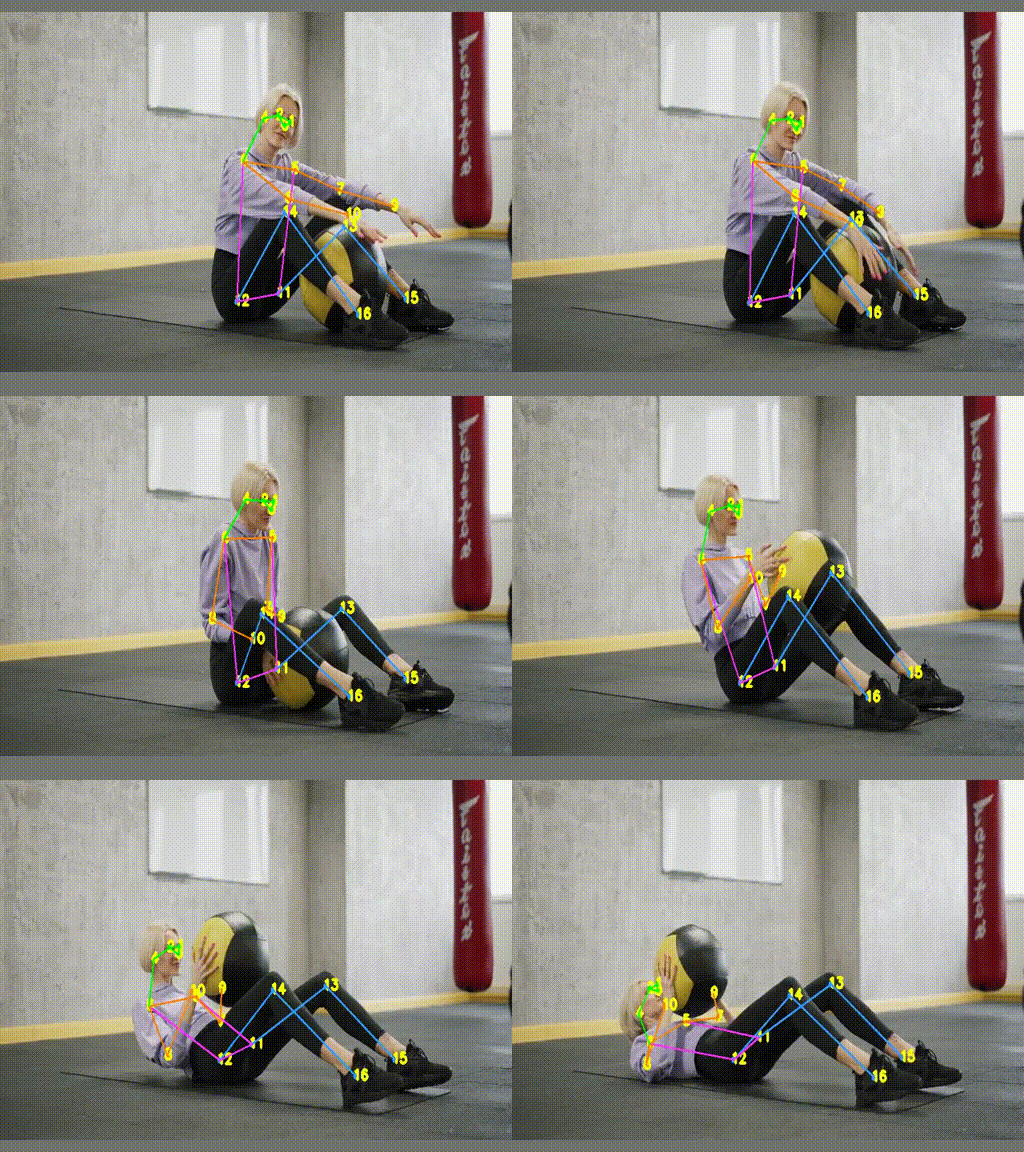
Running over a video results

How to use
You can check the section notebooks in the repository to check the usage of the library or you can ask in the Issues section.
The examples are:
- How to draw key points in a video
- How to draw key points in a video and store it
- How to draw key points in a webcam
- How to draw key points in a picture
- How to capture a frame to apply your business logic
- How to stop the video stream when anybody raises hands with YOLOv7
- How to calculate pose similarity with YOLOv7
- How to turn the pose with YOLOv7
- How to train a pose classificator
References
Support
You can do a donation with the following link.

Or you can try to make a pull request with your improvements to the repo.
Source of videos and images
- Video: Mikhail Nilov
Images (Pexels)
Release history Release notifications | RSS feed


Download files
Download the file for your platform. If you're not sure which to choose, learn more about installing packages.
Source Distribution
Built Distribution
Filter files by name, interpreter, ABI, and platform.
If you're not sure about the file name format, learn more about wheel file names.
Copy a direct link to the current filters
File details
Details for the file aipose-3.2.0.tar.gz.
File metadata
- Download URL: aipose-3.2.0.tar.gz
- Upload date:
- Size: 71.0 MB
- Tags: Source
- Uploaded using Trusted Publishing? No
- Uploaded via: uv/0.11.7 {"installer":{"name":"uv","version":"0.11.7","subcommand":["publish"]},"python":null,"implementation":{"name":null,"version":null},"distro":{"name":"Ubuntu","version":"24.04","id":"noble","libc":null},"system":{"name":null,"release":null},"cpu":null,"openssl_version":null,"setuptools_version":null,"rustc_version":null,"ci":true}
File hashes
| Algorithm | Hash digest | |
|---|---|---|
| SHA256 |
60f0ba5093e4f45e504c2decedd44176c6016d59d27c0e6d959a80363fa36c7c
|
|
| MD5 |
e792757d27759b152f0791d25358b4a6
|
|
| BLAKE2b-256 |
f552b61766228ebd4e882b336b53d45b72f82d3b0e5bca87d4876182d8f08b6e
|
File details
Details for the file aipose-3.2.0-py3-none-any.whl.
File metadata
- Download URL: aipose-3.2.0-py3-none-any.whl
- Upload date:
- Size: 22.8 kB
- Tags: Python 3
- Uploaded using Trusted Publishing? No
- Uploaded via: uv/0.11.7 {"installer":{"name":"uv","version":"0.11.7","subcommand":["publish"]},"python":null,"implementation":{"name":null,"version":null},"distro":{"name":"Ubuntu","version":"24.04","id":"noble","libc":null},"system":{"name":null,"release":null},"cpu":null,"openssl_version":null,"setuptools_version":null,"rustc_version":null,"ci":true}
File hashes
| Algorithm | Hash digest | |
|---|---|---|
| SHA256 |
36be02f812602a3d19d1fe97246bb3523868897a4782a900f78a3b11c5e11f30
|
|
| MD5 |
bd19d95f9a3a63a5a0ce2f0398b09a1b
|
|
| BLAKE2b-256 |
3ea7e3afbe9938a6cfacba01befe05030cd2f774796cbbf5efd3f4827fb6c09d
|






