
Airflow Provider XLSX
Apache Airflow operators for converting XLSX files from/to Parquet, CSV and JSON.





System Requirements
- Airflow Versions
- 2.0 or newer
Installation
$ pip install airflow-provider-xlsx
Operators
FromXLSXOperator
Read an XLSX or XLS file and convert it into Parquet, CSV, JSON, JSON Lines(one line per record) file.
Example
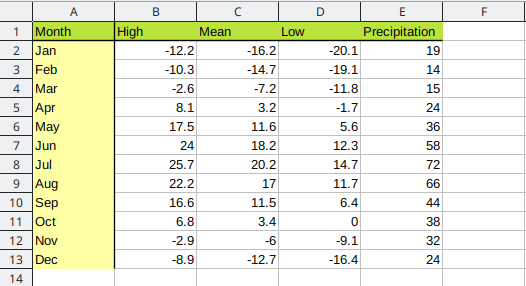
XLSX Source
Airflow Task
from xlsx_provider.operators.from_xlsx_operator import FromXLSXOperator

xlsx_to_jsonl = FromXLSXOperator(
   task_id='xlsx_to_jsonl',
   source='{{ var.value.tmp_path }}/test.xlsx',
   target='{{ var.value.tmp_path }}/test.jsonl',
   file_format='jsonl',
   dag=dag
)
JSON Lines Output
{"month": "Jan", "high": -12.2, "mean": -16.2, "low": -20.1, "precipitation": 19}
{"month": "Feb", "high": -10.3, "mean": -14.7, "low": -19.1, "precipitation": 14}
{"month": "Mar", "high": -2.6, "mean": -7.2, "low": -11.8, "precipitation": 15}
{"month": "Apr", "high": 8.1, "mean": 3.2, "low": -1.7, "precipitation": 24}
{"month": "May", "high": 17.5, "mean": 11.6, "low": 5.6, "precipitation": 36}
{"month": "Jun", "high": 24, "mean": 18.2, "low": 12.3, "precipitation": 58}
{"month": "Jul", "high": 25.7, "mean": 20.2, "low": 14.7, "precipitation": 72}
{"month": "Aug", "high": 22.2, "mean": 17, "low": 11.7, "precipitation": 66}
{"month": "Sep", "high": 16.6, "mean": 11.5, "low": 6.4, "precipitation": 44}
{"month": "Oct", "high": 6.8, "mean": 3.4, "low": 0, "precipitation": 38}
FromXLSXQueryOperator
Execute an SQL query an XLSX/XLS file and export the result into a Parquet or CSV file
This operators loads an XLSX or XLS file into an in-memory SQLite database, executes a query on the db and stores the result into a Parquet, CSV, JSON, JSON Lines(one line per record) file. The output columns names and types are determinated by the SQL query output.
Example
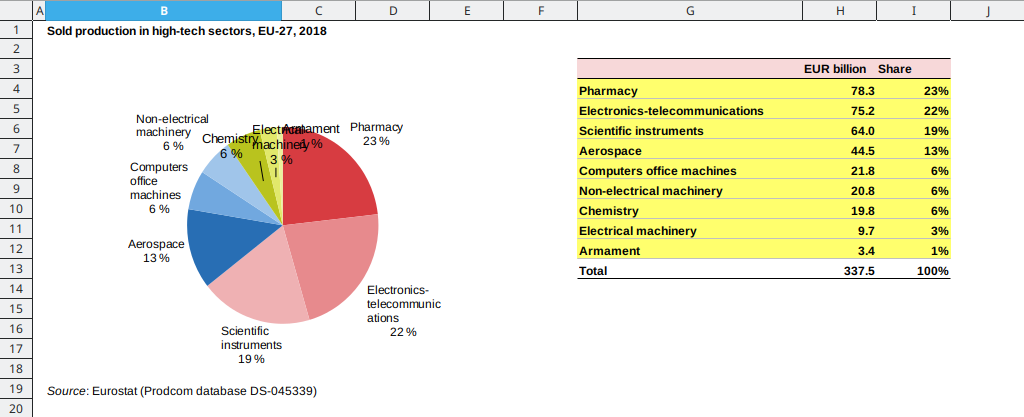
XLSX Source
SQL Query
 select
     g as high_tech_sector,
     h as eur_bilion,
     i as share
 from
     high_tech
 where
     _index > 1
     and high_tech_sector <> ''
     and lower(high_tech_sector) <> 'total'
Airflow Task
from xlsx_provider.operators.from_xlsx_query_operator import FromXLSXQueryOperator

xlsx_to_csv = FromXLSXQueryOperator(
   task_id='xlsx_to_csv',
   source='{{ var.value.tmp_path }}/high_tech.xlsx',
   target='{{ var.value.tmp_path }}/high_tech.parquet',
   file_format='csv',
   csv_delimiter=',',
   table_name='high_tech',
   worksheet='Figure 3',
   query='''
       select
           g as high_tech_sector,
           h as eur_bilion,
           i as share
       from
           high_tech
       where
           _index > 1
           and high_tech_sector <> ''
           and lower(high_tech_sector) <> 'total'
   ''',
   dag = dag
)
Output
high_tech_sector,value,share
Pharmacy,78280,0.231952169555313
Electronics-telecommunications,75243,0.222954583130376
Scientific instruments,64010,0.189670433253542
Aerospace,44472,0.131776952366115
Computers office machines,21772,0.0645136852766778
Non-electrical machinery,20813,0.0616714981835167
Chemistry,19776,0.058598734453222
Electrical machinery,9730,0.028831912195612
Armament,3384,0.0100300315856265
ToXLSXOperator
Read a Parquest, CSV, JSON, JSON Lines(one line per record) file and convert it into XLSX.
Example
from xlsx_provider.operators.to_xlsx_operator import ToXLSXOperator

parquet_to_xlsx = ToXLSXOperator(
   task_id='parquet_to_xlsx',
   source='{{ var.value.tmp_path }}/test.parquet',
   target='{{ var.value.tmp_path }}/test.xlsx',
   dag=dag
)
Links
- Apache Airflow - https://github.com/apache/airflow
- Project home page (GitHub) - https://github.com/andreax79/airflow-provider-xlsx
- Documentation (Read the Docs) - https://airflow-provider-xlsx.readthedocs.io/en/latest
- openpyxl, library to read/write Excel 2010 xlsx/xlsm/xltx/xltm files - https://foss.heptapod.net/openpyxl/openpyxl
- lrd, library for reading data and formatting information from Excel files in the historical .xls format - https://github.com/python-excel/xlrd
- Python library for Apache Arrow - https://github.com/apache/arrow/tree/master/python
1 maintainer

Metadata
1 maintainer
Release files for airflow-provider-xlsx 1.0.1
For a detailed explanation of source distributions (sdists) and built distributions (wheels), please see the package formats documentation.
Source distribution (sdist)
| File | Size | Uploaded | Provenance | |
|---|---|---|---|---|
| airflow-provider-xlsx-1.0.1.tar.gz | 16.8 kB | Without provenance | Details |
Built distribution (wheel)
| File | Interpreter | ABI | Platform | Reset |
|---|---|---|---|---|
| airflow_provider_xlsx-1.0.1-py3-none-any.whl | Python 3 | none | any | Details |
Total release size: 38.3 kB
Release files / airflow-provider-xlsx-1.0.1.tar.gz
| Download URL | airflow-provider-xlsx-1.0.1.tar.gz |
|---|---|
| Size | 16.8 kB |
| Tags | Source |
|
SHA-256 checksum How to use checksums |
63596c14ceb923fee1cacb1d65df6de7bf3b36b6d0d969dbbf27bdd90a1c7c72
|
|
BLAKE2b-256 checksum How to use checksums |
953d5c3046f8b734adeaba2bf8b4a549f91475f0bbb7ad01c65b4c21aba41a1b
|
| Upload date | |
|
Uploaded using Trusted Publishing? What is trusted publishing? |
No |
| Uploaded via |
twine/3.3.0 pkginfo/1.8.2 requests/2.25.1 setuptools/59.6.0 requests-toolbelt/0.9.1 tqdm/4.61.2 CPython/3.6.15
|
Release files / airflow_provider_xlsx-1.0.1-py3-none-any.whl
| Download URL | airflow_provider_xlsx-1.0.1-py3-none-any.whl |
|---|---|
| Size | 21.5 kB |
| Tags | Python 3 |
|
SHA-256 checksum How to use checksums |
40ba22e33febe43f9a046dd53b592905c8ec154b2e3ff54411df7a610be8bab5
|
|
BLAKE2b-256 checksum How to use checksums |
28046b6d521523c9c94649aea400c0bffcfef61fb8df53d07d12c015e661995b
|
| Upload date | |
|
Uploaded using Trusted Publishing? What is trusted publishing? |
No |
| Uploaded via |
twine/3.3.0 pkginfo/1.8.2 requests/2.25.1 setuptools/59.6.0 requests-toolbelt/0.9.1 tqdm/4.61.2 CPython/3.6.15
|
Security for airflow-provider-xlsx 1.0.1
Provenance
Provenance describes where a file came from. On PyPI, provenance is shared via attestations, which provide a verifiable record of the build or publishing details. View details, limitations and caveats.
No provenance found
None of the files in this release were uploaded with provenance metadata.
A note on package security
PyPI is a repository for distributing packages, not a service for auditing them. While third-party security researchers and our staff do their best to detect and remove malicious packages, PyPI cannot guarantee the quality, security or suitability of any given package.
To learn more about protecting yourself from malicious actors, visit our package security documentation.














