




AirFly: Auto Generate Airflow's dag.py On The Fly
Effective data pipeline management is essential for a company's data operations. Many engineering teams rely on tools like Airflow to organize various batch processing tasks, such as ETL/ELT workflows, data reporting pipelines, machine learning projects and so on.
Airflow is a powerful tool for task scheduling and orchestration, allowing users to define workflows as "DAGs". A typical DAG represents a data pipeline and includes a series of tasks along with their dependencies.
As a pipeline grows in complexity, more tasks and interdependencies are added, which often lead to confusion and disrupt the structure of the DAG, resulting in lower code quality and making it more difficult to maintain and update, especially in collaborative environments.
airfly aims to alleviate such challenges and streamline the development lifecycle. It assumes that tasks are encapsulated in a specific structure, with dependencies defined as part of the task attributes. During deployment, airfly recursively collects all tasks, resolves the dependency tree, and automatically generates the DAG.
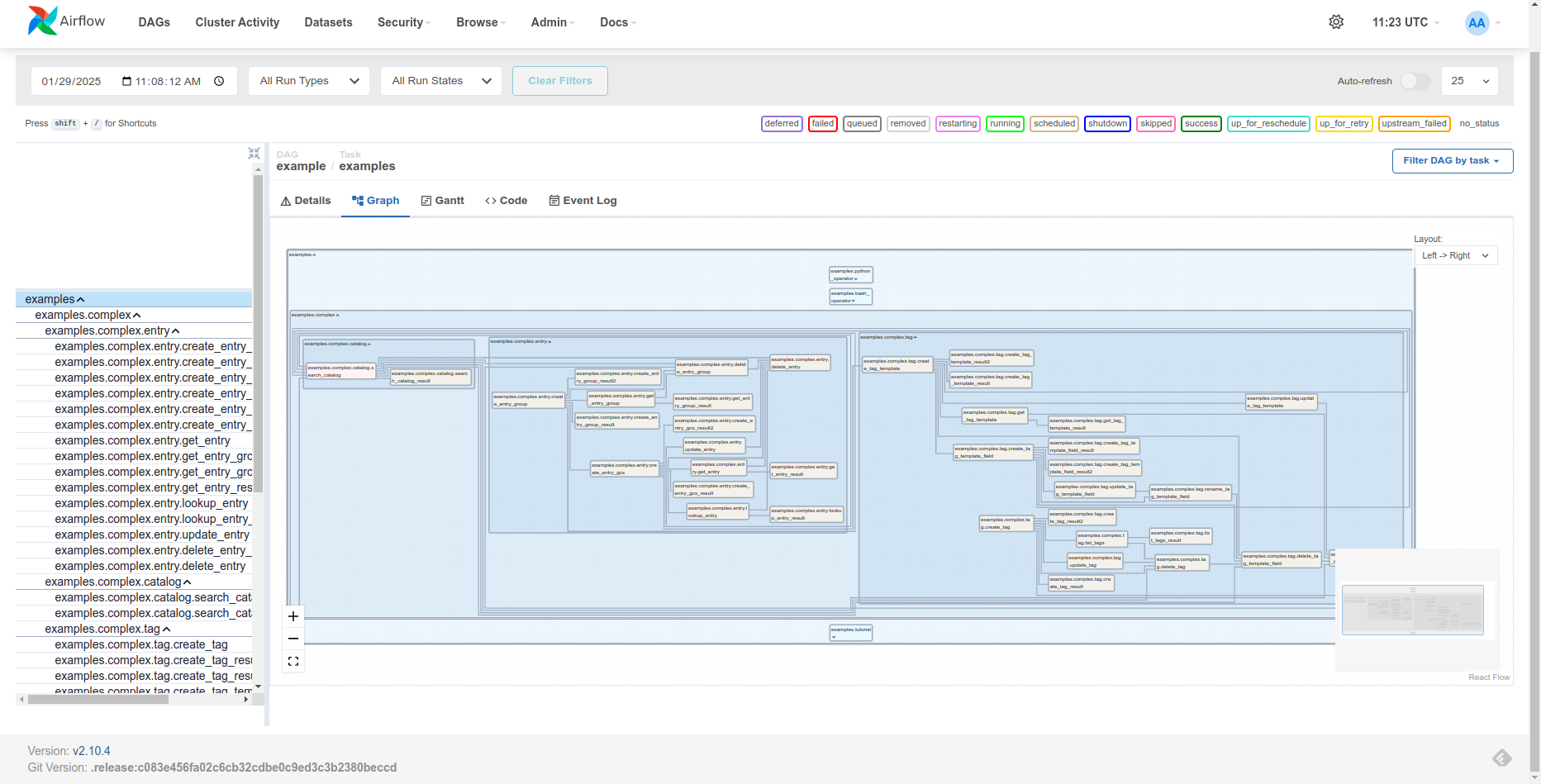
Key Features
dag.pyAutomation: focus on your tasks and let airfly handle the rest.- No Airflow Installation Required: keep your environment lean without the need for Airflow.
- Task Group Support: a nice feature from Airflow 2.0+.
- Duck Typing Support: flexible class inheritance for greater customization.
Install
Download airfly from PyPI
$ pip install airfly

$ airfly --help
Usage: airfly [OPTIONS]

Options:
  --version                   Show version and exit.
  -n, --name TEXT             Assign to DAG id.
  -m, --modname TEXT          Name of the module to search tasks for building
                              the task dependency tree and using it to
                              generate the airflow DAG file.
  -p, --path TEXT             Insert into "sys.path" to include certain
                              modules, multi-value is allowed.
  -e, --exclude-pattern TEXT  Exclude the tasks from the dependency tree if
                              their __qualname__ get matched with this regex
                              pattern.
  -i, --includes TEXT         Paths of python files, the code within will be
                              included in the output DAG file, multi-value is
                              allowed.
  -d, --dag-params TEXT       Parameters to construct DAG object, defined by a
                              dictionary in a python file. Pass this option
                              with <python-file>:<variable> form, the
                              <variable> should be the dictionary which will
                              be passed to DAG as keyword arguments.
  -t, --task-class TEXT       Target task class to search, default:
                              'airfly.model.v1.AirFly'
  -g, --task-group BOOLEAN    Whether to enable TaskGroup, default: True
  --help                      Show this message and exit.
How It Works
airfly assumes that tasks are defined within a Python module (or package, such as main_dag in the example below). Each task holds attributes corresponding to an Airflow operator, and the dependencies are declared by assigning upstream or downstream. As airfly walks through the module, it discovers and collects all tasks, resolves the dependency tree, and generates the DAG in Python code, which can then be saved as dag.py.
main_dag
├── __init__.py
├── mod_a.py
│   ├── task_a1
│   └── task_a2
│       └── upstream: task_a1
├── mod_b.py
│   └── task_b1
│       └── downstream: task_a1, task_a2
├── sub_dag
│   ├── __init__.py
│   ├── mod_c.py
:   :
Define your task with AirFly
Declare a task as follows(see demo):
# in demo.py
from airfly.model import AirFly


class print_date(AirFly):
    op_class = "BashOperator"
    op_params = dict(bash_command="date")


# During DAG generation,
# This class will be auto-converted to the following code:
# examples_tutorial_demo_print_date = BashOperator(
#     task_id='examples.tutorial.demo.print_date',
#     bash_command='date',
#     task_group=group_examples_tutorial_demo
# )
op_class (str): specifies the airflow operator to this task.op_params: keyword arguments which will be passed to the operator(op_class), a parameter (i.e., value in the dictionary) could be one of the primitive types, a function or a class.
You can also define the attributes using property:
from airfly.model import AirFly


class print_date(AirFly):

    @property
    def op_class(self):
        return "BashOperator"

    def greeting(self) -> str:
        return "Hello World"

    @property
    def op_params(self):
        return dict(bash_command=f"echo {self.greeting()}")

# Corresponding generated code:
# examples_tutorial_demo_print_date = BashOperator(
#     task_id='examples.tutorial.demo.print_date',
#     bash_command='echo Hello World',
#     task_group=group_examples_tutorial_demo
# )
By default, the class name (print_date) is used as the task_id for the applied operator after DAG generation. You can change this behavior by overriding _get_taskid as a class method. Make sure that the task_id is globally unique:
import re
from airfly.model import AirFly


class PrintDate(AirFly):
    @classmethod
    def _get_taskid(cls):
        # customize the task id
        return "task_" + re.sub(r'(?<!^)(?=[A-Z])', '_', cls.__name__).lower()

    op_class = "BashOperator"
    op_params = dict(bash_command="date")


# Corresponding generated code:
# task_print_date = BashOperator(
#     task_id='task_print_date',
#     bash_command='date',
#     task_group=group_task_print_date
# )
Define task dependency
Specifying task dependency with upstream or downstream.
# in demo.py

from textwrap import dedent


templated_command = dedent(
    """
{% for i in range(5) %}
    echo "{{ ds }}"
    echo "{{ macros.ds_add(ds, 7)}}"
    echo "{{ params.my_param }}"
{% endfor %}
"""
)

class templated(AirFly):
    op_class = "BashOperator"
    op_params = dict(depends_on_past=False,
                  bash_command=templated_command,
                  params={"my_param": "Parameter I passed in"})


class sleep(AirFly):
    op_class = "BashOperator"
    op_params = dict(depends_on_past=False,
                  bash_command="sleep 5",
                  retries=3)

    upstream = print_date

    @property   # property also works
    def downstream(self):
        return (templated,)
upstream/downstream: return a task class or a iterable such as list or tuple.
Generate dag.py
Generate the dag by the command:
$ airfly --name demo_dag --modname demo > dag.py
Output in dag.py:
# This file is auto-generated by airfly 1.0.0
from airflow.models import DAG
from airflow.utils.task_group import TaskGroup

with DAG("demo_dag") as dag:
    from airflow.operators.bash import BashOperator

    group_demo = TaskGroup(group_id="demo", prefix_group_id=False)
    demo_print_date = BashOperator(
        task_id="demo.print_date", bash_command="date", task_group=group_demo
    )
    demo_sleep = BashOperator(
        task_id="demo.sleep",
        depends_on_past=False,
        bash_command="sleep 5",
        retries=3,
        task_group=group_demo,
    )
    demo_templated = BashOperator(
        task_id="demo.templated",
        depends_on_past=False,
        bash_command='\n{% for i in range(5) %}\n    echo "{{ ds }}"\n    echo "{{ macros.ds_add(ds, 7)}}"\n    echo "{{ params.my_param }}"\n{% endfor %}\n',
        params={"my_param": "Parameter I passed in"},
        task_group=group_demo,
    )
    demo_print_date >> demo_sleep
    demo_sleep >> demo_templated
Make sure the demo module is in the current environment so that airfly can find it.
If it's not the case, you can use --path/-p to add the location of the module into sys.path, e.g.,
.
├── folder
│   └── subfolder
│       └── demo.py   # Assume this is the target module
:

$ airfly --name demo_dag --path folder/subfolder --modname demo > dag.py
The target module can be a package as well, e.g.,
.
├── folder
│   └── subfolder
│       └── demo   # Assume this is the target package
│           ├── __init__.py
│           ├── module_a.py
:           :

$ airfly --name demo_dag --path folder/subfolder --modname demo > dag.py
Inject parameters to DAG
Manage the DAG arguments in a python file(see demo), then pass them to airfly.
# in params.py

from datetime import timedelta

from airflow.utils.dates import days_ago

default_args = {
    "owner": "airflow",
    "depends_on_past": False,
    "email": ["airflow@example.com"],
    "email_on_failure": False,
    "email_on_retry": False,
    "retries": 1,
    "retry_delay": timedelta(minutes=5),
    # 'queue': 'bash_queue',
    # 'pool': 'backfill',
    # 'priority_weight': 10,
    # 'end_date': datetime(2016, 1, 1),
    # 'wait_for_downstream': False,
    # 'dag': dag,
    # 'sla': timedelta(hours=2),
    # 'execution_timeout': timedelta(seconds=300),
    # 'on_failure_callback': some_function,
    # 'on_success_callback': some_other_function,
    # 'on_retry_callback': another_function,
    # 'sla_miss_callback': yet_another_function,
    # 'trigger_rule': 'all_success'
}

dag_kwargs = dict(
    default_args=default_args,
    description="A simple tutorial DAG",
    schedule_interval=timedelta(days=1),
    start_date=days_ago(2),
    tags=["example"],
)
Inject the arguments by passing --dag-params option, with the format of <python-file>:<variable>:
$ airfly --name demo_dag --modname demo --dag-params params.py:dag_kwargs > dag.py
Output in dag.py:
# This file is auto-generated by airfly 1.0.0
from datetime import timedelta

from airflow.models import DAG
from airflow.utils.dates import days_ago
from airflow.utils.task_group import TaskGroup

# >>>>>>>>>> Include from 'params.py'
default_args = {
    "owner": "airflow",
    "depends_on_past": False,
    "email": ["airflow@example.com"],
    "email_on_failure": False,
    "email_on_retry": False,
    "retries": 1,
    "retry_delay": timedelta(minutes=5),
}
dag_kwargs = dict(
    default_args=default_args,
    description="A simple tutorial DAG",
    schedule_interval=timedelta(days=1),
    start_date=days_ago(2),
    tags=["example"],
)
# <<<<<<<<<< End of code insertion
with DAG("demo_dag", **dag_kwargs) as dag:
    from airflow.operators.bash import BashOperator

    group_demo = TaskGroup(group_id="demo", prefix_group_id=False)
    demo_print_date = BashOperator(
        task_id="demo.print_date", bash_command="date", task_group=group_demo
    )
    demo_sleep = BashOperator(
        task_id="demo.sleep",
        depends_on_past=False,
        bash_command="sleep 5",
        retries=3,
        task_group=group_demo,
    )
    demo_templated = BashOperator(
        task_id="demo.templated",
        depends_on_past=False,
        bash_command='\n{% for i in range(5) %}\n    echo "{{ ds }}"\n    echo "{{ macros.ds_add(ds, 7)}}"\n    echo "{{ params.my_param }}"\n{% endfor %}\n',
        params={"my_param": "Parameter I passed in"},
        task_group=group_demo,
    )
    demo_print_date >> demo_sleep
    demo_sleep >> demo_templated
As you can see, airfly wraps required information including variables and import dependencies into output code, and pass the specified value to DAG object.
Exclude tasks from codegen
By passing --exclude-pattern to match any unwanted objects with their __qualname__. then filter them out.
$ airfly --name demo_dag --modname demo --exclude-pattern templated > dag.py
Output in dag.py:
# This file is auto-generated by airfly 1.0.0
from airflow.models import DAG
from airflow.utils.task_group import TaskGroup

with DAG("demo_dag") as dag:
    from airflow.operators.bash import BashOperator

    group_demo = TaskGroup(group_id="demo", prefix_group_id=False)
    demo_print_date = BashOperator(
        task_id="demo.print_date", bash_command="date", task_group=group_demo
    )
    demo_sleep = BashOperator(
        task_id="demo.sleep",
        depends_on_past=False,
        bash_command="sleep 5",
        retries=3,
        task_group=group_demo,
    )
    demo_print_date >> demo_sleep
The templated task is gone.
Operators Support
Built-in Operators
Operators defined in the official Airflow package, such as BashOperator, PythonOperator, and KubernetesPodOperator, are considered built-in, including those contributed by the community through various providers (e.g., Google, Facebook, OpenAI).
To use a built-in operator, assign op_class to its name and specify corresponding parameters using op_params:
from airfly.model import AirFly

def log_sql(**kwargs):
    print("Python task decorator query: %s", str(kwargs["templates_dict"]["query"]))

class Task1(AirFly):

    op_class = "KubernetesPodOperator"
    op_params = dict(
        image="debian",
        cmds=["bash", "-cx"],
        arguments=["echo", "10"],
        labels={"foo": "bar"},
    )


class Task2(AirFly):

    op_class = "PythonOperator"
    op_params = dict(
        python_callable=log_sql,
        templates_dict={"query": "sql/sample.sql"},
        templates_exts=[".sql"],
    )
Sometimes, operators may have a naming ambiguity. For instance, EmailOperator could refer to either airflow.operators.email.EmailOperator or airflow.providers.smtp.operators.smtp.EmailOperator. To resolve such ambiguities, specify the correct module using op_module:
from airfly.model import AirFly

class Task3(AirFly):

    op_class = "EmailOperator"
    op_module = "airflow.providers.smtp.operators.smtp"
    op_params = dict(
        subject="Hello World",
        from_email="me@mail.com",
        to="you@mail.com",
    )
This approach ensures that Task3 explicitly references the EmailOperator from the airflow.providers.smtp.operators.smtp module, avoiding conflicts with similarly named operators.
Private Operators
Operators not included in the official Airflow package are considered private. Developers often create custom operators by extending existing built-in ones to meet their use cases. Since these custom operators are not registered within Airflow, airfly cannot automatically infer them by name.
To use a private operator, provide its class definition directly in op_class:
# in my_package/operators.py
from airflow.operators.bash import BashOperator

class EchoOperator(BashOperator):

    def __init__(self, text: str, **kwargs):
        cmd = f"echo {text}"
        super().__init__(bash_command=cmd, **kwargs)

# in my_package/tasks.py
from airfly.model import AirFly
from my_package.operators import EchoOperator

class Task4(AirFly):
    op_class = EchoOperator
    op_params = dict(text="Hello World")
This approach enables seamless integration of private, custom-built operators with airfly.
Task Group
airfly defines TaskGroup in the DAG context and assigns task_group to each operator for you.
It maps the module hierarchy to the nested group structure,
so the tasks in the same python module will be grouped closer.
If you don't like this feature, pass --task-group/-g with 0 to disable it.
Duck Typing
In fact, there's no need to inherite from AirFly, you can have your own task class definition, as long as it provides certain attributes, airfly can still work for you.
# my_task_model.py
from typing import Any, Dict, Iterable, Type, Union

TaskClass = Type["MyTask"]


class MyTask:
    # airfly assumes these attributes exist
    op_class: str = "BashOperator"
    op_params: Dict[str, Any] = None
    op_module: str = None
    upstream: Union[TaskClass, Iterable[TaskClass]] = None
    downstream: Union[TaskClass, Iterable[TaskClass]] = None

    # other stuffs


# in demo2.py
from textwrap import dedent

from my_task_model import MyTask


class print_date(MyTask):
    op_params = dict(bash_command="date")


templated_command = dedent(
    """
{% for i in range(5) %}
    echo "{{ ds }}"
    echo "{{ macros.ds_add(ds, 7)}}"
    echo "{{ params.my_param }}"
{% endfor %}
"""
)


class templated(MyTask):
    op_params = dict(
        depends_on_past=False,
        bash_command=templated_command,
        params={"my_param": "Parameter I passed in"},
    )


class sleep(MyTask):
    op_params = dict(depends_on_past=False, bash_command="sleep 5", retries=3)

    upstream = print_date
    downstream = (templated,)
Pass the task definition with --task-class
$ airfly --name demo_dag --modname demo2 --task-class my_task_model.MyTask > dag.py
Output in dag.py:
# This file is auto-generated by airfly 1.0.0
from airflow.models import DAG
from airflow.utils.task_group import TaskGroup

with DAG("demo_dag") as dag:
    from airflow.operators.bash import BashOperator

    group_demo2 = TaskGroup(group_id="demo2", prefix_group_id=False)
    demo2_print_date = BashOperator(
        task_id="demo2.print_date", bash_command="date", task_group=group_demo2
    )
    demo2_sleep = BashOperator(
        task_id="demo2.sleep",
        depends_on_past=False,
        bash_command="sleep 5",
        retries=3,
        task_group=group_demo2,
    )
    demo2_templated = BashOperator(
        task_id="demo2.templated",
        depends_on_past=False,
        bash_command='\n{% for i in range(5) %}\n    echo "{{ ds }}"\n    echo "{{ macros.ds_add(ds, 7)}}"\n    echo "{{ params.my_param }}"\n{% endfor %}\n',
        params={"my_param": "Parameter I passed in"},
        task_group=group_demo2,
    )
    demo2_print_date >> demo2_sleep
    demo2_sleep >> demo2_templated
Examples
Please explore more examples here.
1 maintainer

Metadata
1 maintainer
Release files for airfly 1.1.0
For a detailed explanation of source distributions (sdists) and built distributions (wheels), please see the package formats documentation.
Source distribution (sdist)
| File | Size | Uploaded | Provenance | Actions |
|---|---|---|---|---|
| airfly-1.1.0.tar.gz | 96.4 kB | Without provenance | Details for airfly-1.1.0.tar.gz |
Built distribution (wheel)
| File | Interpreter | ABI | Platform | Actions Reset |
|---|---|---|---|---|
| airfly-1.1.0-py3-none-any.whl | Python 3 | none | any | Details for airfly-1.1.0-py3-none-any.whl |
Total release size: 377.2 kB
Release files / airfly-1.1.0.tar.gz
| Download URL | airfly-1.1.0.tar.gz |
|---|---|
| Size | 96.4 kB |
| Tags | Source |
|
SHA-256 checksum How to use checksums |
ac8ee0fa19003b141c536969479915609dc560c5b61c02ef8dda5d15ad08109d
|
|
BLAKE2b-256 checksum How to use checksums |
e65381da495b757c6d3c618efe5c64d3d2c2ff13666114b67f8c46750749f908
|
| Upload date | |
|
Uploaded using Trusted Publishing? What is trusted publishing? |
No |
| Uploaded via |
pdm/2.20.1 CPython/3.8.5 Linux/4.15.0-213-generic
|
Release files / airfly-1.1.0-py3-none-any.whl
| Download URL | airfly-1.1.0-py3-none-any.whl |
|---|---|
| Size | 280.8 kB |
| Tags | Python 3 |
|
SHA-256 checksum How to use checksums |
1309992dc2472312800fde4c2fbf4d8455c306c2ca0f94f948bce2db310bdece
|
|
BLAKE2b-256 checksum How to use checksums |
95687026a43b98bb8decc77ae7bf66937bb37c24e023c547a66abdbcce854d2e
|
| Upload date | |
|
Uploaded using Trusted Publishing? What is trusted publishing? |
No |
| Uploaded via |
pdm/2.20.1 CPython/3.8.5 Linux/4.15.0-213-generic
|
Security for airfly 1.1.0
Provenance
Provenance describes where a file came from. On PyPI, provenance is shared via attestations, which provide a verifiable record of the build or publishing details. View details, limitations and caveats.
No provenance found
None of the files in this release were uploaded with provenance metadata.
A note on package security
PyPI is a repository for distributing packages, not a service for auditing them. While third-party security researchers and our staff do their best to detect and remove malicious packages, PyPI cannot guarantee the quality, security or suitability of any given package.
To learn more about protecting yourself from malicious actors, visit our package security documentation.














