
AI Assistant

AIssist is a simple, but capable command-line-interface (CLI) to chat with OpenAI's cutting-edge AI models.
Install me with pip install aissist. Set the OPENAI_API_KEY environment variable to be your OpenAI API key, then type ai.
Why AIssist?
This library was written to scratch a personal itch. I have found GPT 3.5 to be incredibly useful in my day-to-day coding activities, but also found that having to go to a web browser and interact there was tedious. What I really wanted was a tool that would:
- Be accessible from a simple command line prompt (
ai) - That single command should open up a shell to interact with ChatGPT, with the system already prompted to respond tersely but helpfully to coding questions
- Have chat history accessible with the up arrow
- Have syntax highlighting on ChatGPT responses
- Have multi-line editing capabilities on multi-line prompts
This library is precisely that.
Installation
Install using pypi with
pip install aissist
There is one required environment variable, OPENAI_API_KEY, which should contain an OpenAI API key. aissist will prompt you if the key is not set or is invalid.
Usage
Invoke the program with ai. Various pieces of configuration can be edited with command-line parameters, list these with ai --help.
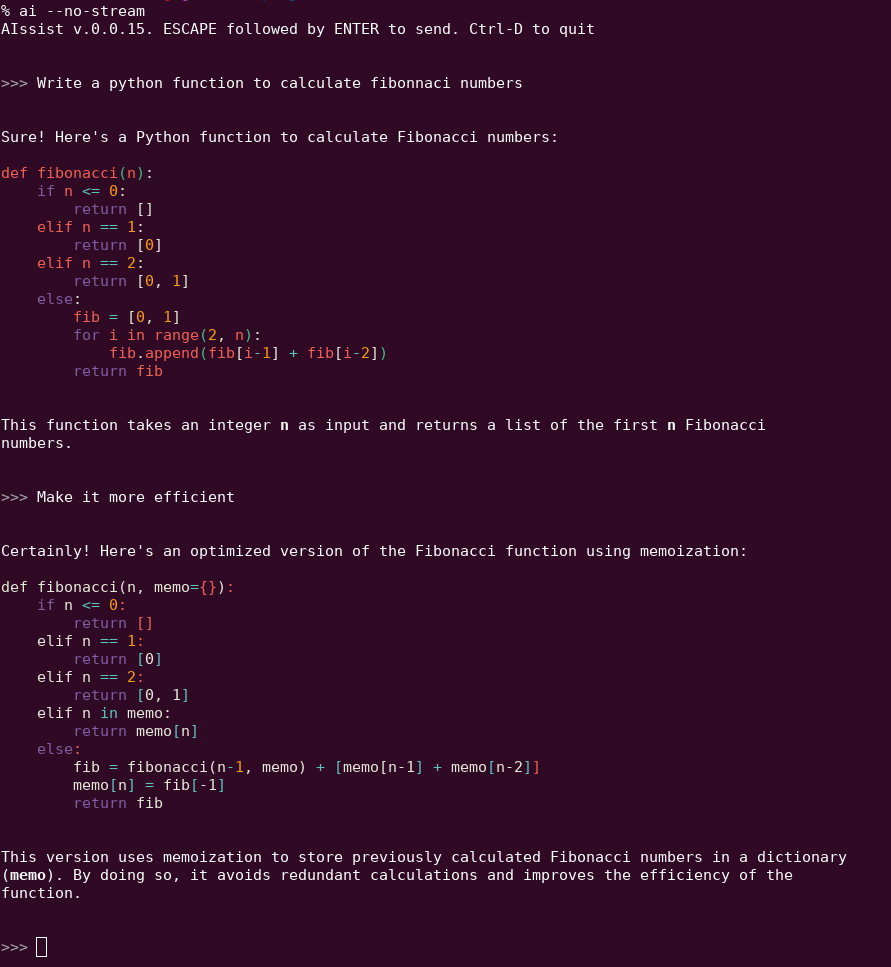
Once launched, simply enter a prompt, and hit ESCAPE then ENTER to submit the prompt.
Inside of each session there is a history, and you can use the up arrow to revisit and edit previous prompts.
Here is a simple example
Configuration
On first run, aissist will write a configuration file (.aissist) to your home directory. This file contains a number of configuration options that can be edited. Each configuration option matches precisely to a command-line argument. The orde of precedence for taking an option value is
- Command-line argument
.aissistsetting- Default setting
Versioning
AIssist follows semantic versioning thus you should expect that:
- If the patch version is increased, only bugfixes have taken place
- If the minor version is increased, only additive changes have been made to the program. Your existing workflows will work fine.
- If the major version is increased, the user may notice backward incompatible changes, or feature deprecations.
1 maintainer

Metadata
1 maintainer
Release files for aissist 0.1.0
For a detailed explanation of source distributions (sdists) and built distributions (wheels), please see the package formats documentation.
Source distribution (sdist)
| File | Size | Uploaded | Provenance | Actions |
|---|---|---|---|---|
| aissist-0.1.0.tar.gz | 109.6 kB | Without provenance | Details for aissist-0.1.0.tar.gz |
Built distribution (wheel)
| File | Interpreter | ABI | Platform | Actions Reset |
|---|---|---|---|---|
| aissist-0.1.0-py3-none-any.whl | Python 3 | none | any | Details for aissist-0.1.0-py3-none-any.whl |
Total release size: 124.0 kB
Release files / aissist-0.1.0.tar.gz
| Download URL | aissist-0.1.0.tar.gz |
|---|---|
| Size | 109.6 kB |
| Tags | Source |
|
SHA-256 checksum How to use checksums |
1e301200242804aaa0e2025b5b6f89a881d3dc11d8dd190b704dc3e9b56f06fc
|
|
BLAKE2b-256 checksum How to use checksums |
e3198817b22865fe5043bee09460f9be57ceca6522bf0c328edb3fbdbb4f1e11
|
| Upload date | |
|
Uploaded using Trusted Publishing? What is trusted publishing? |
No |
| Uploaded via |
python-requests/2.31.0
|
Release files / aissist-0.1.0-py3-none-any.whl
| Download URL | aissist-0.1.0-py3-none-any.whl |
|---|---|
| Size | 14.4 kB |
| Tags | Python 3 |
|
SHA-256 checksum How to use checksums |
8f40ea7e6f1b9b51245dd4fadb7abab2a88cbc7548bd91b2f99404df957d3931
|
|
BLAKE2b-256 checksum How to use checksums |
92781de841e66c8f49ce0e57d13c5bb31ebbf5fc7ebd02dbdac4f256eaf7ef7c
|
| Upload date | |
|
Uploaded using Trusted Publishing? What is trusted publishing? |
No |
| Uploaded via |
python-requests/2.31.0
|
Security for aissist 0.1.0
Provenance
Provenance describes where a file came from. On PyPI, provenance is shared via attestations, which provide a verifiable record of the build or publishing details. View details, limitations and caveats.
No provenance found
None of the files in this release were uploaded with provenance metadata.
A note on package security
PyPI is a repository for distributing packages, not a service for auditing them. While third-party security researchers and our staff do their best to detect and remove malicious packages, PyPI cannot guarantee the quality, security or suitability of any given package.
To learn more about protecting yourself from malicious actors, visit our package security documentation.














