
AKFruitData: AK_SM_RECORDER - Azure Kinect SM Recorder
A simple GUI recorder based on Python to manage Azure Kinect camera devices in a standalone mode. Visit the project site at https://pypi.org/project/ak-sm-recorder/
Contents
- Pre-requisites.
- Functionalities.
- Install and run.
- Files and folder description.
- Development tools, environment, build executables.
1. Pre-requisites
- Azure Kinect DK camera connected to the computer. Specifications can be seen in the manufacturer site.
- SDK Azure Kinect installed.
- pyk4a library installed. If the operating system is Windows, follow this steps. You can find test basic examples with pyk4a here.
- In Ubuntu 20.04, we provide a script to install the camera drivers following the instructions in azure_kinect_notes.
2. Functionalities
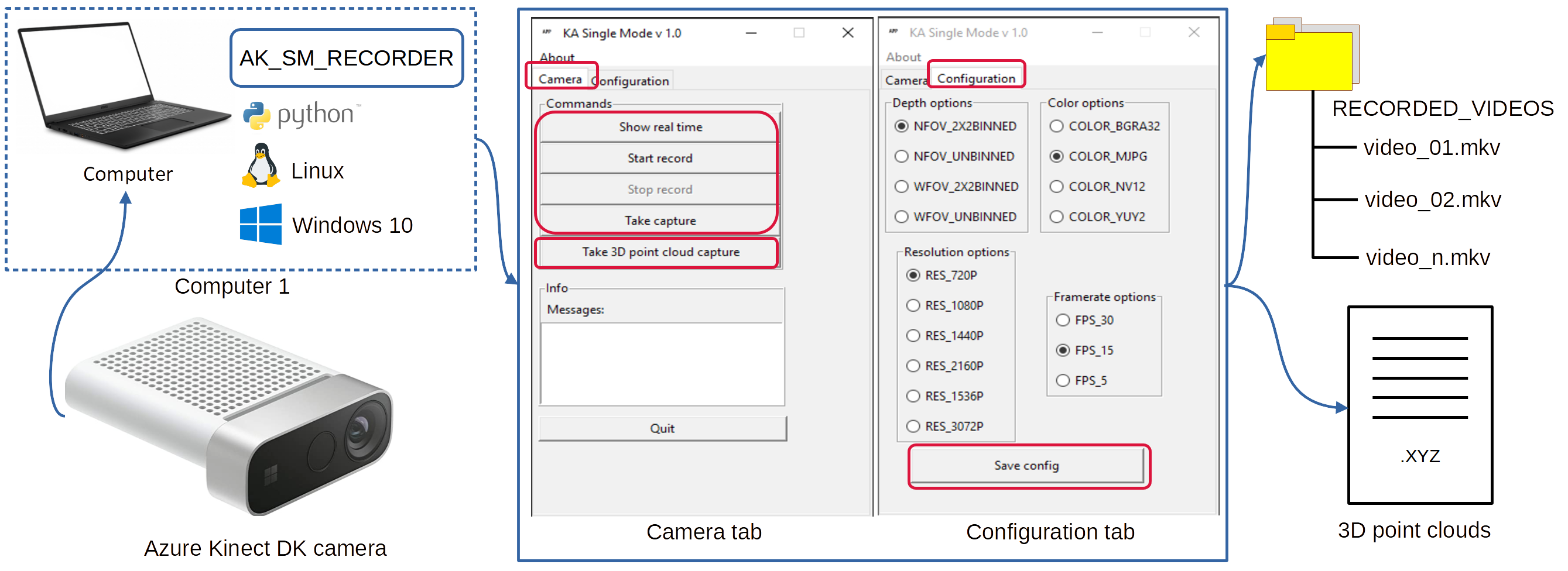
The functionalities of the software are briefly described. Supplementary material can be found in USER's Manual.
- [Show real time] Display images of the device in real time. Used to see where the camera is pointing.
- [Start record] Start a video recording.
- [Stop record] Stops a video recording in progress.
- [Take screenshots] Take screenshots and save them in Matroska format as short videos.
- [Take 3D point cloud capture] Take the captures as 3D point cloud data and save them in .XYZ format.
- [Save config] Enables to the user to configure Azure Kinect devices parameters.
- Videos and 3D cloud points can be retrieved from "RECORDER_VIDEOS/" folder.
3. Install and run
3.1 PIP quick install package
Create your Python virtual environment.
python3 -m venv ./ak_sm_recorder_venv
source ./ak_sm_recorder_venv/bin/activate
pip install --upgrade pip

# on Windows systems
.\ak_frame_extractor_venv\Scripts\activate
python.exe -m pip install --upgrade pip


pip install ak-sm-recorder
python -m ak_sm_recorder
3.2 Install and run virtual environments using scripts provided
- [Linux] Enter to the folder "ak_sm_recorder/"
Create virtual environment(only first time)
./creating_env_ak_sm_recorder.sh
Run script.
./ak_sm_recorder_start.sh
- [Windows] Enter to the folder "ak_sm_recorder/"
Create virtual environment(only first time)
TODO_HERE
Run script from CMD.
./ak_sm_recorder_start.bat
4. Files and folder description
Folder description:
| Folders | Description |
|---|---|
| docs/ | Documentation |
| src/ | Source code |
| win_exe_conf/ | Specifications for building .exe files with Pyinstaller. |
| . | . |
Files description:
| Files | Description | OS |
|---|---|---|
| activate.bat | Activate environments in Windows | WIN |
| clean_files.bat | Clean files under CMD. | WIN |
| ak_sm_recorder_main.bat | Executing main script | WIN |
| build_pip.bat | Build PIP package for distribution | WIN |
| build_win.bat | Build .EXE for distribution | WIN |
| creating_env_ak_sm_recorder.sh | Automatically creates Python environments | Linux |
| ak_sm_recorder_start.sh | Executing main script | Linux |
| /src/ak_sm_recorder/main.py | Main function used in package compilation | Supported by Python |
| /ak_sm_recorder_main.py | Python main function | Supported by Python |
| setup.cfg | Package configuration PIP | Supported by Python |
| pyproject.toml | Package description pip | Supported by Python |
5. Development tools, environment, build executables
Some development tools are needed with this package, listed below:
- Pyinstaller.
- Opencv.
- Curses for Python
pip install windows-curses. - 7zip.
5.1 Notes for developers
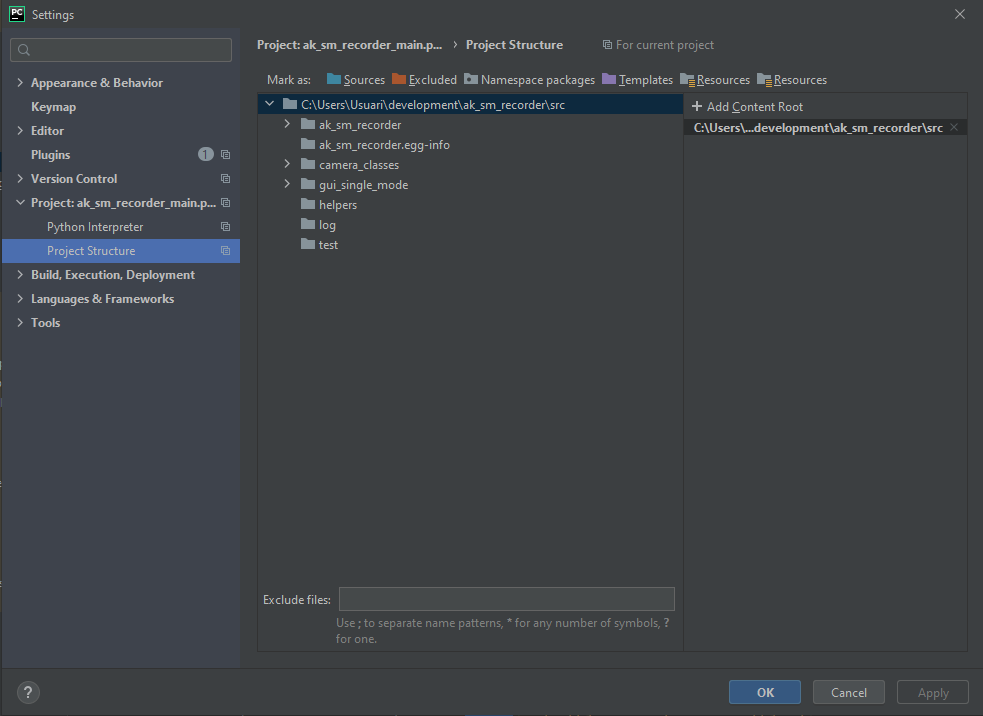
You can use the main.py for execute as first time in src/ak_sm_recorder/_ _ main _ _.py Configure the path of the project, if you use Pycharm, put your folder root like this:
(docs/img/ak_sm_recorded_presentation.png)
5.2 Creating virtual environment Linux
python3 -m venv ./venv
source ./venv/bin/activate
pip install --upgrade pip
pip install -r requirements_linux.txt
5.3 Creating virtual environment Windows
%userprofile%"\AppData\Local\Programs\Python\Python38\python.exe" -m venv ./venv
venv\Scripts\activate.bat
pip install --upgrade pip
pip install -r requirements_windows.txt
** If there are some problems in Windows, follow this **
pip install pyk4a --no-use-pep517 --global-option=build_ext --global-option="-IC:\Program Files\Azure Kinect SDK v1.4.1\sdk\include" --global-option="-LC:\Program Files\Azure Kinect SDK v1.4.1\sdk\windows-desktop\amd64\release\lib"
5.4 Building PIP package
We are working to offer Pypi support for this package. At this time this software can be built by scripts automatically.
5.4.1 Build packages
py -m pip install --upgrade build
build_pip.bat
5.4.2 Download PIP package
pip install ak_sm_recorder-1.0-py3-none-any.whl
5.4.3 Run ak_sm_recorder
python -m ak_sm_recorder.py
5.4 Building .EXE for Windows 10
build_win.bat
After the execution of the script, a new folder will be generated inside the project "/dist". You can copy ** ak_sm_recorder_f/** or a compressed file "ak_sm_recorder_f.zip" to distribute.
5.6 Package distribution format
Explain about packages distribution.
| Package type | Package | Url | Description |
|---|---|---|---|
| Windows | .EXE | .EXE | Executables are stored under build/ |
| Linux | .deb | .deb | NOT IMPLEMENTED YET |
| PIP | .whl | .whl | PIP packages are stored in build/ |
Authorship
This project is contributed by GRAP-UdL-AT. Please contact authors to report bugs juancarlos.miranda@udl.cat
Citation
If you find this code useful, please consider citing: GRAP-UdL-AT/ak_sm_recorder.
Acknowledgements
This work is a result of the RTI2018-094222-B-I00 project (PAgFRUIT) granted by MCIN/AEI and by the European Regional Development Fund (ERDF). This work was also supported by the Secretaria d’Universitats i Recerca del Departament d’Empresa i Coneixement de la Generalitat de Catalunya under Grant 2017-SGR-646. The Secretariat of Universities and Research of the Department of Business and Knowledge of the Generalitat de Catalunya and Fons Social Europeu (FSE) are also thanked for financing Juan Carlos Miranda’s pre-doctoral fellowship (2020 FI_B 00586).


1 maintainer

Metadata
1 maintainer
Release files for ak-sm-recorder 1.2.1
For a detailed explanation of source distributions (sdists) and built distributions (wheels), please see the package formats documentation.
Source distribution (sdist)
| File | Size | Uploaded | Provenance | |
|---|---|---|---|---|
| ak_sm_recorder-1.2.1.tar.gz | 47.2 kB | Without provenance | Details |
Built distribution (wheel)
| File | Interpreter | ABI | Platform | Reset |
|---|---|---|---|---|
| ak_sm_recorder-1.2.1-py3-none-any.whl | Python 3 | none | any | Details |
Total release size: 98.1 kB
Release files / ak_sm_recorder-1.2.1.tar.gz
| Download URL | ak_sm_recorder-1.2.1.tar.gz |
|---|---|
| Size | 47.2 kB |
| Tags | Source |
|
SHA-256 checksum How to use checksums |
94ca95f3bbd831e048d31a2b470aad8e2d669e2d2724425778e8eda9934b8820
|
|
BLAKE2b-256 checksum How to use checksums |
dfe03a2ce639e38ee95edcd4d29a42ce82097951ceaf4d6c9f71ca29d8b9a9a7
|
| Upload date | |
|
Uploaded using Trusted Publishing? What is trusted publishing? |
No |
| Uploaded via |
twine/4.0.2 CPython/3.8.10
|
Release files / ak_sm_recorder-1.2.1-py3-none-any.whl
| Download URL | ak_sm_recorder-1.2.1-py3-none-any.whl |
|---|---|
| Size | 50.9 kB |
| Tags | Python 3 |
|
SHA-256 checksum How to use checksums |
b2584d55a7decca53743a5d168c6d44375c85c4c497b468b6aecb913d7060ff7
|
|
BLAKE2b-256 checksum How to use checksums |
47201d47a391fb38816b95c814577d5df7f6fb8b0922d60b40ac485eb3204e7a
|
| Upload date | |
|
Uploaded using Trusted Publishing? What is trusted publishing? |
No |
| Uploaded via |
twine/4.0.2 CPython/3.8.10
|
Security for ak-sm-recorder 1.2.1
Provenance
Provenance describes where a file came from. On PyPI, provenance is shared via attestations, which provide a verifiable record of the build or publishing details. View details, limitations and caveats.
No provenance found
None of the files in this release were uploaded with provenance metadata.
A note on package security
PyPI is a repository for distributing packages, not a service for auditing them. While third-party security researchers and our staff do their best to detect and remove malicious packages, PyPI cannot guarantee the quality, security or suitability of any given package.
To learn more about protecting yourself from malicious actors, visit our package security documentation.














