
alicat
TCP/Serial driver and command line tool for Alicat Laminar DP and BASIS mass flow devices.
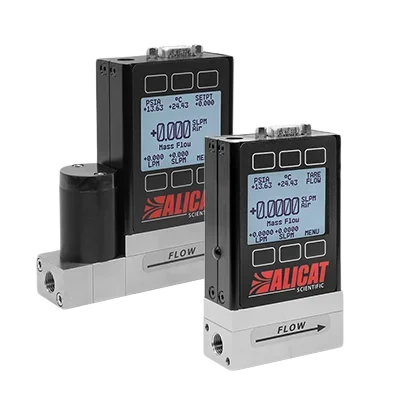
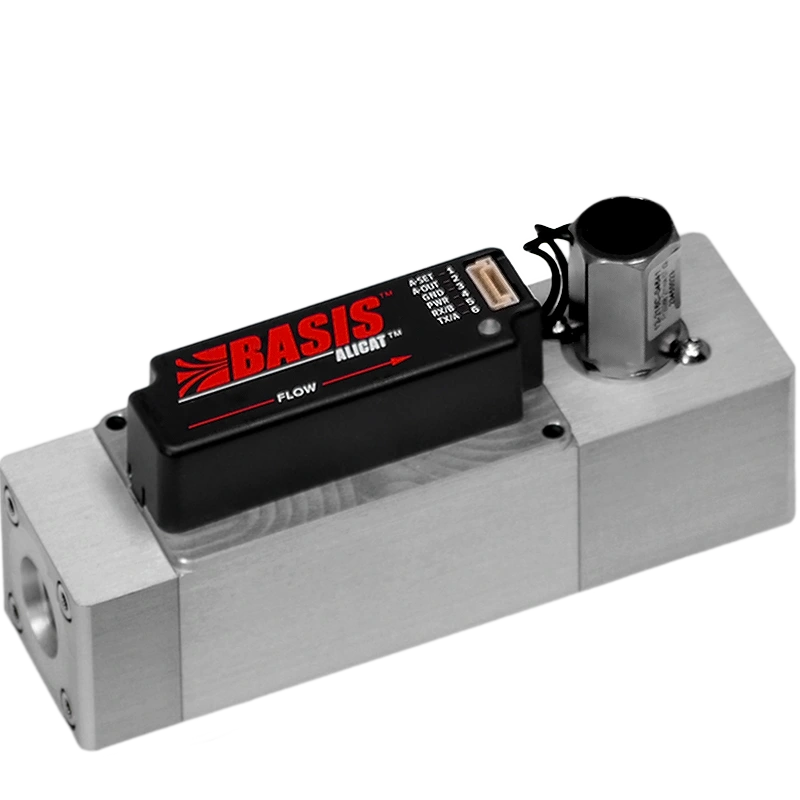
If you are using Analyt-MTC flow controllers, go to this repository for more info. This driver does not currently support CODA devices.
Example Connections
| Type | Usage |
|---|---|
The standard DB9 cable connected directly to a computer (unix: /dev/ttyS0, windows: COM1). |
Good with older computers that still have the connector. |
The cable connected to a computer through a USB converter (unix: /dev/ttyUSB0, windows: COM1). |
Good for newer computers and maker boards such as Raspberry Pis. |
Multiple cables connected to one port via a splitter and Alicat's addressing (A-Z). |
Good when number of ports is limited. |
Cables routed through a TCP device server (192.168.1.100:23). |
Installation
pip install alicat
Usage
Command Line
For basic tasks, this driver includes a command-line interface. Read the help for more.
alicat --help
Python
This uses Python ≥3.5's async/await syntax to asynchronously communicate with an Alicat. For example:
import asyncio
from alicat.driver import FlowController

async def get():
    async with FlowController(address = "com_port", unit = "unit_id") as flow_controller:
        print(await flow_controller.get())

asyncio.run(get())
#  If there is already an event loop (e.g. Jupyter), replace the above line with:
#  sawait get()
A similar format can be used to communicate with a BASIS device.
import asyncio
from alicat.basis import BASISController

async def get():
    async with BASISController(address = "com_port", unit = "unit_id") as basis_controller:
        print(await basis_controller.get())

asyncio.run(get())
If the flow controller is communicating on the specified port, this should return a dictionary of the form:
## Standard Devices
{
  'setpoint': 0.0,         # Setpoint, either mass flow rate or pressure
  'control_point': 'flow', # Either 'flow' or 'pressure'
  'gas': 'Air',            # Can be any option in `flow_controller.gases`
  'mass_flow': 0.0,        # Mass flow (in units specified at time of purchase)
  'pressure': 25.46,       # Pressure (normally in psia)
  'temperature': 23.62,    # Temperature (normally in C)
  'total_flow': 0.0,       # Optional. If totalizer function purchased, will be included
  'volumetric_flow': 0.0   # Volumetric flow (in units specified at time of purchase)
}

## BASIS Devices
{
  'setpoint': 0.0,         # Mass Flow Setpoint
  'gas': 'Air',            # Can be Air, Ar, CO2, N2, O2, N2O, H2, He, CH4
  'mass_flow': 0.0,        # Mass flow (in SCCM or SLPM)
  'temperature': 23.62,    # Temperature (normally in C)
  'volumetric_flow': 0.0   # Volumetric flow (in CCM or LPM)
}
On flow controllers, you can set the flow or pressure setpoints.
await flow_controller.set_flow_rate(1.0)
await flow_controller.set_pressure(20)
Gas Type
You can set the gas type by name or by index. For more on setting by index, see the gas table in your Alicat's manual.
await flow_controller.set_gas('N2')
await flow_controller.set_gas(8)
For firmware 5v and greater, you can create and set gas mixes. Mixes can contain up to five gases and are stored in gas indices 236-255.
await flow_controller.create_mix(mix_no=236, name="Mix1", gases={'N2': 50, 'O2': 30, 'CO2': 20})
await flow_controller.set_gas(236)
await flow_controller.delete_mix(236)
PID Parameters
For flow controllers, read and write PID loop settings for device tuning.
await flow_controller.set_pid(p=4000, i=4000, d=10, loop_type='PD2I')
print(await flow_controller.get_pid())
{
    'loop_type': 'PD2I',
    'P': '4000',
    'I': '4000',
    'D': '10',
}
Other Features
Additional features include override commands to increase device functionality.
await flow_controller.lock()            # Lock the front display.
await flow_controller.unlock()          # Unlock the front display.
await flow_controller.hold()            # Hold the valve in its current position.
await flow_controller.cancel_hold()     # Cancel the valve hold.
await flow_controller.tare_volumetric() # Tare volumetric flow.
await flow_controller.tare_pressure()   # Tare pressure.
await flow_controller.reset_totalizer() # Reset totalizer, if totalizer functionality included.
Addressing
You can have multiple controllers on the same port by using Alicat's A-Z addresses
and an RS-232 splitter.
flow_controller_1 = FlowController(address='A')
flow_controller_2 = FlowController(address='B')

await flow_controller_1.set_flow_rate(1.0)
await flow_controller_2.set_flow_rate(0.5)

await flow_controller_1.close() # /dev/ttyUSB0 is still open!
await flow_controller_2.close()
Breaking changes
0.5.0
- Support only
asyncio. The last version with synchronous code was0.4.1. - Rename
address/-atounit/-uto match Alicat's documentation - Rename
-uto-ul(for--unlock)
0.4.1
Remove TCP support. Use pip install alicat==0.3.1 if needed
3 maintainers


Metadata
3 maintainers
Release files for alicat 0.10.0
For a detailed explanation of source distributions (sdists) and built distributions (wheels), please see the package formats documentation.
Source distribution (sdist)
| File | Size | Uploaded | Provenance | Actions |
|---|---|---|---|---|
| alicat-0.10.0.tar.gz | 27.9 kB | Without provenance | Details for alicat-0.10.0.tar.gz |
Built distribution (wheel)
| File | Interpreter | ABI | Platform | Actions Reset |
|---|---|---|---|---|
| alicat-0.10.0-py3-none-any.whl | Python 3 | none | any | Details for alicat-0.10.0-py3-none-any.whl |
Total release size: 54.8 kB
Release files / alicat-0.10.0.tar.gz
| Download URL | alicat-0.10.0.tar.gz |
|---|---|
| Size | 27.9 kB |
| Tags | Source |
|
SHA-256 checksum How to use checksums |
d35c34a204b42fe34f0eb15794279140f38403b20822701e932ed380664448bf
|
|
BLAKE2b-256 checksum How to use checksums |
d0cd86392c71c25c7244c3353309fee88f927f085ae71729dbc46dc0ccdb8f4b
|
| Upload date | |
|
Uploaded using Trusted Publishing? What is trusted publishing? |
No |
| Uploaded via |
twine/5.0.0 CPython/3.12.3
|
Release files / alicat-0.10.0-py3-none-any.whl
| Download URL | alicat-0.10.0-py3-none-any.whl |
|---|---|
| Size | 27.0 kB |
| Tags | Python 3 |
|
SHA-256 checksum How to use checksums |
ca4c3f5d326142eace1c91db1bf512f5c9bfa10edeb7fdda437f7ad8cb295101
|
|
BLAKE2b-256 checksum How to use checksums |
70f316d5b7276deca331ded0dd96fc947d1b9829be2366e22ad9020347b03e7a
|
| Upload date | |
|
Uploaded using Trusted Publishing? What is trusted publishing? |
No |
| Uploaded via |
twine/5.0.0 CPython/3.12.3
|
Security for alicat 0.10.0
Provenance
Provenance describes where a file came from. On PyPI, provenance is shared via attestations, which provide a verifiable record of the build or publishing details. View details, limitations and caveats.
No provenance found
None of the files in this release were uploaded with provenance metadata.
A note on package security
PyPI is a repository for distributing packages, not a service for auditing them. While third-party security researchers and our staff do their best to detect and remove malicious packages, PyPI cannot guarantee the quality, security or suitability of any given package.
To learn more about protecting yourself from malicious actors, visit our package security documentation.














