
alpyca 3.1.3
Python 3.10+ API library for all ASCOM Alpaca universal interfaces

Produced by the ASCOM Initiative, and derived from Ethan Chappel's Alpyca 1.0.0. Ethan kindly released the name Alpyca to the ASCOM Initiative, hence this expanded package started life as Version 2.0. Beginning with 3.0.0 it has been expanded to support the additions in ASCOM Platform 7. NOTE This package runs on Linux, MacOS, and Windows. It has no depencence on the Windows ASCOM PLatform. Alpaca does not depend on Windows.
Requirements
This package runs under Python 3.10 or later. It is compatible with most Linux distros, Windows , and MacOS. Dependencies are minimal: requests, netifaces, typing-extensions, python-dateutil, enum-tools, and ifaddr.
Installation
The package installs from PyPi as
pip install alpyca
Current Status & Documentation
This version 3.1.3. See CHANGES.rst (on GitHub) for change log.
The documentation is extensive and available online as Alpyca: API Library for Alpaca as well as a PDF Document here. Each element of the package references the relevant documentation in the ASCOM Master Interfaces Document. See CHANGES.rst (on GitHub) for change log.
Feedback and Discussion
Feedback can be given on the ASCOM Driver and Application Development Support Forum. Please note that the protocols are universal and strictly curated. This library is an implementation of the protocols, not the protocols themselves. For background please visit About Alpaca and ASCOM, as well as the ASCOM Interface Principle, The Standards Process, and the General Requirements.
Example
This requires the cross-platform ASCOM Omni Simulators which will give you fully functional simulators for all Alpaca devices, as well as a live OpenAPI/Swagger interface to the Alpaca RESTful endpoints (see the details below). If you are on a Windows system, the Omni Simulators are included with the ASCOM Platform 7. If you are on Linux or MacOS, you can get the cross-platform OmniSimulators from GitHub at the Omni Simulators Repo.
This example will
use the Telescope simulator. Assuming you are running the Omni Simulator on your local host
at its default port of 32323, its address is then localhost:32323. Here is a sample
program using Alpaca:
REQUIRES LATEST OMNI SIM WITH PLATFORM 7 CONNECTION SEMANTICS:
    import time
    from alpaca.telescope import *      # Multiple Classes including Enumerations
    from alpaca.exceptions import *     # Or just the exceptions you want to catch

    T = Telescope('localhost:32323', 0) # Local Omni Simulator
    T.Connect()                         # New async connect
    while T.Connecting
        time.sleep(1)
    print(f'Connected to {T.Name}')
    print(T.Description)
    T.Tracking = True               # Needed for slewing (see below)
    try:
        print('Starting slew...')
        T.SlewToCoordinatesAsync(T.SiderealTime + 2, 50)    # 2 hrs east of meridian
        while(T.Slewing):
            time.sleep(5)               # What do a few seconds matter?
        print('... slew completed successfully.')
        print(f'RA={T.RightAscension} DE={T.Declination}')
        print('Turning off tracking then attempting to slew...')
        T.Tracking = False
        T.SlewToCoordinatesAsync(T.SiderealTime + 2, 55)    # 5 deg slew N
        # This will fail for tracking being off
        print("... you won't get here!")
    except Exception as e:                      # Should catch specific InvalidOperationException
        print(f'Caught {type(e).__name__}')
        print(f'  Slew failed: {e.message}')    # Using exception named properties
    finally:                            # Assure that you disconnect
        print("Disconnecting...")
        T.Disconnect()
Results
    Connected to Alpaca Telescope Sim
    Software Telescope Simulator for ASCOM
    Starting slew...
    ... slew completed successfully.
    RA=10.939969572854931 DE=50
    Turning off tracking then attempting to slew...
    Caught InvalidOperationException
      Slew failed: SlewToCoordinatesAsync is not allowed when tracking is False
    Disconnecting...
    done
See how easliy exceptions are handled? The error message came from the OmniSim.
Alpaca Omni Simulators
The ASCOM Alpaca Simulators are included in ASCOM Platform 7 or if you are on Linux or MacOS, they are available via GitHub here. Scroll down to the Assets section and pick the package for your OS and CPU type.
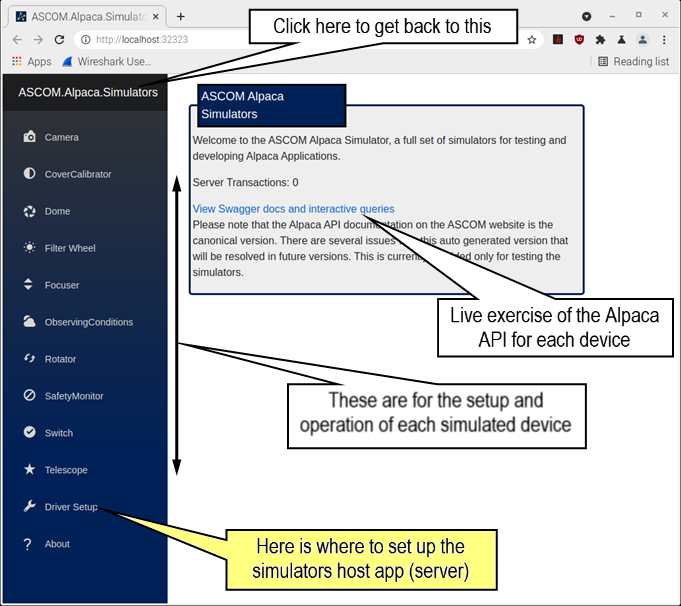
./ascom-alpaca.simulators
(or the equivalent on Windows or MacOS). You may need to open a web browser to
http://localhost:32323 if that option is off in the server settings. This is
the primary user interface to the simulator server and simulated devices. Once
you get this running you are ready to try the sample above.
ASCOM Remote
Any current ASCOM COM device that is hosted on a Windows system can have an Alpaca interface added via the ASCOM Remote Windows app. This app allows you to expose any of your Windows-hosted astronomy devices to the Alpaca world, making them reachable from programs using alpyca.
Wireshark
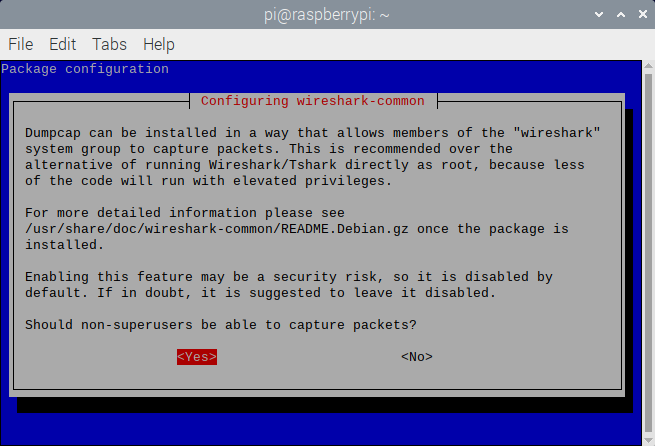
If you are interested in monitoring the HTTP/REST traffic that alpyca creates and exchanges with the Alpaca devices, you can install the Wireshark network protocol analyzer. One thing that trips people up is making the installation so that Wireshark has access to all of the network insterfaces without needing root privs (linux) or running "As Administrator" on Windows. Pay close attention the installation steps on this. On WIndows the capture driver installation will require elevation, as it is a privileged module. For example installing on Linux (e.g Debian/Raspberry Pi) you'll see this, and be sure to answer Yes.
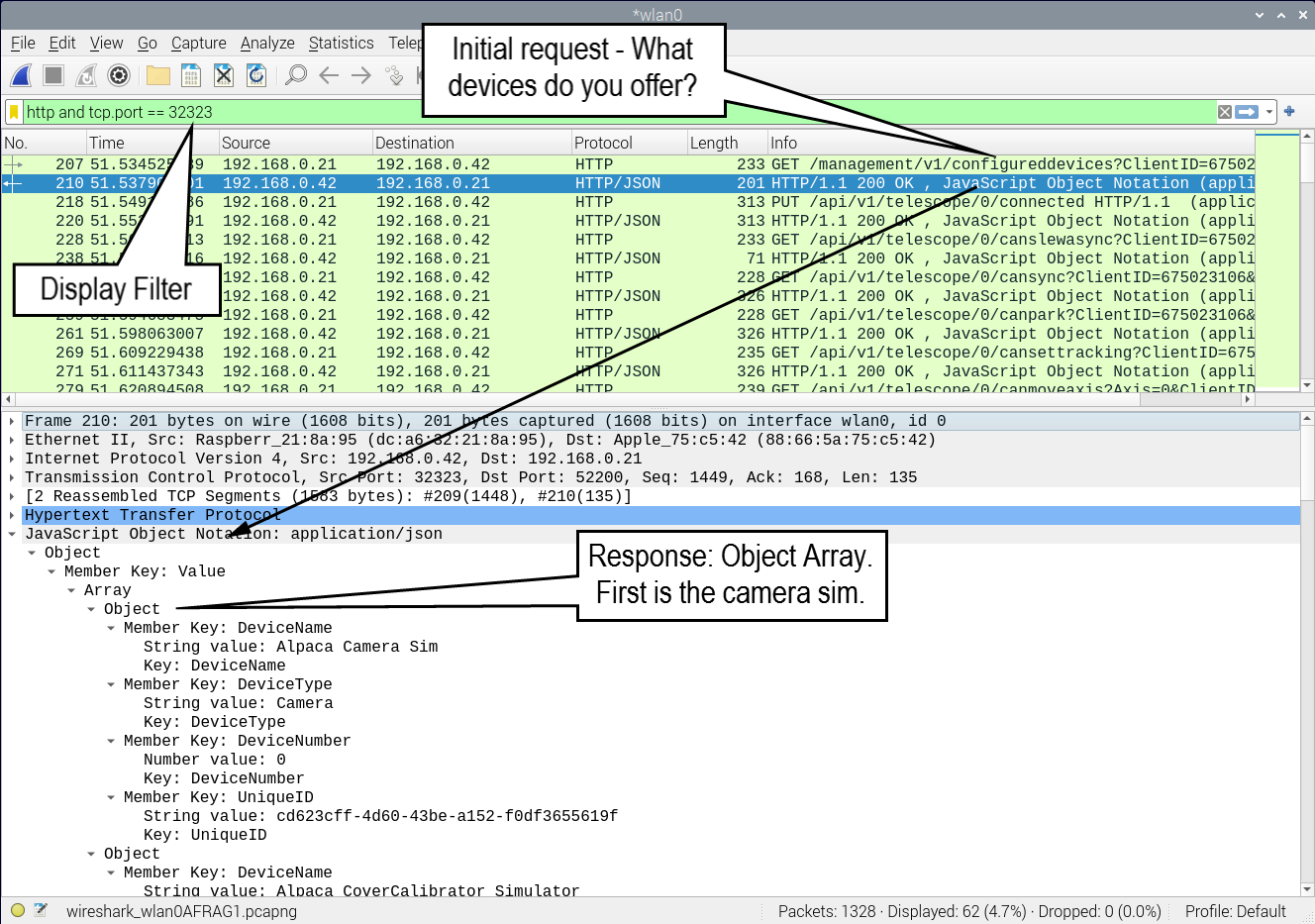
To watch Alpaca traffic, set this simple display filter http and tcp.port == 32323
(with 32323 being the port of the OmniSim, see above). You'll get a nice analysis
of the Alpaca traffic like this
2 maintainers


Metadata
2 maintainers
Release files for alpyca 3.1.3
For a detailed explanation of source distributions (sdists) and built distributions (wheels), please see the package formats documentation.
Source distribution (sdist)
| File | Size | Uploaded | |
|---|---|---|---|
| alpyca-3.1.3.tar.gz | 65.3 kB | Details |
Built distribution (wheel)
| File | Interpreter | ABI | Platform | Reset |
|---|---|---|---|---|
| alpyca-3.1.3-py3-none-any.whl | Python 3 | none | any | Details |
Total release size: 149.5 kB
Release files / alpyca-3.1.3.tar.gz
| Download URL | alpyca-3.1.3.tar.gz |
|---|---|
| Size | 65.3 kB |
| Tags | Source |
|
SHA-256 checksum How to use checksums |
da6103a2853a55d164556891bbac5cf9d608ff860381177419c412f15cac2614
|
|
BLAKE2b-256 checksum How to use checksums |
dc57d42d34c87a96c6073fa9acf0ed660c07f7525f008c5a26d3a838678ef4a2
|
| Upload date | |
|
Uploaded using Trusted Publishing? What is trusted publishing? |
No |
| Uploaded via |
poetry/1.8.1 CPython/3.11.1 Windows/10
|
Release files / alpyca-3.1.3-py3-none-any.whl
| Download URL | alpyca-3.1.3-py3-none-any.whl |
|---|---|
| Size | 84.2 kB |
| Tags | Python 3 |
|
SHA-256 checksum How to use checksums |
dae8b6bf98290f099a6b4ea42bfb0628c951d1cccd175c23c0c97caf2948876e
|
|
BLAKE2b-256 checksum How to use checksums |
7473238f52043573a417850c738f3243c34d3c3f8cda5f5662e9fa32d72bc6f5
|
| Upload date | |
|
Uploaded using Trusted Publishing? What is trusted publishing? |
No |
| Uploaded via |
poetry/1.8.1 CPython/3.11.1 Windows/10
|














