
Altair Viewer
Offline chart viewer for Altair visualizations



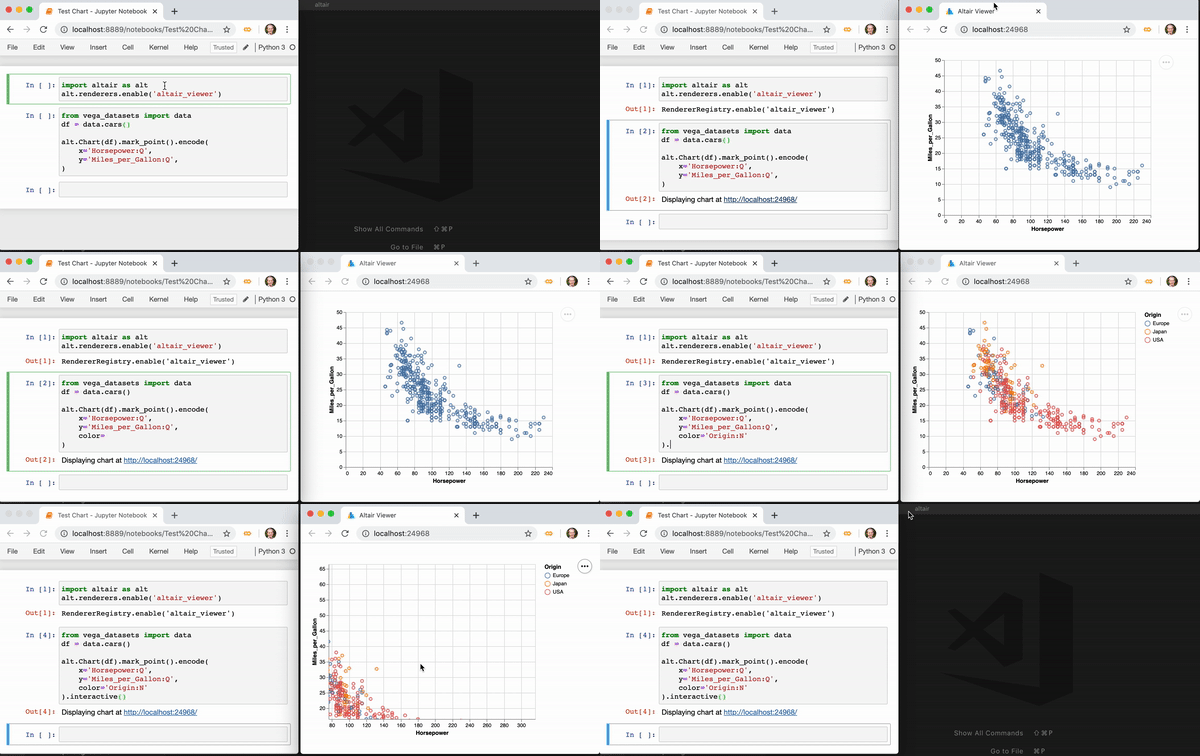
This package provides tools for viewing Altair charts without a web connection in arbitrary Python environments. Charts can be displayed either inline in a Jupyter notebook environment, or in a separate browser window for use in any environment.
Installation
Altair Viewer can be installed from the
Python Package Index with pip:
$ pip install altair_viewer
Usage: General Environments
Altair viewer provides two top-level functions for displaying charts: display() and show().
Their intended use is slightly different:
import altair_viewer
altair_viewer.display(chart)
display(chart) is meant for use in interactive computing environments where
a single Python process is used interactively. It will serve a chart viewer at a localhost
URL, and any susequent chart created within the session will appear in the same window.
The background server will be terminated when the main Python process terminates, so this
is not suitable for standalone scripts.
import altair_viewer
altair_viewer.show(chart)
show(chart) is meant for use once at the end of a Python script. It does the
same as display(), but automatically opens a browser window, and adds an input
prompt to prevent the script (and the server it creates) from terminating.
Usage: IPython & Jupyter
Within Jupyter notebook, IPython terminal, and related environments that support
Mimetype-based display,
altair viewer can be used by enabling the altair_viewer renderer:
import altair as alt
alt.renderers.enable('altair_viewer')
This will cause charts at the end of a Jupyter notebook cell to be rendered in a
separate browser window, as with the display() and show() methods.
If enabled with inline=True, charts will be rendered inline in the notebook:
import altair as alt
alt.renderers.enable('altair_viewer', inline=True)
To display a single inline chart using Altair viewer in an IPython environment without
globally enabling the associated renderer, you can use the display method directly:
import altair_viewer
altair_viewer.display(chart, inline=True)
Note that the display based on altair viewer will only function correctly as long as the kernel that created the charts is running, as it depends on the background server started by the kernel. In particular, this means that if you save a notebook and reopen it later, charts will not display until the associated cells are re-run.
3 maintainers


Metadata
3 maintainers
Release files for altair-viewer 0.3.0
For a detailed explanation of source distributions (sdists) and built distributions (wheels), please see the package formats documentation.
Source distribution (sdist)
| File | Size | Uploaded | Provenance | Actions |
|---|---|---|---|---|
| altair_viewer-0.3.0.tar.gz | 560.3 kB | Without provenance | Details for altair_viewer-0.3.0.tar.gz |
Built distribution (wheel)
| File | Interpreter | ABI | Platform | Actions Reset |
|---|---|---|---|---|
| altair_viewer-0.3.0-py3-none-any.whl | Python 3 | none | any | Details for altair_viewer-0.3.0-py3-none-any.whl |
Total release size: 1.1 MB
Release files / altair_viewer-0.3.0.tar.gz
| Download URL | altair_viewer-0.3.0.tar.gz |
|---|---|
| Size | 560.3 kB |
| Tags | Source |
|
SHA-256 checksum How to use checksums |
2964dbde6b7c5be723ddd9d509db4de67c9fb4c765d4e864087dc931c4524439
|
|
BLAKE2b-256 checksum How to use checksums |
c1990683c908b7733f2c739b2a06db4ef565dba4bf2fa326747175bbb7cecb1f
|
| Upload date | |
|
Uploaded using Trusted Publishing? What is trusted publishing? |
No |
| Uploaded via |
twine/3.1.1 pkginfo/1.5.0.1 requests/2.22.0 setuptools/42.0.2.post20191203 requests-toolbelt/0.9.1 tqdm/4.41.0 CPython/3.7.5
|
Release files / altair_viewer-0.3.0-py3-none-any.whl
| Download URL | altair_viewer-0.3.0-py3-none-any.whl |
|---|---|
| Size | 563.0 kB |
| Tags | Python 3 |
|
SHA-256 checksum How to use checksums |
5e290c472b70f14b5c943d464b96ca78c7131bb5f515cdb8b031e0d0722267e5
|
|
BLAKE2b-256 checksum How to use checksums |
04a4c3ddcd67e7929109f40b4a6d8afc56f358fc3231569ff22207e8befc8912
|
| Upload date | |
|
Uploaded using Trusted Publishing? What is trusted publishing? |
No |
| Uploaded via |
twine/3.1.1 pkginfo/1.5.0.1 requests/2.22.0 setuptools/42.0.2.post20191203 requests-toolbelt/0.9.1 tqdm/4.41.0 CPython/3.7.5
|
Security for altair-viewer 0.3.0
Provenance
Provenance describes where a file came from. On PyPI, provenance is shared via attestations, which provide a verifiable record of the build or publishing details. View details, limitations and caveats.
No provenance found
None of the files in this release were uploaded with provenance metadata.
A note on package security
PyPI is a repository for distributing packages, not a service for auditing them. While third-party security researchers and our staff do their best to detect and remove malicious packages, PyPI cannot guarantee the quality, security or suitability of any given package.
To learn more about protecting yourself from malicious actors, visit our package security documentation.














