
# anaGo
**anaGo** is a Python library for sequence labeling(NER, PoS Tagging,...), implemented in Keras.
anaGo can solve sequence labeling tasks such as named entity recognition (NER), part-of-speech tagging (POS tagging), semantic role labeling (SRL) and so on. Unlike traditional sequence labeling solver, anaGo don't need to define any language dependent features. Thus, we can easily use anaGo for any languages.
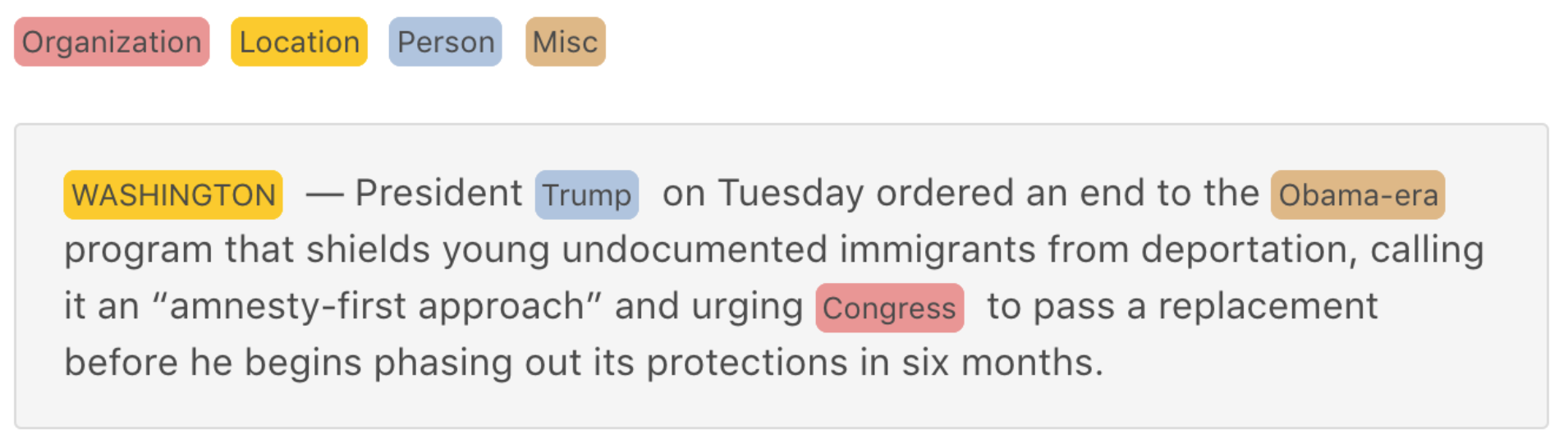
As an example of anaGo, the following image shows named entity recognition in English:
[anaGo Demo](https://anago.herokuapp.com/)

<!--

-->
## Get Started
In anaGo, the simplest type of model is the `Sequence` model. Sequence model includes essential methods like `fit`, `score`, `analyze` and `save`/`load`. For more complex features, you should use the anaGo modules such as `models`, `preprocessing` and so on.
Here is the data loader:
```python
>>> from anago.utils import load_data_and_labels
>>> x_train, y_train = load_data_and_labels('train.txt')
>>> x_test, y_test = load_data_and_labels('test.txt')
>>> x_train[0]
['EU', 'rejects', 'German', 'call', 'to', 'boycott', 'British', 'lamb', '.']
>>> y_train[0]
['B-ORG', 'O', 'B-MISC', 'O', 'O', 'O', 'B-MISC', 'O', 'O']
```
You can now iterate on your training data in batches:
```python
>>> import anago
>>> model = anago.Sequence()
>>> model.fit(x_train, y_train, epochs=15)
Epoch 1/15
541/541 [==============================] - 166s 307ms/step - loss: 12.9774
...
```
Evaluate your performance in one line:
```python
>>> model.score(x_test, y_test)
80.20 # f1-micro score
# For more performance, you have to use pre-trained word embeddings.
# For now, anaGo's best score is 90.90 f1-micro score.
```
Or tagging text on new data:
```python
>>> text = 'President Obama is speaking at the White House.'
>>> model.analyze(text)
{
"words": [
"President",
"Obama",
"is",
"speaking",
"at",
"the",
"White",
"House."
],
"entities": [
{
"beginOffset": 1,
"endOffset": 2,
"score": 1,
"text": "Obama",
"type": "PER"
},
{
"beginOffset": 6,
"endOffset": 8,
"score": 1,
"text": "White House.",
"type": "LOC"
}
]
}
```
To download a pre-trained model, call `download` function:
```python
>>> from anago.utils import download
>>> url = 'https://storage.googleapis.com/chakki/datasets/public/ner/conll2003_en.zip'
>>> weights, params, preprocessor = download(url)
>>> model = anago.Sequence.load(weights, params, preprocessor)
>>> model.score(x_test, y_test)
0.9090262970859986
```
## Feature Support
anaGo supports following features:
* Model Training
* Model Evaluation
* Tagging Text
* Custom Model Support
* Downloading pre-trained model
* GPU Support
* Character feature
* CRF Support
* Custom Callback Support
anaGo officially supports Python 3.4–3.6.
## Installation
To install anaGo, simply use `pip`:
```bash
$ pip install anago
```
or install from the repository:
```bash
$ git clone https://github.com/Hironsan/anago.git
$ cd anago
$ python setup.py install
```
## Documentation
(coming soon)
Fantastic documentation is available at [http://example.com/](http://example.com/).
<!--
## Data and Word Vectors
Training data takes a tsv format.
The following text is an example of training data:
```
EU B-ORG
rejects O
German B-MISC
call O
to O
boycott O
British B-MISC
lamb O
. O
Peter B-PER
Blackburn I-PER
```
anaGo supports pre-trained word embeddings like [GloVe vectors](https://nlp.stanford.edu/projects/glove/).
-->
## Reference
This library uses bidirectional LSTM + CRF model based on
[Neural Architectures for Named Entity Recognition](https://arxiv.org/abs/1603.01360)
by Lample, Guillaume, et al., NAACL 2016.
**anaGo** is a Python library for sequence labeling(NER, PoS Tagging,...), implemented in Keras.
anaGo can solve sequence labeling tasks such as named entity recognition (NER), part-of-speech tagging (POS tagging), semantic role labeling (SRL) and so on. Unlike traditional sequence labeling solver, anaGo don't need to define any language dependent features. Thus, we can easily use anaGo for any languages.
As an example of anaGo, the following image shows named entity recognition in English:
[anaGo Demo](https://anago.herokuapp.com/)

<!--


-->
## Get Started
In anaGo, the simplest type of model is the `Sequence` model. Sequence model includes essential methods like `fit`, `score`, `analyze` and `save`/`load`. For more complex features, you should use the anaGo modules such as `models`, `preprocessing` and so on.
Here is the data loader:
```python
>>> from anago.utils import load_data_and_labels
>>> x_train, y_train = load_data_and_labels('train.txt')
>>> x_test, y_test = load_data_and_labels('test.txt')
>>> x_train[0]
['EU', 'rejects', 'German', 'call', 'to', 'boycott', 'British', 'lamb', '.']
>>> y_train[0]
['B-ORG', 'O', 'B-MISC', 'O', 'O', 'O', 'B-MISC', 'O', 'O']
```
You can now iterate on your training data in batches:
```python
>>> import anago
>>> model = anago.Sequence()
>>> model.fit(x_train, y_train, epochs=15)
Epoch 1/15
541/541 [==============================] - 166s 307ms/step - loss: 12.9774
...
```
Evaluate your performance in one line:
```python
>>> model.score(x_test, y_test)
80.20 # f1-micro score
# For more performance, you have to use pre-trained word embeddings.
# For now, anaGo's best score is 90.90 f1-micro score.
```
Or tagging text on new data:
```python
>>> text = 'President Obama is speaking at the White House.'
>>> model.analyze(text)
{
"words": [
"President",
"Obama",
"is",
"speaking",
"at",
"the",
"White",
"House."
],
"entities": [
{
"beginOffset": 1,
"endOffset": 2,
"score": 1,
"text": "Obama",
"type": "PER"
},
{
"beginOffset": 6,
"endOffset": 8,
"score": 1,
"text": "White House.",
"type": "LOC"
}
]
}
```
To download a pre-trained model, call `download` function:
```python
>>> from anago.utils import download
>>> url = 'https://storage.googleapis.com/chakki/datasets/public/ner/conll2003_en.zip'
>>> weights, params, preprocessor = download(url)
>>> model = anago.Sequence.load(weights, params, preprocessor)
>>> model.score(x_test, y_test)
0.9090262970859986
```
## Feature Support
anaGo supports following features:
* Model Training
* Model Evaluation
* Tagging Text
* Custom Model Support
* Downloading pre-trained model
* GPU Support
* Character feature
* CRF Support
* Custom Callback Support
anaGo officially supports Python 3.4–3.6.
## Installation
To install anaGo, simply use `pip`:
```bash
$ pip install anago
```
or install from the repository:
```bash
$ git clone https://github.com/Hironsan/anago.git
$ cd anago
$ python setup.py install
```
## Documentation
(coming soon)
Fantastic documentation is available at [http://example.com/](http://example.com/).
<!--
## Data and Word Vectors
Training data takes a tsv format.
The following text is an example of training data:
```
EU B-ORG
rejects O
German B-MISC
call O
to O
boycott O
British B-MISC
lamb O
. O
Peter B-PER
Blackburn I-PER
```
anaGo supports pre-trained word embeddings like [GloVe vectors](https://nlp.stanford.edu/projects/glove/).
-->
## Reference
This library uses bidirectional LSTM + CRF model based on
[Neural Architectures for Named Entity Recognition](https://arxiv.org/abs/1603.01360)
by Lample, Guillaume, et al., NAACL 2016.
1 maintainer

Metadata
1 maintainer
Release files for anago 1.0.8
For a detailed explanation of source distributions (sdists) and built distributions (wheels), please see the package formats documentation.
Built distribution (wheel)
| File | Interpreter | ABI | Platform | Reset |
|---|---|---|---|---|
| anago-1.0.8-py3-none-any.whl | Python 3 | none | any | Details |
Release files / anago-1.0.8-py3-none-any.whl
| Download URL | anago-1.0.8-py3-none-any.whl |
|---|---|
| Size | 22.6 kB |
| Tags | Python 3 |
|
SHA-256 checksum How to use checksums |
f6c75c28dfd7c75c7e401e960c0e61ffd5d4531aa55d20cc5e220e7a108d7b60
|
|
BLAKE2b-256 checksum How to use checksums |
0e09a62ba9564e488376966f771105522c4d7783ec141964c0b955230b1f5f63
|
| Upload date | |
|
Uploaded using Trusted Publishing? What is trusted publishing? |
No |
Security for anago 1.0.8
Provenance
Provenance describes where a file came from. On PyPI, provenance is shared via attestations, which provide a verifiable record of the build or publishing details. View details, limitations and caveats.
No provenance found
None of the files in this release were uploaded with provenance metadata.
A note on package security
PyPI is a repository for distributing packages, not a service for auditing them. While third-party security researchers and our staff do their best to detect and remove malicious packages, PyPI cannot guarantee the quality, security or suitability of any given package.














