
⚓ anchor-droplet-chip
Measuring single-cell susceptibility to antibiotics within monoclonal fluorescent bacteria.
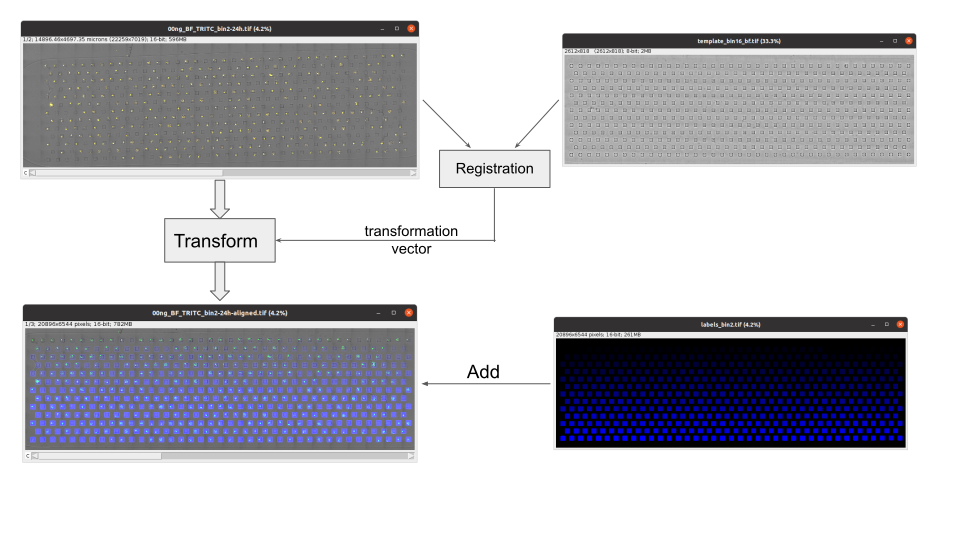
We are imaging the entire chip using 20x 0.7NA objective lens using automatic stitching in NIS. Bright-field image 2D and TRITC-3D acquired. The 3D stack is converted to 2D using maximum projection in NIS or Fiji. Both channels are then merged together and saved as a tif stack. After that this package can be applied to detect the individual droplets and count the fluorescent cells.
As the chips are bonded to the coverslip manually, they contain a randon tilt and shift, so detecting individual droplets proved to be unreliable. The current approach consisnts of preparing a well-lebelled template bright-field image and a labelled mask and matching the experimental brightfield image to the template.
Installation
pip install anchor-droplet-chip
Usage
-
Notebook:
jupyter lab example.ipynb -
Napari plugin: see the menu `Plugins / andhor-droplet-chips / ...
-
Command line:
python -m adc.align --helppython -m adc.count --help
Dowloading the raw data
Head to release page https://github.com/BaroudLab/anchor-droplet-chip/releases/tag/v0.0.1 and download files one by one.
Or
Execute the notebook example.ipynb - the data will be fetched automatically.
Aligning the chips with the template and the mask
Day 1:
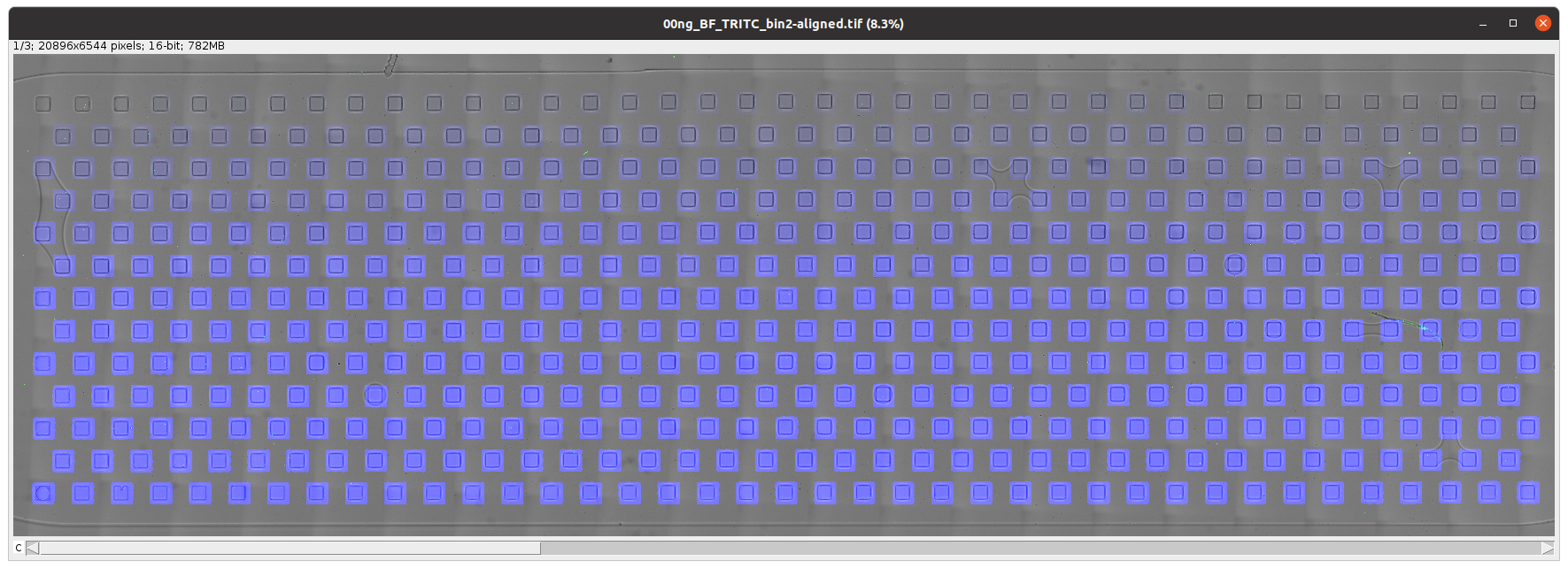
python -m adc.align day1/00ng_BF_TRITC_bin2.tif template_bin16_bf.tif labels_bin2.tif
This command will create the stack day1/00ng_BF_TRITC_bin2-aligned.tif, which can be viewed in Fiji.
Day 2:
python -m adc.align day2/00ng_BF_TRITC_bin2_24h.tif template_bin16_bf.tif labels_bin2.tif
Counting the cells day 1 and day2
python -m adc.count day1/00ng_BF_TRITC_bin2-aligned.tif day1/counts.csv
python -m adc.count day2/00ng_BF_TRITC_bin2_24h-aligned.tif day2/counts.csv
Combining the tables from 2 days
python adc.merge day1/counts.csv day2/counts.csv table.csv
Plotting and fitting the probabilities
Sample data
Batch processing:
First you'll need to clone the repo locally and install it to have the scripts at hand.
git clone https://github.com/BaroudLab/anchor-droplet-chip.git

cd anchor-droplet-chip

pip install .
Make a data folder
mkdir data
Download the dataset from Zenodo https://zenodo.org/record/6940212
zenodo_get 6940212 -o data
Proceed with Snakemake pipeline to get tha table and plots. Be careful with the number of threads -c as a single thread can consume over 8 GBs of RAM.
snakemake -c4 -d data table.csv
Napari plugin functionaluties
nd2 reader
Open large nd2 file by drag-n-drop and select anchor-droplet-chip as a reader. The reader plugin will aotimatically detect the subchannels and split them in different layers. The reader will also extract the pixel size from metadata and save it as Layer.metadata["pixel_size_um"] The data itself is opened ad dask array using nd2 python library.
Substack
Some datasets are so big, it's hard to even to open them, let alone doing processing in them.
anchor-droplet-chip / Make a sub stack addresses this problem.
Upon opening the plugin you'll see all dimensions of you dataset, and the axes will become named accordingly.
Simply choose the subset of data you need, and click "Crop it!". This will create a new layer with the subset of data.
Note that no new files are created in the process and in the background nd2 library lazy loading chunks of data from the original nd2 file.
Populate ROIs along the line
Draw a line in the new shapes layer and call the widget. It will populate square ROIs along the line. Adjust the number of columns and rows. This way you can manually map the 2D wells on your chip.
Crop ROIs
Use this widget to crop the mapped previously ROIs. The extracted crops can be saved as tifs.
Split along axis
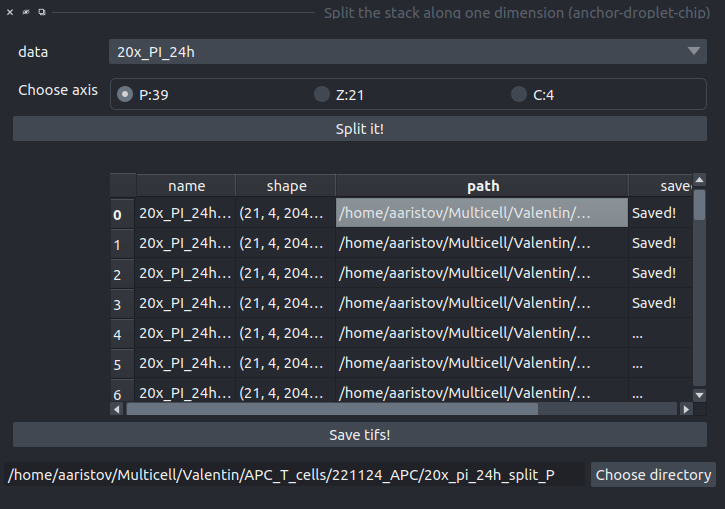
Allows to split any dataset along a selected axis and save the pieces as separate tifs (imagej format, so only TZCYX axes supported)
- Select the axis name
- Click Split it! and check the table with the names, shapes and paths.
- To change the prefix, set the folder by clicking at "Choose folder"
- Once the table looks right, click "Save tifs" and wait. The colunm "saved" will be updated along the way.
1 maintainer

Metadata
1 maintainer
Release files for anchor-droplet-chip 0.5.0
For a detailed explanation of source distributions (sdists) and built distributions (wheels), please see the package formats documentation.
Source distribution (sdist)
| File | Size | Uploaded | |
|---|---|---|---|
| anchor_droplet_chip-0.5.0.tar.gz | 232.0 kB | Details |
Built distribution (wheel)
| File | Interpreter | ABI | Platform | Reset |
|---|---|---|---|---|
| anchor_droplet_chip-0.5.0-py3-none-any.whl | Python 3 | none | any | Details |
Total release size: 304.6 kB
Release files / anchor_droplet_chip-0.5.0.tar.gz
| Download URL | anchor_droplet_chip-0.5.0.tar.gz |
|---|---|
| Size | 232.0 kB |
| Tags | Source |
|
SHA-256 checksum How to use checksums |
2908f308c224df39f914f303b345b28bf6a0c317b33c86a5e4e73f413a7777ff
|
|
BLAKE2b-256 checksum How to use checksums |
f64d7276c86d657b99d805efe6d4c1b7892b4d1e57c2f461cf4e134c804a7184
|
| Upload date | |
|
Uploaded using Trusted Publishing? What is trusted publishing? |
No |
| Uploaded via |
twine/6.2.0 CPython/3.14.2
|
Release files / anchor_droplet_chip-0.5.0-py3-none-any.whl
| Download URL | anchor_droplet_chip-0.5.0-py3-none-any.whl |
|---|---|
| Size | 72.6 kB |
| Tags | Python 3 |
|
SHA-256 checksum How to use checksums |
0eb0c738c364b97aa3b2275d2e1859027daf743ce82dbea0c094f2959b53121d
|
|
BLAKE2b-256 checksum How to use checksums |
918277e32687dd709babfffe0630066c3bac1a9815d1bbd2389b8e29708877e0
|
| Upload date | |
|
Uploaded using Trusted Publishing? What is trusted publishing? |
No |
| Uploaded via |
twine/6.2.0 CPython/3.14.2
|














