






anime-crc
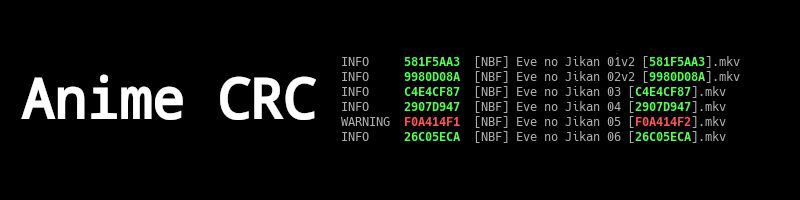
Validate and create CRC checksums for files (ex. anime video [ABCD01234].mkv)
To install anime-crc, run this command in your terminal:
$ sudo pip install anime-crcThis is the preferred method to install anime-crc, as it will always install the most recent stable release.
Usage
Show anime-crc help running:
$ anime-crc -h
The output with the current release is:
usage: anime-crc [-h] [-a [<file> [<file> ...]]] [--delete [<file> [<file> ...]]] [-r] [--debug] [--warning] [--no-warn-missing-xattr-ext] [--warn-no-crc] [-n] [--read-from <stores>] [--write-to <stores>] [<file> [<file> ...]]

CRC32 generator and checker.

positional arguments:
  <file>                Check CRC32 of files. (default: None)

optional arguments:
  -h, --help            show this help message and exit
  -a [<file> [<file> ...]], --addcrc32 [<file> [<file> ...]]
                        Generate CRC32 for files and rename them. (default: None)
  --delete [<file> [<file> ...]]
                        Delete CRC32 tags in the specified files. (default: None)
  -r, --recursive       Explore directories recursively. (default: False)
  --debug               Set log level to debugging messages. (default: 20)
  --warning             Set log level to warnings (hides successful files). (default: 20)
  --no-warn-missing-xattr-ext
                        Don't warn of missing python3-xattr optional dependency. (default: False)
  --warn-no-crc         Show a warning if no CRC tags are found in a file. (default: False)
  -n, --no-progress     Disable progress reporting, even if connected to a tty. (default: False)
  --read-from <stores>  A comma-separated list of tag stores used for checking integrity. First successful read is used. (default: filename)
  --write-to <stores>   A comma-separated list of tag stores used for writing CRC tags. Tags are written in every tag store specified. (default: filename)
Features
Check CRC of files. The checksum can be in the filename (ex. [ABCD01234]), in a separate file or in the file metadatas (xattr).
Set CRC of files. The CRC can be written to the name, to a separate file or to file metadatas.
Delete CRC of file names.
1 maintainer

Metadata
1 maintainer
Release files for anime-crc 0.9.1
For a detailed explanation of source distributions (sdists) and built distributions (wheels), please see the package formats documentation.
Source distribution (sdist)
| File | Size | Uploaded | |
|---|---|---|---|
| anime-crc-0.9.1.linux-x86_64.tar.gz | 14.2 kB | Details |
Built distribution (wheel)
| File | Interpreter | ABI | Platform | Reset |
|---|---|---|---|---|
| anime_crc-0.9.1-py2.py3-none-any.whl | Python 3, Python 2 | none | any | Details |
Total release size: 23.8 kB
Release files / anime-crc-0.9.1.linux-x86_64.tar.gz
| Download URL | anime-crc-0.9.1.linux-x86_64.tar.gz |
|---|---|
| Size | 14.2 kB |
| Tags | Source |
|
SHA-256 checksum How to use checksums |
e21abd314e2a7a1405a1c073fd54ef2dc9068dca78387796924e93ec2033bf9f
|
|
BLAKE2b-256 checksum How to use checksums |
643af9f3ee80051795528e8bcc0ad4a219dd89f13624102bae6963e1fd709f36
|
| Upload date | |
|
Uploaded using Trusted Publishing? What is trusted publishing? |
No |
| Uploaded via |
twine/3.8.0 pkginfo/1.8.2 readme-renderer/32.0 requests/2.27.1 requests-toolbelt/0.9.1 urllib3/1.26.8 tqdm/4.62.3 importlib-metadata/4.11.1 keyring/23.5.0 rfc3986/2.0.0 colorama/0.4.4 CPython/3.8.12
|
Release files / anime_crc-0.9.1-py2.py3-none-any.whl
| Download URL | anime_crc-0.9.1-py2.py3-none-any.whl |
|---|---|
| Size | 9.6 kB |
| Tags | Python 2 Python 3 |
|
SHA-256 checksum How to use checksums |
b52e9ce605c59547c1e2541d120ef198b5c558a0328fce864acc0f89678e7b21
|
|
BLAKE2b-256 checksum How to use checksums |
e8549f162801b98d1387e8a00394f923594e0d9089e8e61678c896969be1295b
|
| Upload date | |
|
Uploaded using Trusted Publishing? What is trusted publishing? |
No |
| Uploaded via |
twine/3.8.0 pkginfo/1.8.2 readme-renderer/32.0 requests/2.27.1 requests-toolbelt/0.9.1 urllib3/1.26.8 tqdm/4.62.3 importlib-metadata/4.11.1 keyring/23.5.0 rfc3986/2.0.0 colorama/0.4.4 CPython/3.8.12
|














