
annt
Simple annotated file loader for object detection task.
Description
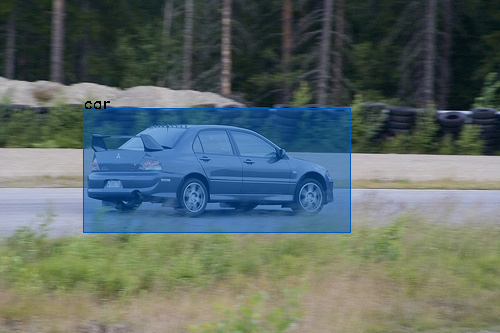
Various tools have been developed so far for object detection tasks. However, there are no standard in annotation tools and formats and developers still write their own json or xml parser of annotation files. annt is an annotation tool that operates in the form of cloud services such as dropbox. annt provides not only simple and comfortable annotation exprience, but also powerful library for loading annotated images.
This is the python library which can read images annotated with annt. You can load annotated images in a simple way and focus on the essential AI development. Also, this library has a basic build-in preprocessing functions. So you can save time to write extra code.
Usage and Example
Example 1. Load annotated images
import annt

# annotations is list of annotation data
annotations = annt.load('~/Dropbox/app/project_name')

# Display ths information of each annotation file.
for a in annotations:
    image = a.image  # opencv2 image array
    boxes = a.boxes  # list of bounding boxes

    height, width, colors = image.shape  # you can

    for box in boxes:
        # Tag information (str)
        print(f'~ tag name : box.tag ~')

        # You can get coordination information of the box by two methods,
        # Left Top Style and Edge Style.
        # Coordination information based on left top of the box. (Left-Top Style)
        print(f'x : {box.x}')
        print(f'y : {box.y}')
        print(f'w : {box.w}')
        print(f'h : {box.h}')

        # Coordination information based on the distance from each edge of the image. (Edge Style)
        print(f'left : {box.left}')
        print(f'right : {box.right}')
        print(f'top : {box.top}')
        print(f'bottom : {box.bottom}')

        # If you change these coordination properties, all of them will recomputed.
        box.w = 300  # This operation will also change box.right property.
Example 2. Data augumentation
import annt
import random

# annotations is list of annotation data
annotations = annt.load('./Dropbox/App/annt/test')
sample_n = 10  # Number of samples from one image

# Display ths information of each annotation file.
augumented = []
for raw_a in annotations:
    for i in range(sample_n):

        # Rotate image
        rot_deg = random.choice([0, 90, 180, 270, 360])
        a = raw_a.rotate(rot_deg)

        # Tilt image
        tilt_deg = random.randint(-8, 8)
        a = a.rotate(tilt_deg)

        # Flip image
        flip_x = random.randint(0, 1)
        flip_y = random.randint(0, 1)
        a = a.flip(flip_x, flip_y)
        augumented.append(a)

# Show first augumented image.
augumented[0].show()
Getting Started
- Register annt and annotate imaes.
- Install this libary from pip.
- Develop you own project.
Install
you can install from pip.
pip install annt
Documentations
Recent Updates
0.0.7: Bug fix.
1 maintainer

Metadata
1 maintainer
Release files for annt 0.0.7
For a detailed explanation of source distributions (sdists) and built distributions (wheels), please see the package formats documentation.
Source distribution (sdist)
| File | Size | Uploaded | Provenance | Actions |
|---|---|---|---|---|
| annt-0.0.7.tar.gz | 11.6 kB | Without provenance | Details for annt-0.0.7.tar.gz |
Built distribution (wheel)
| File | Interpreter | ABI | Platform | Actions Reset |
|---|---|---|---|---|
| annt-0.0.7-py3-none-any.whl | Python 3 | none | any | Details for annt-0.0.7-py3-none-any.whl |
Total release size: 27.6 kB
Release files / annt-0.0.7.tar.gz
| Download URL | annt-0.0.7.tar.gz |
|---|---|
| Size | 11.6 kB |
| Tags | Source |
|
SHA-256 checksum How to use checksums |
4d6bdf77da3e3f594eba2a50ee3325f473f6114d4b12754767e5065e01ec3502
|
|
BLAKE2b-256 checksum How to use checksums |
d96ca672a6f97e00e63462b60e83aae629b1f2067428d00b5ec60895b2c2c646
|
| Upload date | |
|
Uploaded using Trusted Publishing? What is trusted publishing? |
No |
| Uploaded via |
twine/1.12.1 pkginfo/1.4.2 requests/2.25.0 setuptools/47.1.1 requests-toolbelt/0.8.0 tqdm/4.28.1 CPython/3.6.3
|
Release files / annt-0.0.7-py3-none-any.whl
| Download URL | annt-0.0.7-py3-none-any.whl |
|---|---|
| Size | 16.0 kB |
| Tags | Python 3 |
|
SHA-256 checksum How to use checksums |
b8c640f174814ccbadaea53e45c48f70ae0e0d22b866611e65d54a1de133e2b1
|
|
BLAKE2b-256 checksum How to use checksums |
fe50f8ac9bd811a42f004038f6fa2e806ee8605ad7cd941de9b822c8db331652
|
| Upload date | |
|
Uploaded using Trusted Publishing? What is trusted publishing? |
No |
| Uploaded via |
twine/1.12.1 pkginfo/1.4.2 requests/2.25.0 setuptools/47.1.1 requests-toolbelt/0.8.0 tqdm/4.28.1 CPython/3.6.3
|
Security for annt 0.0.7
Provenance
Provenance describes where a file came from. On PyPI, provenance is shared via attestations, which provide a verifiable record of the build or publishing details. View details, limitations and caveats.
No provenance found
None of the files in this release were uploaded with provenance metadata.
A note on package security
PyPI is a repository for distributing packages, not a service for auditing them. While third-party security researchers and our staff do their best to detect and remove malicious packages, PyPI cannot guarantee the quality, security or suitability of any given package.
To learn more about protecting yourself from malicious actors, visit our package security documentation.














