
Correctly configure ArduPilot for your vehicles on your first attempt
| Lint | Quality | Test | Deploy | Maintain |
|---|---|---|---|---|
 |
 |
 |
 |
|
 |
 |
 |
 |
 |
 |
 |
 |
 |
|
 |
 |
 |
||
 |
ArduPilot Methodic Configurator is a software, developed by ArduPilot developers, that semi-automates a clear, proven and safe configuration sequence for ArduCopter drones. We are working on extending it to ArduPlane, Heli and Rover vehicles. But for those it is still very incomplete.
- clear: the sequence is linear, executed one step at the time with no hidden complex dependencies
- proven: the software has been used by hundreds of ArduPilot developers and users. From beginners to advanced. On big and small vehicles.
- safe: the sequence reduces trial-and-error and reduces the amount of flights required to configure the vehicle
Let's compare it with the traditional tool used to configure ArduPilot: a generalist Ground Control Station (GCS) software.
| Feature | Mission Planner, QGroundControl, ... etc | ArduPilot Methodic Configurator |
|---|---|---|
| configuration type | manual 1 | semi-automated 2 |
| explains what to do | No | Yes |
| explains when to do something | No, leaves you lost | Yes, explains the path |
| explains why do something | No | Yes |
| configuration method | a different menu for each task, some tasks have no menu, so you need to dig into the 1200 parameters | each task only presents you a relevant subset of parameters |
| parameter documentation | Yes, only on the full-parameter tree view | Yes |
| displays relevant documentation | No | Yes |
| makes sure you do not forget a step | No | Yes |
| checks that parameters get correctly uploaded | No | Yes |
| reuse params in other vehicles | No, unless you hand edit files | Yes, out-of-the-box |
| documents why you changed each parameter | No | Yes |
| tutorials and learning resources | No, scattered and not integrated | Yes, context-aware help integrated |
It's simple graphical user interface (GUI) manages and visualizes ArduPilot parameters, parameter files and documentation.
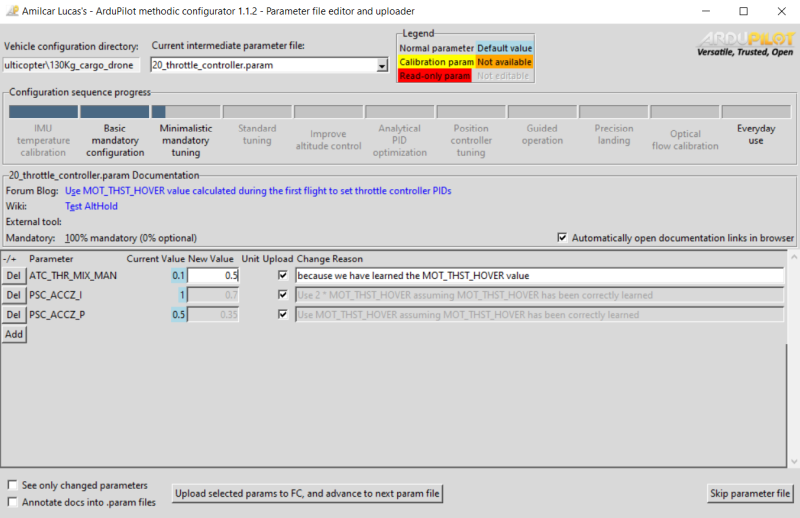
No visible menus, no hidden menus, no complicated options, what you see is what gets changed.
1. Quick overview of the entire process
To methodically build, configure and tune ArduPilot vehicles follow this sequence of steps:
1.1 Select the vehicle components
- while choosing an Autopilot and other hardware components avoid these components
- Use ecalc for multirotor to select the propulsion system.
- follow hardware best practices
1.2 Install Software
- Install ArduPilot Methodic Configurator on MS windows, linux or MacOS
- Install the latest Mission Planner version
- Install the latest ArduPilot firmware on your flight controller board
1.3 Input vehicle components and component connections into ArduPilot Methodic Configurator
The software needs this information to automatically pre-select configuration settings relevant to your specific vehicle
- Start the ArduPilot Methodic Configurator and select a vehicle that resembles yours and input vehicle components and component connections information into the ArduPilot Methodic Configurator component editor window
1.4 Perform IMU temperature calibration before assembling the autopilot into the vehicle (optional)
IMU temperature calibration reduces the probability of Accel inconsistent and Gyro inconsistent errors and reduces the time required to arm the vehicle. IMU temperature calibration requires lowering the temperature of the autopilot (flight controller) to circa -20°C. That is harder to do once the autopilot is assembled inside the vehicle, hence it is done now.
1.5 Assemble all components except the propellers
Assemble and connect all components. Make sure you follow best practices
1.6 Basic mandatory configuration
Again using the ArduPilot Methodic configurator software GUI perform the following steps:
- 04_board_orientation.param flight controller orientation
- 05_remote_controller.param remote controller connections and protocol
- 06_telemetry.param telemetry transceiver connections and protocol (optional)
- 07_esc.param Electronic-Speed-Controller connections and protocol
- 08_batt1.param Battery health and state of charge monitoring
- 10_gnss.param GNSS receiver connection and protocol
- 11_initial_atc.param initial attitude PID gains (vehicle size dependent)
Now use Mission Planner to do:
- 12_mp_setup_mandatory_hardware.param calibrate vehicle sensors
And continue with the ArduPilot Methodic configurator software GUI :
- 13_general_configuration.param general misc configuration
- Test if the hardware diagnostics are OK
- 14_logging.param configure Dataflash/SDCard logging (black box data)
- 15_motor.param motor order and direction tests. ESC linearization.
- 16_pid_adjustment.parm attitude PID gains (vehicle size dependent)
- 17_remote_id.param required by law in many countries
- 18_notch_filter_setup.param to remove motor noise, reduce power consumption and increase flight stability
1.7 Assemble propellers and perform the first flight
Now that all mandatory configuration steps are done you can perform the first flight
1.8 Minimalistic mandatory tuning
These are the very minimum tuning steps required for a stable flight:
- Load the
.binlog file from the first flight into Notch filter webtool - 19_notch_filter_results.param use the webtool information to configure the notch filter(s)
- 20_throttle_controller.param the altitude controller depends on the power-to-thrust ratio found in the first flight
- 21_ekf_config.param sometimes the EKF3 needs a tune to maintain altitude
- 22_quick_tune_setup.param and 23_quick_tune_results.param, you need lua scripting support to do this if not available you can tune manually.
That is it, if you are impatient and do not want an optimized vehicle you can skip to everyday use.
1.9 Standard tuning (optional)
These are the standard tuning steps required for an optimized flight:
- 24_inflight_magnetometer_fit_setup.param, use lua scripted flight path or fly manually, store the results using 25_inflight_magnetometer_fit_results.param, use the magfit webtool to calculate a file that the ardupilot methodic configurator can use
- 26_quick_tune_setup.param and 27_quick_tune_results.param Redo quick-tune now that the compass magnetic interference is fully calibrated
- 28_evaluate_the_aircraft_tune_ff_disable.param and 29_evaluate_the_aircraft_tune_ff_enable.param
- 30_autotune_roll_setup.param and 31_autotune_roll_results.param tune roll axis rate and angle PIDs
- 32_autotune_pitch_setup.param and 33_autotune_pitch_results.param tune pitch axis rate and angle PIDs
- 34_autotune_yaw_setup.param and 35_autotune_yaw_results.param tune yaw axis rate and angle PIDs
- 36_autotune_yawd_setup.param and 37_autotune_yawd_results.param tune yawd axis rate and angle PIDs
- 38_autotune_roll_pitch_retune_setup.param and 39_autotune_roll_pitch_retune_results.param re-tune roll and pitch pitch axis rate and angle PIDs
Now the standard tuning is complete you can skip to everyday use
1.10 Improve altitude under windy conditions (optional)
- 40_windspeed_estimation.param estimates the wind speed
- 41_barometer_compensation.param Uses the estimated wind speed to improve altitude stability
1.11 System identification for analytical PID optimization (optional)
- 42_system_id_roll.param, 43_system_id_pitch.param, 44_system_id_yaw.param
- 46_analytical_pid_optimization.param
1.12 Position controller tuning (optional)
1.13 Everyday use
Now that tuning and configuration are done, some logging and tests can be disabled and some more safety features enabled:
Enjoy your properly configured vehicle.
The following sections describe each step of the procedure in more detail.
2. Install ArduPilot Methodic Configurator software on a PC or Mac
Install ArduPilot Methodic Configurator on MS windows, linux or MacOS
3. Install Mission Planner software on a PC or Mac
Install the latest Mission Planner version
4. Install ArduPilot firmware on the flight controller
Install the latest ArduPilot firmware on your flight controller board
5. Use the ArduPilot Methodic Configurator software for the first time
See the Use the ArduPilot Methodic Configurator software for the first time usecase.
6. Configure the vehicle's parameters in a traceable way
The following simple loop is presented as welcome instructions:

Now do this in a loop until the software automatically closes or you are asked to close the software:
- Read all the documentation links displayed at the top of the GUI (marked with the big red number 4),
- Edit the parameter's New value and Reason changed fields to match your vehicle (marked with the big red number 5),
- The Reason changed field is extremely important because:
- if forces you to think, causing rational decisions instead of impulsive ones
- justifies your decisions on a vehicle certification process required in most countries
- allows for someone else to see if you know what you are doing
- allows for someone else (or yourself after a few weeks) to understand your rationale
- The Reason changed field is extremely important because:
- Press Del and/or Add buttons to delete or add parameters respectively (marked with the big red number 5),
- If necessary scroll down using the scroll bar on the right and make sure you edit all parameters,
- Press Upload selected params to FC, and advance to next param file (marked with the big red number 7),
- Repeat from the top until the program automatically closes.
7. Use the ArduPilot Methodic Configurator software after having created a vehicle from a template
See the Use the ArduPilot Methodic Configurator software after having created a vehicle from a template usecase.
Congratulations your flight controller is now fully configured in the safest and fastest way publicly known.
There is also documentation on other use cases and a detailed but generic Usermanual.
Install
See the install instructions
Documentation and Support
Need help or support
Contributing
Want to help us and contribute?
Software design and development
To meet the Software requirements a software architecture was designed and implemented.
Internationalization
The software is available in multiple languages.
On MS Windows the language is selected during install and that selection is stored in the desktop icon.
You can manually create multiple desktop icons, each will run the software in a different language.
On linux and MacOS the language is selectable by the --language command line argument.
See contributing page if you want to help us translate the software into your language.
Code of conduct
To use and develop this software you must obey the ArduPilot Methodic Configurator Code of Conduct.
License
This software is cost free. This project is licensed under the GNU General Public License v3.0.
Credits
It builds upon other open-source software packages
1 maintainer

Metadata
1 maintainer
Release files for ardupilot-methodic-configurator 1.0.12
For a detailed explanation of source distributions (sdists) and built distributions (wheels), please see the package formats documentation.
Source distribution (sdist)
| File | Size | Uploaded | Provenance | Actions |
|---|---|---|---|---|
| ardupilot_methodic_configurator-1.0.12.tar.gz | 5.1 MB | With provenance | Details for ardupilot_methodic_configurator-1.0.12.tar.gz |
Built distribution (wheel)
| File | Interpreter | ABI | Platform | Actions Reset |
|---|---|---|---|---|
| ardupilot_methodic_configurator-1.0.12-py3-none-any.whl | Python 3 | none | any | Details for ardupilot_methodic_configurator-1.0.12-py3-none-any.whl |
Total release size: 15.8 MB
Release files / ardupilot_methodic_configurator-1.0.12.tar.gz
| Download URL | ardupilot_methodic_configurator-1.0.12.tar.gz |
|---|---|
| Size | 5.1 MB |
| Tags | Source |
|
SHA-256 checksum How to use checksums |
2253f4cf7ee7a4ef3d8524d6bec2dc19dd8d1710e3a7c8d2342f18e9cdfe3321
|
|
BLAKE2b-256 checksum How to use checksums |
94bef6e8c0a62711eb14385fb8716c3e75a48503ffbbd25eae5861cc004c1c5e
|
| Upload date | |
|
Uploaded using Trusted Publishing? What is trusted publishing? |
Yes |
| Uploaded via |
twine/6.0.1 CPython/3.12.8
|
Provenance
Provenance describes where a file came from. On PyPI, provenance is shared via attestations, which provide a verifiable record of the build or publishing details. View details, limitations and caveats.


PyPI Publish Attestation
PyPI verified that this artifact, at this checksum, originated from the publisher listed below.
Signed by GitHub Actions, verified by PyPI on Jan 18, 2025.
Transparency logRelease files / ardupilot_methodic_configurator-1.0.12-py3-none-any.whl
| Download URL | ardupilot_methodic_configurator-1.0.12-py3-none-any.whl |
|---|---|
| Size | 10.6 MB |
| Tags | Python 3 |
|
SHA-256 checksum How to use checksums |
8fbd6a403dcb4bdbf258435046f75b65b94c435406aab1f5e24cfdd09a2075dd
|
|
BLAKE2b-256 checksum How to use checksums |
92ab7e9fb5ea5606c418c70d750663d4b8feff5a951bdf845c5c36e24ba43195
|
| Upload date | |
|
Uploaded using Trusted Publishing? What is trusted publishing? |
Yes |
| Uploaded via |
twine/6.0.1 CPython/3.12.8
|
Provenance
Provenance describes where a file came from. On PyPI, provenance is shared via attestations, which provide a verifiable record of the build or publishing details. View details, limitations and caveats.
PyPI Publish Attestation
PyPI verified that this artifact, at this checksum, originated from the publisher listed below.
Signed by GitHub Actions, verified by PyPI on Jan 18, 2025.
Transparency logSecurity for ardupilot-methodic-configurator 1.0.12
Provenance
Provenance describes where a file came from. On PyPI, provenance is shared via attestations, which provide a verifiable record of the build or publishing details. View details, limitations and caveats.
Full provenance
Both files in this release have been uploaded with provenance metadata.
Attestation for ardupilot_methodic_configurator-1.0.12.tar.gz
PyPI Publish Attestation
PyPI verified that this artifact, at this checksum, originated from the publisher listed below.
Signed by GitHub Actions, verified by PyPI on Jan 18, 2025.
Transparency logA note on package security
PyPI is a repository for distributing packages, not a service for auditing them. While third-party security researchers and our staff do their best to detect and remove malicious packages, PyPI cannot guarantee the quality, security or suitability of any given package.
To learn more about protecting yourself from malicious actors, visit our package security documentation.














