
Databricks Workflows in Airflow
The Astro Databricks Provider is an Apache Airflow provider to write Databricks Workflows using Airflow as the authoring interface. Running your Databricks notebooks as Databricks Workflows can result in a 75% cost reduction ($0.40/DBU for all-purpose compute, $0.07/DBU for Jobs compute).
While this is maintained by Astronomer, it's available to anyone using Airflow - you don't need to be an Astronomer customer to use it.
There are a few advantages to defining your Databricks Workflows in Airflow:
| via Databricks | via Airflow | |
|---|---|---|
| Authoring interface | Web-based via Databricks UI | Code via Airflow DAG |
| Workflow compute pricing | ✅ | ✅ |
| Notebook code in source control | ✅ | ✅ |
| Workflow structure in source control | ✅ | |
| Retry from beginning | ✅ | ✅ |
| Retry single task | ✅ | |
| Task groups within Workflows | ✅ | |
| Trigger workflows from other DAGs | ✅ | |
| Workflow-level parameters | ✅ |
Example
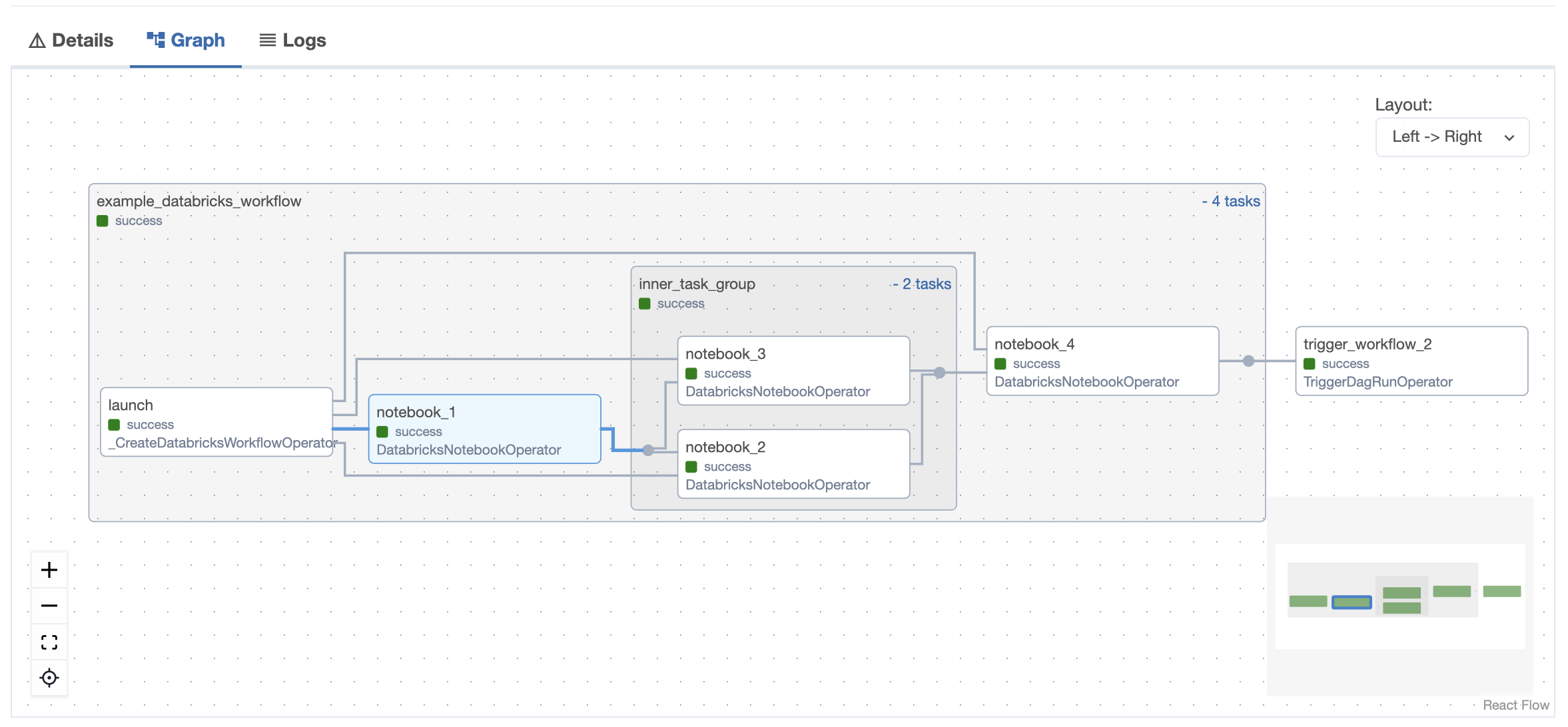
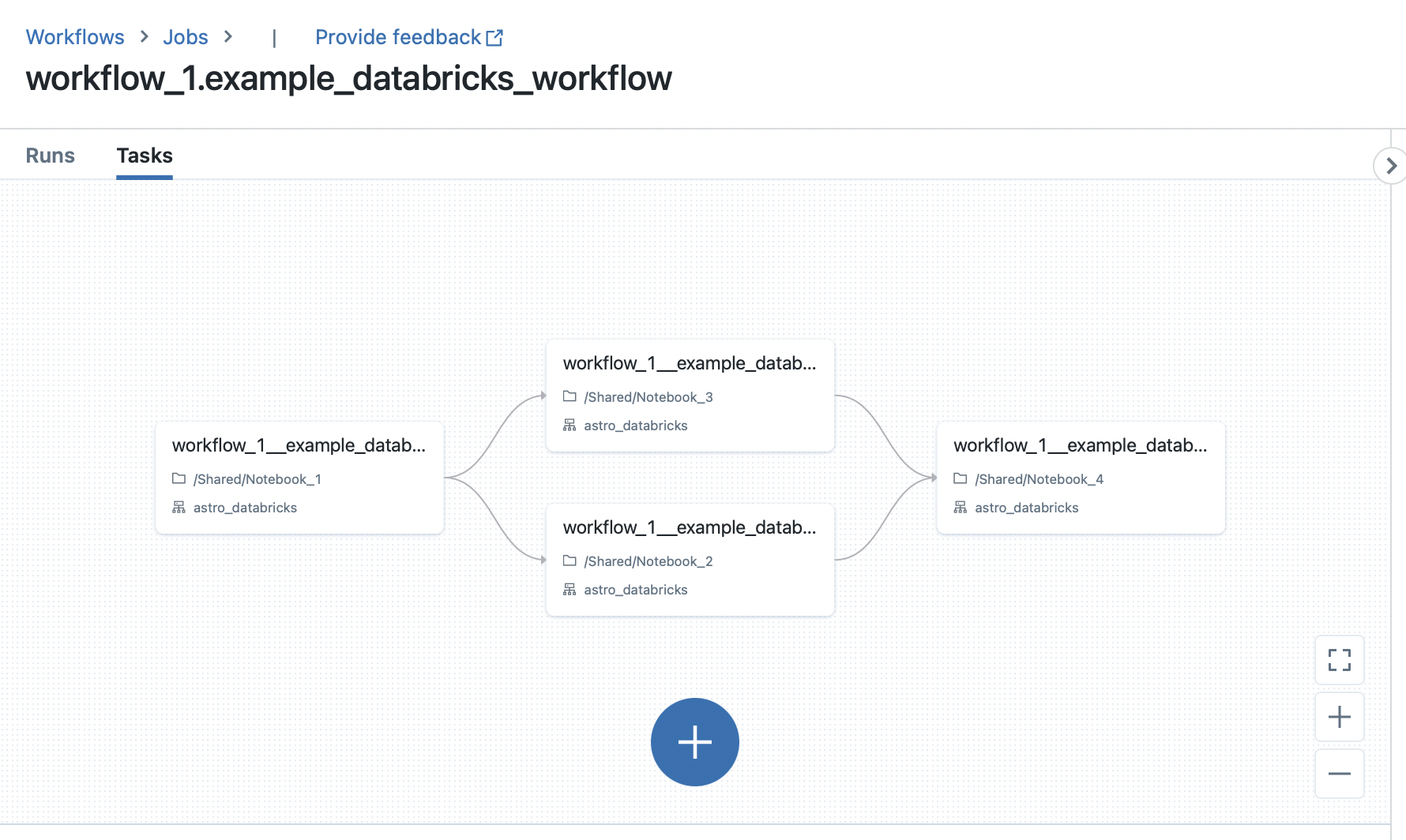
The following Airflow DAG illustrates how to use the DatabricksTaskGroup and DatabricksNotebookOperator to define a Databricks Workflow in Airflow:
from pendulum import datetime

from airflow.decorators import dag, task_group
from airflow.operators.trigger_dagrun import TriggerDagRunOperator
from astro_databricks import DatabricksNotebookOperator, DatabricksWorkflowTaskGroup

# define your cluster spec - can have from 1 to many clusters
job_cluster_spec = [
   {
      "job_cluster_key": "astro_databricks",
      "new_cluster": {
         "cluster_name": "",
         # ...
      },
   }
]

@dag(start_date=datetime(2023, 1, 1), schedule_interval="@daily", catchup=False)
def databricks_workflow_example():
   # the task group is a context manager that will create a Databricks Workflow
   with DatabricksWorkflowTaskGroup(
      group_id="example_databricks_workflow",
      databricks_conn_id="databricks_default",
      job_clusters=job_cluster_spec,
      # you can specify common fields here that get shared to all notebooks
      notebook_packages=[
         { "pypi": { "package": "pandas" } },
      ],
      # notebook_params supports templating
      notebook_params={
         "start_time": "{{ ds }}",
      }
   ) as workflow:
      notebook_1 = DatabricksNotebookOperator(
         task_id="notebook_1",
         databricks_conn_id="databricks_default",
         notebook_path="/Shared/notebook_1",
         source="WORKSPACE",
         # job_cluster_key corresponds to the job_cluster_key in the job_cluster_spec
         job_cluster_key="astro_databricks",
         # you can add to packages & params at the task level
         notebook_packages=[
            { "pypi": { "package": "scikit-learn" } },
         ],
         notebook_params={
            "end_time": "{{ macros.ds_add(ds, 1) }}",
         }
      )

      # you can embed task groups for easier dependency management
      @task_group(group_id="inner_task_group")
      def inner_task_group():
         notebook_2 = DatabricksNotebookOperator(
            task_id="notebook_2",
            databricks_conn_id="databricks_default",
            notebook_path="/Shared/notebook_2",
            source="WORKSPACE",
            job_cluster_key="astro_databricks",
         )

         notebook_3 = DatabricksNotebookOperator(
            task_id="notebook_3",
            databricks_conn_id="databricks_default",
            notebook_path="/Shared/notebook_3",
            source="WORKSPACE",
            job_cluster_key="astro_databricks",
         )

      notebook_4 = DatabricksNotebookOperator(
         task_id="notebook_4",
         databricks_conn_id="databricks_default",
         notebook_path="/Shared/notebook_4",
         source="WORKSPACE",
         job_cluster_key="astro_databricks",
      )

      notebook_1 >> inner_task_group() >> notebook_4

   trigger_workflow_2 = TriggerDagRunOperator(
      task_id="trigger_workflow_2",
      trigger_dag_id="workflow_2",
      execution_date="{{ next_execution_date }}",
   )

   workflow >> trigger_workflow_2

databricks_workflow_example_dag = databricks_workflow_example()
Airflow UI
Databricks UI
Quickstart
Check out the following quickstart guides:
Documentation
The documentation is a work in progress--we aim to follow the Diátaxis system:
Changelog
Astro Databricks follows semantic versioning for releases. Read changelog to understand more about the changes introduced to each version.
Contribution guidelines
All contributions, bug reports, bug fixes, documentation improvements, enhancements, and ideas are welcome.
Read the Contribution Guidelines for a detailed overview on how to contribute.
Contributors and maintainers should abide by the Contributor Code of Conduct.
License
Metadata
Release files for astro-provider-databricks 0.2.2
For a detailed explanation of source distributions (sdists) and built distributions (wheels), please see the package formats documentation.
Source distribution (sdist)
| File | Size | Uploaded | Provenance | Actions |
|---|---|---|---|---|
| astro_provider_databricks-0.2.2.tar.gz | 2.2 MB | Without provenance | Details for astro_provider_databricks-0.2.2.tar.gz |
Built distribution (wheel)
| File | Interpreter | ABI | Platform | Actions Reset |
|---|---|---|---|---|
| astro_provider_databricks-0.2.2-py3-none-any.whl | Python 3 | none | any | Details for astro_provider_databricks-0.2.2-py3-none-any.whl |
Total release size: 2.3 MB
Release files / astro_provider_databricks-0.2.2.tar.gz
| Download URL | astro_provider_databricks-0.2.2.tar.gz |
|---|---|
| Size | 2.2 MB |
| Tags | Source |
|
SHA-256 checksum How to use checksums |
9053e8209cefea43dc855881b46b8747a854d6fc7ef717a3c4c8e48ff00406df
|
|
BLAKE2b-256 checksum How to use checksums |
de92eff0c7ab73545129cbd62a7104ff22be04927f91577e781620dff2d4ccbf
|
| Upload date | |
|
Uploaded using Trusted Publishing? What is trusted publishing? |
No |
| Uploaded via |
python-httpx/0.27.0
|
Release files / astro_provider_databricks-0.2.2-py3-none-any.whl
| Download URL | astro_provider_databricks-0.2.2-py3-none-any.whl |
|---|---|
| Size | 26.4 kB |
| Tags | Python 3 |
|
SHA-256 checksum How to use checksums |
0ffeef47d087908c6255ad245ab62226e50f6ba2cca67f4a0ca43eab2eff13bd
|
|
BLAKE2b-256 checksum How to use checksums |
bb76bcdede455d71189dbcb370fca69091478813546a8124f91e6258a46192db
|
| Upload date | |
|
Uploaded using Trusted Publishing? What is trusted publishing? |
No |
| Uploaded via |
python-httpx/0.27.0
|
Security for astro-provider-databricks 0.2.2
Provenance
Provenance describes where a file came from. On PyPI, provenance is shared via attestations, which provide a verifiable record of the build or publishing details. View details, limitations and caveats.
No provenance found
None of the files in this release were uploaded with provenance metadata.
A note on package security
PyPI is a repository for distributing packages, not a service for auditing them. While third-party security researchers and our staff do their best to detect and remove malicious packages, PyPI cannot guarantee the quality, security or suitability of any given package.
To learn more about protecting yourself from malicious actors, visit our package security documentation.














