
Create sysupgrade images for OpenWrt on demand

Project description
Attendedsysupgrade Server for OpenWrt (GSoC 2017)




This project intends to simplify the sysupgrade process of devices running OpenWrt or
distributions based on the former like LibreMesh. The provided tools here offer an easy
way to reflash the router with a new version or package upgrades, without the need of
opkg installed.
Additionally it offers an API (covered below) to request custom images with any selection of packages pre-installed, allowing to create firmware images without the need of setting up a build environment, even from mobile devices.
Clients
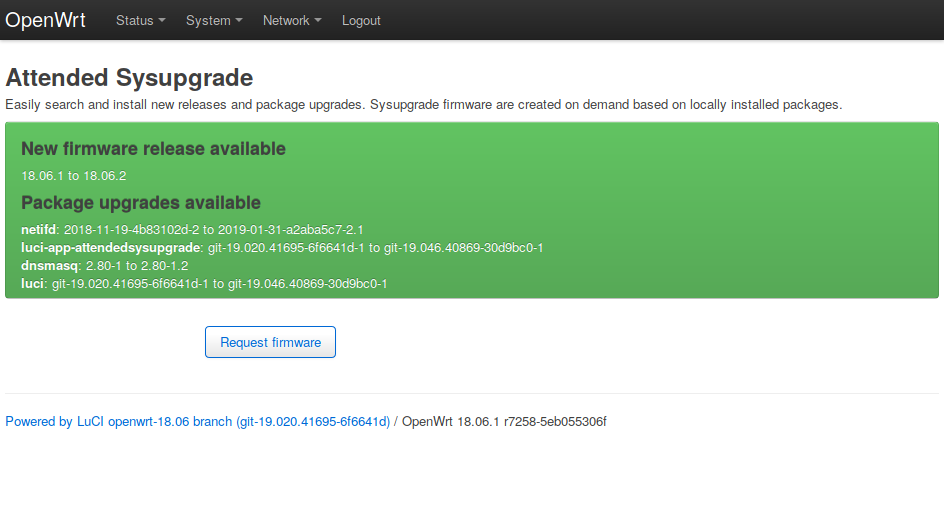
luci-app-attendedsysupgrade
Add a view to the Luci system tab called "Attended Sysupgrade". Offers a button to search for updates and if found, to flash the image created by the update server.
auc
Add CLI to perform sysupgrades. Makes use of ucert to verify images are from a trusted source.
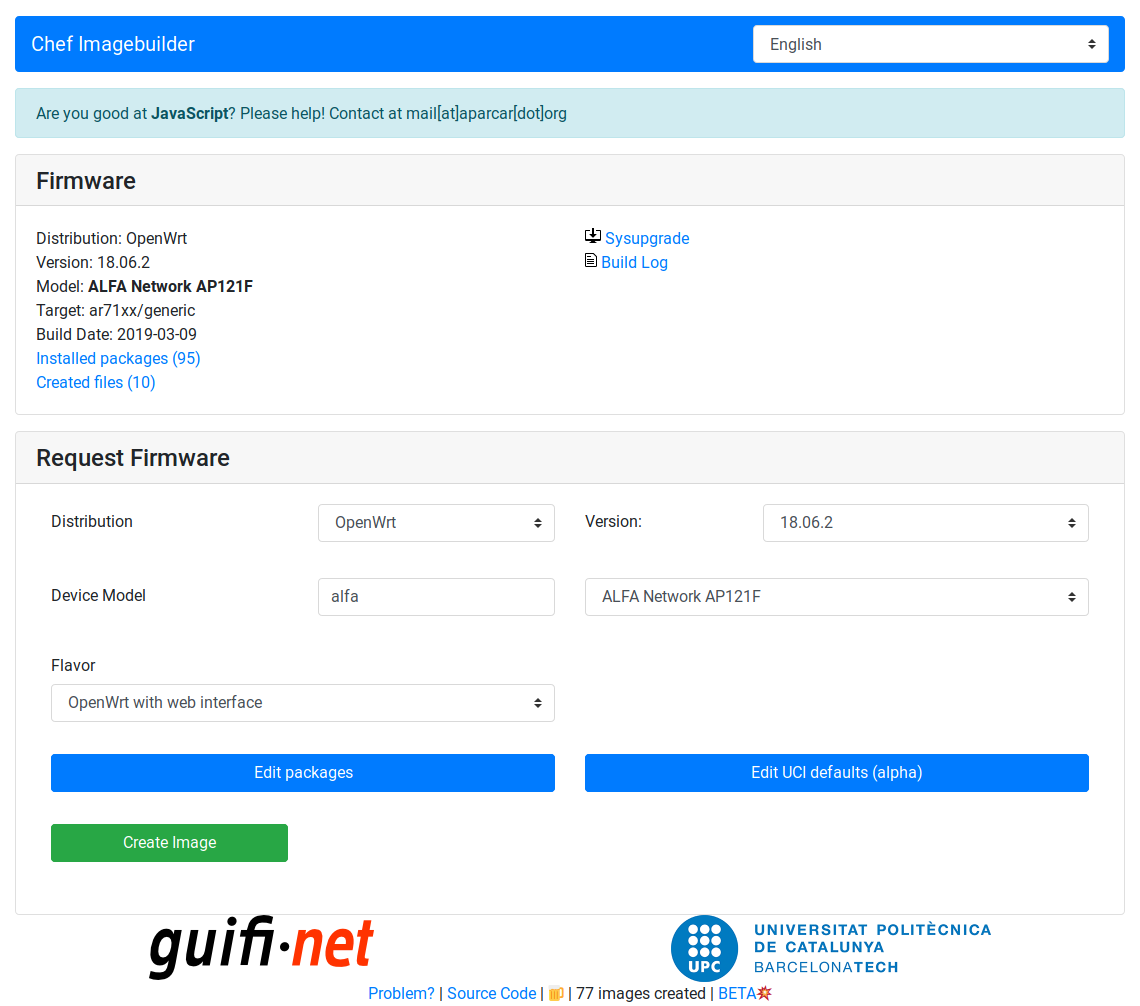
Chef Online Builder
Server
The server listens to update and image requests and images are automatically generated if the requests was valid. This is done by automatically setting up OpenWrt ImageBuilders and cache images in a database. This allows to quickly respond to requests without rebuilding exiting images again.
Active server
- chef.libremesh,org
- as-test.stephen304.com unstable dev server
You can set this server in /etc/config/attendedsysupgrade after installation of a
client.
Run your own server
It's fairly easy to run your own asu server! You can test it locally via Docker, Vagrant or Ansible. The following steps except you are familiar with either Docker, Vagrant or Ansible.
via Docker
Make sure to have docker and docker-compose installed. Simply execute the server via
the following command:
docker-compose up
This will start a postgres container preseeded with the required database schema.
Afterwards a server is started which performs an initial download of available versions
and target/subtarget combinations. Once this is done the server itself is started via
gunicorn3.
A worker container waits for the server to come up (on port 8000) and will start builders, garbage collectors and an updater.
The folders worker and updater are created, caching downloaded ImageBuilders. You
can change this behaviour in the docker-compose.yml file.
via Ansible
Copy the configuration file from ./asu/utils/config.yml.default to
./ansible/host_vars/<hostname>.yml. Add the Ansible variables ansible_host and
ansible_user to the top of the config file.
Change all settings as you like, the config file is automatically copied to the host
folder <server_dir>/config.yml.
via Vagrant
Make sure your vagrant environment is setup and supports the used Debian 9 image (virtualbox/libvirt). Also Ansible is requred to setup the service. To start vagrant simply run the following command:
vagrant up
Ansible automatically starts to setup the postgres database, server and worker. Once
installed two systemd services are running, called asu-server and asu-worker. Check
their well beeing via journalct -fu asu-*.
Ansible takes the configuration file from ./asu/utils/config.yml.default or a specific
one, if exists, from ./ansible/host_vars/<hostname>.yml.
Development
To hack on the server, please install it manually. The following steps give an (may incomplete) overview on the required steps. It's focused on Debian based system, feel free to add documentation for other systems.
Required packages
The server requires the following packages
apt install python3-pip odbc-postgresql unixodbc-dev gunicorn3 git \
    bash wget postgresql
To run the worker addiditonal packages are required, based on the official wiki
apt install subversion g++ zlib1g-dev build-essential git python rsync \
    man-db libncurses5-dev gawk gettext unzip file libssl-dev wget zip
Install the server package
Run pip3 to install the package
pip3 install -e .
This allows gunicorn3 and flask to find the package.
Setting up PostgreSQL
As asu uses ODBC you have
to add the servers database to your .odbc.ini or /etc/odbc.ini. See an example
configuration here. Once added setup the PostgreSQL user account. From a
root shell login as postgres, create the asu database and change the password!
su postgres
createdb asu
psql
create role asu with password 'changeme' nosuperuser nocreatedb nocreaterole noinherit login noreplication nobypassrls;
grant all privileges on database asu to asu;
Now let flask initiate the database and load available targets.
export FLASK_APP=asu
flask initdb
flask loaddb
The server and worker(s) are now ready to run!
Starting the server
Either start the server in single thread mode via flask or via gunicorn3
# runs on localhost:5000
FLASK_APP=asu
flask run

# runs on localhost:8000
gunicorn3 asu:app
Starting the worker
Simply run the following command to run the worker, it will start multiple threads for updating, cleaning and building firmware images:
FLASK_APP=asu
flask run-worker
API
Upgrade check /api/upgrade-check
Sends information about the device to the server to see if a new distribution version or package upgrades are available. An upgrade check could look like this:
| key | value | information |
|---|---|---|
distro |
OpenWrt |
installed distribution |
version |
17.01.0 |
installed version |
target |
ar71xx/generic |
installed target |
installed |
{ "libuci-lua": "2017-04-12-c4df32b3-1", "cgi-io": "3", ...} |
all user installed packages |
Most information can be retrieved via ubus call system board. Missing information can
be gathered via the rpcd-mod-rpcsys package. packages contains all user installed
packages plus version. Packages installed as an dependence are excluded as they've been
automatically and dependencies may change between versions.
It's also possible to check for a new version without sending packages by removing
installed from the request.
Response status 200
The server validates the request. Below is a possible response for a new version:
| key | value | information |
|---|---|---|
version |
18.06.2 |
newest version |
upgrades |
{ "luci-lib-jsonc": [ "git-17.230.25723-2163284-1", "git-17.228.56579-209deb5-1" ], ... } |
Package updates [new_version, current_version] |
packages |
[ "libuci-lua", "cgi-io", ... ] |
All packages for the new image |
An version upgrade does not ignore package upgrades for the following reason. Between versions it possible that package names may change, packages are dropped or merged. The response contains all packages included changed ones.
The upgrade check response should be shown to the user in a readable way.
Upgrade request /api/upgrade-request
Once the user decides to perform the sysupgrade a new request is send to the server called upgrade request.
POST
| key | value | information |
|---|---|---|
distro |
OpenWrt |
installed distribution |
version |
18.06.2 |
installed version |
target |
ar71xx/genreic |
installed target |
board |
tl-wdr4300-v1 |
board_name of ubus call system board |
packages |
[ "libuci-lua", "cgi-io", ... ] |
All packages for the new image |
The upgrade request is nearly the same as the upgrade check before, except only
containing package names without version and adding board and possibly model. While
the server builds the requested image the clients keeps polling the server sending a
request_hash via GET to the server.
GET
If the request_hash was retrieved the client should switch to GET requests with the
hash to save the server from validating the request again.
api/upgrade-request/<request_hash>
Response status 200
| key | value | information |
|---|---|---|
files |
/json/openwrt/18.06.2/ar71xx/generic/ap121f/812744035616fc9/ |
path where files are stored |
sysupgrade |
openwrt-18.06.2-8127440...ric-ap121f-squashfs-sysupgrade.bin |
name of sysupgrade file |
log |
/download/openwrt/18.06...16fc9/buildlog-347d575ed2ca2f1.txt |
path to build log |
image_hash |
347d575ed2ca2f1 |
hash of the image |
request_hash |
f6560b451837 |
hash of the request |
Build request /api/build-request
It's also possible to request to build an image. The request is nearly the same as for
upgrade-request. The response only contains a link to the created files or
upgrade-request parameters if available.
An additional parameter is the defaults parameter which allows to set the content of
/etc/uci-defaults/99-server-defaults within the image. This allows to set custom
options for the resulting image. To distinguish between custom images the name will
contain a hash of the requested defaults value and is stored in a different place,
only visible if the full hash (32bit) is known.
This is a special case for clients that do not necessary require a sysupgrade compatible image. An example is the LibreMesh Chef firmware builder.
Response status codes
The client should check the status code:
| status | meaning | information |
|---|---|---|
| 200 | build finish / upgrade available | see parameters of upgrade-check, upgrade-request or build-request |
| 202 | building, queued, imagebuilder setup | building right now, in build queue, imagebuilder not ready. Details are in header X-Imagebuilder-Status and X-Build-Queue-Position |
| 204 | no updates | device is up to date. Contains request_hash |
| 400 | bad request | see error parameter |
| 409 | manifest fail | selection of requested packages caused a conflict |
| 413 | imagesize fail | produced image too big for device |
| 420 | defaults size fail | requested defaults exceeds maximum size (10kB) |
| 422 | unknown package | unknown package in request |
| 500 | build failed | see log for build log |
| 501 | no sysupgrade | image build successful but no sysupgrade image created |
| 502 | proxy backend down | nginx runs but python part is down, likely maintenance |
| 503 | server overload | please wait ~5 minutes |
Request data
It's also possible to receive information about build images or package versions,
available devices and more. All responses are in JSON format.
-
/api/image/<image_hash>Get information about an image. This contains various information stored about the image. -
/api/manifest/<manifest_hash>Get packages and versions of a manifest. The manifest contains all installed packages of an image. Themanifest_hashcan be received by the api call/api/image. -
/api/distrosGet all supported distros with latest version and a short description if available. -
/api/versions[?distro=<distribution>]Get all supported versions with short description (of a singele distribution if given). -
/api/models?distro=&version=&model_search=<search string>Get all supported devices of distro/version that contain themodel_searchstring -
/api/packages_image?distro=&version=&target=&subtarget=&profile=Get all default packages installed on an image
Request stats
| request | answer |
|---|---|
/api/v1/stats/popular_packages |
Get list of most installed packages |
/api/v1/stats/popular_targets |
Get list of most created targets |
/api/v1/stats/images |
Return image build information |
/api/v1/stats/packages |
Return number of known packages |
Donations
This project cooperates with LibreMesh, please consider a small donation at open collective, directly supporting this project as well!
Release history Release notifications | RSS feed


Download files
Download the file for your platform. If you're not sure which to choose, learn more about installing packages.
Source Distribution
Built Distribution
Filter files by name, interpreter, ABI, and platform.
If you're not sure about the file name format, learn more about wheel file names.
Copy a direct link to the current filters
File details
Details for the file asu-0.2.4.tar.gz.
File metadata
- Download URL: asu-0.2.4.tar.gz
- Upload date:
- Size: 36.3 kB
- Tags: Source
- Uploaded using Trusted Publishing? No
- Uploaded via: twine/1.13.0 pkginfo/1.5.0.1 requests/2.21.0 setuptools/40.8.0 requests-toolbelt/0.9.1 tqdm/4.31.1 CPython/3.7.2+
File hashes
| Algorithm | Hash digest | |
|---|---|---|
| SHA256 |
6c4fa3b52bf826ae403f964fb0a8551dded24104c3290be25b1288b88dda8b2b
|
|
| MD5 |
0aae6fcff29ad9e0e13b5feb17fe0af0
|
|
| BLAKE2b-256 |
4a83a7cddad442fbd8f58e0828912f335f895ecd90de144f3800db28deb9da10
|
File details
Details for the file asu-0.2.4-py3-none-any.whl.
File metadata
- Download URL: asu-0.2.4-py3-none-any.whl
- Upload date:
- Size: 37.6 kB
- Tags: Python 3
- Uploaded using Trusted Publishing? No
- Uploaded via: twine/1.13.0 pkginfo/1.5.0.1 requests/2.21.0 setuptools/40.8.0 requests-toolbelt/0.9.1 tqdm/4.31.1 CPython/3.7.2+
File hashes
| Algorithm | Hash digest | |
|---|---|---|
| SHA256 |
94dea0f35e6962c140905f1f8f6ed4831a0ab2e67238491c6fd1214f9a6e8b3e
|
|
| MD5 |
2e76af970ffa1f1591346301f4fba05d
|
|
| BLAKE2b-256 |
bf8f264adbe5d077673ba4a37918aa6b307ee737ff54ef3d99abb6b34fac98d3
|






