







async_cleverbot
Asyncio API wrapper for the Travitia Cleverbot API. (https://public-api.travitia.xyz/talk)
Installation
Installing with pip from PyPI
pip install -U async_cleverbot
Installing with pip + git from GitHub
pip install -U git+https://github.com/crrapi/async-cleverbot
Usage
import async_cleverbot as ac

cleverbot = ac.Cleverbot("Your API key here") # Create the Cleverbot client
response = await cleverbot.ask("How are you today?") # Ask a question, returns async_cleverbot.cleverbot.Response
print(response.text) # Text from the Response object
await cleverbot.close()
Getting an API key
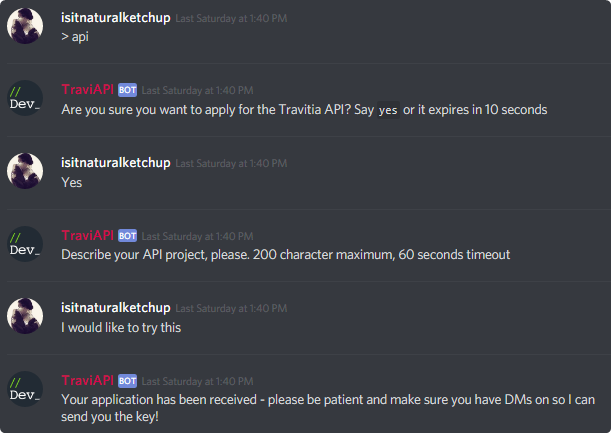
Join the Travitia API Discord server and use the > api command to request an API key.
Using context
This API supports a context parameter for background context, so let's make use of it!
import async_cleverbot as ac

cleverbot = ac.Cleverbot("Your API key here", ac.DictContext())

response = await cleverbot.ask("How are you today?", 246938839720001536) # 2nd param is an identifier, this can be a user id!
print(response.text)

response = await cleverbot.ask("I'm doing good too.", 246938839720001536)
print(response.text)
print(cleverbot.context._storage) # "How are you today?" - returns most recent previous queries
await cleverbot.close()
New in 0.2.1: Emotions
This wrapper's API now supports selecting an emotion to influence its response.
You can specify a custom emotion using the enum async_cleverbot.Emotion.
(The default emotion is Emotion.neutral)
Supported emotions:
async_cleverbot.Emotion.neutral/normal - Neutral response
async_cleverbot.Emotion.sad/sadness - Sad response
async_cleverbot.Emotion.fear/scared - Fearful response
async_cleverbot.Emotion.joy/happy - Excited response
async_cleverbot.Emotion.anger/angry - Angry response
An example
import async_cleverbot as ac

cleverbot = ac.Cleverbot("Your API key here")
resp = await cleverbot.ask("What's up?", emotion=ac.Emotion.joy)
print(resp.text)
New in 0.2.2: Custom sessions, simpler context
You can now pass context and your own session when creating a cleverbot client.
import async_cleverbot as ac

cleverbot = ac.Cleverbot("Your API key here", session=my_aiohttp_sess, context=ac.DictContext())
In addition, DictContext no longer needs an argument.
The argument has been preserved for backwards compatability.
1 maintainer

Metadata
1 maintainer
Release files for async-cleverbot 0.2.2
For a detailed explanation of source distributions (sdists) and built distributions (wheels), please see the package formats documentation.
Source distribution (sdist)
| File | Size | Uploaded | |
|---|---|---|---|
| async_cleverbot-0.2.2.tar.gz | 4.8 kB | Details |
Release files / async_cleverbot-0.2.2.tar.gz
| Download URL | async_cleverbot-0.2.2.tar.gz |
|---|---|
| Size | 4.8 kB |
| Tags | Source |
|
SHA-256 checksum How to use checksums |
91dc53d37da7fbb3dbcee9ff979844a356d531d44ce7cbff9f73d7040e96ed38
|
|
BLAKE2b-256 checksum How to use checksums |
4ba850f3b61c3a2d86cc50f000930071f783de5d28cabf244d27c9b3083fc01c
|
| Upload date | |
|
Uploaded using Trusted Publishing? What is trusted publishing? |
No |
| Uploaded via |
twine/3.1.1 pkginfo/1.5.0.1 requests/2.23.0 setuptools/46.1.3 requests-toolbelt/0.9.1 tqdm/4.45.0 CPython/3.8.1
|













